1. Rhagymadrodd
Thank you for choosing the Taopodo M10-NEWGAO Bluetooth Speaker. This wireless Bluetooth 5.3 speaker delivers powerful bass sound, features IPX7 waterproofing, offers up to 40 hours of battery life, and provides 360-degree surround sound. It supports TWS pairing for an enhanced audio experience and is suitable for outdoor use, parties, and travel. Please read this manual carefully before use to ensure proper operation and to maximize your enjoyment of the product.
2. Cynnwys Pecyn
Gwiriwch y pecyn am yr eitemau canlynol:
- 1 x Taopodo M10-NEWGAO Portable Bluetooth Speaker
- 1 x Cebl Codi Tâl Math-C
- 1 x Canllaw Cychwyn Cyflym
3. Cynnyrch Drosview
The Taopodo M10-NEWGAO is a compact and robust Bluetooth speaker designed for versatile audio playback. It features intuitive controls and a durable, waterproof design.
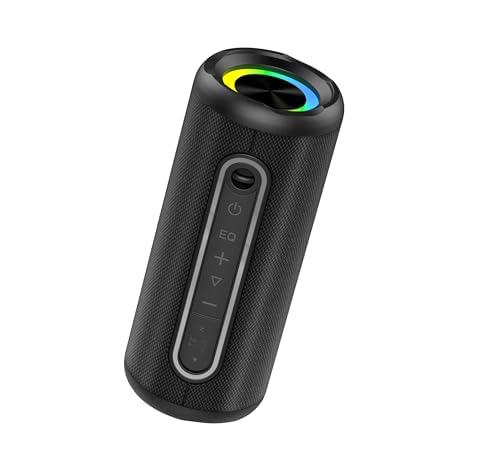
Image of the Taopodo M10-NEWGAO Bluetooth Speaker, showcasing its compact design and integrated light.
Nodweddion Allweddol:
- Bluetooth 5.3: Ar gyfer cysylltedd diwifr sefydlog ac effeithlon.
- Dual 40W Speakers & Dual Bass Drivers: Delivers powerful and rich audio.
- Bywyd Batri 40-Awr: Extended playback for prolonged use.
- Dal dŵr IPX7: Protected against immersion in water up to 1 meter for 30 minutes.
- 360-Degree Surround Sound: Provides immersive audio experience.
- Pâr TWS: Connect two speakers for true wireless stereo sound.
- Golau integredig: Enhances the ambiance.
- Dulliau Chwarae Lluosog: Supports Bluetooth, AUX, and TF Card.
4. Gosod
4.1 Gwefru'r Siaradwr
- Connect the provided Type-C charging cable to the charging port on the speaker.
- Cysylltwch ben arall y cebl ag addasydd pŵer USB (heb ei gynnwys) neu borthladd USB cyfrifiadur.
- Bydd y golau dangosydd gwefru yn goleuo, fel arfer yn goch, yn ystod gwefru.
- Once fully charged, the indicator light will change color or turn off (refer to specific LED behavior in the Quick Start Guide if available).
Nodyn: I gael bywyd batri gorau posibl, gwefrwch y siaradwr yn llawn cyn ei ddefnyddio gyntaf.
4.2 Pweru Ymlaen/Diffodd
- I Bweru Ymlaen: Press and hold the Power button for approximately 2-3 seconds. You will hear an audible prompt, and the indicator light will flash.
- I Bweru i ffwrdd: Press and hold the Power button for approximately 2-3 seconds. You will hear an audible prompt, and the indicator light will turn off.
5. Cyfarwyddiadau Gweithredu
5.1 Pâr Bluetooth
- Ensure the speaker is powered on and in Bluetooth pairing mode (the indicator light will typically flash blue rapidly).
- Galluogi Bluetooth ar eich dyfais (ffôn clyfar, llechen, cyfrifiadur).
- Chwiliwch am Bluetooth devices and select "M10-NEWGAO" from the list.
- Once paired, you will hear a confirmation sound, and the indicator light will turn solid blue.
Paru Stereo Di-wifr Gwirioneddol 5.2 (TWS)
TWS allows you to connect two M10-NEWGAO speakers for a stereo sound experience.
- Ensure both M10-NEWGAO speakers are powered on and not connected to any Bluetooth device.
- On one speaker (this will be the primary speaker), press and hold the TWS button (if available, or a designated button as per Quick Start Guide) for a few seconds until you hear a pairing prompt.
- The two speakers will automatically search and pair with each other. Once connected, you will hear a confirmation sound.
- Nawr, cysylltwch eich dyfais â'r prif siaradwr drwy Bluetooth fel y disgrifir yn Adran 5.1. Bydd y ddau siaradwr yn chwarae sain mewn stereo.
5.3 Modd AUX
To play audio from devices without Bluetooth:
- Connect a 3.5mm audio cable (not included) to the AUX-in port on the speaker.
- Connect the other end of the cable to the audio output of your device.
- The speaker will automatically switch to AUX mode, or you may need to press a Mode button to select AUX.
5.4 TF Card Mode
I chwarae cerddoriaeth yn uniongyrchol o gerdyn TF (MicroSD):
- Insert a TF card (not included) with MP3 audio files i mewn i'r slot cerdyn TF ar y siaradwr.
- The speaker will automatically switch to TF card mode and begin playing music, or you may need to press a Mode button to select TF card.
5.5 Rheoli Golau
The speaker features an integrated light. Refer to the Quick Start Guide for specific button functions, but typically:
- A dedicated Light button or a long press on a specific button may cycle through light modes or turn the light on/off.
5.6 Rheoli Cyfaint a Thrac
- Cyfrol i Fyny: Pwyswch y botwm '+' yn fyr.
- Cyfrol i Lawr: Pwyswch y botwm '-' yn fyr.
- Trac Nesaf: Pwyswch y botwm '+' yn hir.
- Trac Blaenorol: Pwyswch y botwm '-' yn hir.
- Chwarae/Seibiant: Pwyswch y botwm Chwarae/Saib yn fyr.
6. cynnal
- Glanhau: Sychwch y siaradwr â meddal, champ brethyn. Peidiwch â defnyddio glanhawyr neu doddyddion sgraffiniol.
- Storio: Storiwch y siaradwr mewn lle oer, sych i ffwrdd o olau haul uniongyrchol a thymheredd eithafol.
- Gwrthiant Dŵr: While IPX7 rated, avoid prolonged submersion and ensure the charging port cover is securely closed before exposure to water.
7. Datrys Problemau
| Problem | Ateb |
|---|---|
| Nid yw'r siaradwr yn troi ymlaen. | Ensure the speaker is charged. Connect it to a power source using the Type-C cable. |
| Methu paru drwy Bluetooth. | Ensure the speaker is in pairing mode. Turn off and on Bluetooth on your device. Move the speaker closer to your device. Forget previous pairings on your device and try again. |
| Dim sain. | Check volume levels on both the speaker and your connected device. Ensure the correct input mode (Bluetooth, AUX, TF Card) is selected. |
| Mae paru TWS yn methu. | Ensure both speakers are fully charged and not connected to any other Bluetooth device before initiating TWS pairing. |
8. manylebau
| Nodwedd | Manylyn |
|---|---|
| Brand | Taopodo |
| Enw Model | M10-NEWGAO |
| Technoleg Cysylltedd | Bluetooth |
| Technoleg Cyfathrebu Di-wifr | Bluetooth |
| Maint Siaradwr | 55 mm |
| Ffynhonnell Pwer | Wedi'i Bweru â Batri |
| Dull Rheoli | Cyffwrdd |
| Gwrthiant Dŵr | IPX7 (True) |
| Modd Allbwn Sain | Amgylchynu |
| Math o Siaradwr | 3D |
| Nodwedd Arbennig | Bluetooth |
| Dimensiynau Cynnyrch | 8 x 8 x 8 cm; 690 gram |
| Defnyddiau a Argymhellir | For Computers, DVD Players, Gaming Consoles, Music Players, Smartphones or Tablets, Televisions |
| Dyfeisiau Cydnaws | Smartphone, Home Theater, Game Console, Laptop, Projector, Desktop, Karaoke Machine, TV, MP3 Player, Tablet |
| Lliw | Du Tywyll |
9. Gwybodaeth Diogelwch
- Peidiwch â dadosod, atgyweirio nac addasu'r cynnyrch.
- Keep the speaker away from extreme temperatures, direct sunlight, and open flames.
- Do not expose the speaker to strong magnetic fields.
- Defnyddiwch y cebl gwefru a ddarperir neu gebl Math-C ardystiedig yn unig ar gyfer gwefru.
- Ensure the charging port cover is securely closed when near water to maintain IPX7 rating.
- Osgowch wrando ar lefelau cyfaint uchel am gyfnodau estynedig i atal niwed i'r clyw.
10. Gwarant a Chefnogaeth
The Taopodo M10-NEWGAO Bluetooth Speaker comes with a standard manufacturer's warranty. For detailed warranty information, please refer to the warranty card included in your package or contact Taopodo customer support.
If you encounter any issues or have questions regarding your product, please contact our customer support team through the retailer where you purchased the product or visit the official Taopodo websafle ar gyfer opsiynau cymorth.