
1. Rhagymadrodd
This manual provides essential instructions for the safe and effective operation of your Fujifilm S4500 and S4530 Compact Digital Camera. Please read this manual thoroughly before using the camera and keep it in a safe place for future reference. The Fujifilm S4500/S4530 is equipped with a 14MP CCD sensor, a 30x optical zoom Fujinon lens, and is capable of recording 720p HD movies.
2. Cynnyrch Drosview
Familiarize yourself with the main components of your camera.
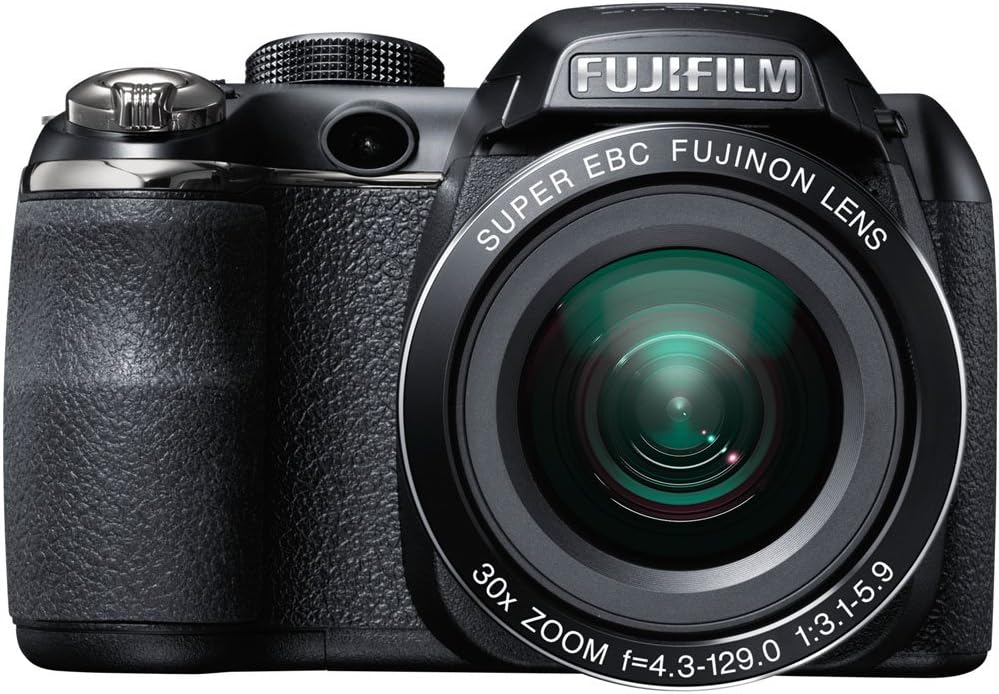
Ffigur 2.1: Blaen view of the Fujifilm S4500/S4530 camera with the built-in flash in the raised position, showcasing the Fujinon 30x optical zoom lens.

Ffigur 2.2: Blaen view of the Fujifilm S4500/S4530 camera with the built-in flash in the lowered position, highlighting the lens barrel and grip.

Ffigur 2.3: Ochr view of the Fujifilm S4500/S4530 camera, showing the ergonomic grip and control layout.
Cydrannau Allweddol:
- Lens: Fujinon 30x Optical Zoom Lens (24-720mm equivalent).
- Fflach: Built-in pop-up flash.
- Arddangosfa LCD: 3-inch, 230,000-dot screen for viewa llywio dewislen.
- Viewdarganfyddwr: Electronig Viewdarganfyddwr (EVF).
- Galw Rheolaeth: For selecting shooting modes.
- Botwm Caead: To capture photos.
- Llifer Chwyddo: Controls optical and digital zoom.
3. Gosod
3.1. Mewnosod Batris
- Agorwch glawr adran y batri sydd wedi'i leoli ar waelod y camera.
- Mewnosodwch bedwar (4) batri alcalïaidd AA, gan sicrhau'r polaredd cywir (+/-) fel y nodir y tu mewn i'r adran.
- Caewch y clawr adran batri yn ddiogel.
3.2. Mewnosod Cerdyn Cof
- Agorwch glawr slot y cerdyn cof, sydd fel arfer wedi'i leoli ar ochr neu waelod y camera.
- Insert an SD, SDHC, or SDXC memory card with the label facing the correct direction until it clicks into place.
- Caewch glawr y slot cerdyn cof yn ddiogel.
3.3. Initial Power On and Date/Time Setting
- Gwasgwch y YMLAEN / I FFWRDD botwm i bweru ar y camera.
- The first time you power on, you will be prompted to set the date and time. Use the directional buttons to navigate and the MENU / Iawn botwm i gadarnhau.
- Dilynwch y cyfarwyddiadau ar y sgrin i gwblhau'r gosodiad cychwynnol.
4. Cyfarwyddiadau Gweithredu
4.1. Tynnu Lluniau
- Trowch y camera ymlaen.
- Select a shooting mode using the mode dial (e.g., AWTO for automatic settings).
- Fframiwch eich llun gan ddefnyddio'r monitor LCD neu'r monitor electronig viewdarganfyddwr.
- Use the zoom lever to adjust the focal length.
- Pwyswch y botwm caead hanner ffordd i lawr i ffocysu. Bydd y ffrâm ffocws yn troi'n wyrdd pan gyrhaeddir ffocws.
- Pwyswch y botwm caead i lawr yn llwyr i dynnu'r llun.
4.2. Recordio Fideos
- Turn the mode dial to the movie recording setting (often indicated by a film camera icon).
- Fframiwch eich pwnc.
- Press the dedicated movie record button (if available) or the shutter button to start recording.
- Press the button again to stop recording. The camera records in 720p HD resolution.
4.3. Chwarae
- Gwasgwch y CHWARAE botwm i fynd i mewn i'r modd chwarae.
- Use the directional buttons to scroll through your photos and videos.
- Gwasgwch MENU / Iawn i view options for the selected image/video.
4.4. Moddau Fflach
The camera offers various flash modes, including Auto and Red Eye Reduction. To change the flash mode, press the flash button (often indicated by a lightning bolt icon) and use the directional buttons to select your desired mode from the on-screen menu.
5. cynnal
5.1. Glanhau'r Camera
- Lens: Defnyddiwch frethyn meddal, di-flwff neu frwsh lens i gael gwared â llwch yn ysgafn. Ar gyfer smotiau, defnyddiwch doddiant glanhau lens arbenigol wedi'i roi ar y brethyn, nid yn uniongyrchol ar y lens.
- Arddangosfa LCD: Wipe gently with a soft, dry cloth. Avoid pressing too hard.
- Corff Camera: Use a soft, dry cloth to wipe away dust and fingerprints. Do not use organic solvents or strong cleaning agents.
5.2. Gofal Batri
- Tynnwch y batris allan pan na fydd y camera'n cael ei ddefnyddio am gyfnod hir er mwyn atal gollyngiadau.
- Storio batris mewn lle oer, sych.
- Replace all four AA batteries at the same time with new ones for optimal performance.
5.3. Storio
When storing the camera, ensure it is turned off, and the lens cap is attached. Store in a dry, well-ventilated area away from direct sunlight, high temperatures, and humidity.
6. Datrys Problemau
| Problem | Ateb |
|---|---|
| Nid yw'r camera yn troi ymlaen. | Check if batteries are inserted correctly and are fully charged. Replace with new AA batteries if necessary. |
| Mae'r delweddau'n aneglur. | Ensure the lens is clean. Press the shutter button halfway to allow the camera to focus before taking the shot. Check if the camera is in a suitable shooting mode for the lighting conditions. |
| Nid yw'r fflach yn tanio. | Check the flash mode settings. Ensure the flash is raised if it is a pop-up type. The flash may not fire if the battery level is low. |
| Gwall cerdyn cof. | Ensure the memory card is inserted correctly. Try formatting the card (this will erase all data). If the problem persists, try a different memory card. |
| Methu recordio fideo. | Ensure the camera is in video recording mode. Check if there is sufficient space on the memory card. |
7. manylebau
| Nodwedd | Manylyn |
|---|---|
| Enw Model | Fujifilm S4500 / S4530 |
| Synhwyrydd Delwedd | 14 Megapixel 1/2.3-inch CCD |
| Lens | Fujinon 30x Optical Zoom (24-720mm equivalent) |
| Chwyddo Digidol | Hyd at 6.7x |
| Sefydlogi Delwedd | Sefydlogi Delweddau Digidol |
| Arddangosfa LCD | 3.0-inch, 230,000 dots |
| Recordio Fideo | 720p HD (MP4 format) |
| Cyfryngau Storio | SD / SDHC / SDXC memory cards |
| Sensitifrwydd ISO | Auto, 100, 200, 400, 800, 1600, 3200, 6400 (expanded to 51200) |
| Cyflymder caead | 8 eiliad i 1/2000 eiliad |
| Cyflenwad Pŵer | 4x AA batris alcalïaidd |
| Cysylltedd | HDMI, USB |
| Dimensiynau (tua) | 1.2 pwys (pwysau'r eitem) |
8. Gwarant a Chefnogaeth
This Fujifilm S4500/S4530 camera typically comes with a 90-day limited warranty. Please refer to your purchase documentation for specific warranty terms and conditions. For technical support or service inquiries, please contact Fujifilm customer service or the retailer from whom the product was purchased.