
Woibugee RM
7 Inch Single Din Touchscreen Car Radio User Manual
Model: RM
Brand: Woibugee
Rhagymadrodd
This user manual provides comprehensive instructions for the installation, operation, and maintenance of your Woibugee 7 Inch Single Din Touchscreen Car Radio. This advanced car stereo system features wireless Apple CarPlay and Android Auto, GPS navigation, Bluetooth connectivity, Wi-Fi, FM radio, USB support, hands-free calling, and mirror link capabilities, designed to enhance your in-car multimedia experience.

Delwedd: Blaen view of the Woibugee 7 Inch Single Din Touchscreen Car Radio, showcasing its large display and compact single-DIN chassis.
Gwybodaeth Diogelwch
Please read all safety warnings and instructions carefully before installing and operating this device. Failure to follow these instructions may result in injury or damage to the device or vehicle.
- Gosodiad Proffesiynol a Argymhellir: For optimal safety and performance, it is recommended to have this product installed by a qualified professional.
- Batri datgysylltu: Always disconnect the vehicle's negative battery terminal before beginning any installation or wiring work on the car stereo. Reconnect the battery only after the stereo is fully installed and all wiring is secure.
- Osgoi Gwrthdyniadau: Do not operate the device or view videos while driving. Distracted driving can lead to accidents.
- Awyru priodol: Ensure the unit has adequate ventilation to prevent overheating.
- Gwirio Cydnawsedd: Cyn prynuasing and installing, verify that the single DIN unit will not obstruct air vents, emergency switch buttons, or other critical vehicle controls.
Cynnwys Pecyn
Gwiriwch fod yr holl eitemau a restrir isod wedi'u cynnwys yn eich pecyn cynnyrch:

Image: Diagram illustrating the dimensions of the head unit and a visual list of included accessories.
- Cebl Pŵer
- Antena GPS
- Audio Video Adapter Cable
- Cebl Mewnbwn Fideo Camera Wrth Gefn
- Cebl Addasydd USB
- CarPlay & Android Auto USB Adapter Cable
- Meicroffon Allanol
- Bracedi Gosod
Cynnyrch Drosview
The Woibugee 7 Inch Single Din Touchscreen Car Radio is an advanced multimedia system designed for seamless integration into your vehicle. Key features include:
- Apple CarPlay a Android Auto diwifr: Connect your smartphone wirelessly for navigation, music, messages, and calls via Siri or Google Assistant.
- System Android: Download and install various applications from the Google Play Store, such as Spotify, Pandora, and YouTube.
- In-Dash GPS Navigation: Utilize built-in Wi-Fi and GPS for online and offline navigation with apps like Waze and Google Maps.
- Customizable UI Options: Personalize your interface with 19 free UI options and additional paid choices.
- Bluetooth & Dual Microphone: Enhanced Bluetooth for faster transmission and stronger anti-interference, with built-in and external microphones for clear call quality.
- Dolen drych: Supports screen mirroring for both Android phones and iPhones.

Image: The car radio display showcasing a variety of downloadable applications, highlighting its Android operating system.
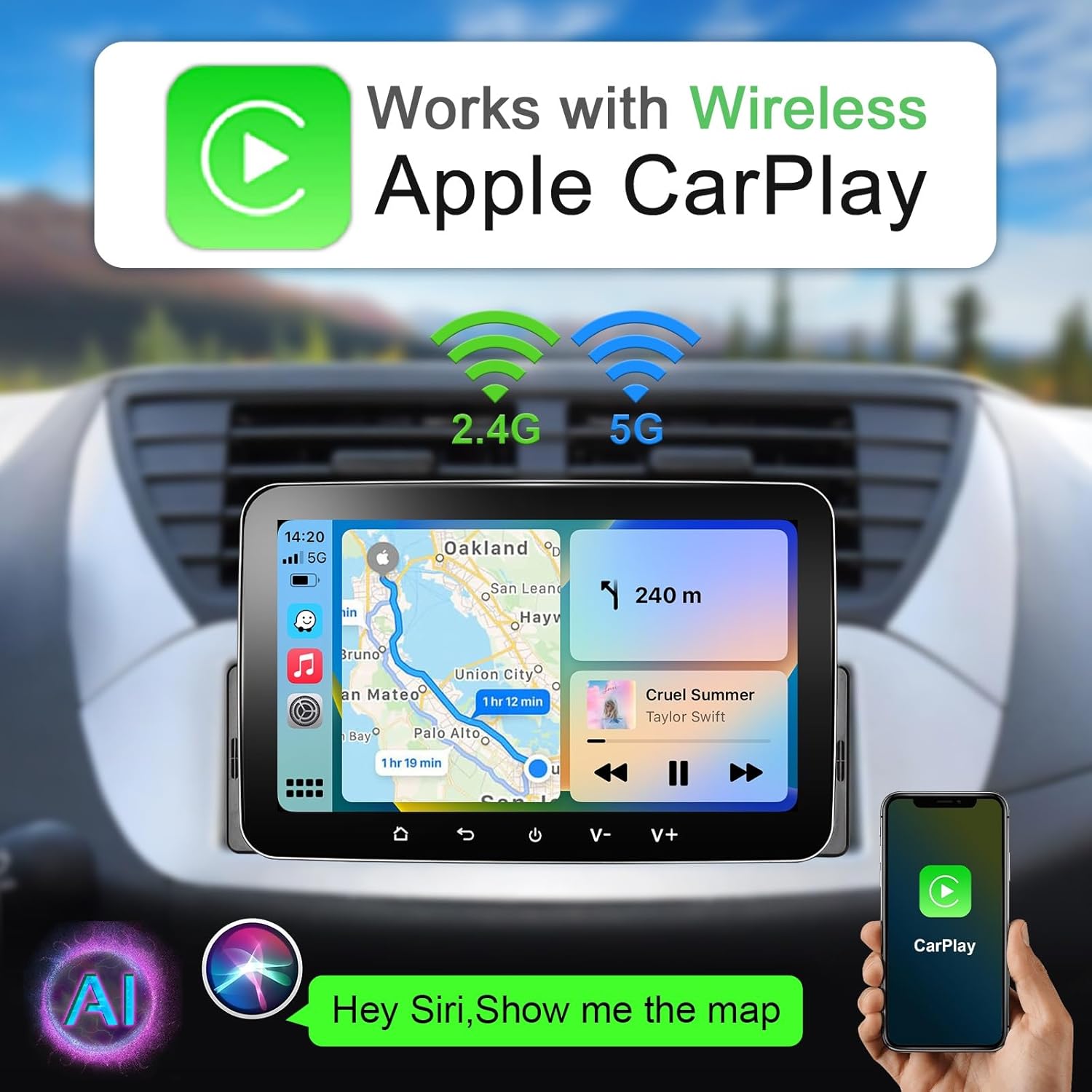
Image: The car radio screen displaying the Apple CarPlay interface, featuring navigation and music playback.
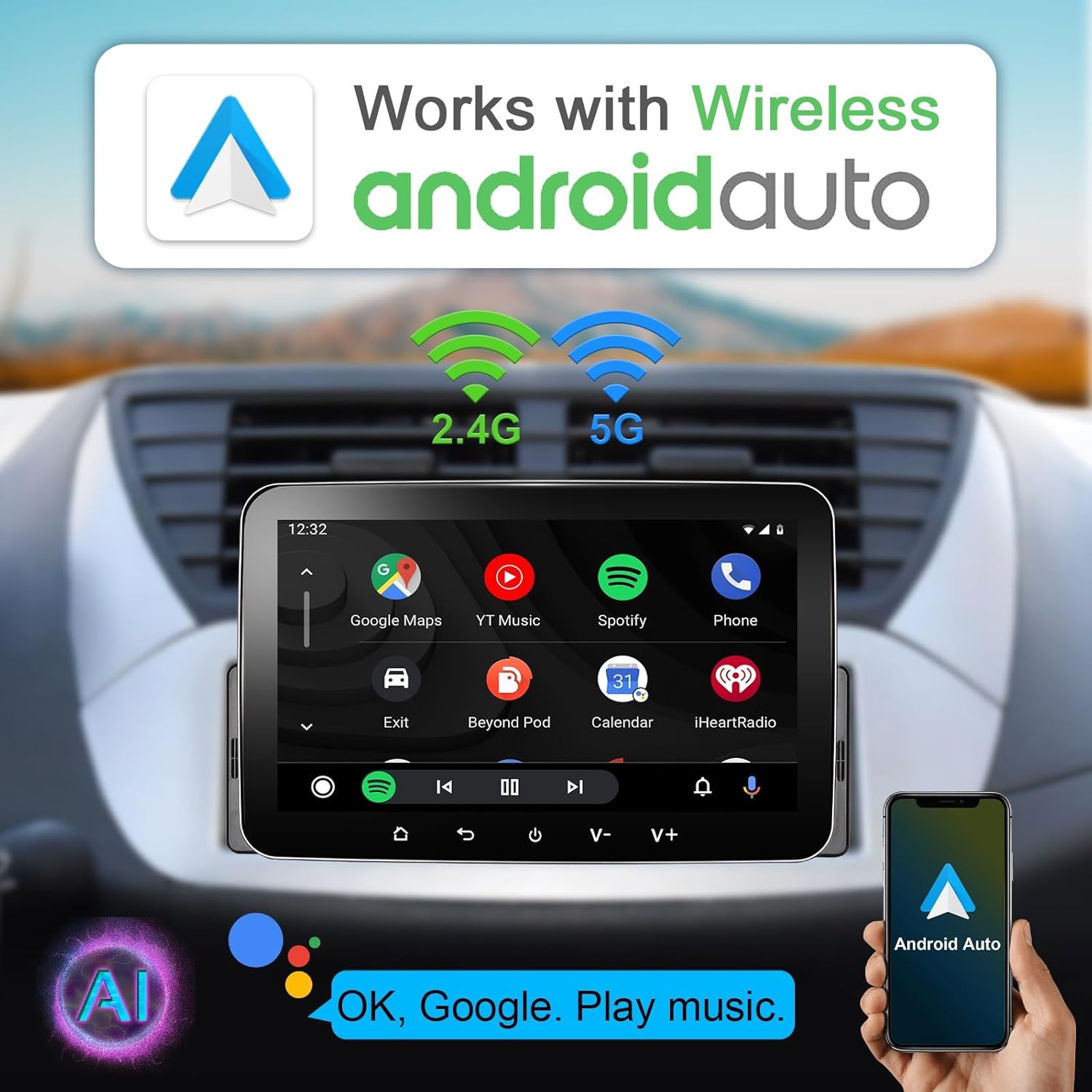
Image: The car radio screen displaying the Android Auto interface, showing Google Maps and music controls.
Gosodiad
Proper installation is crucial for the functionality and safety of your car radio. Follow these general guidelines:
- Paratoi: Before starting, ensure your vehicle's battery negative terminal is disconnected to prevent electrical shorts.
- Mowntio: Install the single DIN unit into your vehicle's dashboard opening. Use the provided installation brackets to secure the unit.
- Gwifrau: Connect the power cable, GPS antenna, audio/video adapter cables, and any other necessary inputs (e.g., backup camera, external microphone) according to the wiring diagram provided with your unit.
- Reversing Camera Wiring (Example):

Image: A detailed wiring diagram illustrating how to connect a reversing camera to the car radio system. Note: Reversing camera is not included and must be purchased separately.
Connect the backup camera video input cable to the corresponding port on the head unit. Ensure the camera's power is connected to the vehicle's reverse light circuit for automatic activation when shifting into reverse.
- Gwiriad Terfynol: Double-check all connections before reconnecting the battery's negative terminal.

Image: A visual comparison showing a car's dashboard with the original stereo and then with the Woibugee 7 Inch Single Din Touchscreen Car Radio installed.
Gosod
After successful installation, power on the unit and proceed with the initial setup:
- Cychwyn Cychwynnol: The system will boot up to the main Android interface.
- Cysylltiad Wi-Fi: Navigate to Settings > Network & Internet > Wi-Fi to connect to an available Wi-Fi network. This is necessary for app downloads, online navigation, and system updates.
- Pâr Bluetooth: Go to Settings > Connected devices > Bluetooth to pair your smartphone for hands-free calling and audio streaming.
- Addasu UI: Access the "Theme-download" section (usually an icon in the top right corner of the screen) to select from 19 free user interface options to personalize your display.

Image: The car radio screen displaying multiple home screen themes available for customization.
Cyfarwyddiadau Gweithredu
This section details the primary functions of your car radio.
Di-wifr Apple CarPlay & Android Auto
Once your phone is paired via Bluetooth and Wi-Fi, the CarPlay or Android Auto interface should automatically launch or be accessible from the main menu. Use voice commands (Siri or Google Assistant) or the touchscreen to navigate, make calls, send messages, and control music.
Video: A demonstration of the 7 Inch Single Din Car Play Stereo, showing its interface, app navigation, music playback, equalizer settings, and app installation from the Google Play Store, including YouTube video playback.
Llywio GPS
The unit supports online and offline navigation. Ensure you have downloaded offline maps if you plan to use navigation without an internet connection. Use Waze, Google Maps, or other compatible navigation apps.

Image: The car radio screen displaying a GPS navigation map with route information.
Chwarae Cyfryngau
Play music or videos from various sources including USB, Bluetooth streaming, or installed apps like Spotify and YouTube. The unit features a 16-band equalizer for audio customization.

Image: The car radio screen displaying the 16-band equalizer interface for audio adjustments.
Dolen Drych
Connect your smartphone via USB to mirror its screen onto the car radio display. This allows you to view content from your phone directly on the larger screen.

Image: The car radio screen displaying a smartphone's mirrored display, showing a video of a basketball game.
Rheoli Olwyn Llywio
If your vehicle supports it, you can connect the unit to your steering wheel controls for convenient operation of volume, track changes, and call management without taking your hands off the wheel.

Image: A diagram illustrating how steering wheel controls can be used to operate the car radio, showing icons for call, volume, and track control.
Cefn View Cefnogaeth Camera
When a compatible rear view camera is connected and properly wired, the display will automatically switch to the camera feed when the vehicle is put into reverse, aiding in parking and maneuvering.

Image: The car radio screen displaying a rear view camera feed with parking guidelines, assisting with safe reversing.
Cynnal a chadw
To ensure the longevity and optimal performance of your car radio, follow these maintenance tips:
- Glanhau'r sgrin: Defnyddiwch frethyn meddal, di-flwff i sychu'r sgrin gyffwrdd yn ysgafn. Ar gyfer staeniau ystyfnig, sychwch ychydigampgolchwch y lliain gyda dŵr neu lanhawr sy'n ddiogel i sgriniau. Osgowch ddeunyddiau sgraffiniol neu gemegau llym.
- Diweddariadau Meddalwedd: Gwiriwch yn rheolaidd am ddiweddariadau meddalwedd drwy osodiadau'r system neu osodiadau'r gwneuthurwr websafle i sicrhau bod gennych y nodweddion a'r atebion i fygiau diweddaraf.
- Osgoi Tymheredd Eithafol: Do not expose the unit to extreme hot or cold temperatures for prolonged periods, as this can affect its electronic components.
- Diogelu rhag hylifau: Cadwch hylifau i ffwrdd o'r uned i atal difrod.
Datrys problemau
Os byddwch chi'n dod ar draws problemau gyda radio eich car, cyfeiriwch at y problemau a'r atebion cyffredin canlynol:
| Problem | Achos / Ateb Posibl |
|---|---|
| Dim Pŵer / Nid yw'r Uned yn Troi Ymlaen |
|
| No Apple CarPlay / Android Auto Connection |
|
| Dim Sain |
|
| GPS Signal Lost / Inaccurate |
|
| Sgrin Gyffwrdd Ddim yn Ymatebol |
|
Manylebau
| Nodwedd | Manylyn |
|---|---|
| Enw Model | RM |
| Maint Sgrin | 7 modfedd (18 cm ar groeslin) |
| Datrysiad | 1024 x 600 |
| Math Arddangos | LCD |
| Technoleg Cysylltedd | Wireless Apple CarPlay, Android Auto, Bluetooth, Wi-Fi, USB |
| Nodwedd Arbennig | Apple CarPlay diwifr, Android Auto diwifr |
| Math o Wasanaeth Cerbyd | Car |
| Math o Fap | North America (offline maps not included) |
| Math Mowntio | Dangosfwrdd Mount |
| Dimensiynau Pecyn | 11.14 x 8.78 x 6.06 modfedd |
| Pwysau Eitem | 3.03 pwys |
Gwarant a Chefnogaeth
For warranty information, please refer to the documentation included with your purchase or contact the seller directly. Woibugee is committed to providing quality products and customer satisfaction.
If you require technical assistance or have questions not covered in this manual, please reach out to the Woibugee customer support team through the retailer where you purchased the product or visit the official Woibugee store page on Amazon for contact details.
Adnoddau Ar-lein:
Ask a question about this manual
Ask about setup, troubleshooting, compatibility, parts, safety, or missing instructions. Manuals+ will review the question and use this page’s manual context to help answer it.