
1. Rhagymadrodd
The BUSICOM PC-SeaV15c is a 15-inch Windows IoT touch panel PC designed for commercial and industrial applications. This manual provides essential information for the safe and efficient setup, operation, and maintenance of your device. Please read this manual thoroughly before using the product and retain it for future reference.
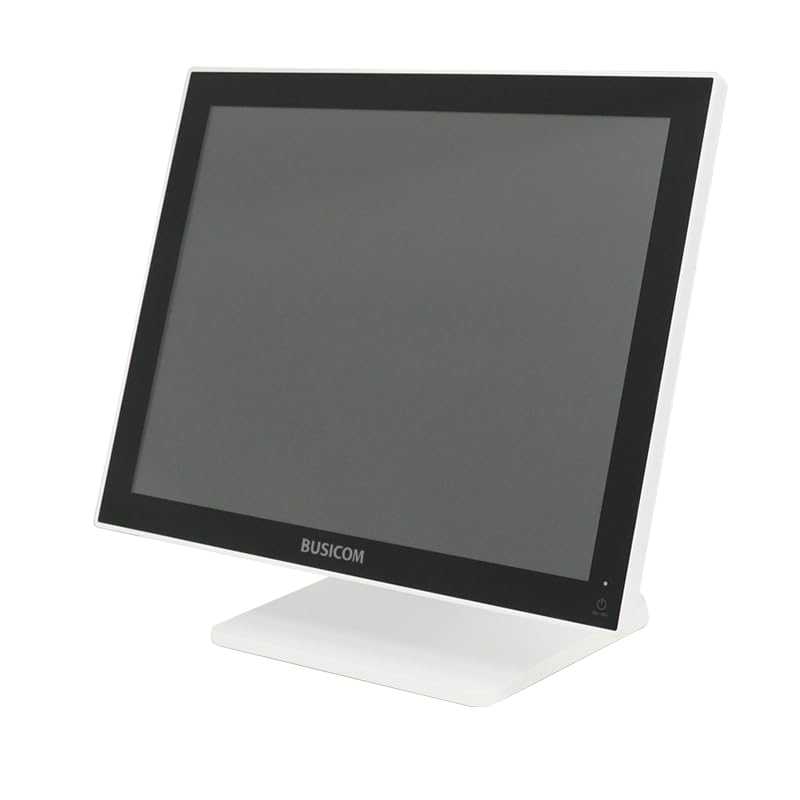
Ffigur 1: Blaen view of the BUSICOM PC-SeaV15c Touch Panel PC.
2. Cynnyrch Drosview
2.1 Nodweddion Allweddol
- Dylunio Uwch: Features an ultra-thin bezel and a highly durable 7H reinforced display for enhanced aesthetics and protection.
- Perfformiad Uwch: Equipped with Microsoft Windows 10 IoT Enterprise, ensuring long-term support and reliable operation.
- Intuitive Touch Panel: Utilizes a capacitive touch method, offering a familiar and responsive touch experience similar to smartphones and tablets.
- Cynnal a Chadw Hawdd: Designed for simple RAM and SSD replacement, facilitating upgrades and servicing.
- Rhyngwynebau Amlbwrpas: Provides a wide range of connectivity options to integrate with various peripherals.
- Storio Effeithlon: SSD storage ensures fast processing speeds, quiet operation, and excellent shock resistance.
2.2 Cydrannau
The package typically includes the BUSICOM PC-SeaV15c unit and a power adapter. Additional accessories may vary.

Figure 2: Front and side profile of the PC-SeaV15c unit.

Ffigur 3: Cefn view showing access panels for RAM and SSD components.
3. Cyfarwyddiadau Gosod
3.1 Dadbacio
- Carefully remove the PC-SeaV15c from its packaging.
- Check for any visible damage. If damaged, contact your vendor immediately.
- Gwnewch yn siŵr bod yr holl gydrannau a restrir yn bresennol.
3.2 Cysylltu Perifferolion
Refer to the interface diagram below for port locations and types.

Figure 4: Detailed diagram of the PC-SeaV15c's rear and bottom interfaces.
- Cysylltiad Pwer: Connect the provided power adapter to the DC In port and then to a power outlet.
- Dyfeisiau USB: Use the USB 2.0 (4 ports) and USB 3.0 (2 ports) for connecting keyboards, mice, printers, and other USB peripherals.
- Cysylltiad Rhwydwaith: Connect an Ethernet cable to the LAN port for wired network access.
- Allbwn sain: Connect external speakers or headphones to the Audio Out port.
- Serial Ports (RJ45): Utilize COM1, COM2, COM3, and COM6 for connecting specialized POS peripherals such as barcode scanners or receipt printers.
- Cash Drawer (RJ11): Connect a compatible cash drawer to the RJ11 port.
- Arddangosfa Allanol: If an external monitor is required, connect it to the Mini DisplayPort.
- USB Math-C: For compatible devices.
3.3 Pweru Ymlaen/Diffodd
- Pŵer Ymlaen: Press the power button located on the upper right side of the display bezel or the power mark on the rear panel.
- Pwer i ffwrdd: To safely shut down the system, use the standard Windows shutdown procedure. Avoid direct power disconnection during operation to prevent data loss.
4. Cyfarwyddiadau Gweithredu
4.1 Windows 10 IoT Enterprise
The PC-SeaV15c operates on Windows 10 IoT Enterprise 2021. Familiarize yourself with the Windows operating system for basic navigation, application management, and system settings.
4.2 Touch Panel Usage
The capacitive touch screen supports multi-touch gestures.
- Tap: Cyfwerth â chlic llygoden.
- Tap Dwbl: Cyfwerth â chlic ddwywaith.
- Pwyswch a Dal: Cyfwerth â chlic dde.
- Swipe: Ar gyfer sgrolio neu lywio.
- Pinsio-i-Chwyddo: Defnyddiwch ddau fys i chwyddo i mewn neu allan.
5. cynnal
5.1 Glanhau'r Dyfais
- Diffoddwch y pŵer a datgysylltwch y ddyfais bob amser cyn glanhau.
- Defnyddiwch frethyn meddal, di-lint ychydig dampwedi'i lanhau â dŵr neu lanhawr sgrin nad yw'n sgraffiniol.
- Do not spray liquids directly onto the screen or device.
- Osgowch ddefnyddio cemegau llym, toddyddion, neu ddeunyddiau sgraffiniol.
5.2 RAM and SSD Replacement
The PC-SeaV15c is designed for easy replacement of RAM and SSD components. Refer to Figure 3 for the access panel location. For detailed instructions on component replacement, consult a qualified technician or the BUSICOM support websafle.
6. Datrys Problemau
Mae'r adran hon yn darparu atebion i broblemau cyffredin y gallech ddod ar eu traws.
- Nid yw'r ddyfais yn troi ymlaen:
- Gwnewch yn siŵr bod yr addasydd pŵer wedi'i gysylltu'n ddiogel â'r ddyfais ac â soced pŵer sy'n gweithio.
- Gwiriwch fod y soced pŵer yn gweithio drwy blygio dyfais arall i mewn.
- Touch screen is unresponsive:
- Ailgychwyn y ddyfais.
- Gwnewch yn siŵr bod y sgrin yn lân ac yn rhydd o rwystrau.
- Dim arddangosfa:
- Gwiriwch a yw'r ddyfais wedi'i phweru ymlaen.
- If an external display is connected, ensure the correct input source is selected on the external display.
- Peripheral not detected:
- Ensure the peripheral is correctly connected to the appropriate port (USB, LAN, COM).
- Ceisiwch gysylltu'r teclyn ymylol â phorthladd gwahanol.
- Check the peripheral's own power supply, if applicable.
For further assistance, please contact BUSICOM customer support.
7. manylebau
| Nodwedd | Manylyn |
|---|---|
| Brand | BWSCOM |
| Enw Model | PC-SeaV15c |
| Lliw | Gwyn |
| Maint Sgrin | 15 modfedd |
| Datrysiad | 1024x768 |
| System Weithredu | Windows 10 IoT Enterprise 2021 |
| Brand CPU | Intel |
| Soced Prosesydd | Intel® N97 |
| Cyflymder CPU | 3.6 GHz |
| Math Cof | DDR4 |
| RAM wedi'i osod | 4 GB |
| Math o Ddisg Caled | SSD |
| Gallu SSD | 128 GB (yn ôl teitl y cynnyrch) |
| Math o Gerdyn Graffeg | Integredig |
| Math VRAM | DDR4 SDRAM |
| Capasiti VRAM | 4 GB |
| Porthladdoedd USB 2.0 | 4 |
| Porthladdoedd USB 3.0 | 2 |
| Gyriant Optegol | Dim |
| Pwysau Cynnyrch | 6 Cilogram |
| Uchder (tua) | 307.5 mm (as per dimension diagram) |

Ffigur 5: Cefn view of the PC-SeaV15c with approximate height dimension.
8. Gwarant a Chefnogaeth
For warranty information and technical support, please refer to the warranty card included with your product or visit the official BUSICOM websafle. Cadwch eich derbynneb prynu fel prawf o brynu ar gyfer hawliadau gwarant.
BUSICOM Official Websafle: BUSICOM Store on Amazon.co.jp