
Rhagymadrodd
This manual provides instructions for the installation, operation, and maintenance of your Mcezdy P5C-6-Pin Ebike LCD Display. This display is designed to enhance your electric bike experience by providing real-time data and control over various functions.
Nodyn Cydnawsedd Pwysig: This P5C ebike display operates using the UART No. 2 protocol. Ensure your ebike controller is compatible with this protocol and features a Cysylltydd 6-pin ar gyfer ymarferoldeb priodol.
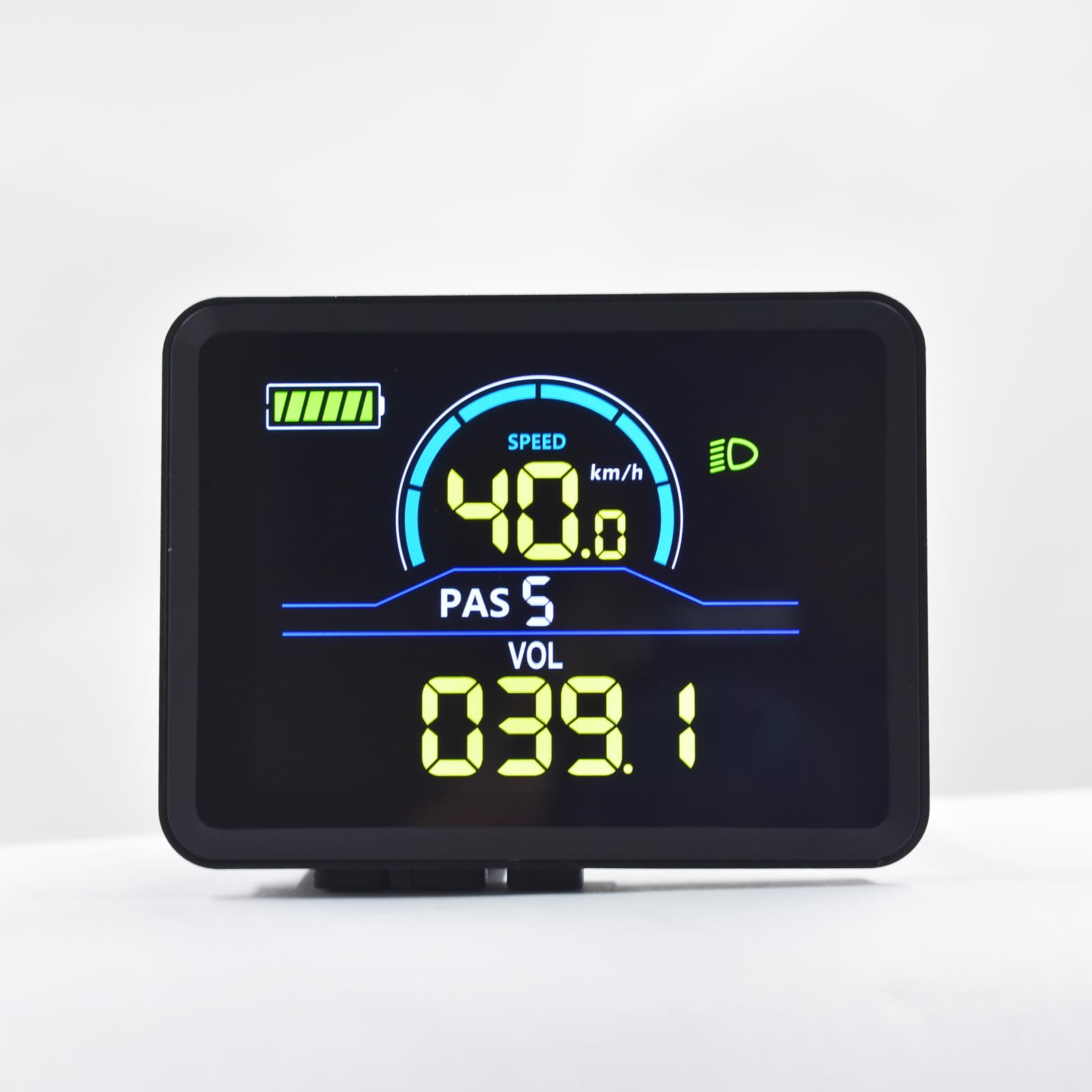
Image: Mcezdy P5C Ebike LCD Display. This image highlights the critical requirement for UART No. 2 protocol compatibility.
The display features a durable ABS+PC housing, a tempered glass screen for clarity and scratch resistance, and an IPX65 waterproof rating for protection against water splashes and rain.
Gosod a Gosod
- Gwirio Cydnawsedd: Before installation, confirm that your ebike controller uses the UART No. 2 protocol and has a compatible 6-pin connector. Incompatible systems will not function correctly.
- Gosod yr Arddangosfa:
The display comes with an adjustable mount designed to fit handlebars with a diameter of 22.2mm. Position the display on the left side of your handlebar for optimal viewing and access to controls. Secure the mount firmly using the provided hardware.

Image: The Mcezdy P5C Ebike LCD Display mounted on a handlebar, demonstrating the adjustable mount for 22.2mm handlebars.
- Cysylltu'r cebl:
Locate the 6-pin waterproof cable (model JL-F-Z609AG) on your display. The exposed cable length is 150mm. Carefully connect this cable to the corresponding 6-pin connector on your ebike controller. Ensure the connection is secure and fully seated to prevent water ingress and ensure reliable communication.

Image: A selection of ebike display connector types, including the 6-pin connector relevant to this model. Ensure you use the correct connector for your system.
- Pweru Ymlaen: Once securely mounted and connected, power on your ebike. The display should illuminate, indicating a successful connection.
Cyfarwyddiadau Gweithredu
The P5C-6-Pin display provides comprehensive information and control features for your ebike. Familiarize yourself with the display layout and button functions.

Image: The Mcezdy P5C Ebike LCD Display illustrating key metrics such as speed, battery level, Pedal Assist System (PAS) level, and voltage.
Metrigau Arddangos:
- Cyflymder: Current riding speed (km/h or mph).
- Lefel Batri: Real-time battery charge indicator.
- PAS (Pedal Assist System): Current assist level.
- Cyftage (VOL): Cyfrol batri amser realtage.
- Dangosydd Prif Oleuadau: Shows if the ebike's headlight is active.
- Milltiroedd y Daith: Distance covered during the current ride.
- Total Mileage (ODO): Total distance covered by the ebike.
Swyddogaethau a Rheolaethau:
- Pŵer ymlaen / i ffwrdd: Typically controlled by a dedicated button on the display or ebike system. Refer to your ebike's main manual for specific power procedures.
- Addasiad Lefel PAS: Use the '+' and '-' buttons (or similar controls) to increase or decrease the pedal assist level.
- Modd Cymorth Cerdded: Activates a low-speed assist for walking the ebike. Consult your ebike's manual for activation method, usually by holding a specific button.
- Rheoli Mordaith: Allows the ebike to maintain a set speed without continuous throttle input. Activation varies by ebike model; refer to your ebike's manual.
- Parameter Modification: The display allows customization of certain parameters such as wheel diameter and speed limit. Accessing these settings typically involves a sequence of button presses. Exercise caution when modifying parameters, as incorrect settings can affect performance and safety.
Cynnal a chadw
Proper maintenance ensures the longevity and optimal performance of your Mcezdy P5C-6-Pin Ebike LCD Display.
- Glanhau: Defnyddiwch feddal, damp cloth to clean the display screen and housing. Avoid abrasive cleaners, solvents, or harsh chemicals that could damage the tempered glass or plastic components.
- Gwrthiant Dŵr: The display has an IPX65 waterproof rating, meaning it is protected against low-pressure water jets from any direction. While it can withstand rain and splashes, avoid submerging the display in water or exposing it to high-pressure water streams.
- Archwiliad cebl: Periodically check the connection cable for any signs of wear, damage, or loose connections. Ensure the waterproof connector remains clean and free of debris.
- Storio: When not in use for extended periods, store the ebike and display in a dry, temperate environment, away from direct sunlight and extreme temperatures.
Datrys problemau
If you encounter issues with your Mcezdy P5C-6-Pin Ebike LCD Display, refer to the following common problems and solutions:
| Problem | Achos Posibl | Ateb |
|---|---|---|
| Nid yw'r arddangosfa'n troi ymlaen. |
|
|
| Darlleniadau cyflymder neu filltiroedd anghywir. |
|
|
| Mae'r arddangosfa'n dangos codau gwall. |
| Refer to the "Fault Code Description" document included with your display or ebike for specific error code meanings and troubleshooting steps. |
| Mae'r arddangosfa'n dywyll neu'n anarllenadwy. |
|
|
If problems persist, contact customer support or a qualified ebike technician.
Manylebau

Image: Detailed specifications of the Mcezdy P5C Ebike LCD Display, including dimensions, cable length, model numbers, and work voltage.
- Model: P5C-6-Pin
- Brand: Mcezdy
- Math Arddangos: LCD, Color
- Protocol Cysylltedd: UART No. 2 (Wired)
- Cyfaddas Voltage: DC 24V, 36V, 48V, 60V
- Deunydd Tai: ABS + PC
- Deunydd Sgrin: Gwydr Tempered
- Deunydd braced: Neilon
- Cydnawsedd Diamedr y Bar Hand: 22.2mm
- Math o gebl: 6-pin waterproof cable (JL-F-Z609AG)
- Exposed Cable Length: 150mm
- Sgôr Diogelu Rhyngwladol: IPX65 (Protected against dust and low-pressure water jets)
- Mewnbwn Rhyngwyneb Dynol: Botymau
- Math Synhwyrydd: Synhwyrydd Cyflymder
- Dimensiynau (Brasamcan): 2.7" (width) x 2.1" (height) - Refer to image for detailed measurements.
- Pwysau: Tua 91 g
Gwybodaeth Gwarant
Specific warranty terms and conditions for the Mcezdy P5C-6-Pin Ebike LCD Display may vary. Please retain your proof of purchase and refer to the retailer or manufacturer's official websafle am wybodaeth fanwl am warant a gweithdrefnau cofrestru.
Cefnogaeth i Gwsmeriaid
For technical assistance, troubleshooting beyond this manual, or inquiries regarding your Mcezdy P5C-6-Pin Ebike LCD Display, please contact your point of purchase or the manufacturer, Mcezdy, through their official support channels.