
Rhagymadrodd
Thank you for choosing the Oakcastle HIFI150 Stereo System. This manual provides essential information for setting up, operating, and maintaining your device. Please read it thoroughly before use and retain it for future reference.
Gwybodaeth Diogelwch
Er mwyn sicrhau gweithrediad diogel ac atal difrod, dilynwch y rhagofalon diogelwch canlynol:
- Peidiwch ag amlygu'r uned i law, lleithder, na thymheredd eithafol.
- Peidiwch ag agor y casing. Cyfeiriwch yr holl waith cynnal a chadw at bersonél cymwys.
- Sicrhewch awyru digonol o amgylch yr uned. Peidiwch â rhwystro unrhyw agoriadau awyru.
- Defnyddiwch yr addasydd pŵer a gyflenwir gyda'r uned yn unig.
- Keep the unit away from heat sources such as radiators, stoves, or other heat-producing appliances.
- Glanhewch yr uned gyda lliain sych yn unig.
Cynnwys Pecyn
Gwiriwch fod yr holl eitemau yn bresennol yn eich pecyn:
- Oakcastle HIFI150 Stereo System
- Rheolaeth Anghysbell
- Batris ar gyfer Rheoli o Bell
- Cebl Pŵer
- Llawlyfr Defnyddiwr
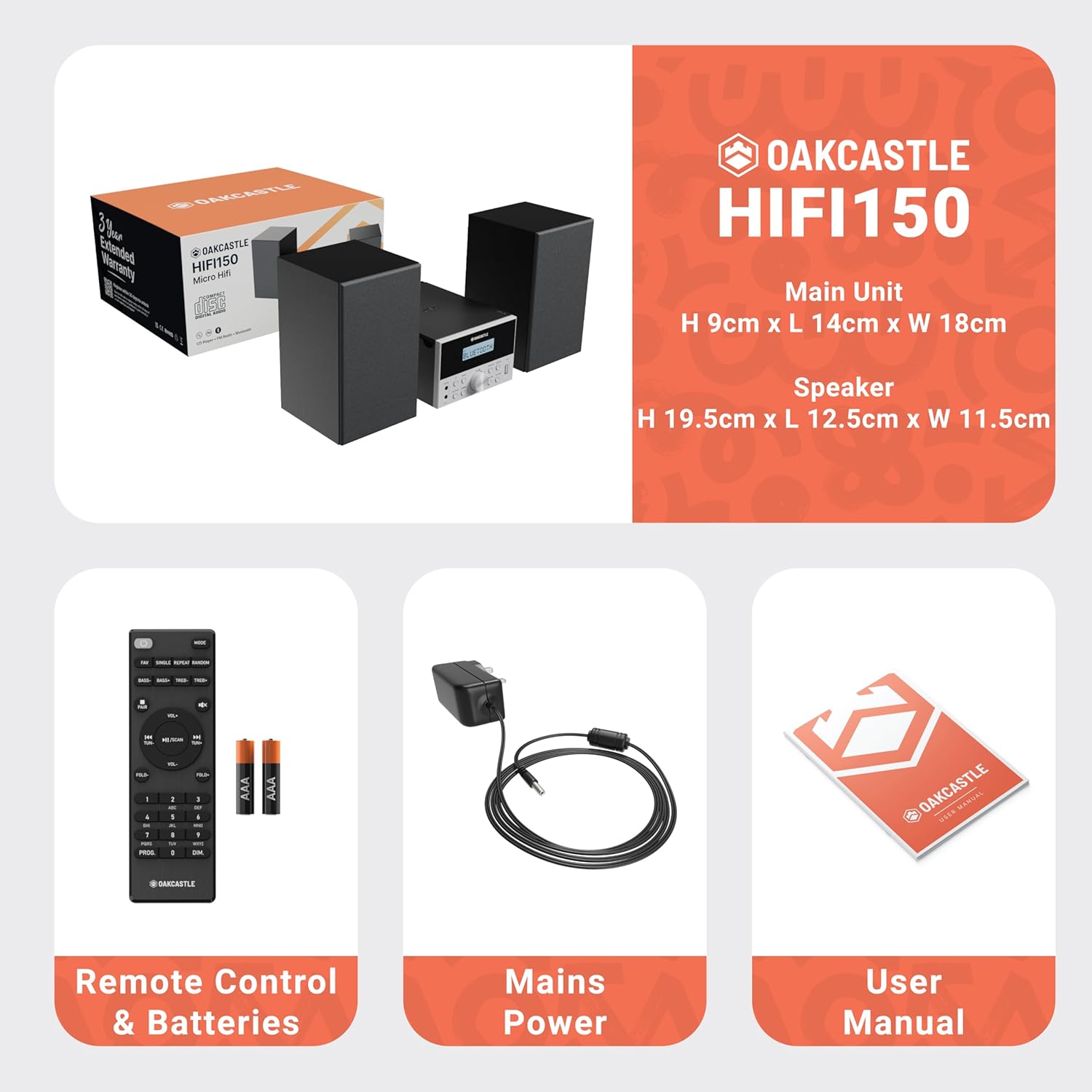
Image: The Oakcastle HIFI150 package contents, showing the main unit, two speakers, remote control with batteries, power adapter, and user manual.
Cynnyrch Drosview
The Oakcastle HIFI150 features a compact design with intuitive controls and multiple connectivity options.
Rheolaethau Panel Blaen ac Arddangos

Image: A close-up of the Oakcastle HIFI150 main unit's front panel, highlighting the digital display, central volume knob, mode selection buttons, and front-facing AUX In and USB ports. The display shows 'BLUETOOTH'.
- Arddangos: Yn dangos y modd cyfredol, gwybodaeth am y trac, ac amledd radio.
- Botwm Pŵer: Yn troi'r uned ymlaen neu i ffwrdd.
- Botwm Modd: Cycles through input sources (CD, FM, Bluetooth, AUX, USB).
- Knob Cyfrol: Yn addasu'r brif gyfrol.
- Botwm Chwarae/Seibiant: Controls playback for CD, USB, and Bluetooth.
- Skip/Tune Buttons: Navigates tracks or tunes radio frequencies.
- AUX Yn Port: Ar gyfer cysylltu dyfeisiau sain allanol trwy gebl 3.5mm.
- Porth USB: Ar gyfer chwarae sain files o yriant USB.
Cysylltiadau Panel Cefn
The rear panel includes connections for speakers and power.
Gosod
1. Cysylltu'r Siaradwyr
Connect the included speakers to the speaker terminals on the rear of the main unit. Ensure correct polarity (red to red, black to black) for optimal sound quality.
2. Cysylltiad Pwer
Plug the power cable into the AC inlet on the rear of the main unit, then plug the other end into a standard wall outlet.
Cyfarwyddiadau Gweithredu
Pŵer Ymlaen / Diffodd
Gwasgwch y Grym botwm ar y panel blaen neu'r teclyn rheoli o bell i droi'r uned ymlaen neu i ffwrdd.
Dewis Modd
Gwasgwch y Modd button on the front panel or remote control repeatedly to cycle through the available input sources: CD, Radio FM, Bluetooth, AUX, a USB.
Gweithrediad Bluetooth
- Dewiswch Bluetooth mode using the Mode button. The display will show 'BLUETOOTH' and the unit will enter pairing mode.
- Ar eich ffôn clyfar neu ddyfais Bluetooth arall, galluogwch Bluetooth a chwiliwch am ddyfeisiau sydd ar gael.
- Select 'OAKCASTLE HIFI150' from the list. Once connected, the unit will confirm the connection.
- You can now stream audio wirelessly from your device to the HIFI150.
Chwarae CD

Image: The Oakcastle HIFI150 with its top-loading CD player mechanism open, revealing a compact disc placed inside. The display shows 'CD'.
- Agorwch glawr yr adran CD.
- Place a CD (MP3, CD, WMA, or CD-R format) onto the spindle with the label side facing up.
- Caewch glawr y compartment CD.
- Dewiswch CD mode. The unit will read the disc and begin playback automatically.
- Defnyddiwch y botymau Chwarae/Saib a Sgipio i reoli'r chwarae.
Gweithrediad Radio FM

Image: The Oakcastle HIFI150 main unit with its telescopic antenna extended, displaying an FM radio frequency on its screen. The unit is placed between two speakers.
- Dewiswch Radio FM modd.
- Estynnwch yr antena telesgopig i gael derbyniad gwell.
- Sgan Auto: Press and hold the Play/Pause button to automatically scan and save available FM stations (up to 30 presets).
- Tiwnio â Llaw: Use the Skip/Tune buttons to manually adjust the frequency.
- Rhagosodiadau Dwyn i gof: Use the 'FAV/PROG' button on the remote to cycle through saved stations.
Chwarae USB
- Mewnosod gyriant USB yn y porthladd USB ar y panel blaen.
- Dewiswch USB mode. The unit will automatically detect and begin playing compatible audio files (MP3, WMA).
- Defnyddiwch y botymau Chwarae/Saib a Sgipio i reoli'r chwarae.
Mewnbwn AUX
- Cysylltwch ddyfais sain allanol (e.e. chwaraewr MP3, ffôn clyfar) â'r AUX Yn port on the front panel using a 3.5mm audio cable (not included).
- Dewiswch AUX modd.
- Rheoli chwarae o'ch dyfais allanol gysylltiedig.
Rheoli Cyfaint
Cylchdroi y Knob Cyfrol on the front panel or use the VOL +/- botymau ar y teclyn rheoli o bell i addasu lefel y sain.
Defnydd Rheolaeth Anghysbell
The included remote control provides full functionality for the HIFI150. Ensure batteries are correctly inserted. Point the remote control towards the front panel of the main unit for optimal response.
Cynnal a chadw
Glanhau
- Sychwch yr uned gyda lliain meddal, sych.
- Peidiwch â defnyddio glanhawyr sgraffiniol, cwyrau na thoddyddion gan y gallant niweidio'r gorffeniad.
Storio
If the unit is not used for an extended period, unplug it from the power outlet and store it in a cool, dry place.
Datrys problemau
If you encounter issues with your HIFI150, please refer to the following common problems and solutions:
| Problem | Achos Posibl | Ateb |
|---|---|---|
| Dim pŵer | Cebl pŵer heb ei gysylltu; Allfa bŵer yn ddiffygiol | Gwnewch yn siŵr bod y cebl pŵer wedi'i gysylltu'n ddiogel; Rhowch gynnig ar soced pŵer gwahanol. |
| Dim sain | Volume too low; Incorrect input mode; Speakers not connected | Increase volume; Select correct input mode; Check speaker connections. |
| CD ddim yn chwarae | CD inserted incorrectly; Disc scratched/dirty; Incorrect format | Reinsert CD correctly; Clean or replace disc; Ensure disc is compatible (MP3, CD, WMA, CD-R). |
| Bluetooth ddim yn cysylltu | Bluetooth mode not selected; Device too far; Device already connected to another unit | Select Bluetooth mode; Move device closer; Disconnect from other devices and try again. |
| Derbyniad FM gwael | Antena heb ei hymestyn; Signal gwan | Fully extend the telescopic antenna; Try repositioning the unit. |
Manylebau
| Rhif Model | 1000002971 |
| Brand | Castell Derw |
| Cysylltedd | Bluetooth 5.2, USB, AUX |
| Allbwn Sain | 20W |
| Cyfryngau â Chymorth | CD, MP3, WMA, CD-R, USB |
| Radio | FM Radio with 30 Presets |
| Dyfeisiau Cydnaws | Chwaraewr MP3, Ffôn Clyfar, Tabled |
| Deunydd Cabinet | Pren |
| Lliw | Du |
| Dimensiynau Eitem (L x W x H) | 13.7 x 17.8 x 9 cm |
| Pwysau Eitem | 2 Cilogram |
Gwarant a Chefnogaeth
The Oakcastle HIFI150 comes with an extended 3-year warranty. Registration is required to activate the full warranty period. Please refer to the warranty card included in your package or visit the official Oakcastle website for registration details and support information.
For technical assistance or further inquiries, please contact Oakcastle customer support through their official channels.