
BUNGPUNG BP-HDC-MC02
BUNGPUNG 8K@60Hz HDMI eARC Audio Extractor Adapter User Manual
Model: BP-HDC-MC02
Brand: BUNGPUNG
1. Cynnyrch Drosview
The BUNGPUNG 8K@60Hz HDMI eARC Audio Extractor Adapter (Model: BP-HDC-MC02) is designed to extract audio signals from an HDMI source or a TV with ARC/eARC functionality. This allows the audio to be outputted to an AV receiver or amplifier, providing enhanced sound experiences while maintaining high-quality video passthrough.
This adapter supports video resolutions up to 8K@60Hz (4:2:0 12bit) and 4K@120Hz (4:4:4 12bit), with backward compatibility for lower resolutions. It is compatible with HDMI 2.1, HDCP 2.3, and HDR, supporting deep color (30/36/48 bit). The device ensures high performance with no noticeable lag or loss in image and sound quality.

Delwedd: Blaen view of the BUNGPUNG 8K@60Hz HDMI eARC Audio Extractor Adapter, showcasing its compact design and labeling.
2. Nodweddion Allweddol
- HDMI eARC Audio Extraction: Extracts audio from HDMI sources or eARC/ARC enabled TVs to an AV receiver.
- Cefnogaeth Cydraniad Uchel: Supports 8K@60Hz (4:2:0 12bit) and 4K@120Hz (4:4:4 12bit) video resolutions.
- Advanced Compatibility: Fully compatible with HDMI 2.1, HDCP 2.3, and HDR. Supports deep color (30/36/48 bit).
- Cydnawsedd Dyfais Eang: Works with Blu-ray players, DVDs, HD players, gaming consoles (PS3/4 Pro, Xbox), PCs, streaming devices (Fire TV, Apple TV, Chromecast, Roku), and outputs to Full HD TVs, monitors, projectors, speakers, amplifiers, and soundbars.
- Adeiladu Gwydn: Features a robust metal body for rapid heat absorption and dissipation, reducing EMI/RFI noise interference.
- Plug-a-Play: Maint cryno a gosodiad hawdd.
- Cyflenwad Pŵer Sefydlog: Independent power supply ensures stable operation.
3. Cynnwys Pecyn
Gwiriwch fod yr holl eitemau yn bresennol yn y pecyn:
- 1 x BUNGPUNG 8K@60Hz HDMI eARC Audio Extractor Adapter (Model: BP-HDC-MC02)
- Addasydd Pŵer 1 x DC 5V
- 1 x Llawlyfr Defnyddiwr (y ddogfen hon)
4. Diagram Cynnyrch a Chydrannau
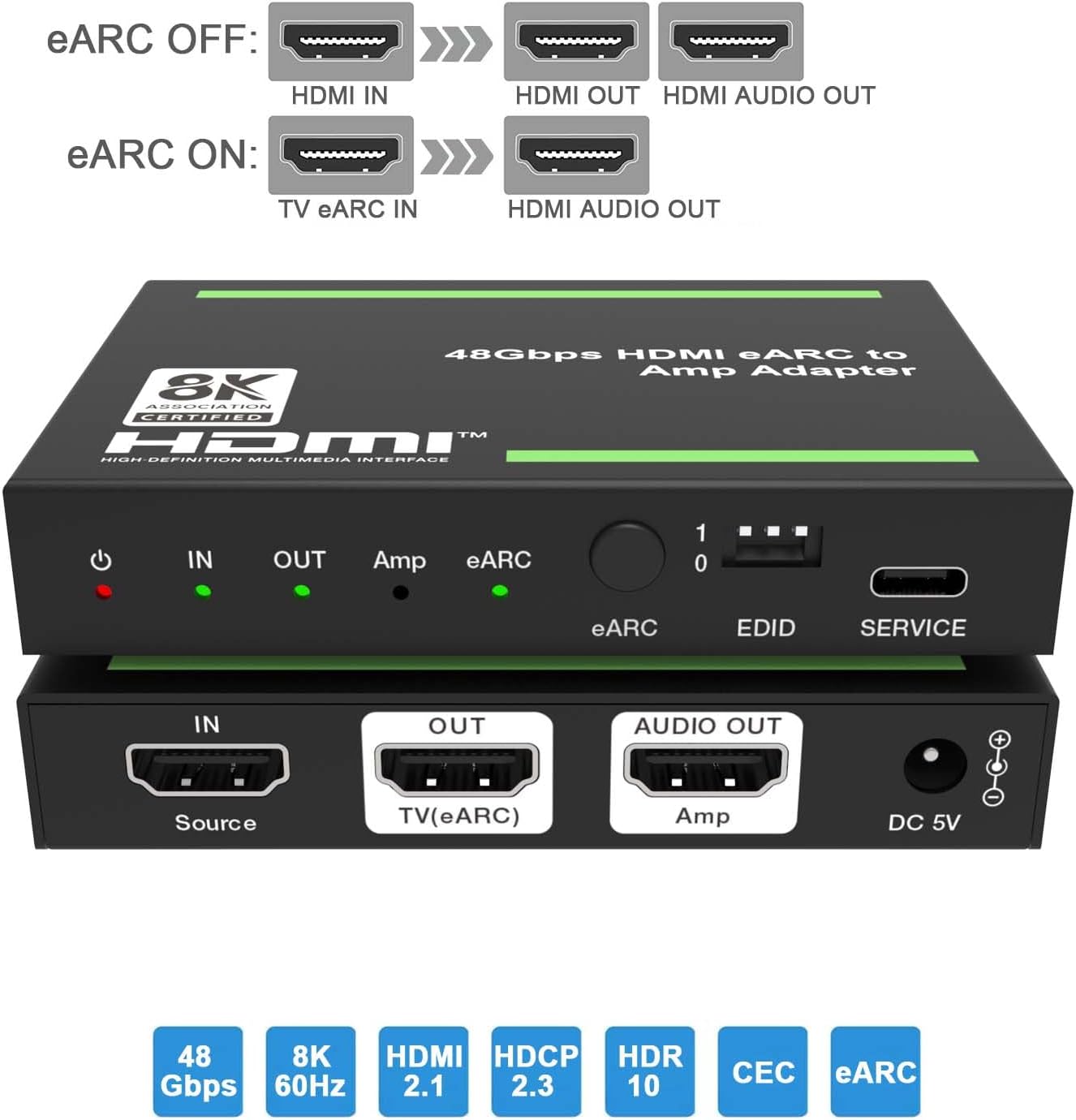
Delwedd: Top a gwaelod views of the adapter, highlighting the input/output ports and control elements.
Rheolyddion a Dangosyddion Panel Blaen:
- Pwer LED: Red indicator, illuminates when the device is powered on.
- YN LED: Green indicator, illuminates when an input signal is detected.
- ALLAN LED: Green indicator, illuminates when the HDMI OUT port is connected to a TV.
- Amp LED: Green indicator, illuminates when the AUDIO OUT port is connected to an ampllewywr.
- eARC LED: Flashes when ARC/eARC function is enabled and CEC communication is working. Off when ARC/eARC is disabled.
- Botwm eARC: Press to enable or disable the eARC function.
- Switsh DIP EDID: Used to set the EDID mode (see Section 6 for details).
- Porthladd GWASANAETH: For firmware updates and debugging.
Porthladdoedd Panel Cefn:
- IN (Source): HDMI input port for connecting source devices (e.g., Blu-ray player, gaming console, PC).
- OUT (TV(eARC)): HDMI output port for connecting to a TV or display. This port also functions as an ARC/eARC audio channel when the eARC function is enabled.
- AUDIO OUT (Amp): HDMI audio output port for connecting to an ampderbynnydd lifier neu AV.
- DC 5V: Power input port for the included 5V DC power adapter.
5. Cyfarwyddiadau Gosod
Follow these steps to set up your HDMI eARC Audio Extractor Adapter:
- Cyswllt Dyfais Ffynhonnell: Cysylltwch gebl HDMI o'ch dyfais ffynhonnell (e.e., chwaraewr Blu-ray, consol gemau, cyfrifiadur personol) i'r IN (Source) porthladd ar yr addasydd.
- Connect Display Device: Cysylltwch gebl HDMI o'r OUT (TV(eARC)) port on the adapter to the HDMI input of your TV or display.
- Connect Audio Receiver: Cysylltwch gebl HDMI o'r AUDIO OUT (Amp) port on the adapter to an HDMI input on your AV receiver or ampllewywr.
- Pwer Cysylltu: Plug the included 5V DC power adapter into the DC 5V port on the adapter, then plug the adapter into a power outlet. The Power LED will illuminate.
- Configure eARC (Optional): If you wish to extract audio from your TV's eARC/ARC channel to your AV receiver, ensure your TV's eARC/ARC function is enabled. Then, press the eARC Button on the adapter to enable eARC mode. The eARC LED will flash.
- Set EDID (Optional): Addaswch y Switsh DIP EDID according to your audio and video requirements. Refer to Section 6 for detailed EDID settings.

Image: Diagram illustrating typical connection scenarios for the HDMI eARC Audio Extractor, showing connections from a Blu-ray player to the adapter, then to a TV and a 7.1 channel audio ampllewywr.
Connection Scenarios:

Image: Diagram showing eARC OFF mode, where HDMI IN provides video to HDMI OUT and audio to HDMI AUDIO OUT.

Image: Diagram showing eARC ON mode, where TV eARC IN provides audio to HDMI AUDIO OUT.
6. Cyfarwyddiadau Gweithredu
Dangosyddion LED:
| Nac ydw. | Enw | Disgrifiad Swyddogaeth |
|---|---|---|
| 1 | Power LED | Pan fydd y ddyfais yn cael ei bweru ymlaen, bydd y LED coch ymlaen. |
| 2 | YN LED | Pan ganfyddir y signal mewnbwn, bydd y LED gwyrdd ymlaen. |
| 3 | ALLAN LED | Pan fydd y porthladd OUT yn cysylltu â theledu, bydd y LED gwyrdd ymlaen. |
| 4 | Amp LED | Pan fydd y porthladd SAIN ALLAN yn cysylltu â amplifier, bydd y LED gwyrdd ymlaen. |
| 5 | eARC LED | Ar: Mae'r swyddogaeth ARC/eARC wedi'i droi ymlaen. Mae cyfathrebu CEC ac ARC/eARC yn gweithio'n iawn. Fflachio: Mae'r swyddogaeth ARC/eARC wedi'i droi ymlaen. Nid yw cyfathrebu CEC ac ARC/eARC yn gweithio'n iawn. Wedi diffodd: Mae'r swyddogaeth ARC/eARC wedi'i diffodd. |
eARC Button Operation:
Gwasgwch y botwm eARC on the front panel to toggle the eARC function on or off. When eARC is enabled, the adapter can extract audio from the TV's eARC/ARC channel and send it to the connected AV receiver via the AUDIO OUT port.
7. Rheolaeth EDID
The EDID (Extended Display Identification Data) DIP switch allows you to manually configure the audio and video capabilities reported by the adapter to the source device. This can be useful for resolving compatibility issues or forcing specific audio formats.

Image: Detailed diagram explaining the function of each LED indicator and the settings for the EDID DIP switch.
EDID DIP Switch Settings:
| DIP Switch Setting (1-0) | Disgrifiad |
|---|---|
| [DIP]=111 | Copy OUT port sink video and audio EDID (Default) |
| [DIP]=110 | Copy AUDIO OUT port sink video and audio EDID |
| [DIP]=101 | FRL12G_8K_HDR, 2.0CH |
| [DIP]=100 | FRL12G_8K_HDR, 5.1CH |
| [DIP]=011 | FRL12G_8K_HDR, 7.1CH |
| [DIP]=010 | FRL10G_8K_HDR, 2.0CH |
| [DIP]=001 | FRL10G_8K_HDR, 5.1CH |
| [DIP]=000 | FRL10G_8K_HDR, 7.1CH |
Nodyn: "FRL" refers to Fixed Rate Link, a signaling method used in HDMI 2.1 for higher bandwidths. "12G" and "10G" indicate the data rate per lane (12 Gbps or 10 Gbps). "HDR" indicates High Dynamic Range support. "CH" indicates audio channels.
8. cynnal
To ensure the longevity and optimal performance of your adapter, follow these maintenance guidelines:
- Keep the device in a cool, dry place, away from direct sunlight, high temperatures, and humidity.
- Osgoi amlygu'r ddyfais i ddŵr neu hylifau eraill.
- Glanhewch y ddyfais gyda lliain meddal, sych. Peidiwch â defnyddio glanhawyr sgraffiniol na thoddyddion.
- Sicrhewch awyru priodol o amgylch y ddyfais i atal gorboethi.
- Disconnect power when the device is not in use for extended periods.
9. Datrys Problemau
If you encounter issues with your HDMI eARC Audio Extractor Adapter, please refer to the following common problems and solutions:
| Problem | Achos / Ateb Posibl |
|---|---|
| No video output on TV/display. |
|
| No audio output from AV receiver/ampllewywr. |
|
| Mae'r sain yn ystumiedig neu'n ysbeidiol. |
|
| eARC function not working or eARC LED is flashing. |
|
10. manylebau
| Nodwedd | Manylyn |
|---|---|
| Rhif Model | BP-HDC-MC02 |
| Fersiwn HDMI | HDMI 2.1 |
| Fersiwn HDCP | HDCP 2.3 |
| Cymorth Datrysiad Uchaf | 8K@60Hz (4:2:0 12bit), 4K@120Hz (4:4:4 12bit) |
| Color Depth Support | 30 did, 36 did, 48 did |
| Cefnogaeth HDR | Oes |
| eARC/ARC Support | Oes |
| Cefnogaeth CEC | Oes |
| Dimensiynau Cynnyrch (L x W x H) | 3.94 x 2.76 x 0.79 modfedd (95 x 68 x 18 mm) |
| Pwysau Eitem | 0.007 owns (tua 0.2 gram) |
| Cyflenwad Pŵer | DC 5V |
| Dyfeisiau Cydnaws | Amplifier, Speaker, Blu-ray player, DVD, HD player, Amazon Fire TV, Apple TV, PS3/4 Pro, Xbox, PC/Laptop, HD camera, Chromecast, Fire Stick, Roku, HDDVR, Full HD TV, monitor, projector, soundbars. |
11. Gwarant a Chefnogaeth
This BUNGPUNG product is covered by a one-year warranty from the date of purchase. This warranty covers manufacturing defects and initial defects.
If you have any questions regarding product compatibility, setup, operation, or encounter any initial defects, please do not hesitate to contact BUNGPUNG customer support. Please refer to the product packaging or the seller's information on the purchase platform for specific contact details.
Ask a question about this manual
Ask about setup, troubleshooting, compatibility, parts, safety, or missing instructions. Manuals+ will review the question and use this page’s manual context to help answer it.