
Hasaller TOWSPE-D20
Hasaller Household Surge Protector User Manual
Brand: Hasaller | Model: TOWSPE-D20 (KF6F3T8S4DH2B864S5B3)
1. Rhagymadrodd
This user manual provides essential information for the safe and effective installation, operation, and maintenance of your Hasaller Household Surge Protector. This device is designed to protect your electrical systems and connected equipment from transient overvoltages (surges) caused by lightning strikes or switching operations. Please read this manual thoroughly before installation and keep it for future reference.
2. Gwybodaeth Diogelwch
RHYBUDD: Electrical installation should only be performed by qualified and licensed electricians in accordance with all local and national electrical codes and regulations. Failure to do so may result in electric shock, fire, serious injury, or death.
- Always disconnect power to the circuit before installing or servicing the surge protector.
- Peidiwch â gosod y ddyfais hon mewn lle gwlyb neu ddŵramp lleoliadau.
- Ensure proper grounding connections are made.
- Gwiriwch fod y cyftage and current ratings of the surge protector match your electrical system requirements.
- Do not attempt to open or repair the device. Refer servicing to qualified personnel.
3. Cynnyrch Drosview
3.1 Nodweddion
- Core components are metal oxide varistor (MOV) components with high discharge capacity.
- Offers low residual voltage and fast response time for effective protection.
- Equipped with Thermo Dynamic Control disconnection for enhanced reliability and safety.
- Includes remote signaling contact for external monitoring and notification.
- Clear fault indication via a red mark in the inspection window.
- Protection modes: Line-to-Neutral (L-N) and Neutral-to-Protective Earth (N-PE).
3.2 Cydrannau
The Hasaller Household Surge Protector is a compact DIN rail mountable device. Key components include:
- L/N Terminals: Input/output terminals for Line and Neutral connections.
- PE Terminal: Terminal for Protective Earth (Ground) connection.
- Inspection Window: Displays the operational status (Green: Normal, Red: Malfunction/Needs Replacement).
- Clip Rheilffordd DIN: For secure mounting on a standard DIN rail.
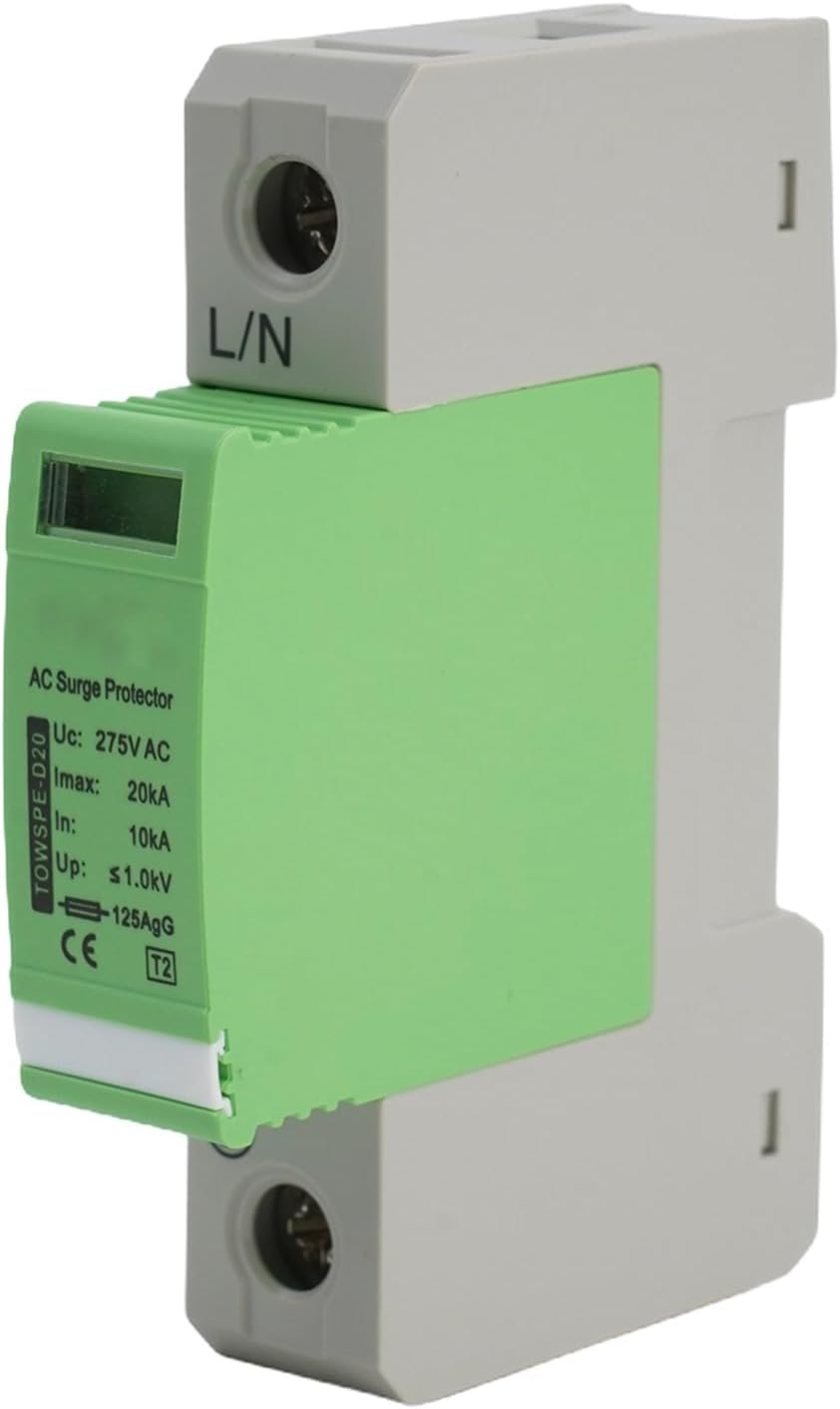
Ffigur 3.2.1: Blaen view of the Hasaller Household Surge Protector, showing the L/N terminals, inspection window, and product specifications printed on the side.
3.3 Manylebau
| Paramedr | Gwerth |
|---|---|
| Model | TOWSPE-D20 |
| Dosbarth Gwarchod | D |
| Max. Gweithredu Parhaus Voltage (Uc) | 275 V AC |
| Nominal Discharge Current (In, 8/20 µs) | 10 kA |
| Max. Discharge Current (Imax, 8/20 µs) | 20 kA |
| Cyftage Lefel Amddiffyn (I fyny) | ≤1 KV |
| Amser Ymateb | <25 ns |
| Tymheredd Amgylchedd Gwaith | -40°C i +80°C |
| Working Environment Relative Humidity | <95% |
| Indication of Deterioration | Green (Normal), Red (Malfunction) |
| Dimensiynau Cynnyrch | 90mm (H) x 50mm (D) x 18mm (W) |

Figure 3.3.1: Dimensional drawing of the surge protector, indicating its height, depth, and width for installation planning.
4. Gosod a Gosod
The Hasaller Household Surge Protector is designed for easy installation on a standard 35mm DIN rail within an electrical distribution board or control cabinet. Ensure all power is disconnected before proceeding.
- Datgysylltu Pŵer: Turn off the main circuit breaker to completely de-energize the electrical panel where the surge protector will be installed. Verify with a voltage tester that no power is present.
- Mowntio: Clip the surge protector onto the DIN rail. Ensure it is securely fastened and does not wobble.
- Cysylltiadau Gwifro:
- Connect the Line (L) conductor to the L terminal of the surge protector.
- Connect the Neutral (N) conductor to the N terminal of the surge protector.
- Connect the Protective Earth (PE) conductor to the PE terminal of the surge protector. Ensure this connection is robust and provides a low-impedance path to ground.

Ffigur 4.1: Uchaf view illustrating the ground connection terminal for the surge protector.
- Dilysu: Double-check all wiring connections for tightness and correctness. Ensure no bare wires are exposed.
- Adfer pŵer: Once installation is complete and verified, restore power to the circuit by turning on the main circuit breaker. The inspection window should display "Green" indicating normal operation.
For optimal protection, install the surge protector as close as possible to the incoming power supply or the equipment it is protecting.
5. Cyfarwyddiadau Gweithredu
The Hasaller Household Surge Protector operates passively, continuously monitoring the electrical system for overvoltage events. It requires no user interaction during normal operation.
- Gweithrediad arferol: When the electrical system is operating within normal voltage parameters, the inspection window on the surge protector will display a GWYRDD indication. This signifies that the device is functioning correctly and providing protection.
- Overvoltage Event: Mewn achos o gyftage surge, the surge protector will divert the excess energy to ground, protecting your connected equipment. This process is instantaneous and automatic.
- Dynodiad Diffyg: If the surge protector has absorbed a significant surge or has reached its end-of-life, the inspection window will change from GWYRDD i COCH. A red indication signifies that the device is no longer providing protection and requires replacement.
6. cynnal
The Hasaller Household Surge Protector is designed for minimal maintenance. Regular visual inspection is recommended to ensure continued protection.
- Archwiliad gweledol: Periodically check the inspection window on the front of the device. Ensure it remains GWYRDD.
- Amnewid: If the inspection window displays COCH, the surge protector has performed its function and is no longer active. It must be replaced immediately to restore protection to your electrical system. Refer to Section 4 for replacement procedures, ensuring power is disconnected first.
- Glanhau: Os oes angen, sychwch du allan y ddyfais yn ysgafn gyda lliain sych, meddal. Peidiwch â defnyddio glanhawyr hylif na thoddyddion.
7. Datrys Problemau
| Problem | Achos Posibl | Ateb |
|---|---|---|
| Inspection window shows COCH. | The surge protector has absorbed a significant overvoltage event or has reached its end-of-life. | The device is no longer providing protection. It must be replaced. Disconnect power and replace the unit following installation instructions. |
| No indication (blank or dark window). | No power to the device, or internal fault. | Verify power supply to the circuit. If power is present and the window is still dark, the device may be faulty and requires replacement. |
| Frequent tripping of circuit breakers after surge protector installation. | Incorrect wiring, faulty device, or persistent overvoltage materion. | Immediately disconnect power. Re-check all wiring connections. If wiring is correct, the device may be faulty and needs replacement. Consult a qualified electrician to assess the electrical system for persistent overvoltage problemau. |
If you encounter issues not listed here or are unsure about any troubleshooting steps, please contact a qualified electrician or the manufacturer's support.
8. Gwarant a Chefnogaeth
For information regarding warranty coverage, technical support, or replacement parts for your Hasaller Household Surge Protector, please refer to the purchase documentation or contact your retailer/seller directly. Keep your proof of purchase for warranty claims.
Gwneuthurwr: Hasaller
Rhif Model: KF6F3T8S4DH2B864S5B3
ASIN: B0D6YNXJSZ
Ask a question about this manual
Ask about setup, troubleshooting, compatibility, parts, safety, or missing instructions. Manuals+ will review the question and use this page’s manual context to help answer it.