
Rhagymadrodd
Thank you for choosing the CHENZILIN L9 Mini Camera. This portable digital video recorder is designed for versatile use, offering high-definition 1080P video recording, night vision capabilities, and a compact, wearable design. It is suitable for various applications including sports, law enforcement, and as a car driving recorder. This manual provides detailed instructions for setup, operation, and maintenance to ensure optimal performance of your device.
Nodweddion Allweddol
- Portable and Wearable Design: Features a back clip for easy attachment to backpacks or pockets, ensuring discreet and convenient recording.
- High-Definition 1080P Video: Captures clear and crisp video footage at 1920x1080 resolution.
- Canfod Cynnig: Automatically starts recording when motion is detected, conserving battery and storage.
- Gweledigaeth Nos: Equipped with 5 white light lamps for clear recording in low-light conditions up to 5 meters.
- 180-Degree Rotatable Lens: The lens can be manually rotated 180 degrees, providing flexible recording angles.
- 140-Degree Wide Angle: Yn cipio maes eang o view, gan sicrhau sylw cynhwysfawr.
- Recordiad Dolen: Overwrites the oldest files when the memory card is full, ensuring continuous recording.
- Photo Taking Capability: Allows for still image capture during video recording.
- Invisible and Quiet Recording: Designed for discreet operation.
- Sgrin 1.3 modfedd: Provides a clear display for viewing recordings and navigating settings.
- Cysylltedd Wi-Fi: (For "With wifi" model) Enables remote control and file transfer via a mobile application.
Cynnyrch Drosview a Chydrannau
Familiarize yourself with the various parts of your L9 Mini Camera:

Ffigur 1: Blaen view of the L9 Mini Camera, showcasing its compact design, 1.3-inch screen, and rotatable lens. The screen displays a live feed of a cyclist.

Ffigur 2: Illustrates key features of the L9 Mini Camera, including one-click recording, the detachable back clip, video recording capability, motion detection, and night vision functionality.

Ffigur 3: A manwl view of the L9 Mini Camera's screen and the control buttons located on its side. The screen shows a live recording, and the buttons are clearly visible for operation.

Ffigur 4: Cefn view of the L9 Mini Camera, highlighting the integrated back clip mechanism. This clip allows for secure attachment to clothing or gear.
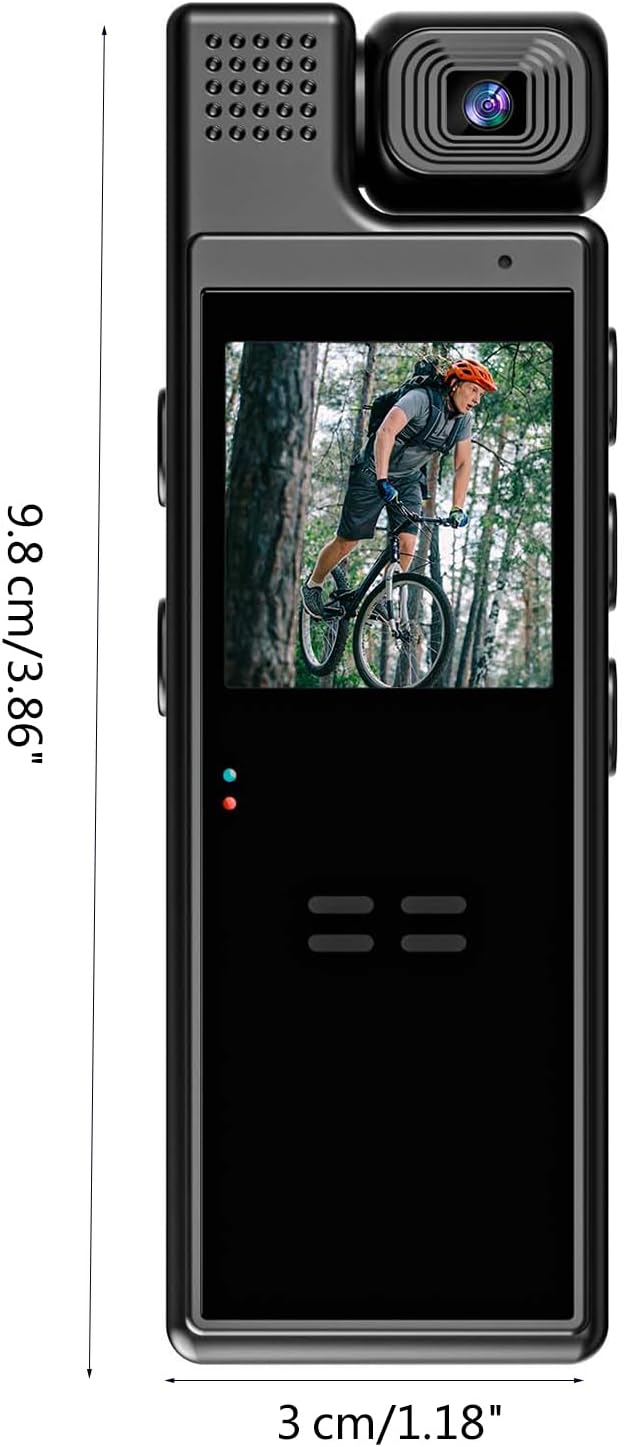
Ffigur 5: Depicts the compact dimensions of the L9 Mini Camera, measuring approximately 9.8 cm (3.86 inches) in length and 3 cm (1.18 inches) in width, emphasizing its portability.
Button and Port Identification:
- Botwm Pŵer: Fe'i defnyddir i droi'r ddyfais ymlaen / i ffwrdd.
- Botwm Cofnodi: Initiates and stops video recording.
- Botwm Modd: Switches between video, photo, and playback modes.
- Navigation Buttons (Up/Down/OK): Ar gyfer llywio a dewis dewislen.
- Porth USB: Ar gyfer codi tâl a throsglwyddo data.
- Slot Cerdyn MicroSD: For external memory storage.
- Lens: The rotatable camera lens.
- Sgrin: Arddangosfa 1.3-modfedd ar gyfer byw view a chwarae.
- Goleuadau Dangosydd: Provide status information (e.g., charging, recording).
Canllaw Gosod
1. Codi Tâl y Dyfais
Before first use, fully charge the L9 Mini Camera. Connect the camera to a USB power adapter (not included) or a computer's USB port using the provided USB cable. The indicator light will show charging status and turn off or change color when fully charged.
Nodyn: The battery capacity is 1200mAh, providing approximately 8 hours of battery life.
2. Mewnosod Cerdyn MicroSD
The L9 Mini Camera requires a MicroSD card (not included) for storing recordings. Locate the MicroSD card slot on the device. Gently insert the MicroSD card with the gold contacts facing down until it clicks into place. To remove, push the card in again until it springs out.
- Ensure the card is formatted to FAT32 for optimal performance.
- Use a high-speed MicroSD card (Class 10 or higher) for smooth video recording.
3. Pweru Ymlaen / I ffwrdd
To power on the camera, press and hold the Power button for a few seconds until the screen lights up. To power off, press and hold the Power button again until the screen turns off.
Cyfarwyddiadau Gweithredu
Recordio Fideo
- Rhowch Modd Fideo: After powering on, the camera typically defaults to video recording mode. If not, use the Mode button to switch to video mode.
- Dechrau Recordio: Press the Record button once to begin video recording. A red indicator light will typically flash, and a recording icon will appear on the screen.
- Stopio Recordio: Press the Record button again to stop recording. The indicator light will stop flashing.
- Recordiad Dolen: The camera supports loop recording. When the memory card is full, the oldest fileBydd s yn cael eu trosysgrifennu'n awtomatig i wneud lle ar gyfer recordiadau newydd.
Tynnu Lluniau
- Enter Photo Mode: Use the Mode button to switch to photo mode.
- Tynnu llun: Press the Record button (or a dedicated photo button if available) once to capture a still image.
Canfod Cynnig
To activate motion detection recording:
- Gosodiadau Mynediad: Navigate through the camera's menu using the navigation buttons to find the motion detection setting.
- Galluogi Canfod Symudiad: Select "On" or "Enable" for motion detection. Once enabled, the camera will automatically start recording when movement is detected within its field of view and stop when motion ceases.
Gweledigaeth y Nos
The L9 Mini Camera features night vision for recording in low-light conditions.
- Actifadu Awtomatig: Night vision may activate automatically in low light.
- Ysgogi â llaw: Refer to the on-screen menu for an option to manually turn night vision on or off if available. The 5 white light lamps will illuminate to assist recording in darkness.
Cylchdro Lens
The camera lens can be manually rotated 180 degrees to adjust the recording angle as needed. Gently rotate the lens housing to achieve the desired perspective.
Connecting to Wi-Fi (For "With wifi" model)
For models with Wi-Fi, you can connect the camera to your smartphone for remote control and file rheoli.
- Ap Lawrlwytho: Chwiliwch am the recommended companion app (e.g., "L9 Camera" or similar) on your smartphone's app store.
- Enable Camera Wi-Fi: Turn on Wi-Fi on the L9 Mini Camera via its settings menu.
- Connect Phone to Camera Wi-Fi: On your smartphone, go to Wi-Fi settings and connect to the camera's Wi-Fi network (SSID usually starts with "L9" or similar). The default password might be "12345678" or "88888888".
- Agor Ap: Launch the app and follow the on-screen instructions to connect to your camera. You can then view byw footage, control recording, and download files.
Cynnal a Chadw a Gofal
- Glanhau: Defnyddiwch frethyn meddal, sych i lanhau corff y camera. Ar gyfer y lens, defnyddiwch frethyn a thoddiant glanhau lens arbenigol. Osgowch lanhawyr neu doddyddion sgraffiniol.
- Storio: Storiwch y camera mewn lle oer, sych i ffwrdd o olau haul uniongyrchol a thymheredd eithafol.
- Gofal Batri: To prolong battery life, avoid fully discharging the battery frequently. If storing for a long period, charge the battery to about 50% every few months.
- Diweddariadau Cadarnwedd: Gwiriwch y gwneuthurwr webgwefan yn rheolaidd am unrhyw ddiweddariadau cadarnwedd sydd ar gael i wella perfformiad ac ychwanegu nodweddion.
- Osgoi Effeithiau: The device is designed to be durable, but avoid dropping or subjecting it to strong impacts.
- Gwrthiant Dŵr: Nid yw'r ddyfais hon yn dal dŵr. Osgowch ddod i gysylltiad â dŵr neu leithder uchel.
Datrys problemau
| Problem | Achos Posibl | Ateb |
|---|---|---|
| Nid yw'r camera yn troi ymlaen. | Batri isel; dyfais wedi rhewi. | Charge the camera fully. If unresponsive, try a soft reset (press and hold power button for longer, or look for a reset pinhole if available). |
| Methu recordio fideo/tynnu lluniau. | No MicroSD card; card full; card error; incorrect mode. | Insert a MicroSD card. Format or replace the card. Ensure sufficient storage. Switch to the correct recording mode. |
| Ansawdd fideo gwael. | Dirty lens; low light; incorrect settings. | Clean the lens. Ensure adequate lighting or activate night vision. Check resolution settings. |
| Problemau cysylltiad Wi-Fi. | Incorrect password; app issues; camera Wi-Fi off. | Verify Wi-Fi password. Restart camera and phone. Reinstall the app. Ensure camera Wi-Fi is enabled. |
| Bywyd batri byr. | Frequent use of power-intensive features (Wi-Fi, night vision); aging battery. | Reduce use of power-intensive features. Ensure full charge. Battery degradation is normal over time. |
Manylebau Technegol
| Nodwedd | Manylyn |
|---|---|
| Model | L9 |
| Sgrin | 1.3-inch (240x240 resolution) |
| Datrysiad | 1920x1080 (1080P) |
| Cylchdro Lens | 180 gradd |
| Lens Wide Angle | 140 gradd |
| Gallu Batri | 1200mAh |
| Fformat Fideo | AVI |
| Bywyd Batri | Tua 8 awr |
| Gweledigaeth Nos Lamps | 5pcs White light lamps |
| Pellter Gweledigaeth Nos | Hyd at 5 metr |
| Deunydd | Styren Biwtadïen Acrylonitrile (ABS) |
| Cysylltedd | Wi-Fi (for "With wifi" model) |
| Dimensiynau | Tua 9.8 x 3 cm (3.86 x 1.18 modfedd) |
Gwarant a Chefnogaeth
For warranty information and technical support, please refer to the retailer or the official CHENZILIN websafle lle prynwyd y cynnyrch. Cadwch eich prawf prynu ar gyfer unrhyw hawliadau gwarant.
If you encounter issues not covered in this manual, please contact customer service for assistance.