
T-Wolf GG-G530
T-Wolf RoboCop Competitive Gaming Mouse GG-G530 User Manual
Model: GG-G530
Rhagymadrodd
This manual provides essential information for the setup, operation, and maintenance of your T-Wolf RoboCop Competitive Gaming Mouse GG-G530. Please read this manual thoroughly before using the product to ensure optimal performance and longevity.
Cynnwys Pecyn
- 1 x T-Wolf RoboCop Competitive Gaming Mouse GG-G530
- 1 x Llawlyfr Defnyddiwr (y ddogfen hon)
Nodweddion Cynnyrch
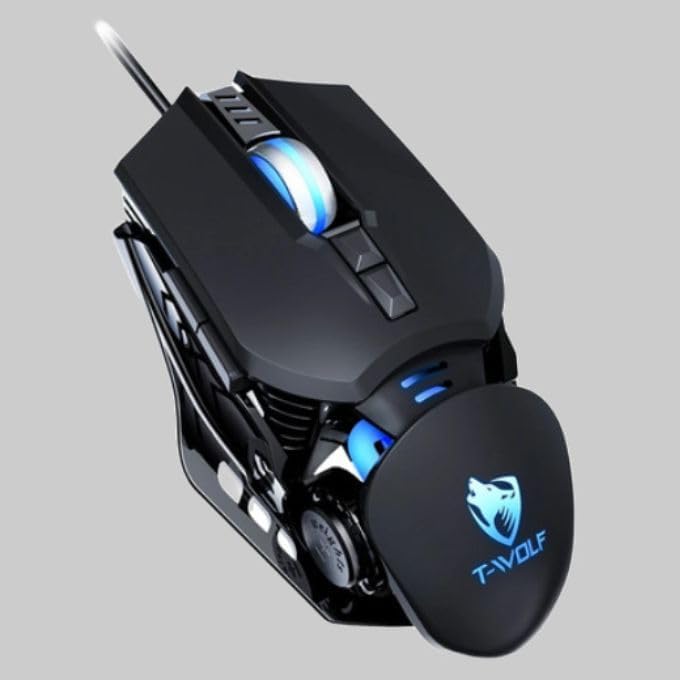
The T-Wolf RoboCop Competitive Gaming Mouse GG-G530 is designed for precision and comfort, suitable for both gaming and office use. Key features include:
- Optical Engine Design: Ensures stable operation and high sensitivity.
- Mechanical Armored Modeling: Distinctive and robust design.
- Symmetrical DIY Counterweight: Allows for adaptable weight adjustment.
- 7 Botymau: Includes left click, right click, scroll wheel, DPI switcher, and additional programmable buttons.
- Cysylltedd Deallus: Plug-and-play functionality with automatic driver installation.
- DPI addasadwy: Four levels of sensitivity (1200/2400/3200/6400 DPI) for precise control.
- Dyluniad ergonomig: Provides comfortable use for extended periods without fatigue.
- Four-Color Light Effect: Dynamic lighting for visual appeal.
- Cysylltiad â gwifrau: Reliable USB interface with a 150cm cable.
- Cydnawsedd System: Supports Windows and Mac operating systems.
Gosod
- Cysylltwch y Llygoden: Insert the USB connector of the T-Wolf RoboCop Gaming Mouse into an available USB port on your computer.
- Gosod Gyrrwr Awtomatig: The operating system will automatically detect the mouse and install the necessary drivers. This process typically takes a few moments. No manual driver installation is required.
- Yn barod i'w Ddefnyddio: Unwaith y bydd y gyrwyr wedi'u gosod, mae'r llygoden yn barod i'w defnyddio ar unwaith.
Cyfarwyddiadau Gweithredu
The T-Wolf RoboCop Gaming Mouse features 7 buttons for various functions. Familiarize yourself with their basic operations:
- Botwm Clic Chwith: Primary selection and interaction.
- Botwm Clic Dde: Accesses contextual menus and secondary functions.
- Olwyn Sgroliwch: Scrolls through documents and web tudalennau. Gall hefyd weithredu fel botwm clicio canol.
- DPI Switcher Button: Yn addasu sensitifrwydd y llygoden (DPI).
- Botymau Ychwanegol: The remaining buttons can be assigned specific functions through your operating system's mouse settings or compatible third-party software (note: no macro programming is natively supported by the mouse hardware).

Addasiad DPI
The mouse features an adjustable DPI (Dots Per Inch) setting, allowing you to change the cursor sensitivity on the fly. This is particularly useful for different tasks, such as precise aiming in games or fast navigation in general use.
- Lleolwch y DPI Switcher Button, typically positioned behind the scroll wheel.
- Press the DPI Switcher Button to cycle through the available DPI settings: 1200 DPI, 2400 DPI, 3200 DPI, and 6400 DPI.
- Each press will change the sensitivity, allowing you to find the setting that best suits your current activity.

Cynnal a chadw
To ensure the longevity and optimal performance of your T-Wolf RoboCop Gaming Mouse, follow these simple maintenance guidelines:
- Glanhau: Defnyddiwch frethyn meddal, sych i sychu wyneb y llygoden. Ar gyfer baw ystyfnig, sychwch ychydigampgolchwch y brethyn gyda dŵr neu doddiant glanhau ysgafn. Osgowch gemegau llym neu ddeunyddiau sgraffiniol.
- Synhwyrydd Optegol: Periodically clean the optical sensor on the underside of the mouse with a cotton swab to prevent dust buildup, which can affect tracking performance.
- Gofal Cebl: Osgowch blygu neu dynnu'r cebl USB yn sydyn i atal difrod mewnol.
- Storio: Pan nad yw'n cael ei ddefnyddio, storiwch y llygoden mewn amgylchedd glân, sych i ffwrdd o dymheredd eithafol.
Datrys problemau
If you encounter issues with your T-Wolf RoboCop Gaming Mouse, refer to the following common solutions:
- Llygoden Ddim yn Ymateb:
- Gwnewch yn siŵr bod y cebl USB wedi'i blygio'n ddiogel i borthladd USB sy'n gweithio ar eich cyfrifiadur.
- Rhowch gynnig ar blygio'r llygoden i mewn i borthladd USB gwahanol.
- Ailgychwyn eich cyfrifiadur.
- Mae Symudiad y Cyrchwr yn Anwadal neu'n Neidio:
- Glanhewch y synhwyrydd optegol ar ochr isaf y llygoden.
- Gwnewch yn siŵr eich bod yn defnyddio'r llygoden ar arwyneb glân, di-adlewyrchol, ac unffurf. Argymhellir padiau llygoden.
- Addasiad DPI Ddim yn Gweithio:
- Ensure you are pressing the correct DPI switcher button.
- The mouse cycles through fixed DPI settings; there is no visual indicator on the mouse itself for the current DPI level, only the change in cursor speed.
- Botymau Ddim yn Gweithio:
- Check your operating system's mouse settings to ensure buttons are enabled and configured correctly.
- Test the mouse on another computer to rule out a software or system issue.
Manylebau
| Model | GG-G530 |
| Deunydd | ABS + Electroplating |
| System Olrhain | Optegol |
| Cysylltiad | Wired |
| Hyd Cebl | 150 cm |
| Math Rhyngwyneb | USB |
| Gosodiadau DPI | 1200 / 2400 / 3200 / 6400 (Addasadwy) |
| Nifer y Botymau | 7 |
| Bywyd Gwasanaeth | Approximately three years |
| Dull Gweithio | Ffotoelectric |
| Effaith Ysgafn | Four-color cycling |
| Maint yr Eitem | 130 x 80 x 35 mm |
| Pwysau Eitem | 160 g |
| Systemau â Chymorth | Windows, Mac |
Gwarant a Chefnogaeth
Your T-Wolf RoboCop Competitive Gaming Mouse GG-G530 comes with a Gwarant gwneuthurwr 6 mis o'r dyddiad prynu.
This warranty covers defects in materials and workmanship under normal use. It does not cover damage caused by accident, misuse, abuse, unauthorized modification, or external causes such as liquid damage.
For warranty claims or technical support, please contact your retailer or the point of purchase. Please retain your proof of purchase for warranty validation.

Dogfennau Cysylltiedig - GG-G530
 |
Q8 Bluetooth Wireless Dual Mode Mouse Instruction Manual User manual for the T-WOLF Q8 Bluetooth and 2.4G wireless dual-mode mouse, covering specifications, system requirements, and setup instructions. |
 |
T-Wolf V1 Mouse Instruction Manual User manual for the T-Wolf V1 wired optical mouse, featuring setup instructions, button functions, and care guidelines for optimal performance. |
 |
T-Wolf X4 Game Mouse User Manual User manual for the T-Wolf X4 Three-Mode Bluetooth Wireless Gaming Mouse. Includes warnings, precautions, and after-sales service information. |
 |
T-WOLF X7 Tri-mode Light Emitting Gaming Mouse - Instruction Manual Official instruction manual for the T-WOLF X7 Tri-mode Light Emitting Gaming Mouse, detailing product features, specifications, usage instructions for 2.4GHz and Bluetooth modes, and warranty information. |
 |
T-WOLF X4 Tri-mode Gaming Mouse Instruction Manual Official instruction manual for the T-WOLF X4 Tri-mode Gaming Mouse, covering specifications, package contents, and setup instructions for 2.4GHz and Bluetooth modes. |
 |
T-WOLF TF-400 4-in-1 Gaming Kit User Manual Comprehensive user manual and technical specifications for the T-WOLF TF-400 4-in-1 gaming kit, featuring a backlit keyboard, optical mouse, fabric mouse pad, and stereo gaming headset. |
Ask a question about this manual
Ask about setup, troubleshooting, compatibility, parts, safety, or missing instructions. Manuals+ will review the question and use this page’s manual context to help answer it.