
JeaTone 1080P Video Intercom System User Manual
Model: 82M723P225C-1
This manual provides comprehensive instructions for the installation, operation, and maintenance of your JeaTone 1080P Video Intercom System. Please read thoroughly before use.
1. Cynnyrch Drosview
The JeaTone 1080P Video Intercom System is a comprehensive security solution featuring a 7-inch touch monitor, a 2-wire outdoor unit, WiFi connectivity, motion detection, RFID unlocking, two-way audio, and night vision capabilities. It is designed to enhance home security and communication.
1.1 Nodweddion Allweddol
- Canfod Cynnig PIR: Equipped with PIR motion detection technology, this video intercom provides security and peace of mind, sending immediate notifications to your device upon motion detection, allowing real-time action.
- WiFi Connectivity & Remote Monitoring: Maintain control of your home from anywhere with remote monitoring via the dedicated mobile application. View byw footage, communicate with visitors, or unlock the door directly from your smartphone.
- Cyfathrebu Sain Dwy Ffordd: Equipped with clear hands-free communication, it allows for two-way calls, offering the ability to speak with visitors directly from the 7-inch touch screen, enhancing communication and security.
- Dulliau Datgloi Lluosog: Integrates an advanced unlocking system supporting RFID swipe cards, in addition to traditional unlocking via the indoor display and mobile phone, providing secure and personalized access.
- Gwydn a Dibynadwy: This device not only offers advanced security but also the assurance of long-lasting support, ensuring reliable and durable protection for your home.
1.2 Cynnwys Pecyn
Gwiriwch fod yr holl eitemau yn bresennol yn eich pecyn:
- JeaTone 7-inch Indoor Touch Monitor
- JeaTone 1080P Outdoor Doorbell Unit
- Mounting Bracket for Indoor Monitor
- Mounting Bracket for Outdoor Unit
- Addasydd Pŵer
- Connection Cables (2-wire)
- RFID Key Fobs (Quantity may vary, typically 5-10)
- Sgriwiau a Phlygiau Wal
- Llawlyfr Defnyddiwr (Y ddogfen hon)

Ffigur 1: Drosoddview of the JeaTone 1080P Video Intercom System components.
2. Gosod a Gosod
Proper installation is crucial for optimal performance and security. It is recommended to consult a qualified electrician if you are unsure about any steps.
2.1 Dewis Safle
Choose appropriate locations for both the indoor monitor and the outdoor doorbell unit. The outdoor unit should be placed at a height that allows clear viewing of visitors, typically around 1.5 meters (5 feet) from the ground. Ensure the indoor monitor is in a convenient location for access and power.
2.2 Diagram Gwifro
The system uses a 2-wire connection between the indoor monitor and the outdoor unit. Ensure power is disconnected before wiring to prevent electrical hazards.

Figure 2: Basic wiring connection for the JeaTone Video Intercom System.
2.3 Mounting the Outdoor Unit
- Secure the outdoor unit's mounting bracket to the wall using the provided screws and wall plugs.
- Connect the 2-wire cable from the indoor monitor to the designated terminals on the outdoor unit.
- Mount the outdoor unit onto its bracket, ensuring it is securely fastened and weatherproof.

Figure 3: The outdoor unit is designed with IP65 weather resistance for outdoor installation.
2.4 Mounting the Indoor Monitor
- Secure the indoor monitor's mounting bracket to the desired wall location.
- Connect the 2-wire cable from the outdoor unit to the indoor monitor's terminals.
- Connect the power adapter to the indoor monitor and plug it into a power outlet.
- Mount the indoor monitor onto its bracket.

Figure 4: The 7-inch indoor touch monitor provides easy interaction.
2.5 Initial Power-Up and WiFi Connection
Once all connections are secure, power on the system. Follow the on-screen prompts on the indoor monitor to connect to your home WiFi network. The system supports 2.4GHz WiFi only. This step is essential for mobile app functionality.

Figure 5: The system supports 2.4GHz WiFi for stable connectivity.
3. Cyfarwyddiadau Gweithredu
This section details how to use the various features of your JeaTone Video Intercom System.
3.1 Indoor Monitor Functions
The 7-inch touch screen monitor is your primary interface for managing the intercom system.
- Byw View: Tap the camera icon on the screen to view byw footage o'r uned awyr agored.
- Cyfathrebu Dwy Ffordd: When a visitor presses the doorbell, the monitor will ring. Tap the answer button to initiate two-way audio communication.
- Unlock Door: Tap the unlock icon on the screen to remotely open a connected electronic lock.
- Record/Snapshot: Capture images or record video directly from the monitor for later review.

Figure 6: Two-way communication via the indoor monitor.
3.2 Outdoor Unit Functions
The outdoor unit serves as the doorbell and camera for your system, providing essential outdoor monitoring.
- Botwm Doorbell: Visitors press this button to alert you via the indoor monitor and mobile app.
- 1080P Camera: Provides high-definition video feed to the monitor and app, ensuring clear visuals.
- Synhwyrydd Cynnig PIR: Detects movement in its field of view (up to 150 degrees) and sends alerts to your connected devices.
- Gweledigaeth Nos: Integrated infrared LEDs enable clear viewing and recording in low-light conditions or complete darkness.
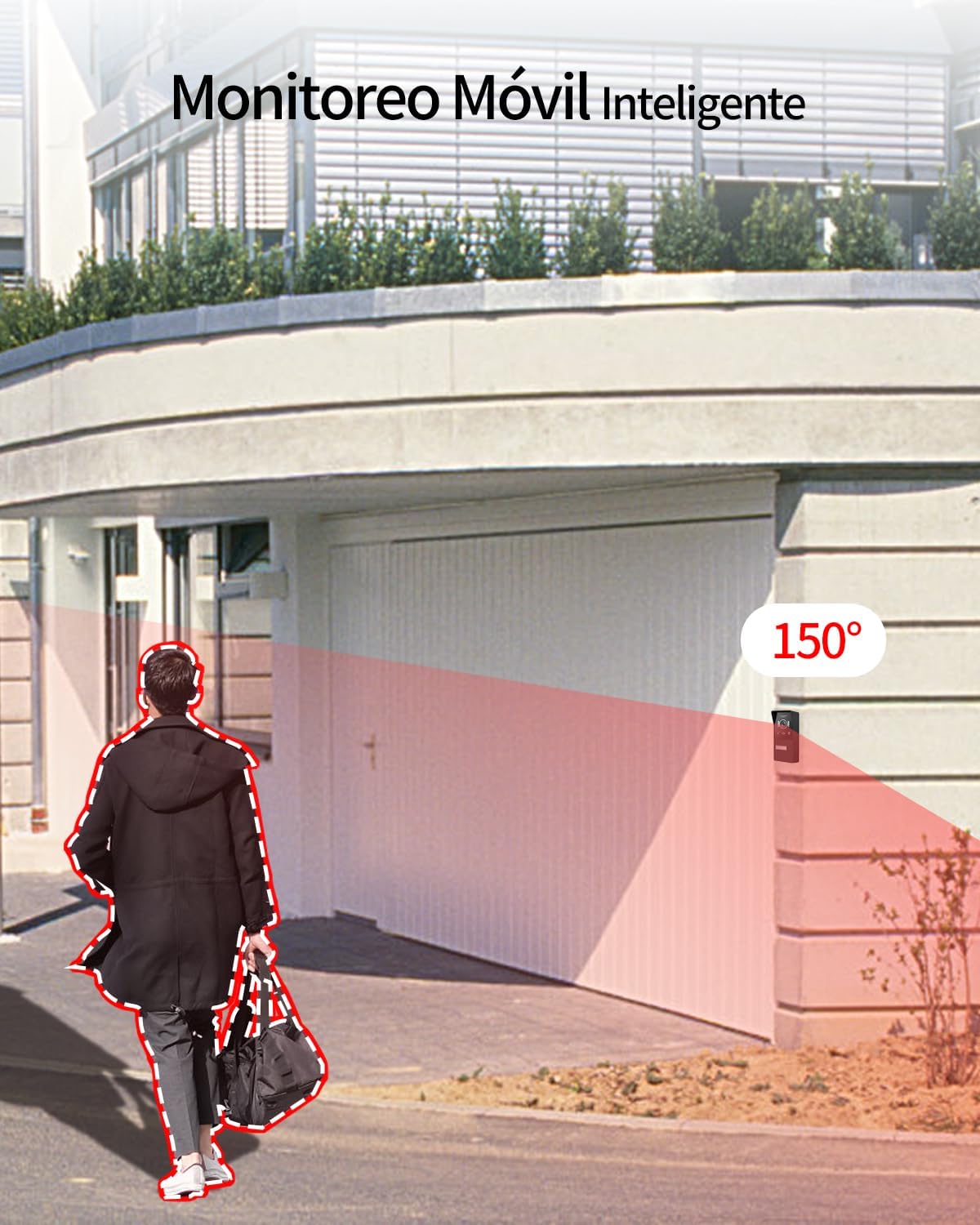
Figure 7: The outdoor unit features a 150-degree motion detection angle.

Figure 8: Night vision capability of the outdoor unit for clear visibility in darkness.
3.3 Mobile App Usage
Download the dedicated JeaTone app from your smartphone's app store (available for iOS and Android). Register an account and add your device by following the in-app instructions.
- Byw o Bell View: Access the camera feed from anywhere with an internet connection.
- Remote Two-Way Audio: Speak with visitors through your smartphone, even when you're not home.
- Rhybuddion Cynnig: Receive instant push notifications on your phone when motion is detected by the outdoor unit.
- Datgloi o Bell: Unlock your door remotely via the app, providing convenient access for trusted visitors.
- Chwarae yn ôl: Review fideo wedi'i recordio footage (requires an installed SD card in the monitor or activated cloud storage).
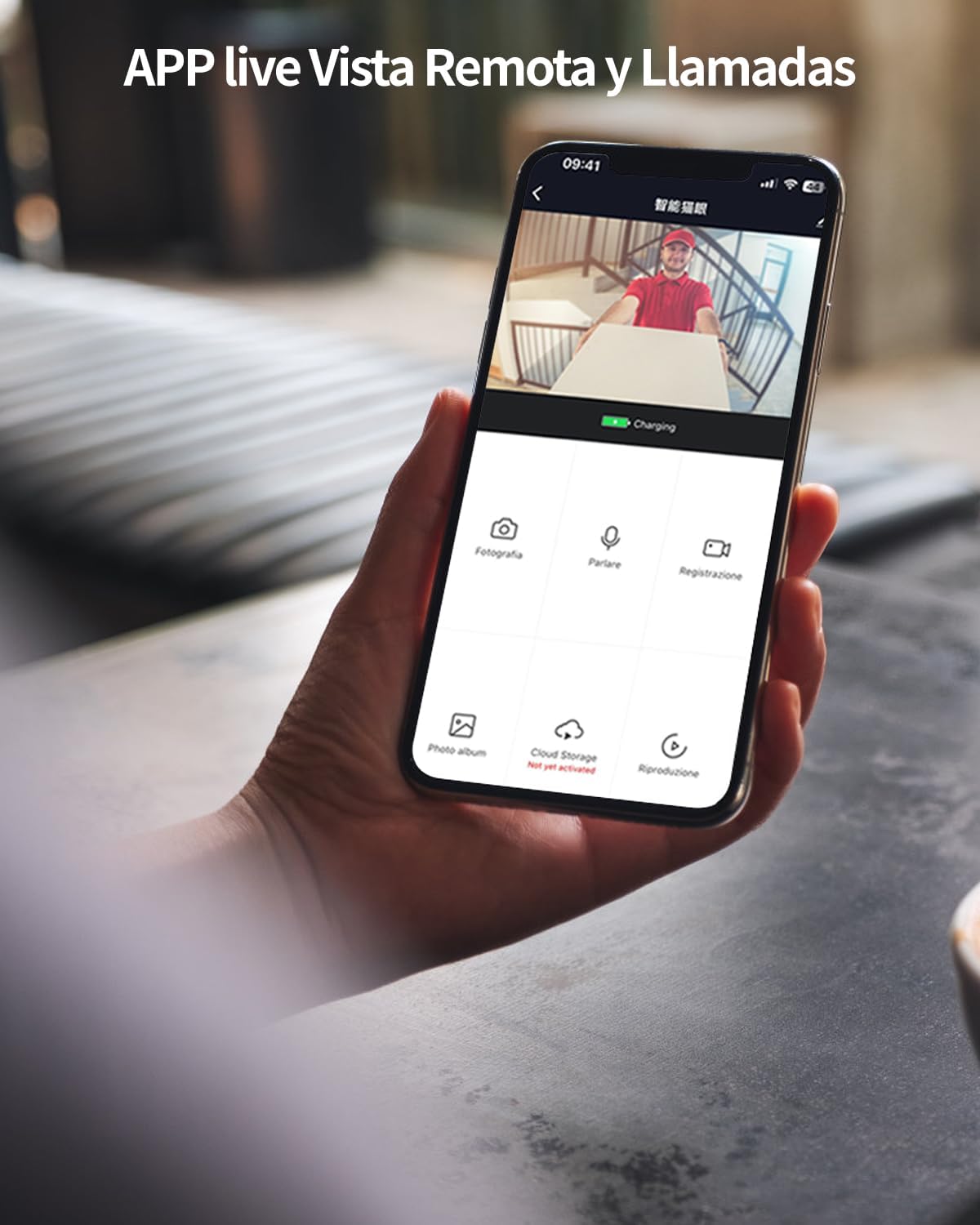
Figure 9: Mobile app interface for remote viewing a rheolaeth.

Figure 10: Motion detection alerts received on the smartphone app.
3.4 Dulliau Datgloi
The system offers flexible options for unlocking your door, providing convenience and security.
- Monitor Dan Do: Tap the dedicated unlock icon on the monitor screen during a call or live view.
- Ap Symudol: Use the unlock function within the JeaTone app from anywhere.
- Cerdyn RFID: Swipe a registered RFID key fob over the designated area on the outdoor unit for quick and secure entry.
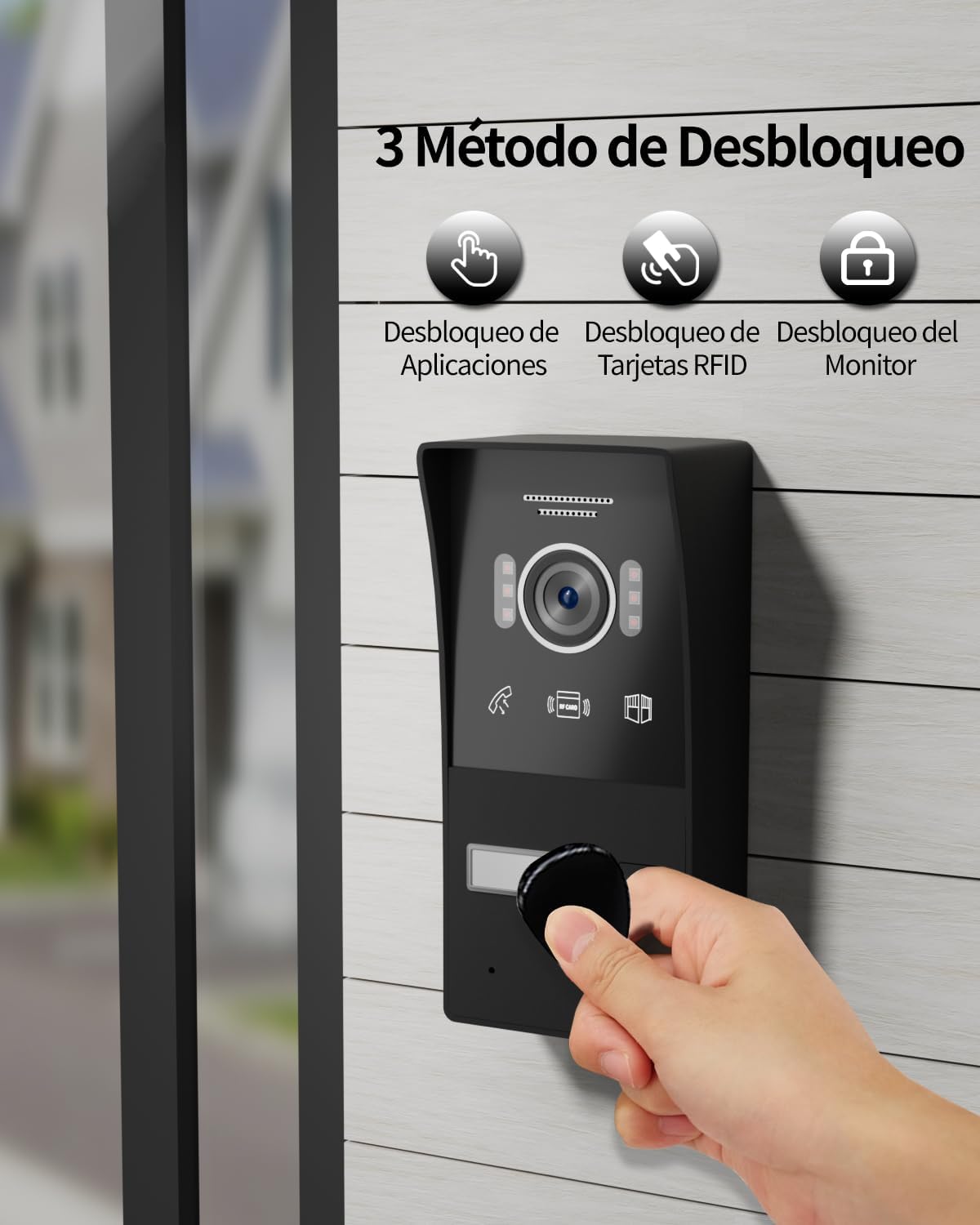
Figure 11: Unlocking the door using an RFID key fob.
4. Gofal a Chynnal a Chadw
Regular care ensures the longevity and optimal performance of your intercom system.
4.1 Glanhau
Regularly clean the indoor monitor screen and the outdoor unit's camera lens and surface with a soft, slightly damp cloth. Avoid abrasive cleaners, solvents, or harsh chemicals that could damage the surfaces or electronic components.
4.2 Diweddariadau Meddalwedd
Periodically check the mobile app or indoor monitor settings for available firmware updates. Keeping your system updated ensures optimal performance, enhances security, and provides access to new features and improvements.
4.3 Ystyriaethau Amgylcheddol
While the outdoor unit is IP65 rated for weather resistance, ensure it is not submerged in water or exposed to direct high-pressure water jets. Protect the indoor monitor from extreme temperatures, high humidity, and direct sunlight to prevent damage.
5. Datrys Problemau
This section provides solutions to common issues you might encounter with your JeaTone Video Intercom System. If the problem persists, please contact customer support.
| Problem | Achos Posibl | Ateb |
|---|---|---|
| No image on indoor monitor. | Loose wiring, power issue, faulty unit. | Check all cable connections between units and to power. Ensure power adapter is plugged in and working. Restart the system. Contact support if issue persists. |
| No audio during two-way communication. | Microphone/speaker blocked, volume too low, connection issue. | Check for obstructions on microphone/speaker. Adjust volume settings on the monitor. Verify stable connection between units. |
| Mobile app cannot connect to the system. | Incorrect WiFi password, 5GHz WiFi, weak signal, app issues. | Ensure monitor is connected to a 2.4GHz WiFi network. Re-enter WiFi password. Check router signal strength. Restart the app and your phone. |
| Nid yw canfod symudiad yn gweithio neu'n rhy sensitif. | Incorrect sensitivity settings, obstructions, environmental factors (e.g., direct sunlight, moving branches). | Adjust motion detection sensitivity in the monitor or app settings. Clear any obstructions in the camera's view. |
| RFID unlocking not working. | RFID card not registered, faulty card/reader, incorrect swipe technique. | Ensure RFID cards are properly registered in the system. Try a different card. Ensure you are swiping the card correctly over the designated area. Contact support if issue persists. |
6. Manylebau Technegol
Detailed specifications for the JeaTone 1080P Video Intercom System.
| Nodwedd | Manylyn |
|---|---|
| Rhif Model | 82M723P225C-1 |
| Maint y Monitor Dan Do | Sgrin Gyffwrdd 7-modfedd |
| Outdoor Unit Camera Resolution | 1080P (2MP High Definition) |
| Cysylltedd | 2-Wire Wired, Wi-Fi (2.4GHz) |
| Canfod Cynnig | PIR Sensor, 150-degree detection angle |
| Sain | Two-Way Audio, Hands-free |
| Dulliau Datgloi | Indoor Monitor, Mobile App, RFID Card |
| Gweledigaeth y Nos | Yes (Infrared LEDs) |
| Outdoor Unit IP Rating | IP65 (Wind and Rain Proof) |
| Dimensions (Outdoor Unit) | Tua 20 x 13 x 3 cm (7.87 x 5.12 x 1.18 modfedd) |
| Pwysau | Tua. 1.14 kg (2.51 pwys) |
| Ffynhonnell Pwer | Wired (Power Adapter Included) |
| Dyfeisiau Cydnaws | Smartphones (iOS/Android) |

Ffigur 12: Dimensiynau'r cynnyrch ar gyfer cynllunio gosod.
7. Gwarant a Chefnogaeth
7.1 Gwybodaeth Gwarant
JeaTone products are manufactured to high-quality standards and are guaranteed against manufacturing defects. Please refer to your purchase documentation for specific warranty terms and duration. It is important to retain your proof of purchase for any warranty claims.
7.2 Cefnogaeth i Gwsmeriaid
If you encounter any issues or have questions not covered in this manual, please contact JeaTone customer support. You can typically find contact information through the retailer's platform where you purchased the product or on the official JeaTone website. When contacting support, please provide your product model number (82M723P225C-1) and a detailed description of the issue for faster assistance.
Am ragor o wybodaeth ac adnoddau ychwanegol, ewch i'r swyddog JeaTone Store on Amazon.