
BONTEC MG400-FBA
BONTEC TV Wall Mount Instruction Manual
Model: MG400-FBA
Brand: BONTEC
1. Rhagymadrodd
Thank you for choosing the BONTEC TV Wall Mount. This manual provides detailed instructions for the safe and proper installation, operation, and maintenance of your new TV wall mount. Please read this manual thoroughly before installation and keep it for future reference.

Image 1.1: The BONTEC TV Wall Mount, designed for secure and flexible TV placement.
2. Gwybodaeth Diogelwch
Please observe the following safety precautions to prevent personal injury or property damage:
- Cynhwysedd Pwysau: Do not exceed the maximum load capacity of 45 kg (99 lbs). Overloading can result in serious injury or damage.
- Maint y sgrin: This mount is designed for 26-65 inch screens. Ensure your TV falls within this range.
- Cydnawsedd VESA: Verify your TV's VESA pattern (100x100mm to 400x400mm) matches the mount's compatibility.
- Math o Wal: This mount is intended for installation on solid concrete walls, brick walls, or wood studs. DO NOT MOUNT ON DRYWALL ALONE.
- Gosodiad Proffesiynol: Os ydych chi'n ansicr ynghylch y broses osod neu'r math o wal, ymgynghorwch â gweithiwr proffesiynol cymwys.
- Gwiriadau Rheolaidd: Gwiriwch yr holl sgriwiau a chysylltiadau o bryd i'w gilydd i sicrhau eu bod yn parhau i fod yn ddiogel.

Image 2.1: Illustration of compatible wall types: concrete, wood studs, and brick. A warning indicates not to mount on drywall alone.
3. Cynnwys Pecyn
Before beginning installation, please verify that all components are present and undamaged. If any parts are missing or damaged, contact customer support.
- Cynulliad Mowntio Wal Teledu
- Pecyn Caledwedd Mowntio (sgriwiau, angorau, golchwyr amrywiol)
- Cebl HDMI 1.8m
- 5 Tei Cebl
- Lefel Ysbryd
- Llawlyfr Cyfarwyddiadau

Image 3.1: Accessories included with the BONTEC TV Wall Mount, such as the spirit level, HDMI cable, and cable ties.
4. Gosod a Gosod
4.1 Cyn Gosod
Before mounting, ensure your television is compatible with this wall mount. Check your TV's screen size and VESA mounting pattern.
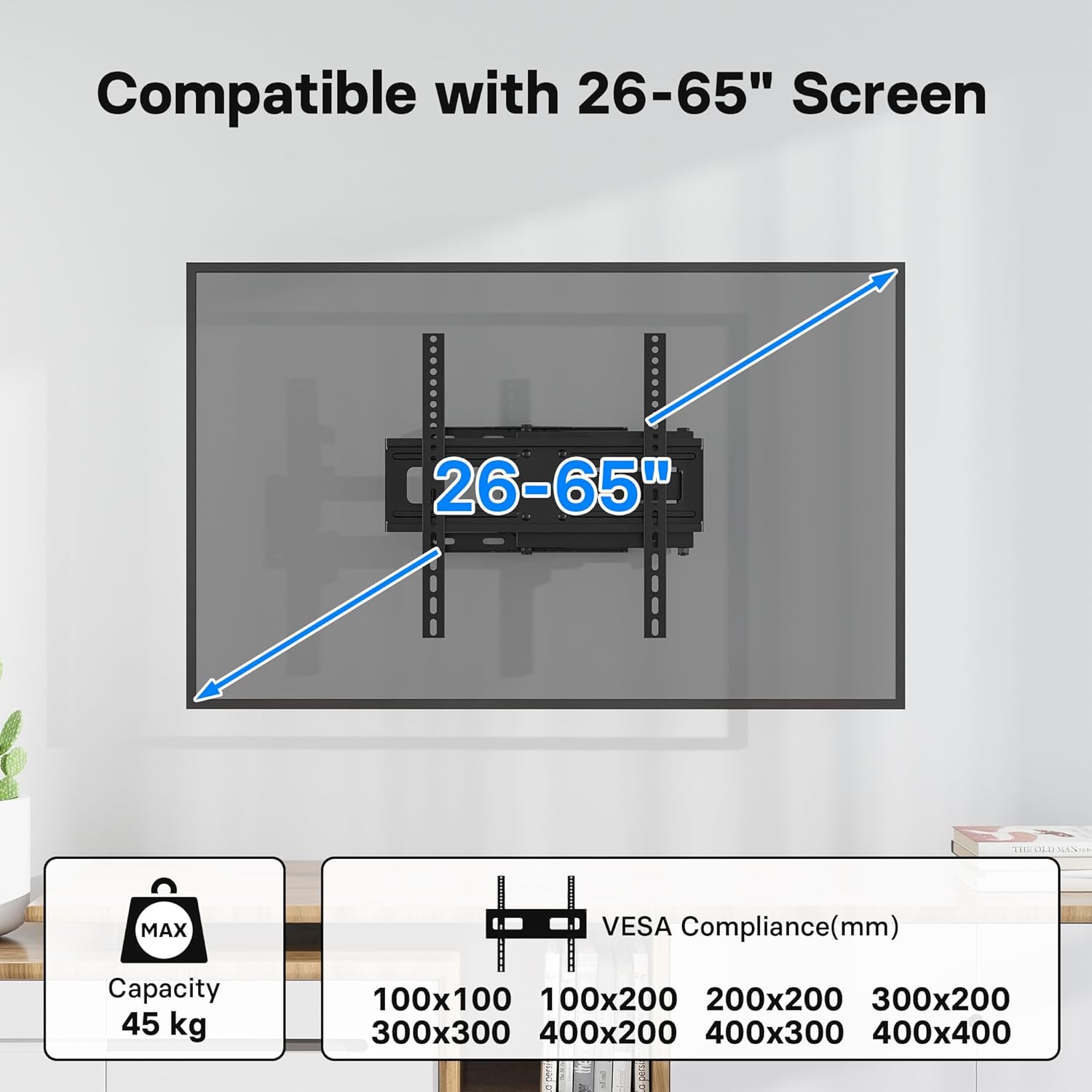
Image 4.1: Compatibility details showing support for 26-65 inch screens and various VESA patterns (100x100 to 400x400mm), with a maximum capacity of 45 kg.
4.2 Camau Gosod
Follow these steps for a secure and easy installation. The process typically takes about 15 minutes.
- Lleoli Safle Mowntio: Determine the desired height and position for your TV. Use the included spirit level to ensure the wall plate is perfectly horizontal.
- Tyllau Peilot Drilio: Mark the drilling points through the wall plate. Drill pilot holes according to the recommended drill bit size for your wall type.
- Atodwch y Plât Wal: Secure the wall plate to the wall using the appropriate screws and anchors from the hardware kit. Ensure it is firmly attached.
- Atodwch fracedi teledu: Fasten the two vertical TV brackets to the back of your television using the correct VESA screws and spacers.
- Crogi'r teledu ar y mownt: Carefully lift the TV with the attached brackets and hook them onto the wall mount arm. Ensure the TV is securely seated.
- Teledu Diogel: Tighten any safety screws or locking mechanisms on the brackets to prevent the TV from accidentally lifting off the mount.

Image 4.2: Visual representation of the easy installation process, showing the TV being attached to the pre-mounted arm.
Note: No official product videos with 'Seller' as creator type were available in the provided data to embed in this manual.
5. Gweithrediad
5.1 Adjusting the TV Mount
This BONTEC TV mount offers flexible viewing angles to enhance your experience:
- Tilt: Adjust the screen tilt from +5° to -10° to reduce glare and optimize viewing.
- troi: Swivel the TV up to ±90° (left/right) to view from different seating positions or rooms.
- Addasiad Lefel: Fine-tune the horizontal level by ±3° after installation for a perfectly straight screen.
- Estyniad: The articulated arm allows the TV to extend from a minimum of 80mm (3.1 inches) from the wall to a maximum of 500mm (19.7 inches).

Image 5.1: Demonstrates the flexible viewing angles, including ±90° swivel, +5°/-10° tilt, and ±3° level adjustment.

Image 5.2: Shows the mount's extension capability, from a minimum of 80mm to a maximum of 500mm from the wall.
The mount's design also makes it ideal for corner wall mounting, optimizing space in various room layouts.
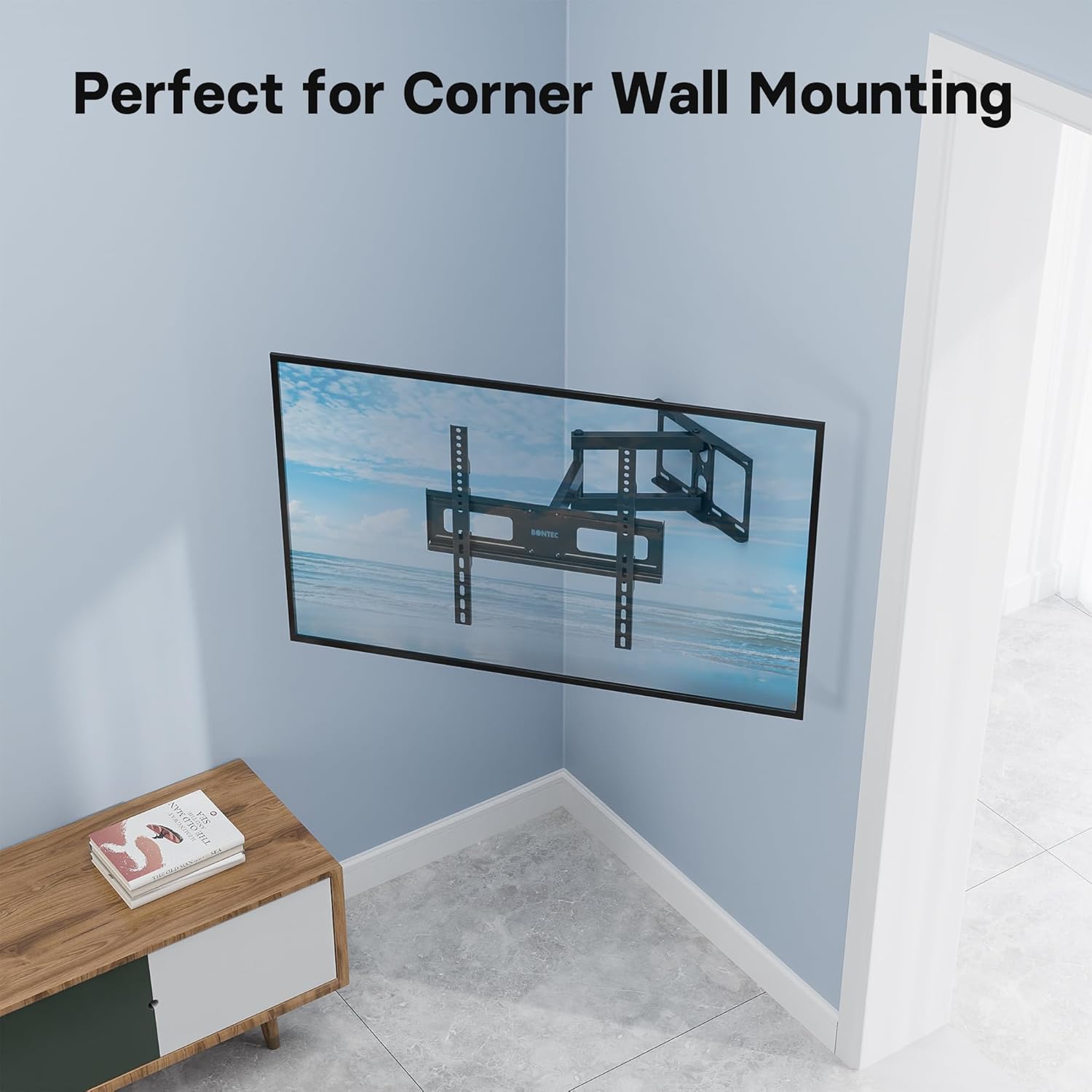
Image 5.3: The mount's design allows for effective corner wall installation, saving space.
6. cynnal
To ensure the longevity and safe operation of your TV wall mount, follow these maintenance guidelines:
- Regular Screw Checks: Periodically (e.g., every 6 months) check all mounting screws and bolts to ensure they are tight and secure. Vibrations or movement can sometimes loosen connections over time.
- Glanhau: Clean the mount with a soft, dry cloth. Avoid using abrasive cleaners or solvents, as they may damage the finish.
- Iro: If the articulating arms become stiff over time, a small amount of silicone-based lubricant can be applied to the pivot points. Do not use oil-based lubricants.
- Osgoi gorlwytho: Never exceed the specified weight capacity of 45 kg.
7. Datrys Problemau
If you encounter any issues with your BONTEC TV wall mount, refer to the following common problems and solutions:
- Nid yw'r teledu yn lefel: Use the ±3° level adjustment feature to fine-tune the horizontal position. Ensure the wall plate was installed level using the spirit level.
- Mae'r mownt yn teimlo'n rhydd: Immediately check all wall mounting screws and TV bracket screws. Tighten any loose connections. If the issue persists, re-evaluate your wall type and consider professional assistance.
- Difficulty moving the arm/TV: Ensure no cables are snagged or obstructing movement. Check if any pivot points require lubrication (refer to Maintenance section). Do not force movement.
- Rhannau coll: Refer to the Package Contents section. If parts are missing upon unboxing, contact BONTEC customer support immediately.
8. manylebau
| Nodwedd | Manyleb |
|---|---|
| Brand | BONTEC |
| Rhif Model | MG400-FBA |
| Dyfeisiau Cydnaws | Television (LED, LCD, OLED flat and curved screens) |
| Cydweddoldeb Maint Sgrin | 26 - 65 modfedd |
| VESA Compatibility (mm) | 100x100, 100x200, 200x200, 300x200, 300x300, 400x200, 400x300, 400x400 |
| Capasiti Llwyth Uchaf | 45 kg (99 pwys) |
| Ongl Tilt | +5° / -10° |
| Ongl troi | ±90° |
| Addasiad Lefel | ±3° |
| Estyniad o'r Wal | 80mm (munud) i 500mm (uchafswm) |
| Deunydd | Metal (Thick Steel) |
| Lliw | Du |
9. Gwarant a Chefnogaeth
BONTEC products are manufactured to high-quality standards. For information regarding warranty coverage, technical support, or replacement parts, please refer to the warranty card included with your product or visit the official BONTEC website. Please have your model number (MG400-FBA) ready when contacting support.
Regularly checking the screws and avoiding overloading will help prolong the lifespan of your TV wall mount.
Ask a question about this manual
Ask about setup, troubleshooting, compatibility, parts, safety, or missing instructions. Manuals+ will review the question and use this page’s manual context to help answer it.