
1. Rhagymadrodd
This manual provides essential information for the safe and effective operation of your Mastech MS8301A Digital Multimeter. Please read this manual thoroughly before using the device to ensure proper functionality and to prevent potential hazards. Keep this manual for future reference.
2. Gwybodaeth Diogelwch
Always adhere to the following safety precautions to avoid electric shock or personal injury, and to prevent damage to the multimeter or the equipment under test.
- Darllenwch y Cyfarwyddiadau: Understand all instructions and safety information before use.
- Graddedig Voltage: Peidiwch â chymhwyso mwy na'r cyftage, as marked on the multimeter, between the terminals or between any terminal and ground.
- Arweinwyr Prawf: Inspect test leads for damaged insulation or exposed metal. Replace if damaged.
- Circuit Disconnection: Disconnect the circuit power and discharge all high-voltage cynwysorau cyn profi gwrthiant, parhad, deuodau, neu gynhwysedd.
- Dewis Swyddogaeth: Gwnewch yn siŵr bod y switsh swyddogaeth yn y safle cywir ar gyfer y mesuriad sy'n cael ei wneud.
- Cylchedau Byw: Do not measure current on a live circuit with the test leads connected in parallel.
- Amgylchedd Gweithredu: Do not operate the multimeter in explosive gas, vapor, or damp amgylcheddau.
- Offer Diogelu Personol: Always wear appropriate personal protective equipment, such as safety glasses, when working with electrical circuits.
- Sgôr diogelwch: This device is rated for CAT III 600V. Do not exceed this rating.
3. Cynnyrch Drosview
3.1 Nodweddion
The Mastech MS8301A Digital Multimeter offers a range of features for various electrical measurements:
- Arddangos: 2000 o Gyfrifon
- Daliad Data: Freezes the displayed reading for convenient recording.
- Profwr Batri: For 1.5V and 9V batteries.
- Dyluniad Compact: Product Size: 150mm x 74mm x 48mm (5.9" x 2.9" x 1.7")
- Pwysau ysgafn: Product Weight: 220g (0.48lb)

Image: Detailed features and specifications of the Mastech MS8301A multimeter, including display count, data hold, battery test function, and physical dimensions.
3.2 Cydrannau
The Mastech MS8301A package typically includes the following components:
- Mastech MS8301A Digital Multimeter Unit
- Gwifrau Prawf (Coch a Du)
- AAA Batteries (2x1.5V)
- Calibration Certificate (if applicable)
- Canllaw Cychwyn Cyflym
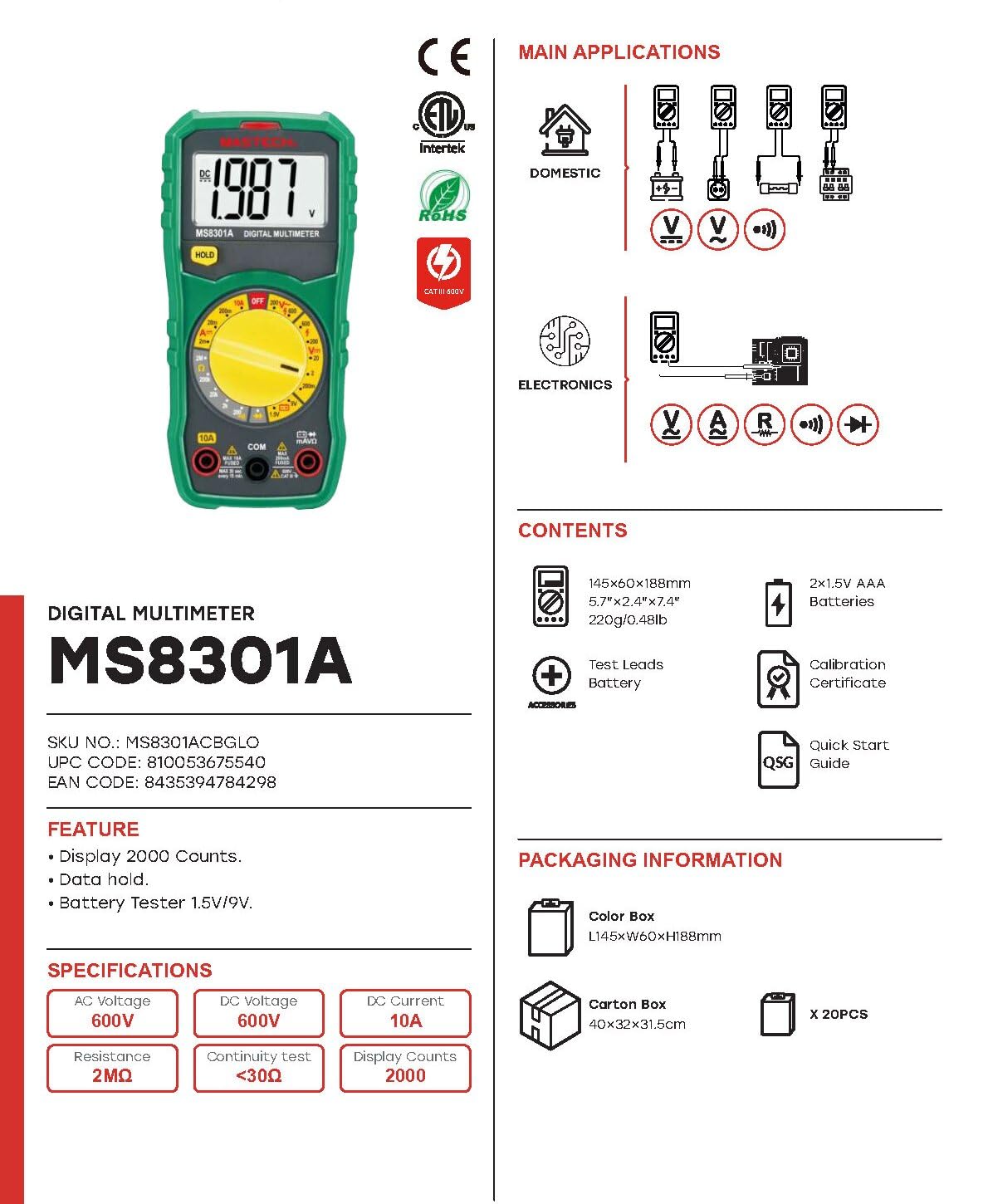
Image: The Mastech MS8301A Digital Multimeter showing its front panel, rotary switch, display, input jacks, and a list of included accessories such as test leads and batteries.
4. Gosod
4.1 Gosod Batri
- Ensure the multimeter is turned off and disconnect any test leads.
- Lleolwch glawr adran y batri ar gefn y multimedr.
- Dadsgriwiwch y sgriw(iau) cadw a thynnwch y gorchudd.
- Insert two 1.5V AAA batteries, observing the correct polarity (+ and -) as indicated inside the compartment.
- Rhowch glawr adran y batri yn ôl a'i sicrhau gyda'r sgriw(iau).
4.2 Cysylltu Gwifrau Prawf
Connect the test leads to the appropriate input jacks on the multimeter:
- Mewnosoder y du plwm prawf i mewn i'r COM jac (cyffredin).
- Ar gyfer y rhan fwyaf o fesuriadau (Cyf.tage, Resistance, Diode, Continuity, Temperature, Battery Test), insert the coch plwm prawf i mewn i'r VΩmA jac.
- For high current measurements (up to 10A), insert the coch plwm prawf i mewn i'r 10A jac.
5. Cyfarwyddiadau Gweithredu
Cyn cymryd unrhyw fesuriad, gwnewch yn siŵr bod y gwifrau prawf wedi'u cysylltu'n gywir a bod y switsh cylchdro wedi'i osod i'r swyddogaeth a ddymunir.
5.1 Mesur DC Cyftage (V=)
- Set the rotary switch to the desired V= range (e.g., 20V for measuring up to 20V DC).
- Cysylltwch y plwm prawf coch ag ochr bositif (+) y gylched a'r plwm prawf du â'r ochr negatif (-).
- Darllenwch y cyftage gwerth ar yr arddangosfa.
5.2 Mesur AC Cyftage (V~)
- Set the rotary switch to the desired V~ range (e.g., 200V for measuring up to 200V AC).
- Cysylltwch y gwifrau prawf ar draws y cyfaint ACtage ffynhonnell.
- Darllenwch y cyftage gwerth ar yr arddangosfa.
5.3 Mesur Cerrynt DC (A=)
- Pwysig: Disconnect power to the circuit before connecting the multimeter in series.
- Set the rotary switch to the desired A= range (e.g., 200mA or 10A). Remember to move the red lead to the 10A jack for high current.
- Agorwch y gylched lle mae'r cerrynt i'w fesur.
- Connect the multimeter in series with the circuit, ensuring the current flows through the multimeter.
- Rhowch bŵer i'r gylched a darllenwch y gwerth cerrynt ar yr arddangosfa.
5.4 Mesur Gwrthiant (Ω)
- Pwysig: Gwnewch yn siŵr bod y gylched wedi'i dad-egnïo a bod yr holl gynwysyddion wedi'u rhyddhau cyn mesur gwrthiant.
- Set the rotary switch to the desired Ω ystod.
- Cysylltwch y gwifrau prawf ar draws y gydran i'w mesur.
- Darllenwch y gwerth gwrthiant ar yr arddangosfa.
5.5 Prawf Deuod (→|)
- Pwysig: Gwnewch yn siŵr bod y deuod wedi'i ddatgysylltu o'r gylched.
- Gosodwch y switsh cylchdro i'r Prawf Deuod sefyllfa.
- Cysylltwch y wifren brawf goch â'r anod a'r wifren brawf ddu â chatod y deuod. Bydd yr arddangosfa'n dangos y gyfaint ymlaen.tage gollwng.
- Gwrthdrowch y gwifrau. Dylai'r arddangosfa ddangos "OL" (Dolen Agored) am ddeuod da.
5.6 Prawf Parhad ())))
- Pwysig: Gwnewch yn siŵr bod y gylched wedi'i dad-egni.
- Gosodwch y switsh cylchdro i'r Prawf Parhad sefyllfa.
- Connect the test leads across the component or wire to be tested.
- Os yw'r gwrthiant yn is na thua 30Ω, bydd y swnyn yn seinio, gan nodi parhad. Bydd yr arddangosfa hefyd yn dangos gwerth y gwrthiant.
5.7 Battery Test (1.5V/9V)
- Gosodwch y switsh cylchdro i'r 1.5V or 9V battery test position, corresponding to the battery type.
- Connect the red test lead to the positive (+) terminal of the battery and the black test lead to the negative (-) terminal.
- Darllenwch y batri voltage ar yr arddangosfa.
5.8 Dal Data
Press the "HOLD" button to freeze the current reading on the display. Press it again to release the hold function and resume live readings.
6. manylebau
| Mesur | Amrediad | Datrysiad |
|---|---|---|
| DC Cyftage | 200mV / 2V / 20V / 200V / 600V | 100µV / 1mV / 10mV / 100mV / 1V |
| AC Cyftage | 200V / 600V | 100mV / 1V |
| DC Cyfredol | 2mA / 20mA / 200mA / 10A | 1µA / 10µA / 100µA / 10mA |
| Gwrthsafiad | 200Ω / 2kΩ / 20kΩ / 200kΩ / 2MΩ | 0.1Ω / 1Ω / 10Ω / 100Ω / 1kΩ |
| Prawf Parhad | Buzzer sounds at <30Ω | — |
| Prawf Deuod | Ymlaen cyftage gollwng | — |
| Prawf Batri | 1.5V / 9V | — |
Manylebau Cyffredinol
- Arddangos: 2000 o Gyfrifon
- Cyflenwad Pŵer: 2 x 1.5V Batris AAA
- Dimensiynau: 150mm x 74mm x 48mm (5.9 "x 2.9" x 1.7 ")
- Pwysau: 220g (0.48 pwys)
- Sgôr diogelwch: CAT III 600V
- Deunydd: Styren Biwtadïen Acrylonitrile (ABS)
- Lliw: Glas

Image: A table detailing manual ranging specifications for various Mastech digital multimeters, including the MS8301A, showing display counts, safety ratings, and measurement capabilities.
7. cynnal
7.1 Batri Newydd
When the battery low indicator appears on the display, replace the batteries immediately to ensure accurate readings. Follow the steps outlined in Section 4.1 for battery installation.
7.2 Glanhau
Sychwch yr achos gyda hysbysebamp lliain a glanedydd ysgafn. Peidiwch â defnyddio sgraffinyddion na thoddyddion. Gwnewch yn siŵr bod y multimedr yn hollol sych cyn ei ddefnyddio.
7.3 Storio
If the multimeter is not used for an extended period, remove the batteries to prevent leakage and damage to the device. Store in a cool, dry place away from direct sunlight.
8. Datrys Problemau
| Problem | Achos Posibl | Ateb |
|---|---|---|
| Dim arddangosfa neu arddangosfa dywyll | Dead or low batteries; incorrect battery polarity. | Amnewid batris; gwiriwch gyfeiriad y batri. |
| "OL" (Gorlwytho) yn cael ei arddangos | Measurement exceeds selected range; open circuit. | Select a higher range; check for open circuit in the component or leads. |
| Darlleniadau anghywir | Incorrect function selected; poor test lead connection; damaged test leads. | Verify function switch position; ensure secure lead connection; inspect and replace damaged leads. |
| Dim bîp parhad | Open circuit; resistance too high. | Check for breaks in the circuit; ensure resistance is below 30Ω. |
9. Gwarant a Chefnogaeth
Mastech products are designed for reliability and performance. For specific warranty information, please refer to the warranty card included with your product or contact Mastech customer support. Keep your purchase receipt as proof of purchase.
For technical support or service inquiries, please visit the official Mastech websafle neu cysylltwch â'u canolfannau gwasanaeth awdurdodedig.