
1. Drosview
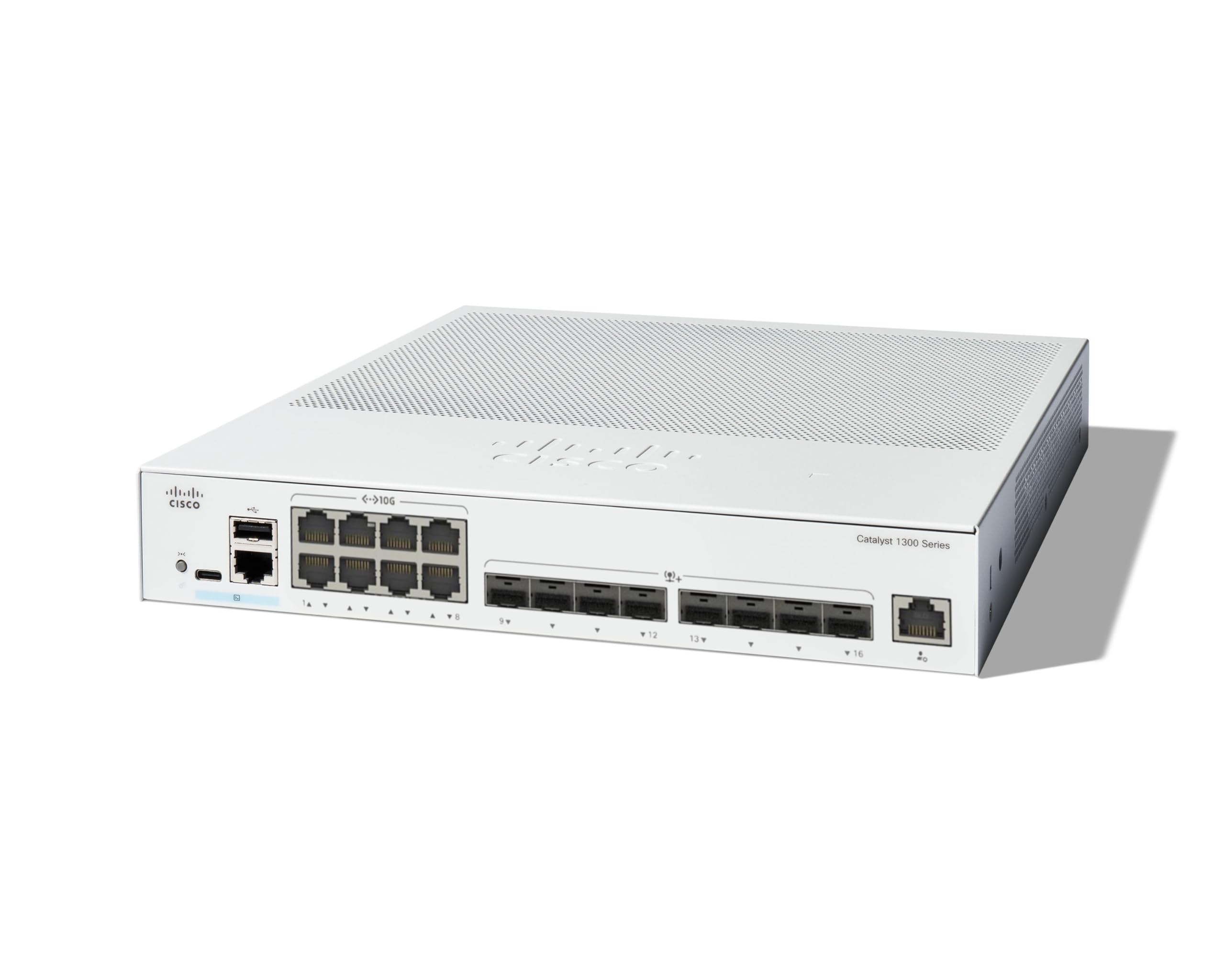
The Cisco Catalyst 1300-16XTS is a fully managed switch designed to provide reliable and secure connectivity for small business networks. This switch offers full Layer 2/3 capabilities, an intuitive web dashboard, advanced networking features, and Power over Ethernet Plus (PoE+) support.
Mae nodweddion allweddol yn cynnwys:
- Porthladdoedd switsh: 8 ports 10G Copper + 8x 10GE SFP+ ports + 1x GE Management Port.
- Rheolaeth Syml: Intuitive Cisco Business mobile app and local web interface for setup, management, and monitoring.
- Diogelwch Gwell: IP-MAC port binding and IPv6 First Hop Security for network protection.
- Effeithlonrwydd Ynni: Optimizes power usage, compliant with IEEE 802.3az Energy Efficient Ethernet.
- Business Ready: No subscription or licenses required, includes limited lifetime hardware warranty and complimentary 1-year technical support.
2. Cynnwys Pecyn
Gwiriwch fod eich pecyn yn cynnwys yr eitemau canlynol:
- Cisco Catalyst 1300-16XTS Managed Switch unit
- Cortyn pŵer neu addasydd
- Cebl USB Math-C
- Mowntio caledwedd
Os oes unrhyw eitemau ar goll neu wedi'u difrodi, cysylltwch â'ch gwerthwr neu gymorth Cisco.
3. Gosod
Follow these steps to set up your Cisco Catalyst 1300-16XTS Managed Switch:
- Pwer Cysylltu: Connect the power adapter to the switch's power input and then plug the power cord into an electrical outlet. Ensure the power LED on the switch illuminates.
- Connect to Router/Network: Use an Ethernet cable to connect one of the switch's 10G copper ports (or SFP+ ports with appropriate transceivers) to your router or existing network infrastructure.
- Cysylltu Dyfeisiau: Connect your network devices (e.g., computers, servers, wireless access points) to the remaining available ports on the switch.
- Initial Configuration (Mobile App):
- Download the Cisco Business mobile app from your device's app store.
- Launch the app and follow the on-screen instructions to create your site and add your switch.
- The app will guide you through basic configuration, including setting up site credentials and adding wired/wireless devices.
- Ffurfweddiad Cychwynnol (Web UI): Alternatively, you can access the switch's webrhyngwyneb defnyddiwr wedi'i seilio (Web UI) by connecting a computer directly to the switch and navigating to its default IP address (refer to the Quick Start Guide for details).

4. Cyfarwyddiadau Gweithredu
Once the switch is powered on and connected, it will begin forwarding network traffic. For advanced configuration and monitoring, use the following tools:
- Ap Symudol Busnes Cisco: Provides real-time monitoring of device status, network activity, and connected clients. It also allows for basic actions like rebooting devices and upgrading firmware.
- Web Rhyngwyneb Defnyddiwr (Web UI): Offers comprehensive configuration options for all Layer 2/3 features, including VLANs, QoS, security settings, and port management.
- Dangosfwrdd Busnes Cisco: For managing multiple Cisco Business devices across different sites, the Dashboard provides a centralized platform for monitoring, configuration, and troubleshooting.
Refer to the detailed documentation available via the QR code on the product packaging or the Cisco support website for in-depth configuration guides.
5. cynnal
To ensure optimal performance and longevity of your Cisco Catalyst 1300-16XTS switch, consider the following maintenance practices:
- Diweddariadau Cadarnwedd: Regularly check for and apply the latest firmware updates to benefit from new features, performance improvements, and security patches.
- Amodau Amgylcheddol: Ensure the switch is operated within its specified temperature and humidity ranges. Avoid placing it in direct sunlight or near heat sources.
- Arolygiad Corfforol: Periodically inspect the switch for any physical damage, loose cables, or excessive dust accumulation. Clean vents and ports as needed to maintain proper airflow.
- Ffurfweddiad Wrth Gefn: Gwnewch gopi wrth gefn o gyfluniad eich switsh yn rheolaidd i atal colli data rhag ofn y bydd problemau annisgwyl.
6. Datrys Problemau
If you encounter issues with your switch, try these basic troubleshooting steps:
- Dim pŵer: Verify that the power cord is securely connected to both the switch and the electrical outlet. Check the power adapter and outlet for functionality.
- Dim Cysylltedd Rhwydwaith:
- Check the Ethernet cables connecting devices to the switch and the switch to the router. Ensure they are securely plugged in and not damaged.
- Observe the link/activity LEDs on the switch ports. A solid green or amber light typically indicates a valid connection, while a blinking light indicates activity. No light may suggest a cable or device issue.
- Verify IP address settings on connected devices and the switch.
- Perfformiad Araf:
- Check for excessive network traffic or loops using the switch's management interface.
- Ensure all devices are connected at their optimal speed (e.g., 10G devices to 10G ports).
- Ystyriwch ddiweddaru firmware.
- Mynediad i'r Rhyngwyneb Rheoli: Os na allwch gael mynediad i'r Web UI or mobile app, ensure your device is on the same network segment as the switch or connected directly. Verify the switch's IP address.
For more complex issues, refer to the comprehensive troubleshooting guides on the Cisco support websafle neu cysylltwch â chymorth technegol.
7. manylebau
| Nodwedd | Manylyn |
|---|---|
| Brand | Cisco |
| Rhif Model | C1300-16XTS |
| Nifer y Porthladdoedd | 16 (8x 10G Copper, 8x 10GE SFP+) + 1x GE Management Port |
| Cyfradd Trosglwyddo Data | 80 gigabeit yr eiliad |
| Newid Math | Newid Rhwydwaith a Reolir |
| Rhyngwyneb | PoE, SFP |
| Dimensiynau Eitem (L x W x H) | 11.81"H x 10.55"L x 1.73"U |
| Pwysau Eitem | 3.6 Cilogram |
| Case Material Type | Copr |
| UPC | 889728521482 |
8. Gwarant a Chefnogaeth
The Cisco Catalyst 1300-16XTS Managed Switch comes with a Gwarant Caledwedd Gydol Oes Cyfyngedig, which includes return-to-factory replacement. Additionally, you receive 1-year complimentary phone support to the Small Business Support Center.
For technical assistance, warranty claims, or to access additional resources, please visit the official Cisco support website or contact the Small Business Support Center.