
1. Rhagymadrodd
This manual provides detailed instructions for the installation, operation, and maintenance of your DB Drive SPRO2500.4 4-Channel Class AB Amplifier. Please read this manual thoroughly before attempting installation or operation to ensure proper use and to prevent damage to the unit or your vehicle's audio system. Keep this manual for future reference.
2. Gwybodaeth Diogelwch
Dilynwch y rhagofalon diogelwch canlynol bob amser yn ystod y gosodiad a'r gweithrediad:
- Datgysylltwch derfynell batri negyddol y cerbyd cyn dechrau unrhyw waith trydanol.
- Gwnewch yn siŵr bod yr holl wifrau wedi'u llwybro a'u sicrhau'n iawn i atal pinsio, torri neu gylched fer.
- Defnyddiwch wifrau mesurydd priodol ar gyfer cysylltiadau pŵer a daear fel y nodir yn y llawlyfr hwn.
- Gosod y amphylifydd mewn lleoliad sy'n caniatáu awyru digonol i atal gorboethi.
- Osgoi mowntio'r amplifer mewn ardaloedd sy'n agored i olau haul uniongyrchol, gwres gormodol, lleithder neu lwch.
- Peidiwch â cheisio agor neu addasu'r ampCyfeiriwch yr holl waith cynnal a chadw at bersonél cymwys.
- Wear eye protection when working with tools and electrical components.
3. Gosod a Gosod
3.1 Dadbacio
Tynnwch y amplifier from its packaging. Inspect the unit for any signs of damage. If damage is found, contact your dealer immediately.
3.2 Lleoliad Mowntio
Choose a mounting location that is dry, well-ventilated, and protected from physical damage. Ensure sufficient space around the amplifier for air circulation. Secure the ampgludydd yn gadarn i arwyneb solet gan ddefnyddio caledwedd priodol.
3.3 Gwifro Cysylltiadau
Proper wiring is crucial for optimal performance and safety. Refer to the diagram below for terminal identification.

Delwedd: Rear panel of the DB Drive SPRO2500.4 ampcyflenwr sy'n dangos terfynellau allbwn pŵer, daear, teclyn rheoli o bell, ffiws, a siaradwr.
- Pŵer (BATT+): Connect a 4-gauge power cable directly from the positive (+) terminal of the vehicle's battery. Install an in-line fuse holder (not supplied) within 18 inches (45 cm) of the battery.
- Tir (GND): Connect a 4-gauge ground cable from the ampCysylltwch derfynell GND y cyflenwr ag arwyneb metel glân, heb ei beintio ar siasi'r cerbyd. Sicrhewch gysylltiad trydanol cadarn.
- O Bell (REM): Cysylltwch wifren troi ymlaen o bell 18-measure o allbwn o bell eich uned ben i'r ampterfynell REM y liferydd. Mae'r wifren hon yn troi'r amplifer ymlaen ac i ffwrdd gyda'ch uned ben.
- Speaker Outputs (CH1-CH4): Connect your speakers to the appropriate output terminals. The SPRO2500.4 supports 4-channel stereo operation or 2-channel bridged operation. Refer to the specifications for minimum impedance requirements.
- Ffiwsiau: Mae'r amplifier is equipped with internal fuses. Do not attempt to replace them.
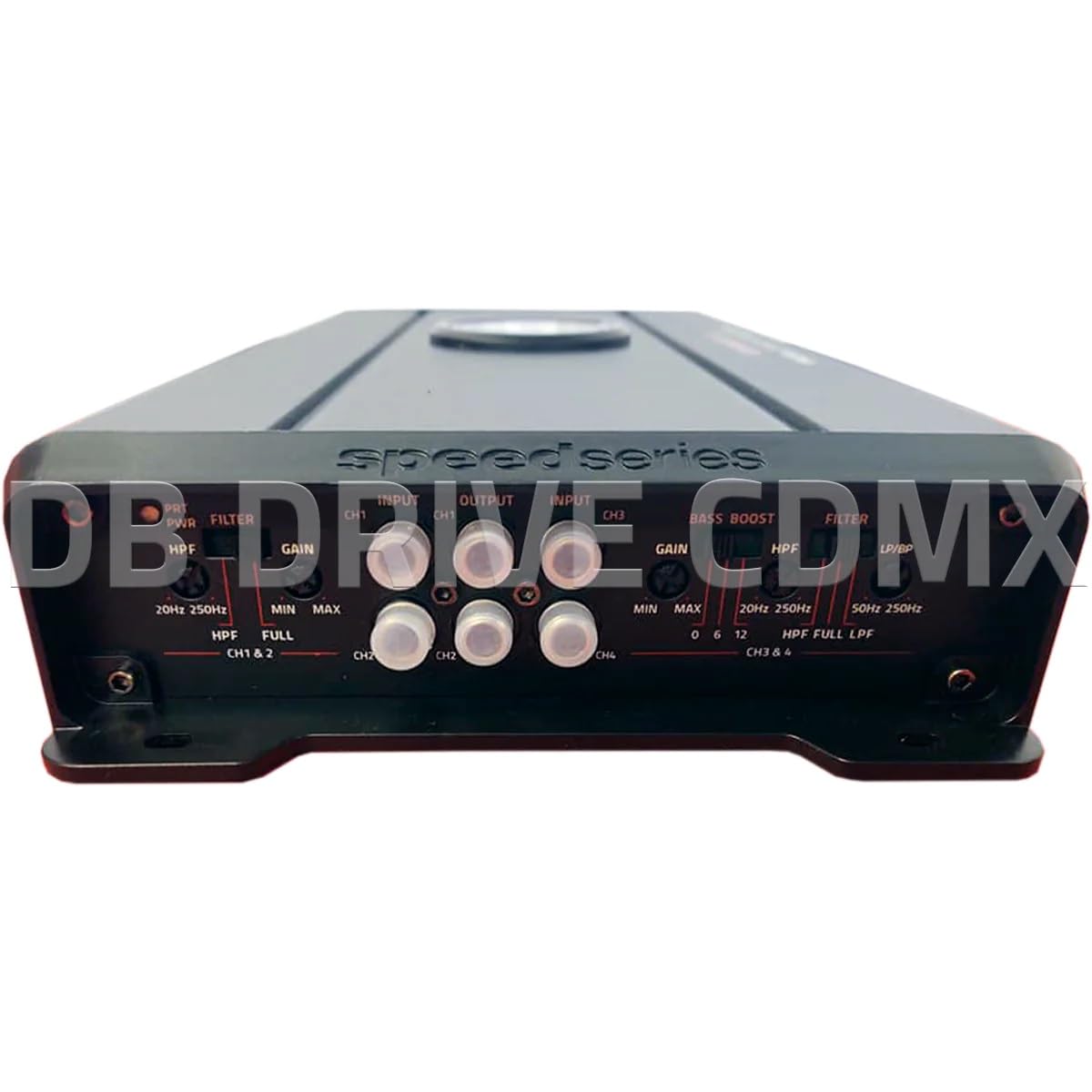
Delwedd: Front panel of the DB Drive SPRO2500.4 amplifier showing input, gain, filter, and bass boost controls.
3.4 Control Panel Settings
The front panel features controls for fine-tuning the amplifier's audio output:
- Input (CH1/CH2, CH3/CH4): Cysylltwch geblau RCA o rag-uned eich penamp outputs to these inputs.
- Gain (CH1&2, CH3&4): Yn addasu sensitifrwydd mewnbwn y amplifier to match the output level of your head unit. Start with the gain at minimum and slowly increase until desired volume is achieved without distortion.
- Filter (HPF/FULL/LPF): Selects the crossover mode for the respective channels.
- HPF (Hidl Llwyddo): Allows frequencies above the set point to pass, blocking lower frequencies. Useful for full-range speakers.
- LPF (Hidl Llwyddo Isel): Allows frequencies below the set point to pass, blocking higher frequencies. Useful for subwoofers.
- LLAWN: Allows all frequencies to pass without filtering.
- HPF/LPF Frequency Controls: Adjusts the cutoff frequency for the selected HPF or LPF.
- Hwb Bas: Provides an adjustable bass enhancement at a specific frequency. Use sparingly to avoid distortion.
4. Cyfarwyddiadau Gweithredu
Once all connections are made and verified, you can power on your audio system. The amplifier will turn on automatically with your head unit via the remote wire.
- Pŵer i Fyny Cychwynnol: Trowch eich uned pen ymlaen. Y ampDylai dangosydd pŵer y liferydd oleuo.
- Addasiad Sain: Start with the head unit volume low. Gradually increase the volume and adjust the amplifier's gain controls until the desired sound level is reached without audible distortion.
- Crossover Tuning: Adjust the HPF and LPF settings according to your speaker types and desired sound characteristics. For full-range speakers, use HPF to remove low bass. For subwoofers, use LPF.
- Hwb Bas: If desired, slowly increase the bass boost control to enhance low frequencies. Overuse can lead to distortion and potential speaker damage.
5. cynnal
The DB Drive SPRO2500.4 ampMae angen cyn lleied â phosibl o waith cynnal a chadw ar lifer i sicrhau perfformiad hirdymor.
- Glanhau: Sychwch y o bryd i'w gilydd ampGlanhewch du allan y liferydd gyda lliain meddal, sych. Peidiwch â defnyddio cemegau llym na glanhawyr sgraffiniol.
- Awyru: Sicrhau bod y ampMae esgyll oeri'r lifer yn rhydd o lwch a malurion i gynnal gwasgariad gwres priodol.
- Gwiriad Cysylltiad: Occasionally check all wiring connections for tightness and corrosion. Loose connections can cause performance issues or damage.
6. Datrys Problemau
Os ydych chi'n cael problemau gyda'ch amplifier, refer to the following common issues and solutions:
| Problem | Achos Posibl | Ateb |
|---|---|---|
| Dim Pŵer / Amplifer Ddim yn Troi Ymlaen | Ffiws wedi chwythu, gwifren bŵer/tir/o bell rhydd, signal troi ymlaen o bell diffygiol. | Check in-line fuse near battery. Verify all power, ground, and remote connections are secure. Test remote wire for 12V when head unit is on. |
| Dim Allbwn Sain | RCA cables disconnected, speaker wires disconnected or shorted, gain set too low, head unit volume too low. | Check RCA input connections. Verify speaker wiring for proper polarity and no shorts. Increase gain and head unit volume. |
| Sain ystumiedig | Ennill wedi'i osod yn rhy uchel, gosodiadau croesi amhriodol, seinyddion wedi'u difrodi, cysylltiad daear gwael. | Lleihau'r enillion. Addasu gosodiadau HPF/LPF. Archwiliwch y siaradwyr am ddifrod. Gwnewch yn siŵr bod y cysylltiad daear yn gadarn. |
| AmpGorboethi'r lifer | Insufficient ventilation, impedance too low, prolonged high output. | Sicrhewch ddigon o aer o gwmpas y amplifier. Verify speaker impedance meets specifications. Reduce volume or allow amplififier i oeri. |
If these steps do not resolve the issue, contact DB Drive customer support or a qualified car audio technician.
7. manylebau
The following table details the technical specifications for the DB Drive SPRO2500.4 ampllewywr:

Delwedd: Detailed specifications sheet for the DB Drive SPRO2500.4 ampllewywr.
| Nodwedd | Manyleb |
|---|---|
| AmpDosbarth lifier | Dosbarth A/B |
| Sianeli | 4-Sianel |
| Output Power (RMS @ 14.4VDC, 2Ω) | 4 x 500W |
| Output Power (RMS @ 14.4VDC, 4Ω) | 4 x 250W |
| Output Power (RMS @ 14.4VDC Bridged) | 2 x 1000W |
| Mewnbwn Cyflenwad Pwer Cyftage | 12.0VDC i 14.8VDC |
| THD (100Hz @ 1Ω) | 0.04% |
| Frequency Response (3dB) | 20Hz - 250Hz |
| Damping Factor (1KHz @ 4Ω) | 100 |
| S/N Ratio (as weighted @ 1 Volt) | 99dB |
| Sensitifrwydd Mewnbwn | .20mV - 5.0V RMS |
| Isafswm rhwystriant Llwyth | 2Ω |
| Mewnbwn | Cyn yn RCA |
| Llethr Hidlo Crossover | 12dB |
| Crossover Filter Range in Mono | 24dB |
| Channel 1-2 HPF Range | 20Hz - 250Hz |
| Channel 3-4 HPF Range | 20Hz - 250Hz |
| Channel 3-4 LPF/BPF Range | 50Hz - 250Hz |
| Selectable Bass Boost CH 1-2 or 3-4 | 0 - 6dB - 12dB |
8. Gwarant a Chefnogaeth
DB Drive products are designed and manufactured to the highest quality standards. For specific warranty information, please refer to the warranty card included with your product or contact your authorized DB Drive dealer.
Cefnogaeth i Gwsmeriaid:
For technical assistance or support, please contact:
DB Research L.L.P
302 Parc Diwydiannol Hanmore
Harlingen, TX 78550 USA
Ffôn: 877-787-0101
Local: 956-421-4513