
1. Rhagymadrodd
Thank you for choosing the Hoco HC17 Mini Portable Speaker. This manual provides essential information for the safe and efficient operation of your device. Please read it carefully before use and retain it for future reference.
2. Gwybodaeth Diogelwch
- Peidiwch ag amlygu'r siaradwr i dymheredd eithafol, golau haul uniongyrchol, na lleithder uchel.
- Osgoi gollwng neu orfodi'r siaradwr i effeithiau cryf.
- Peidiwch â dadosod, atgyweirio na newid y ddyfais eich hun. Cysylltwch â phersonél gwasanaeth cymwys i gael cymorth.
- Cadwch y siaradwr i ffwrdd o ddŵr a hylifau eraill.
- Defnyddiwch y cebl gwefru a ddarperir neu gyfwerth ardystiedig yn unig.
3. Cynnwys Pecyn
Sicrhewch fod yr holl eitemau yn bresennol yn y pecyn:
- Hoco HC17 Mini Portable Speaker
- Cebl Codi Tâl USB
- Llawlyfr Defnyddiwr (y ddogfen hon)

Image: The Hoco HC17 Mini Portable Speaker shown in its retail packaging, highlighting its compact size and clip design.
4. Cynnyrch Drosview
The Hoco HC17 is a compact and versatile portable speaker designed for on-the-go audio. It features Bluetooth 5.3 connectivity, a built-in microphone for hands-free calls, and multiple playback options including FM radio, TF card, and USB flash drive support. Its clip design enhances portability.

Delwedd: Manwl view of the grey Hoco HC17 speaker, showcasing its textured grille, control buttons, and integrated carabiner clip.

Image: A display of the Hoco HC17 speaker available in multiple vibrant color options, each with a metallic carabiner clip.
5. Gosod
5.1 Gwefru'r Siaradwr
- Cysylltwch y cebl gwefru USB a ddarperir â phorthladd gwefru'r siaradwr.
- Cysylltwch ben arall y cebl USB ag addasydd pŵer USB (heb ei gynnwys) neu borthladd USB cyfrifiadur.
- Bydd y golau dangosydd gwefru yn goleuo. Ar ôl gwefru'n llawn, gall y golau newid lliw neu ddiffodd.
- Mae gwefr lawn yn darparu hyd at 2 awr o amser chwarae.
5.2 Pweru Ymlaen/Diffodd
- To power on: Press and hold the Power button for a few seconds until you hear an audible prompt or see an indicator light.
- To power off: Press and hold the Power button again for a few seconds until the speaker powers down.
5.3 Pâr Bluetooth
- Gwnewch yn siŵr bod y siaradwr wedi'i bweru ymlaen ac yn y modd paru Bluetooth (fel arfer wedi'i nodi gan LED sy'n fflachio).
- Ar eich dyfais (ffôn clyfar, tabled, ac ati), galluogwch Bluetooth a chwiliwch am ddyfeisiau sydd ar gael.
- Select "HC17" from the list of found devices.
- Ar ôl paru, bydd y siaradwr yn cadarnhau gyda sŵn clywadwy, a bydd y dangosydd LED yn rhoi'r gorau i fflachio.
- Bydd y siaradwr yn ailgysylltu'n awtomatig â'r ddyfais a barwyd ddiwethaf pan gaiff ei throi ymlaen, os yw o fewn cyrraedd.
5.4 TF Card / USB Flash Drive Playback
- Insert a TF card or USB flash drive (with supported audio files) into the corresponding slot on the speaker.
- The speaker will automatically detect the storage device and begin playing music.
- Defnyddiwch fotymau rheoli'r siaradwr i lywio traciau ac addasu'r gyfrol.
Gweithrediad Radio 5.5 FM
- Switch the speaker to FM radio mode (this might be a dedicated button or a mode cycle button).
- Press the Play/Pause button to initiate an automatic station scan. The speaker will save available stations.
- Use the Next/Previous track buttons to switch between saved FM stations.
6. Gweithredu'r Siaradwr
6.1 Rheolyddion Chwarae Cerddoriaeth
- Chwarae/Seibiant: Pwyswch y botwm Chwarae/Seibiant unwaith.
- Trac Nesaf: Pwyswch y botwm "+".
- Trac Blaenorol: Pwyswch y botwm "-".
- Cyfrol i Fyny: Pwyswch a daliwch y botwm "+".
- Cyfrol i Lawr: Pwyswch a daliwch y botwm "-".
6.2 Galwadau Di-ddwylo
Pan fyddwch wedi'i gysylltu trwy Bluetooth â ffôn clyfar:
- Ateb Galwad: Pwyswch y botwm Chwarae/Saib unwaith pan fydd galwad sy'n dod i mewn yn canu.
- Galwad Diwedd: Pwyswch y botwm Chwarae/Saib unwaith yn ystod galwad.
- Gwrthod Galwad: Pwyswch a daliwch y botwm Chwarae/Saib am 2 eiliad pan fydd galwad sy'n dod i mewn yn canu.
- Mae'r meicroffon adeiledig yn caniatáu cyfathrebu clir.
7. cynnal
- Glanhau: Defnyddiwch frethyn meddal, sych i lanhau wyneb y siaradwr. Peidiwch â defnyddio glanhawyr sgraffiniol na thoddyddion.
- Storio: Storiwch y siaradwr mewn lle oer, sych i ffwrdd o olau haul uniongyrchol a thymheredd eithafol pan nad yw'n cael ei ddefnyddio am gyfnodau hir.
- Gofal Batri: Er mwyn ymestyn oes y batri, osgoi rhyddhau'r batri'n llwyr yn aml. Gwefrwch y siaradwr yn rheolaidd, hyd yn oed os nad yw'n cael ei ddefnyddio.
8. Datrys Problemau
| Problem | Achos Posibl | Ateb |
|---|---|---|
| Nid yw'r siaradwr yn troi ymlaen. | Batri isel. | Gwefrwch y siaradwr yn llawn. |
| Methu paru drwy Bluetooth. | Speaker not in pairing mode; device Bluetooth off; too far apart. | Ensure speaker is in pairing mode. Turn on Bluetooth on your device. Move speaker closer to device (within 10 meters). |
| Dim sain yn ystod chwarae. | Volume too low; speaker not connected; incorrect source. | Increase volume on both speaker and connected device. Re-pair Bluetooth. Ensure correct input source (Bluetooth, TF, USB, FM) is selected. |
| Derbyniad radio FM gwael. | Signal gwan; ymyrraeth amgylcheddol. | Move to an open area. Try rescanning for stations. |
9. manylebau
- Model: HC17
- Fersiwn Bluetooth: 5.3
- Uned Siaradwyr: 45mm
- Cynhwysedd Batri: 500mAh
- Amser chwarae: Hyd at 2 awr
- Cysylltedd: Bluetooth, FM, TF Card, USB Flash Drive
- Meicroffon adeiledig: Ydw (ar gyfer galwadau di-ddwylo)
- Dimensiynau: Approximately 13.3D x 8.5W x 4.9H centimetres
- Cydrannau wedi'u Cynnwys: USB Charger (cable)
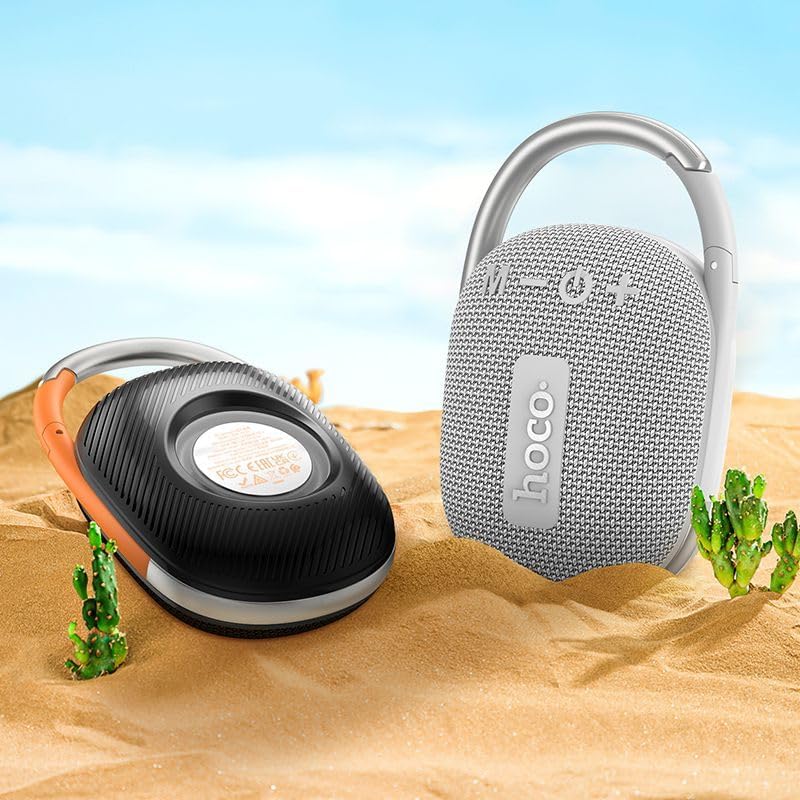
Image: The Hoco HC17 speaker positioned on sand with small cacti, illustrating its portability and suitability for outdoor use.
10. Gwarant a Chefnogaeth
This product comes with a standard manufacturer's warranty. For detailed warranty terms and conditions, please refer to the warranty card included with your purchase or contact your retailer. For technical support or service inquiries, please contact the point of purchase or the official Hoco support channels.