
Reobiux A9Q-2PCS
Reobiux Security Camera Outdoor User Manual
Model: A9Q-2PCS
Rhagymadrodd
Thank you for choosing the Reobiux Security Camera Outdoor with Dual Lens. This advanced security system is designed to provide comprehensive surveillance for your home or business, featuring 2.5K/6MP resolution, auto-tracking, human detection, color night vision, and two-way audio. This manual will guide you through the setup, operation, and maintenance of your new security cameras.

Image: Two Reobiux outdoor security cameras, showcasing their design and the accompanying mobile application interface.
Beth Sydd yn y Bocs
Gwiriwch gynnwys y pecyn yn ofalus. Os oes unrhyw eitemau ar goll neu wedi'u difrodi, cysylltwch â chymorth cwsmeriaid.
- Reobiux Security Cameras (2 units)
- Llawlyfr Defnyddiwr
- Bag Sgriw Gosod
- Power Cables (10-foot)

Delwedd: Cynrychiolaeth weledol o'r holl eitemau sydd wedi'u cynnwys ym mhecyn y cynnyrch.
Cynnyrch Drosview
The Reobiux security camera features a unique dual-lens design for comprehensive coverage and advanced monitoring capabilities.

Image: Detailed diagram illustrating the fixed and rotating lenses, along with the 355° pan and 90° tilt functionality of the camera.
Cydrannau Allweddol:
- Lens Sefydlog: Provides a stable view of a primary area.
- Rotating Lens: Offers broader coverage with 355° pan and 90° tilt capabilities.
- LEDs isgoch: For clear night vision in low light.
- Sbotoleuadau: For full-color night vision and alarm illumination.
- Meicroffon: For audio input and two-way communication.
- Siaradwr: Ar gyfer allbwn sain a chyfathrebu dwyffordd.
- Antenâu: For stable Wi-Fi connectivity.
- Sylfaen Mowntio: Ar gyfer gosodiad diogel.
Canllaw Gosod
1. Lawrlwytho Ap a Chofrestru Cyfrif
- Activate Permissions: Ensure Bluetooth and 2.4GHz Wi-Fi are enabled on your smartphone.
- Lawrlwythwch yr Ap: Scan the QR code below or search for "iCSee" in the App Store (iOS) or Google Play Store (Android).
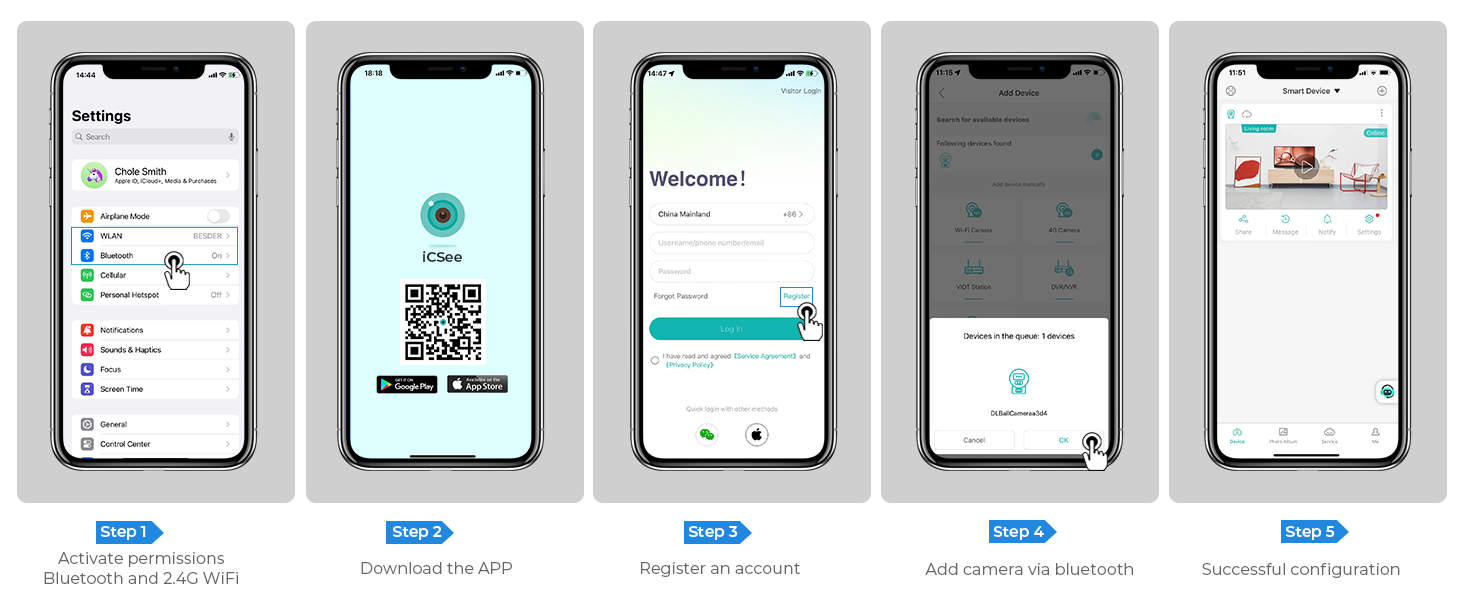
Image: Step-by-step guide for app download, account registration, and device configuration.
Alternatively, download the iCSee app directly from: http://d.xmeye.net/CSee
- Cofrestru Cyfrif: Open the iCSee app and follow the on-screen instructions to register a new account.
- Add Camera via Bluetooth: Once logged in, select "Add Device" and choose to add the camera via Bluetooth. The app will guide you through the pairing process.
- Successful Configuration: After successful pairing, your camera will be ready for use.
2. Pweru'r Camera
Connect the provided power cable to the camera's power input port and then plug it into a standard electrical outlet. The camera will power on and initiate its startup sequence.
3. Network Connection Options
- Cysylltiad Wi-Fi: The camera supports 2.4GHz Wi-Fi networks only. During app setup, select your Wi-Fi network and enter the password.
- Cysylltiad cebl Ethernet: For a more stable connection, you can connect the camera directly to your router using an Ethernet cable.
- Personal Hotspot: In situations where Wi-Fi is unavailable, the camera can also connect via a personal hotspot from your smartphone.
4. Mowntio'r Camera
The camera is designed for both indoor and outdoor use and can be ceiling-mounted. Choose a location that provides optimal viewing angles and is within range of your Wi-Fi network or Ethernet connection.
- Marciwch Bwyntiau Drilio: Use the mounting template (if provided) or the camera base to mark the drilling points on the desired surface.
- Tyllau Dril: Drill holes at the marked points. Insert wall anchors if mounting on drywall or masonry.
- Diogelu'r Sylfaen: Attach the camera's mounting base to the surface using the provided screws.
- Atodwch y Camera: Securely attach the camera unit to the mounted base.

Image: The camera installed outdoors, highlighting its robust IP66 waterproof design suitable for various weather conditions.
Cyfarwyddiadau Gweithredu
1. Yn fyw View a Chwarae
Access the iCSee app to view byw footage from your cameras. You can switch between the fixed and rotating lens views. The app also allows you to review foo wedi'i recordiotagwedi'i storio ar y cerdyn SD neu'r cwmwl.

Image: The dual-screen feature in the iCSee app, displaying simultaneous views from the fixed and rotating lenses.
2. Pan, Tilt, and Digital Zoom
Use the iCSee app to remotely control the rotating lens. You can pan the camera 355° horizontally and tilt it 90° vertically to cover a wide area. The camera also supports 5x digital zoom to view manylion.

Delwedd: Uwchben view demonstrating the camera's extensive 355° pan and 90° tilt range, covering a large residential area.
3. Motion Tracking and Human Detection
The camera is equipped with advanced motion tracking. When human motion is detected, the rotating lens will automatically track the subject's movement. You will receive real-time alerts on your smartphone via the iCSee app, capturing images or video of the activity.

Image: The camera's alarm features, including real-time push notifications, siren, and light activation upon detecting suspicious activity.
4. Sain Dwyffordd
With the built-in microphone and speaker, you can communicate with visitors or deter intruders directly through the iCSee app from anywhere.

Image: Illustration of the two-way audio function, allowing communication with individuals near the camera.
5. Moddau Gweledigaeth Nos
The camera offers three night vision modes, selectable via the app, to ensure clear visibility up to 30 meters (98 feet) in various lighting conditions:
- Gweledigaeth Nos Lliw Llawn: Utilizes built-in spotlights to provide vivid, full-color images even in complete darkness.
- Gweledigaeth Nos Isgoch: Uses infrared LEDs for clear black-and-white images in low-light conditions.
- Smart Vision: Automatically switches between infrared and full-color modes based on detected motion or light conditions.

Image: Visual comparison of infrared night vision and full-color night vision capabilities at night.
6. Opsiynau Storio
- Cerdyn Micro SD: Supports up to 128GB micro SD card for local storage of recordings. (Card not included)
- Storio Cwmwl: Optional cloud storage service available for secure, remote access to your video recordings.
7. Integreiddio Cartref Clyfar
The Reobiux camera is compatible with NVR systems for continuous recording and can be integrated with Amazon Alexa for convenient voice control.

Image: The camera's compatibility with smart home devices like Amazon Alexa for voice-controlled viewing.
Cynnal a chadw
- Glanhau: Sychwch lens a chorff y camera yn rheolaidd gyda lliain meddal, damp lliain i gael gwared â llwch a baw. Peidiwch â defnyddio cemegau llym na glanhawyr sgraffiniol.
- Diweddariadau Cadarnwedd: Check the iCSee app periodically for firmware updates to ensure optimal performance and security.
- Cyflenwad Pŵer: Ensure the power cable is securely connected and not damaged.
- Amodau Amgylcheddol: While IP66 rated, avoid prolonged exposure to extreme temperatures outside the operating range (-20°C to 55°C) or direct high-pressure water jets.
Datrys problemau
| Problem | Achos Posibl | Ateb |
|---|---|---|
| Camera all-lein/Methu cysylltu â Wi-Fi | Incorrect Wi-Fi password; Camera too far from router; 5GHz Wi-Fi network used; Network interference. |
|
| Ansawdd delwedd wael | Dirty lens; Insufficient lighting; Network bandwidth issues. |
|
| Nid yw canfod cynnig yn gweithio | Detection sensitivity too low; Detection zone not set correctly; Obstructions in view. |
|
| Problemau sain dwyffordd | Meicroffon/siaradwr wedi'i fud yn yr ap; Sain yn rhy isel; Oedi rhwydwaith. |
|
Manylebau
| Nodwedd | Manylyn |
|---|---|
| Rhif Model | A9Q-2PCS |
| Datrysiad Fideo | 2.5K/6MP (2048p) |
| Datrysiad llonydd effeithiol | 3 AS |
| Lensys | Dual Lens (Fixed and Rotating) |
| Ystod Tremio/Tilt | Tremio 355°, Tilt 90° |
| Chwyddo Digidol | 5x |
| Ystod Golwg Nos | Hyd at 30 metr (98 troedfedd) |
| Moddau Gweledigaeth Nos | Full-color, Infrared, Smart Vision |
| Cysylltedd | 2.4GHz Wi-Fi, Ethernet, Bluetooth, ONVIF, RTSP |
| Opsiynau Storio | Cerdyn Micro SD (hyd at 128GB), Storio Cwmwl |
| Sain | Sain Dwyffordd (Meic a Siaradwr Mewnol) |
| Canfod | Human Detection, Motion Tracking |
| Rhybuddion | Real-time App Notifications, Siren, Light Alarm |
| Gwrthsefyll Tywydd | IP66 dal dŵr |
| Ffynhonnell Pwer | Trydan â Llinyn (12 Folt, 3 Wat) |
| Tymheredd Gweithredu | Hyd at 55°C |
| Dimensiynau (L x W x H) | 5.88 x 4.68 x 6.2 modfedd |
| Pwysau | 2.75 pwys |
| Dyfeisiau Cydnaws | Smartphone, Tablet, Laptop, NVR Systems, Amazon Alexa |
| Dull Rheoli | Ap iCSee |
Gwarant a Chefnogaeth
Reobiux provides dedicated customer support for its products. For any technical assistance, warranty claims, or inquiries, please contact our 24/7 online customer support team. Refer to your purchase documentation for specific warranty terms and conditions.

Image: Reobiux customer support representative ready to assist.
Dogfennau Cysylltiedig - A9Q-2PCS
 |
Imou Ranger 2 Deuol 6MP: Camera PT Wi-Fi Deuol-Lens 6MP Archwiliwch gamera 6MP deuol Imou Ranger 2, sy'n cynnwys system lens deuol 6MP, canfod AI uwch (Dyn/Anifail Anwes), Olrhain Clyfar, gweledigaeth nos, a Wi-Fi 6 deuol-fand ar gyfer diogelwch cartref cynhwysfawr. |
 |
Canllaw Cysylltu a Chywiro Camera VERYHDSN Canllaw i ddefnyddio'r nodweddion Cysylltu Camera a Chywiro Cysylltu ar gamerâu gwyliadwriaeth VERYHDSN ar gyfer lleoli a datrys gwallau gwell. |
 |
ICSee Dual-Lens PTZ Camera User Guide A comprehensive guide to setting up and using the ICSee Dual-Lens PTZ Camera, covering installation, app connection, and features like zoom, night vision, and two-way audio. |
 |
Camera Deuol 8MP Imou Ranger 2: Nodweddion, Manylebau, a Drosoddview Archwiliwch yr Imou Ranger 2 Dual 8MP, camera PT Wi-Fi H.265 cydraniad uchel sy'n cynnwys lensys deuol ar gyfer monitro cartref cynhwysfawr. Mae'r camera clyfar hon yn cynnig nodweddion uwch fel Canfod Bodau Dynol/Anifeiliaid Anwes, Olrhain Clyfar, Auto-cruise, a Gweledigaeth Nos Lliw Llawn, gan sicrhau diogelwch a chyfleustra gwell. Dysgwch am ei fanylebau, cysylltedd, a'r hyn sydd wedi'i gynnwys yn y blwch. |
 |
Llawlyfr Defnyddiwr Camera Clyfar Tuya HomeHawk E27: Gosod a Chyflunio Canllaw cynhwysfawr ar gyfer Camera Clyfar Tuya HomeHawk E27. Yn cynnwys lawrlwytho apiau, ailosod dyfeisiau, gosod Wi-Fi trwy Bluetooth neu god QR, a chael mynediad at ffrydiau fideo byw gydag esboniadau manwl o nodweddion. |
 |
CUGUU 8MP Dual Lens Light Bulb Security Camera User Guide User guide and specifications for the CUGUU 8MP Dual Lens WiFi Light Bulb Security Camera featuring auto-tracking, two-way audio, and night vision. |
Ask a question about this manual
Ask about setup, troubleshooting, compatibility, parts, safety, or missing instructions. Manuals+ will review the question and use this page’s manual context to help answer it.