
1. Rhagymadrodd
This manual provides essential instructions for the safe and effective operation of your HIKMICRO B01S Thermal Camera. Please read this manual thoroughly before using the device and retain it for future reference. The HIKMICRO B01S is a handheld thermal imaging camera designed for various applications, including home inspection, electrical maintenance, and mechanical fault detection.
2. Gwybodaeth Diogelwch
Dilynwch y rhagofalon diogelwch canlynol i atal anaf a difrod i'r ddyfais:
- Do not point the camera directly at intense heat sources such as the sun or lasers, as this may damage the thermal sensor.
- Cadwch y ddyfais yn sych. Peidiwch â'i hamlygu i law na lleithder.
- Operate the camera within the specified temperature and humidity ranges.
- Use only the charger and accessories provided or approved by HIKMICRO.
- Peidiwch â cheisio dadosod na newid y ddyfais. Dim ond personél awdurdodedig ddylai wneud atgyweiriadau.
- Sicrhewch fod y batri wedi'i wefru'n llawn cyn ei ddefnyddio i ddechrau.
3. Gosod
3.1 Cynnwys Pecyn
Gwiriwch fod yr holl eitemau yn bresennol yn eich pecyn:
- HIKMICRO B01S Thermal Camera
- 2-in-1 USB C to USB A and USB C Cable
- Carrying Case with Shoulder Strap
- Strap arddwrn
- Llawlyfr Defnyddiwr
- Cerdyn Calibro

Figure 3.1: Included items in the HIKMICRO B01S Thermal Camera package.
3.2 Dyfais Drosoddview
Familiarize yourself with the physical components of the HIKMICRO B01S Thermal Camera.

Ffigur 3.2: Blaen view of the HIKMICRO B01S Thermal Camera and included accessories.

Figure 3.3: The 3.2-inch LCD screen provides a clear display for thermal imaging.
3.3 Initial Power-Up and Charging
- Codi'r Batri: Connect the camera to a power source using the provided USB-C cable. The charging indicator will illuminate. A full charge supports approximately 6 hours of continuous operation.
- Pweru ymlaen / i ffwrdd: Press and hold the power button until the screen illuminates to power on. Repeat the action to power off.
- Atodiad strap arddwrn: Attach the wrist strap to the designated loop on the camera for secure handling.
- Gosod Tripod: The camera features a standard tripod mount for stable, scheduled captures. This is useful for monitoring temperature changes over time in a fixed location.

Figure 3.4: The camera can be mounted on a tripod for stable, continuous monitoring.
4. Cyfarwyddiadau Gweithredu
4.1 Delweddu Thermol Sylfaenol
The HIKMICRO B01S provides clear thermal imagery with a 25Hz refresh rate for smooth viewing.
- Viewing Live Image: Once powered on, the camera displays a live thermal image on the 3.2-inch LCD screen.
- Cipio Delweddau: Press the capture button to save a thermal image to the internal 16GB eMMC flash storage, which can hold over 90,000 images.
- Paletau Lliw: The camera supports 6 color palettes to visualize temperature differences. Cycle through these palettes using the dedicated button to find the most suitable display for your inspection.

Figure 4.1: Multiple color palettes are available for different viewing preferences and analysis.
4.2 Mesur Tymheredd
The B01S offers precise temperature measurement capabilities:
- Measurement Presets: Utilize automatic Center Spot, Hot Spot, and Cold Spot tracking to quickly identify temperature extremes. Three user-defined spots can also be set for specific areas of interest.
- Amrediad Tymheredd: The camera measures temperatures from -20°C to 550°C (-4°F to 1022°F).
- Gosodiadau Addasadwy: For improved accuracy, adjust emissivity settings based on the material being inspected and input the distance to the object.
- Larwm Tymheredd Uchel/Isel: Configure the camera to trigger an audio alarm and warning light when temperatures exceed or fall below preset thresholds.
- Level and Span Selection: Switch between automatic and manual level and span adjustments to precisely highlight specific temperature ranges.

Figure 4.2: Instant temperature display with automatic and user-defined spot measurements.

Figure 4.3: High/Low temperature alarm indicators on the display.

Figure 4.4: Adjustable settings for emissivity and temperature range to enhance measurement accuracy.

Figure 4.5: Manual level and span selection for precise temperature visualization.
4.3 Nodweddion Uwch
- SuperIR Image Enhancement: The B01S utilizes HIKMICRO's SuperIR technology to upscale thermal images from 256x192 pixels to 640x480 pixels, providing enhanced detail for analysis.
- SuperScene Detection: This feature, powered by deep learning, automatically detects potential moisture leaks and insulation defects, simplifying inspections.
- Pro Scene Color Alarm: For advanced diagnostics, the Pro Scene Color Alarm provides customized data-driven alerts for thermal anomalies, such as condensation or insulation issues.
- Image Transfer & Auto-Update: Wirelessly transfer images and reports to mobile devices using the HIKMICRO Viewer app (available on Google Play and Apple App Store). The app also facilitates seamless firmware updates.
- Image Analysis & Instant Projection: Use the HIKMICRO Analyzer PC software for comprehensive image analysis, screen projection, real-time monitoring, and 3D plotting.

Figure 4.6: SuperIR technology enhances thermal image resolution for greater detail.

Figure 4.7: SuperScene detection highlights potential water leaks and insulation voids.

Figure 4.8: Pro Scene Color Alarm identifies specific thermal anomalies like condensation.

Figure 4.9: Wireless image transfer and auto-update functionality via the HIKMICRO Viewer app.
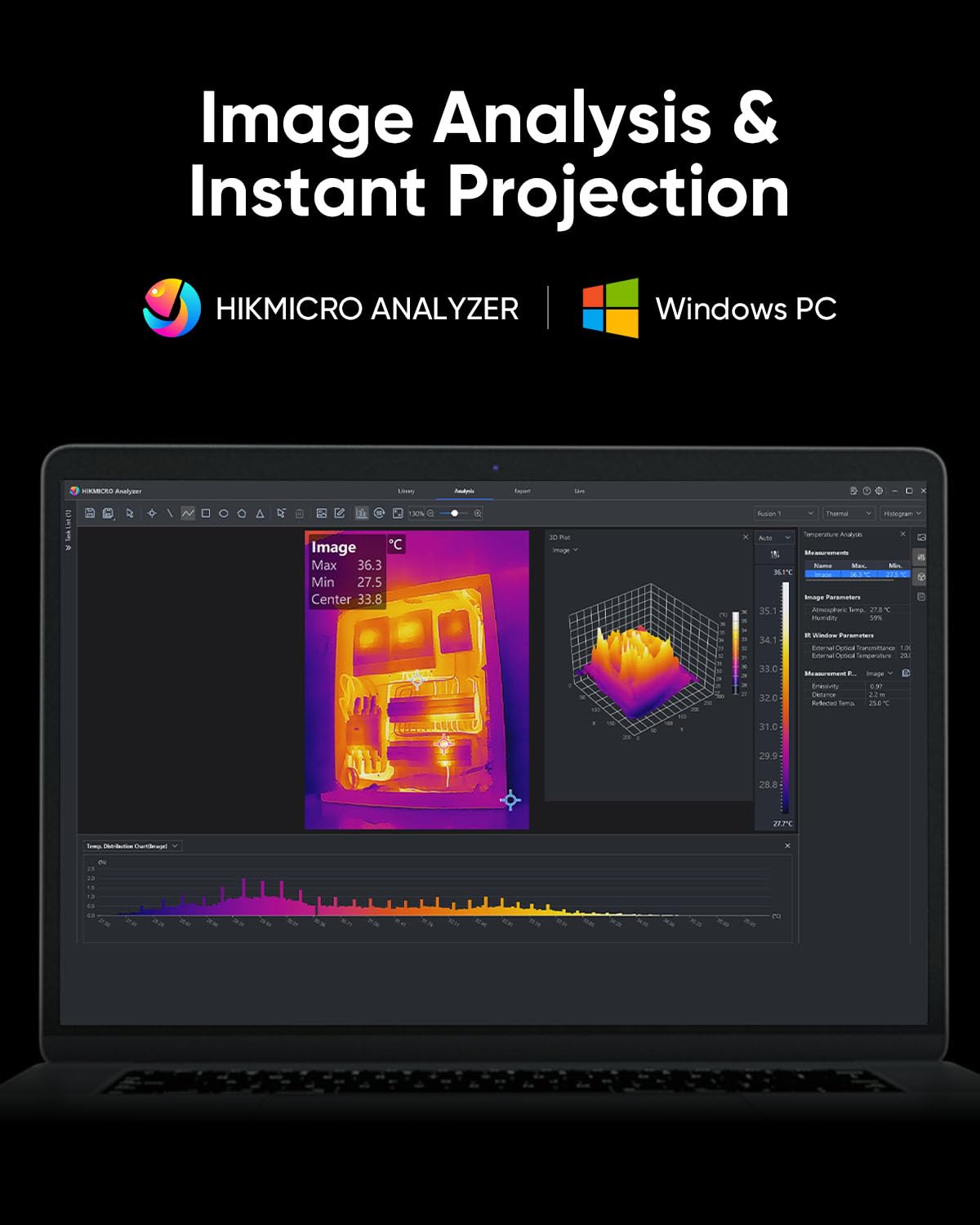
Figure 4.10: HIKMICRO Analyzer PC software for detailed image analysis and projection.
5. cynnal
5.1 Glanhau
- Defnyddiwch frethyn meddal, sych i lanhau corff y camera.
- Ar gyfer y lens, defnyddiwch frethyn a thoddiant glanhau lens arbenigol i osgoi crafiadau.
- Peidiwch â defnyddio glanhawyr neu doddyddion sgraffiniol.
5.2 Storio
- Store the camera in its protective carrying case when not in use.
- Cadwch y ddyfais mewn lle oer, sych, i ffwrdd o olau haul uniongyrchol a thymheredd eithafol.
- If storing for extended periods, ensure the battery is partially charged (around 50%) and recharge it every few months to maintain battery health.
5.3 Gwydnwch
The HIKMICRO B01S is designed for durability, featuring an IP54 rating for dust and water resistance and a 2-meter (6.6 ft) drop resistance.

Figure 5.1: The B01S is built to be durable with IP54 protection and 6.6 ft drop resistance.
6. Datrys Problemau
If you encounter issues with your HIKMICRO B01S, refer to the following common problems and solutions:
| Problem | Achos Posibl | Ateb |
|---|---|---|
| Nid yw'r ddyfais yn pweru ymlaen | Batri isel; Botwm pŵer heb ei wasgu'n gywir | Charge the battery; Press and hold the power button firmly for a few seconds |
| Fuzzy or unclear image | Lens is dirty; Incorrect focus (if applicable); Extreme temperature difference | Clean the lens; Adjust focus (if manual focus is available); Allow camera to acclimate to environment |
| Darlleniadau tymheredd anghywir | Incorrect emissivity setting; Incorrect distance setting; Object outside temperature range | Adjust emissivity for the material; Input correct distance; Ensure object temperature is within camera's range |
| Cannot connect to app/PC software | Wi-Fi/USB connection issue; Outdated app/software; Firewall blocking connection | Ensure Wi-Fi is enabled on camera and device; Check USB cable connection; Update app/software; Temporarily disable firewall |
| Bywyd batri byr | Battery degradation; Frequent use of power-intensive features | Contact support for battery replacement; Reduce screen brightness or turn off Wi-Fi when not needed |
7. manylebau
| Nodwedd | Manyleb |
|---|---|
| Penderfyniad IR | 256 x 192 (49,152 picsel) |
| Datrysiad SuperIR | 640 x 480 (307,200 picsel) |
| Sensitifrwydd Thermol (NETD) | < 40mK |
| Amrediad Tymheredd | -20°C i 550°C (-4°F i 1022°F) |
| Cywirdeb Tymheredd | ±2°C or ±2% (whichever is greater) |
| Cyfradd Adnewyddu | 25Hz |
| Sgrin Arddangos | 3.2" LCD, 640 x 480 resolution |
| Storio | 16GB eMMC (stores >90,000 images) |
| Cysylltedd | Wi-Fi, USB-C |
| Math Batri | 1 batri Ion Lithiwm (wedi'i gynnwys) |
| Bywyd Batri | Approx. 6 hours continuous operation |
| Graddfa IP | IP54 |
| Gollwng Resistance | 2 metr (6.6 troedfedd) |
| Dimensiynau (Parsel) | 31.2 x 21.1 x 11.8 cm |
| Pwysau (Parsel) | 1.08 kg |
| Rhif Model | HM-TP52+-3AQF/W-B01S |
| Gwneuthurwr | HIKMICRO |
| Gwlad Tarddiad | Tsieina |
8. Gwarant a Chefnogaeth
HIKMICRO products are covered by a limited warranty. Please refer to the warranty card included in your package for specific terms and conditions. For technical support, service, or warranty claims, please contact HIKMICRO customer service through their official website or the contact information provided on your calibration card.