
1. Rhagymadrodd
Diolch am brynuasing the Sharp GX-BT390 Crystal Clear Series Bluetooth Speaker. This portable speaker is designed to deliver high-quality audio with enhanced bass, featuring IP67 waterproof and dustproof capabilities, LED light modes, and True Wireless Stereo (TWS) pairing. This manual provides essential information for setup, operation, and maintenance to ensure optimal performance and longevity of your device.
2. Cynnwys Pecyn
Gwiriwch fod yr holl eitemau yn bresennol:
- Sharp GX-BT390 Bluetooth Speaker
- Cebl Gwefru (USB-C)
- Llawlyfr Defnyddiwr
3. Cynnyrch Drosview
Familiarize yourself with the various parts of your Sharp GX-BT390 speaker.
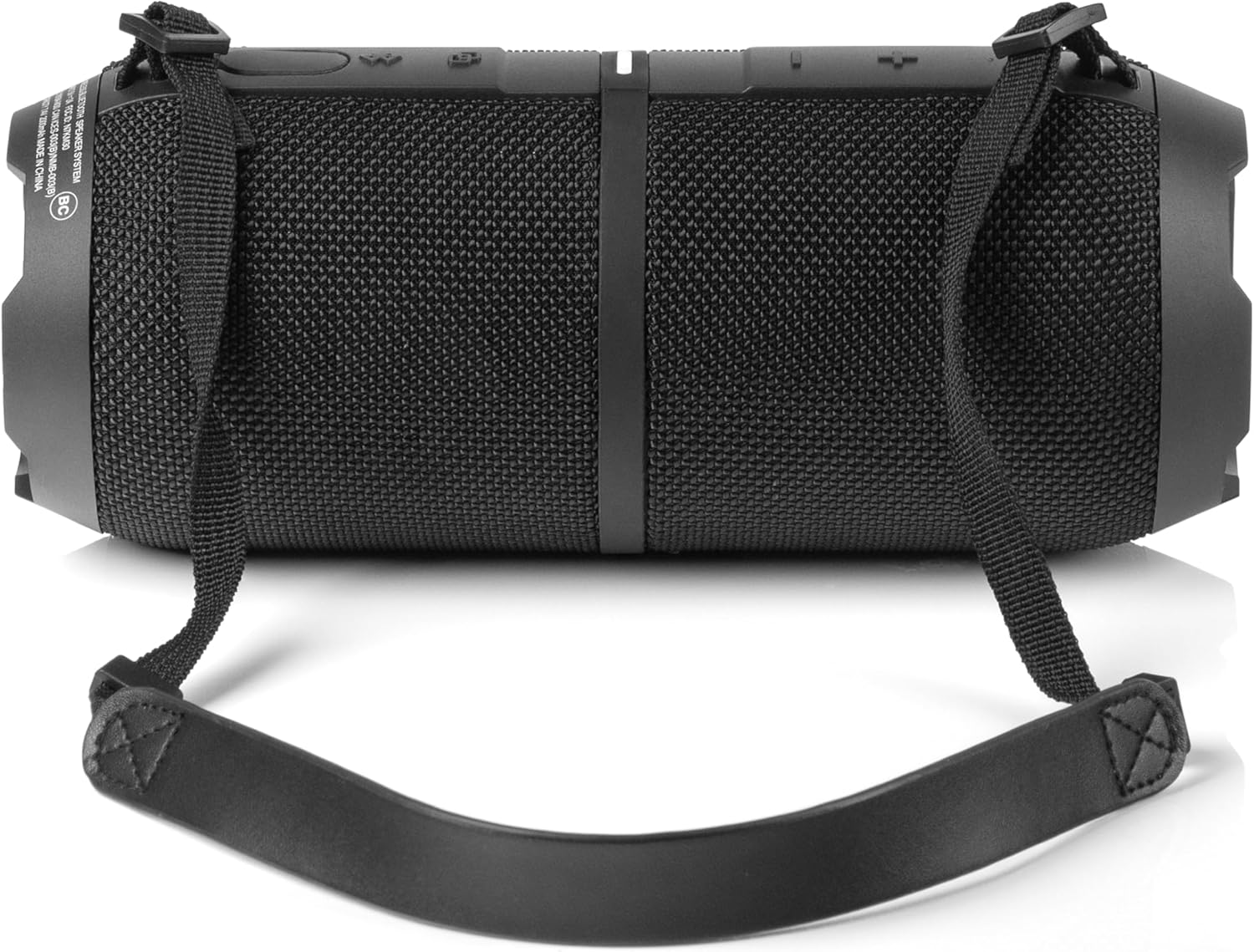
Ffigur 3.1: Blaen view of the Sharp GX-BT390 speaker, highlighting the control panel with volume buttons, play/pause, and power indicator.

Ffigur 3.2: Yn ôl view of the Sharp GX-BT390 speaker, illustrating the sealed charging port and attachment points for the carrying strap.

Ffigur 3.3: Ochr view of the Sharp GX-BT390 speaker, showing the textured surface and the adjustable carrying strap.

Figure 3.4: The Sharp GX-BT390 speaker with its end cap illuminated, displaying the Sharp logo and an active LED light mode.
Rheolaethau a Dangosyddion:
- Botwm Pŵer: Pwyswch a dal i droi ymlaen / i ffwrdd.
- Cyfrol i Fyny (+): Cynyddu cyfaint.
- Cyfrol i Lawr (-): Lleihau cyfaint.
- Botwm Chwarae/Seibiant: Play or pause music, answer/end calls.
- Botwm Paru Bluetooth: Initiate Bluetooth pairing mode.
- Dangosydd LED: Yn dangos statws pŵer, statws gwefru, a statws cysylltiad Bluetooth.
- Botwm Modd Ysgafn: Cycle through LED light modes.
4. Gosod
4.1 Gwefru'r Siaradwr
- Open the protective cover on the back of the speaker to access the USB-C charging port.
- Cysylltwch y cebl USB-C a ddarperir â phorthladd gwefru'r siaradwr.
- Cysylltwch ben arall y cebl USB-C ag addasydd pŵer USB cydnaws (heb ei gynnwys).
- Bydd y dangosydd LED yn dangos statws y gwefru. Mae gwefr lawn fel arfer yn cymryd tua 3-4 awr.
- Once fully charged, disconnect the cable and securely close the protective cover to maintain IP67 water and dust resistance.
4.2 Pweru Ymlaen/Diffodd
- I Bweru Ymlaen: Press and hold the Power button for approximately 2 seconds until you hear an audible tone and the LED indicator illuminates.
- I Bweru i ffwrdd: Press and hold the Power button for approximately 2 seconds until you hear an audible tone and the LED indicator turns off.
4.3 Pâr Bluetooth
- Ensure the speaker is powered on and within 1 meter of your Bluetooth device.
- The speaker will automatically enter Bluetooth pairing mode when first powered on, or if no device is connected. The LED indicator will flash rapidly.
- Ar eich dyfais Bluetooth (ffôn clyfar, tabled, ac ati), galluogwch Bluetooth a chwiliwch am ddyfeisiau sydd ar gael.
- Select "Sharp GX-BT390" from the list of devices.
- Once paired, you will hear a confirmation tone, and the LED indicator will glow solid blue.
- If pairing fails, turn off the speaker and your device, then repeat the steps.
5. Cyfarwyddiadau Gweithredu
5.1 Chwarae Cerdd
- Chwarae/Seibiant: Pwyswch y botwm Chwarae/Seibiant unwaith.
- Cyfrol i Fyny: Pwyswch y botwm '+'.
- Cyfrol i Lawr: Pwyswch y botwm '-'.
- Trac Nesaf: Pwyswch a daliwch y botwm '+'.
- Trac Blaenorol: Pwyswch a daliwch y botwm '-'.
5.2 Galwadau Di-ddwylo
The Sharp GX-BT390 features a built-in microphone for hands-free calls when connected to your smartphone.
- Ateb Galwad: Pwyswch y botwm Chwarae/Seibiant unwaith.
- Galwad Diwedd: Pwyswch y botwm Chwarae/Saib unwaith yn ystod galwad.
- Gwrthod Galwad: Pwyswch a dal y botwm Chwarae/Saib am 2 eiliad.
Paru Stereo Di-wifr Gwirioneddol 5.3 (TWS)
You can pair two Sharp GX-BT390 speakers together for a stereo sound experience.
- Ensure both GX-BT390 speakers are powered on and not connected to any Bluetooth device.
- On one speaker (this will be the primary speaker), press and hold the Bluetooth pairing button for 3 seconds. You will hear a tone.
- Bydd y ddau siaradwr yn chwilio am ei gilydd ac yn cysylltu â'i gilydd yn awtomatig. Ar ôl cysylltu, byddwch yn clywed tôn cadarnhau.
- Now, connect your Bluetooth device to the primary speaker as described in section 4.3.
5.4 Modd Golau LED
The speaker features two LED mood lighting effects that synchronize with the music.
- Press the Light Mode button to cycle through the available light modes.
- Press the Light Mode button again to select the next mode or turn off the lights.

Ffigur 5.1: Drosoddview of key features including hands-free calling, LED light effects, IP67 rating, 10-hour playtime, 30W power output, and Bluetooth connectivity.
6. cynnal
To ensure the longevity and performance of your Sharp GX-BT390 speaker, follow these maintenance guidelines:
- Glanhau: Sychwch y siaradwr â meddal, champ brethyn. Peidiwch â defnyddio glanhawyr neu doddyddion sgraffiniol.
- Gwrthiant Dŵr a Llwch (IP67): The speaker is rated IP67, meaning it is protected from dust ingress and can withstand immersion in water up to 1 meter for 30 minutes. Ensure the charging port cover is securely closed to maintain this rating. Avoid prolonged exposure to water or extreme conditions.
- Storio: Storiwch y siaradwr mewn lle oer, sych i ffwrdd o olau haul uniongyrchol a thymheredd eithafol.
- Gofal Batri: To preserve battery life, charge the speaker regularly, even if not in use for extended periods. Avoid fully discharging the battery frequently.

Figure 6.1: Visual representation of the speaker's IP67 waterproof and dustproof capabilities.
7. Datrys Problemau
Os byddwch chi'n dod ar draws problemau gyda'ch siaradwr, cyfeiriwch at y problemau a'r atebion cyffredin canlynol:
| Problem | Achos Posibl | Ateb |
|---|---|---|
| Nid yw'r siaradwr yn troi ymlaen | Batri isel; Botwm pŵer heb ei wasgu'n ddigon hir | Charge the speaker; Press and hold the Power button for 2 seconds |
| Dim sain | Volume too low; Device not paired; Speaker muted | Increase volume on speaker and device; Re-pair Bluetooth; Check device mute settings |
| Mae paru Bluetooth yn methu | Speaker too far from device; Device Bluetooth off; Interference | Ensure speaker is within 1 meter; Turn device Bluetooth on/off; Move away from other wireless devices |
| Ansawdd sain gwael | Batri isel; Dyfais yn rhy bell; Rhwystrau | Charge speaker; Move device closer; Remove obstructions between speaker and device |
| Mae paru TWS yn methu | Speakers not in pairing mode; Already connected to another device | Ensure both speakers are disconnected from other devices; Follow TWS pairing steps carefully |
8. manylebau
Detailed technical specifications for the Sharp GX-BT390 Bluetooth Speaker:
| Nodwedd | Manyleb |
|---|---|
| Enw Model | GX-BT390(K) |
| Math o Siaradwr | Siaradwr Bluetooth Cludadwy Awyr Agored |
| Technoleg Cysylltedd | Bluetooth |
| Technoleg Cyfathrebu Di-wifr | Bluetooth |
| Llefarydd Uchafswm Pŵer Allbwn | 60 Watts (30W RMS) |
| Modd Allbwn Sain | Stereo (gyda pharu TWS) |
| Nodweddion Arbennig | Bass Boost, Built-in Microphone, Dustproof, LED Light, Lightweight |
| Lefel Gwrthsefyll Dŵr | IP67 (Ddŵr a Llwch) |
| Ffynhonnell Pwer | Wedi'i Bweru â Batri (1 batri Ion Lithiwm wedi'i gynnwys) |
| Bywyd Batri | Hyd at 10 awr |
| Ystod Uchaf | 33 troedfedd (10 metr) |
| Dull Rheoli | Botymau Cyffwrdd |
| Dimensiynau Cynnyrch | 4"D x 8.5"L x 4"U (10.16 cm D x 21.59 cm L x 10.16 cm U) |
| Pwysau Eitem | 1.75 pwys (28 owns) |

Figure 8.1: Internal component diagram illustrating the speaker drivers responsible for 30-watt rich bass and powerful sound.
9. Gwarant a Chefnogaeth
The Sharp GX-BT390 Bluetooth Speaker comes with a Limited Warranty. Please refer to the warranty card included in your package for specific terms and conditions. For technical support or service inquiries, please contact Sharp customer service through their official websafle neu'r wybodaeth gyswllt a ddarparwyd gyda dogfennaeth eich cynnyrch.