
1. Rhagymadrodd
The Colorlight X6 is a professional-grade LED video wall controller designed for fixed installations and rental environments. It provides high-definition video processing for LED display walls, video wall panels, and large-scale screen systems, ensuring reliable performance. The X6 is suitable for applications in live events, broadcast, digital signage, and corporate displays, offering stability, flexibility, and accurate image reproduction.
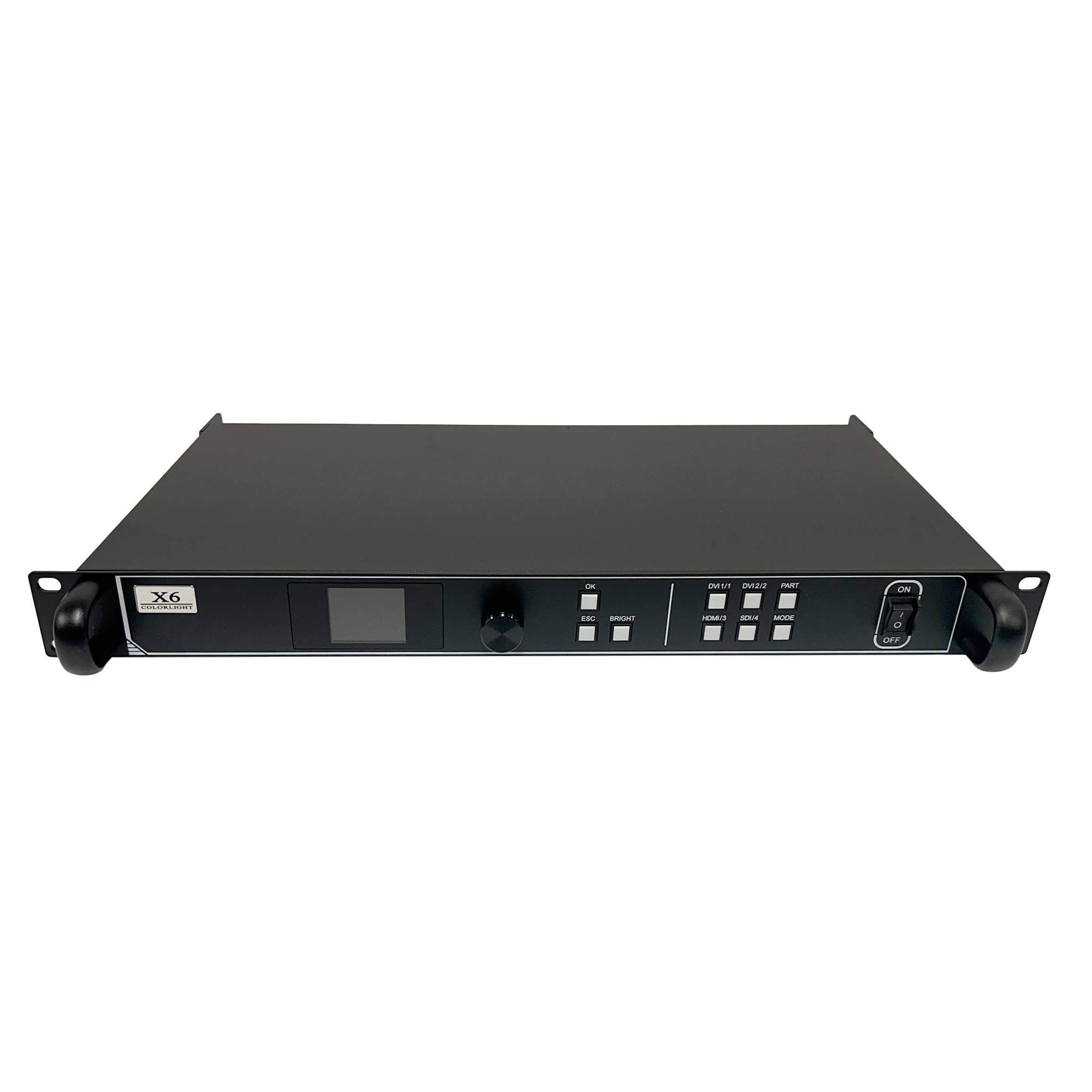
Ffigur 1.1: Blaen view of the Colorlight X6 LED Video Wall Controller.
2. Beth sydd yn y Bocs
Gwiriwch fod yr holl eitemau canlynol wedi'u cynnwys yn eich pecyn:
- 1 × Colorlight X6 LED Video Wall Controller
- 1 × Cebl Pŵer
- 1 × DVI / HDMI / SDI Cable
- 1 × Cebl Sain
- 1 × Bracedi Mowntio
- Cebl 1 × USB
- 1 × Llawlyfr Defnyddiwr
- Cerdyn Gwarant 1 ×

Figure 2.1: Package contents of the Colorlight X6 controller.
3. Nodweddion Cynnyrch
The Colorlight X6 offers a range of features for advanced LED video wall management:
- High Capacity Performance: Supports up to 3.9 million pixels, with a maximum width of 8192 pixels or height of 4096 pixels. Input resolutions up to 1920×1200@60Hz.
- Advanced Connectivity & Redundancy: Features six Gigabit Ethernet outputs for stable data transmission. Supports Ethernet port and controller redundancy. Compatible with Colorlight receiving cards E120, E320, 5A-75B, and 5A-75E.
- Professional Video Processing: Supports free display layout with three independent HD layers, user-definable scaling, cropping, and seamless switching between inputs. Includes pixel-level brightness, contrast, saturation, chromaticity, and color temperature adjustments. Enhances grayscale performance at low brightness.
- Flexible Audio Integration: Offers independent 3.5mm audio input from external devices and HDMI audio decoding for synchronized transmission. Audio output option for external speakers or ampcodwyr.
- Dyluniad Dibynadwy: Built with a robust 1U chassis, engineered for stable operation in environments from -20°C to +60°C with up to 80% humidity. Certified with CCC, CE, FCC, IC, EAC, and UKCA standards.
- Nodweddion Rheoli: USB cascading, RS232 control, and multiple user presets for quick setup and recall.
4. Canllaw Gosod
Follow these steps to set up your Colorlight X6 controller:
4.1 Gosod Corfforol
- Mowntio Rack: Install the X6 controller into a standard 1U equipment rack using the provided mounting brackets. Ensure adequate ventilation around the unit.
- Cysylltiad Pwer: Connect the power cable to the AC input on the rear panel of the X6 and then to a suitable power outlet (100-240V AC, 50/60Hz).
4.2 Mewnbwn Cysylltiadau
Connect your video sources to the input ports on the rear panel:
- HDMI: Connect an HDMI source to the HDMI 1.4 port.
- DVI: Connect DVI sources to the DVI 1 and DVI 2 ports.
- SDI: Connect an SDI source to the SDI port.
- Mewnbwn sain: For external audio, connect a 3.5mm audio cable to the AUDIO IN port.
4.3 Cysylltiadau Allbwn
Connect the X6 to your LED display panels:
- Ethernet Outputs: Connect Ethernet cables from the six Gigabit Ethernet output ports (PORT 1 to PORT 6) to your Colorlight receiving cards (e.g., E120, E320, 5A-75B, 5A-75E) on the LED display panels.
- Allbwn sain: If using external speakers or amplifiers, connect an audio cable from the AUDIO OUT port.
4.4 Cysylltiadau Rheoli
- Rheolaeth USB: Connect a USB cable from your computer to the USB-IN port for configuration and control. The USB-OUT port can be used for cascading multiple units.
- Rheolaeth RS232: For serial communication, connect an RS232 cable to the RS232 port.
- CONFIG Port: Use the CONFIG port for specific configuration tasks as detailed in the advanced user manual.

Figure 4.1: Rear panel connections of the Colorlight X6.
5. Cyfarwyddiadau Gweithredu
This section outlines the basic operation of the Colorlight X6 controller.
5.1 Pŵer Ymlaen/Diffodd
- Pŵer Ymlaen: Flip the ON/OFF switch on the front panel to the 'ON' position. The display screen will illuminate.
- Pwer i ffwrdd: Flip the ON/OFF switch to the 'OFF' position.
5.2 Dewis Mewnbwn
Use the input selection buttons on the front panel to switch between video sources:
- Gwasgwch HDMI/3 to select the HDMI input.
- Gwasgwch DVI 1/1 to select DVI 1 input.
- Gwasgwch DVI 2/2 to select DVI 2 input.
- Gwasgwch SDI/4 to select the SDI input.
5.3 Basic Display Adjustments
The X6 allows for real-time adjustments to the display output:
- Disgleirdeb: Defnyddiwch y LLAWR button and the rotary knob to adjust the overall brightness of the display.
- Llywio Dewislen: Defnyddiwch y ESC button to exit menus and the OK button (rotary knob press) to confirm selections.
- Modd: Mae'r MODD button may cycle through display modes or presets.
- RHAN: Mae'r RHAN button is typically used for managing display partitions or layers.
5.4 Ffurfweddiad Uwch
For detailed configuration of display layout, scaling, cropping, pixel-level adjustments, and user presets, refer to the comprehensive software manual provided with the device or available on the Colorlight website. These functions are typically managed via the connected computer using the USB or RS232 control interfaces.

Figure 5.1: Front panel controls of the Colorlight X6.
6. cynnal
Proper maintenance ensures the longevity and optimal performance of your Colorlight X6 controller.
- Glanhau: Regularly clean the exterior of the unit with a soft, dry cloth. Avoid using liquid cleaners or solvents. Ensure ventilation openings are free from dust and obstructions.
- Amodau Amgylcheddol: Operate the X6 within its specified temperature range of -20°C to +60°C and humidity up to 80% (non-condensing). Avoid extreme temperatures, direct sunlight, and high humidity.
- Diweddariadau Cadarnwedd: Periodically check the Colorlight official websafle ar gyfer diweddariadau cadarnwedd. Dilynwch y cyfarwyddiadau a ddarperir yn ofalus ar gyfer unrhyw weithdrefnau diweddaru.
- Rheoli Ceblau: Gwnewch yn siŵr bod yr holl geblau wedi'u cysylltu'n ddiogel ac wedi'u llwybro'n iawn i atal datgysylltu neu ddifrod damweiniol.
7. Datrys Problemau
If you encounter issues with your Colorlight X6, refer to the following common troubleshooting steps:
- Dim pŵer:
- Check if the power cable is securely connected to both the X6 and the power outlet.
- Ensure the power switch on the front panel is in the 'ON' position.
- Gwiriwch a yw'r allfa bŵer yn weithredol.
- Dim Allbwn Fideo:
- Confirm that the input source is correctly connected to the X6 and is active.
- Ensure the correct input source is selected on the X6 front panel.
- Check the Ethernet connections from the X6 output ports to the LED receiving cards.
- Verify that the LED display panels are powered on and configured correctly.
- If using redundancy, check the status of both primary and backup connections.
- Ystumio Delwedd/Lliwiau Anghywir:
- Check the resolution and refresh rate settings of your input source to ensure compatibility with the X6.
- Adjust brightness, contrast, and color temperature settings via the X6 controls or software.
- Ensure all cables are in good condition and securely connected.
- Control Issues (USB/RS232):
- Verify the USB or RS232 cable is properly connected.
- Ensure the correct drivers are installed on your computer.
- Check the communication settings in your control software.
If the problem persists after following these steps, consult the detailed troubleshooting section in the full user manual or contact Colorlight technical support.
8. manylebau
| Nodwedd | Manyleb |
|---|---|
| Model | X6 |
| Brand | Lliw lliw |
| Cynhwysedd Llwytho | Up to 3.9 million pixels |
| Max Width/Height | 8192 pixels wide or 4096 pixels high |
| Datrysiad Mewnbwn | Hyd at 1920×1200@60Hz |
| Mewnbynnau Fideo | 1 × HDMI 1.4, 2 × DVI, 1 × SDI |
| Mewnbynnau Sain | 1 × 3.5mm Audio In, HDMI Audio Decoding |
| Allbynnau Sain | 1 × 3.5mm Audio Out |
| Porthladdoedd Allbwn | 6 × GigabitEthernet |
| Rhyngwynebau Rheoli | USB-IN, USB-OUT, RS232, CONFIG |
| Tymheredd Gweithredu | -20°C i +60°C |
| Lleithder | 0% i 80% (ddim yn cyddwyso) |
| Defnydd Pŵer | 30W |
| Cyftage | 100-240V AC, 50/60Hz |
| Dimensiynau Cynnyrch (L × W × H) | 19" × 12.05" × 1.73" (48.26cm × 30.61cm × 4.39cm) |
| Pwysau Eitem | 6.8 pwys (3.08 kg) |
| Deunydd | Metel |
| Ardystiadau | CCC, CE, FCC, IC, EAC, UKCA |
9. Gwarant a Chefnogaeth
The Colorlight X6 LED Video Wall Controller comes with a warranty. Please refer to the included Warranty Card for detailed terms and conditions, including warranty period and coverage.
For technical support, service, or further inquiries, please contact your authorized Colorlight dealer or visit the official Colorlight websafle ar gyfer gwybodaeth gyswllt ac adnoddau.