
1. Rhagymadrodd
The FeelTech FY6600 30M is a dual-channel Direct Digital Synthesis (DDS) arbitrary signal generator designed for various electronic testing and measurement applications. This device offers high-performance signal generation with advanced features such as a 250MSa/s sampling rate, 14-bit vertical resolution, and a wide frequency range. This manual provides essential information for the proper setup, operation, maintenance, and troubleshooting of your FY6600 30M signal generator.
2. Nodweddion Allweddol
- High-Speed D/A Chip: Utilizes a professional 14-bit high-speed D/A chip for superior waveform accuracy.
- Gwell SampCyfradd ling: Features a 250MSa/s sampling rate, providing clearer waveform contours.
- Deep Waveform Memory: Waveform memory depth upgraded to 8192 * 14 bits, allowing for high-precision signal detail restoration.
- Precise Phase Resolution: Offers a phase resolution of up to 0.1 degrees for accurate control over signal delays.
- Wide Frequency Measurement: Maximum measurement frequency reaches 100MHz, with a minimum of 0.01Hz.
- Integrated VCO Function: Includes a practical Voltage Controlled Oscillator (VCO) function.
- Durable Output Terminals: Signal output terminals are constructed from pure copper material for reliability.
- Rhyngwyneb Defnyddiwr-gyfeillgar: Equipped with long-life keys and simultaneous display of two-channel waveforms on the LCD.
- Multiple TTL Outputs: Provides 4 TTL outputs for extended application possibilities.
- Small Signal Output Capability: Capable of outputting small signals with 1mVPP amplitude resolution, adjustable from 1mVpp to 20Vpp.
- Ystod Amledd Eang: Sine wave frequency range from 1uHz to 60MHz, square wave from 1uHz to 25MHz, and other waves from 1uHz to 20MHz, all with 1uHz frequency resolution.
- Fast Square Wave Rise Time: Square wave 5V rising edge time is as low as 7nS, with a maximum output frequency of 25MHz.
3. Cynnyrch Drosview
The FY6600 30M signal generator features a compact design with a clear LCD display and intuitive controls. Understanding the layout of the device is crucial for effective operation.
3.1 Cynllun y Panel Blaen

Ffigur 1: Front panel of the FY6600 30M, highlighting the 2.4-inch TFT Color LCD, Function Shortcut Buttons, Knob, Power Button, Menu Button, Output Terminals (CH1, CH2), Direction Button, and Input Terminal.
3.2 Cynllun y Panel Cefn

Ffigur 2: Rear panel of the FY6600 30M, showing the Power Switch, USB Communication Interface, 4 Channel TTL Output ports, Special Function Port, and AC Power Input.
3.3 Power Plug Options

Ffigur 3: The FY6600 30M supports various power plug types, including UK, US, AU, and EU standards, ensuring compatibility in different regions.
4. Gosod
Follow these steps to set up your FeelTech FY6600 30M signal generator:
- Dadbacio: Carefully remove the signal generator and all accessories from its packaging. Verify that all components listed in the packing list are present.
- Cysylltiad Pwer: Connect the appropriate AC power cord (refer to Figure 3 for plug types) to the AC Power Input on the rear panel (refer to Figure 2). Plug the other end into a suitable power outlet.
- Pŵer Cychwynnol Ar: Flip the Power Switch on the rear panel to the 'ON' position. The LCD screen on the front panel should illuminate, indicating the device is powered on.
- Cysylltiadau Allbwn: Connect your test leads or cables to the desired Output Terminals (CH1 or CH2) on the front panel. Connect the other end of the leads to the device under test (e.g., oscilloscope, circuit).
- Cysylltiad USB (Dewisol): If you plan to control the device via a computer, connect a USB cable from the USB Communication Interface on the rear panel to your computer. Install any necessary drivers or software as provided by FeelTech.
5. Cyfarwyddiadau Gweithredu
The FY6600 30M offers various functions accessible via the front panel buttons and knob. The LCD screen displays real-time settings and waveform information.
5.1 Basic Waveform Generation
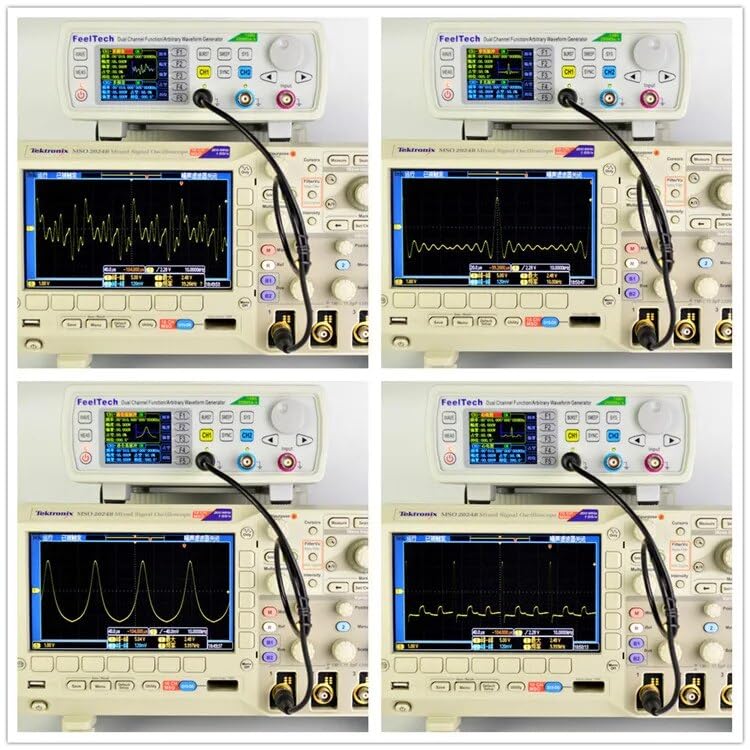
Ffigur 4: The FY6600 30M generating various waveforms, as observed on an oscilloscope. This demonstrates the device's capability to produce different signal types for testing.
- Dewiswch Sianel: Gwasgwch y CH1 or CH2 button to select the desired output channel.
- Dewiswch Donffurf: Gwasgwch y TONAU function shortcut button. Use the knob to scroll through available waveforms (Sine, Square, Ramp, Pulse, Arbitrary, etc.) and press OK i gadarnhau.
- Addasu Amlder: Defnyddiwch y FREQ button and the knob to set the desired frequency. The direction buttons can be used to select specific digits for adjustment.
- Addasu Ampgolau: Defnyddiwch y AMPL button and the knob to set the peak-to-peak ampgoleuad y signal.
- Adjust Offset: Defnyddiwch y OFFS button and the knob to set the DC offset of the signal.
- Adjust Duty Cycle (for Square/Pulse): For square or pulse waveforms, use the DYLETSWYDD button and the knob to adjust the duty cycle.
5.2 Swyddogaethau Uwch

Ffigur 5: Different operational interfaces displayed on the FY6600 30M's LCD, illustrating the range of functions available, including waveform parameters, synchronization, sweep, VCO, modulation, burst, counter, frequency meter, and system settings.
- VCO Function: Gwasgwch y VCO button to access the Voltage Controlled Oscillator settings. This allows external voltage to control the output frequency.
- Modulation Function: Gwasgwch y MOD button to configure modulation types such as PSK, ASK, PM, and FM. Use the knob and direction buttons to adjust modulation parameters.
- Sweep Function: Gwasgwch y ysgub button to set up frequency sweeps. Define start frequency, end frequency, sweep time, and sweep mode (linear/logarithmic).
- Swyddogaeth Byrstio: Gwasgwch y BURST button to generate a burst of waveforms. Configure the number of cycles, burst period, and trigger source.
- Frequency Meter/Counter: Gwasgwch y COUNTER button to use the device as a frequency counter for external signals. Connect the external signal to the Input Terminal.
- Gosodiadau System: Gwasgwch y SYSTEM button to access general device settings, including language, buzzer, and firmware version information.
5.3 AM Modulation Example
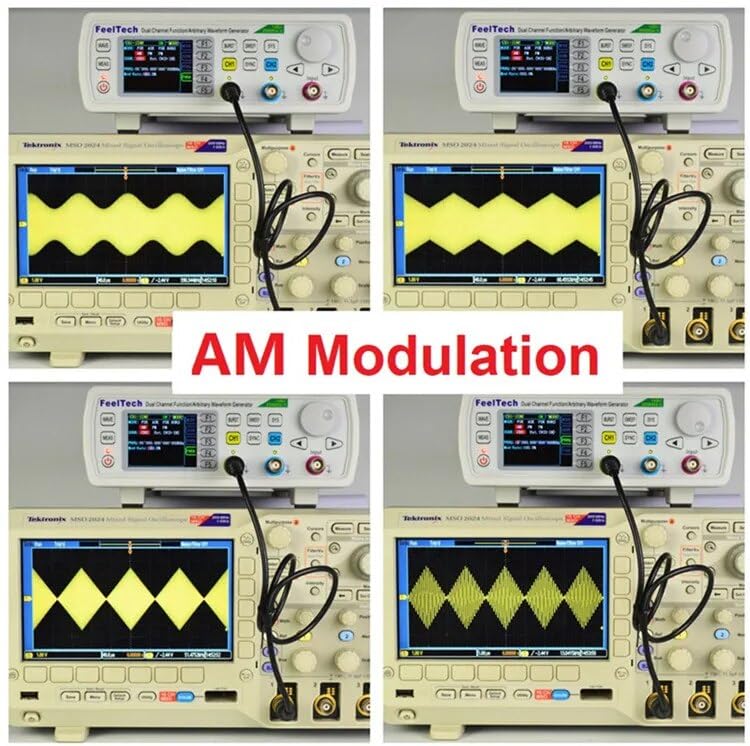
Ffigur 6: Examples o Amplitude Modulation (AM) waveforms generated by the FY6600 30M and displayed on an oscilloscope. This illustrates the device's capability to perform complex signal modulations.
6. cynnal
Proper maintenance ensures the longevity and optimal performance of your FY6600 30M signal generator.
- Glanhau: Regularly clean the exterior of the device with a soft, dry cloth. For stubborn dirt, use a slightly damp cloth with mild detergent, then wipe dry. Avoid using abrasive cleaners or solvents.
- Storio: When not in use, store the device in a cool, dry place away from direct sunlight, extreme temperatures, and high humidity.
- Awyru: Ensure the ventilation openings on the device are not obstructed to prevent overheating.
- Batri: The device includes a Lithium metal battery. If the device is not used for extended periods, it is advisable to periodically power it on to maintain battery health. Refer to the manufacturer for battery replacement or service.
7. Datrys Problemau
If you encounter issues with your FY6600 30M, refer to the following common troubleshooting steps:
- Dim pŵer:
- Gwiriwch a yw'r llinyn pŵer wedi'i gysylltu'n ddiogel â'r ddyfais a'r soced pŵer.
- Ensure the Power Switch on the rear panel is in the 'ON' position.
- Gwiriwch fod y soced pŵer yn gweithio drwy blygio dyfais arall i mewn.
- Dim Arwydd Allbwn:
- Confirm that the output channel (CH1 or CH2) is enabled and the waveform is selected.
- Gwiriwch y amplitude setting; ensure it is not set to 0V.
- Verify that the test leads are correctly connected to the output terminals and the device under test.
- Ensure the frequency is within the operational range of the connected device.
- Incorrect Waveform/Readings:
- Check all parameter settings (frequency, amplitude, offset, duty cycle, modulation) for accuracy.
- Ensure the device under test is properly configured to receive the signal.
- Perform a factory reset if settings appear corrupted (refer to the System menu for this option).
- USB Communication Issues:
- Sicrhewch fod y cebl USB wedi'i gysylltu'n iawn.
- Verify that the correct drivers are installed on your computer.
- Rhowch gynnig ar borth USB neu gebl gwahanol.
If the problem persists after attempting these steps, contact customer support for further assistance.
8. manylebau
The following table details the technical specifications of the FeelTech FY6600 30M Dual Channel DDS Arbitrary Signal Generator.
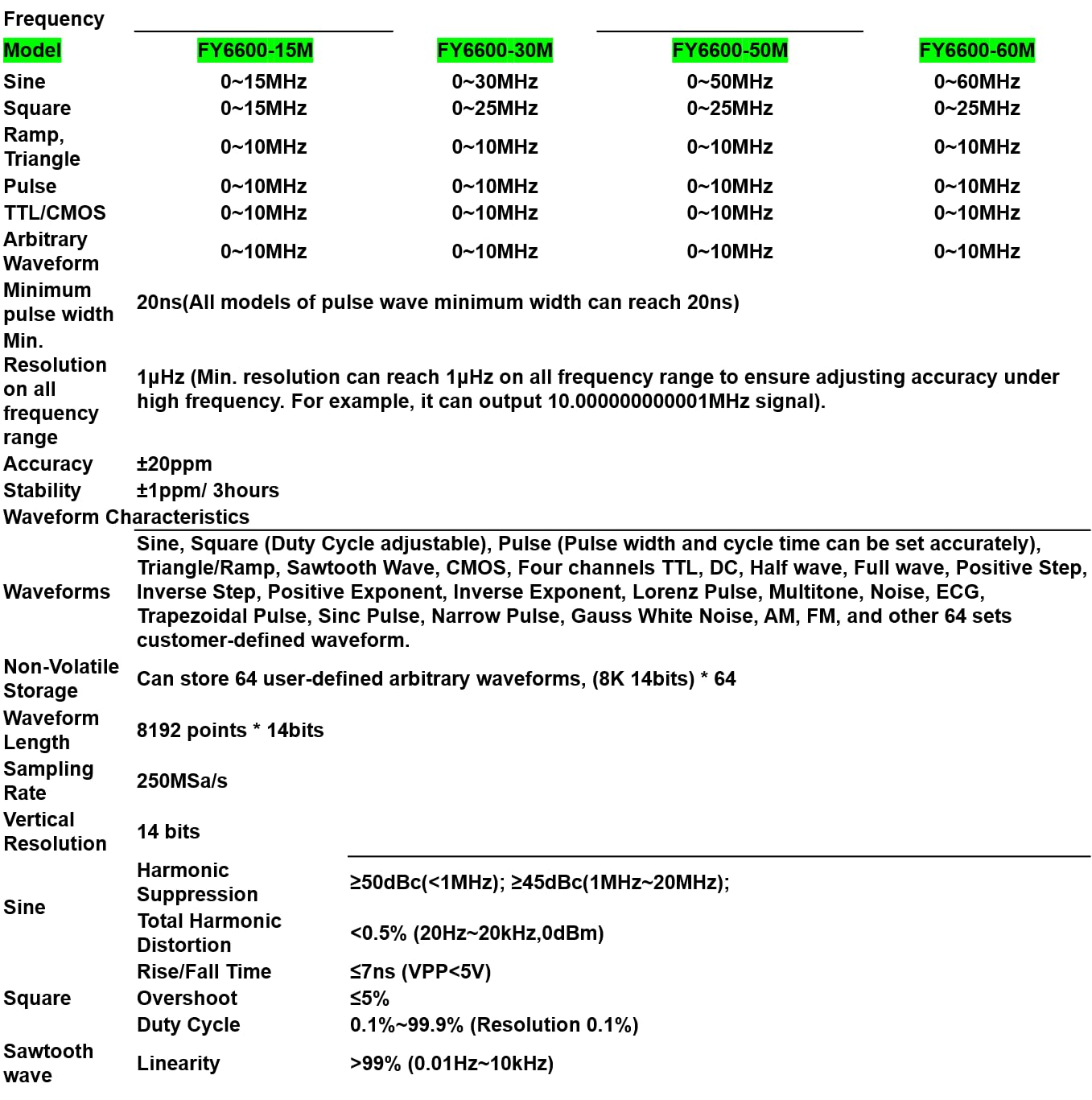
Ffigur 7: Comprehensive technical specifications for the FY6600 series, including frequency ranges, resolution, accuracy, and waveform characteristics.
| Nodwedd | Manyleb |
|---|---|
| Gwneuthurwr | FeelTech/FeelElec |
| Rhif Model | GT-FY6600 30M |
| Dimensiynau (L x W x H) | 25 x 20 x 15 cm |
| Pwysau | 1 Cilogram |
| Deunydd | Biwtadïen Acrylonitrile Styrene |
| Math Pwer | Wedi'i bweru gan fatri (1 batri lithiwm metel wedi'i gynnwys) |
| Defnydd Pŵer | 15 Watt-awr |
| Cywirdeb Mesur | 0.5% |
| System of Measurement | Metrig |
| Gwlad Tarddiad | Tsieina |
9. Gwarant a Chefnogaeth
FeelTech provides comprehensive support for its products.
- Gwarant Cynnyrch: The FeelTech FY6600 30M comes with a 1-year manufacturer's warranty from the date of purchase. This warranty covers defects in materials and workmanship under normal use.
- Argaeledd Rhannau Sbâr: Mae rhannau sbâr ar gyfer y model hwn ar gael am gyfnod o 2 mlynedd.
- Cefnogaeth i Gwsmeriaid: For technical assistance, warranty claims, or service inquiries, please contact FeelTech customer support through their official websafle neu'r manwerthwr lle prynwyd y cynnyrch.