
podofo W203/W209/W463 Series
Podofo Android 13 Car Stereo User Manual
Model: W203/W209/W463 Series
Brand: Podofo
1. Rhagymadrodd a Throsoddview
This manual provides detailed instructions for the installation, operation, and maintenance of your new Podofo Android 13 Car Stereo. This intelligent car radio system is designed for specific Mercedes-Benz models, offering advanced features such as wireless Carplay, Android Auto, GPS navigation, FM/RDS radio, Bluetooth connectivity, and support for a rearview camera.

Image 1.1: Podofo Android 13 Car Stereo with included rearview camera, microphone, and smartphone displaying Carplay/Android Auto.
Mae nodweddion allweddol yn cynnwys:
- Carplay Di-wifr ac Android Auto: Seamless integration with your smartphone for navigation, calls, messages, and music.
- System Android 13: Latest Android operating system for smooth performance and access to various applications.
- Radio FM/RDS: High-quality radio reception with station information display.
- Bluetooth 4.0: Galwadau di-dwylo a ffrydio sain.
- Cefnview Cymorth Camera: Arddangosfa awtomatig o'r cefnview image for safer parking.
- Dolen drych: Screen projection for iOS/Android devices.
2. Gosod a Gosod
2.1 Dadbacio a Chynnwys y Pecyn
Carefully unpack all components and verify that all items listed below are present. If any items are missing or damaged, please contact customer support.

Delwedd 2.1: Manwl view of the packing list, including the head unit, power cable, radio antenna, USB cable, Canbus, GPS antenna, RCA cable, rear camera input cable, microphone, and rear camera.
Cynnwys pecyn safonol:
- Podofo Android Car Stereo Unit
- Cebl Pŵer
- Antena Radio
- Cebl USB
- Datgodiwr Canbus
- Antena GPS
- RCA Cable
- Cebl Mewnbwn Camera Cefn
- Meicroffon Allanol
- Rear Camera (if included in package)
2.2 Gwiriad Cydnawsedd Cerbydau
This car stereo is specifically designed for certain Mercedes-Benz models. Please ensure your vehicle's model and year are listed below for compatibility.

Image 2.2: Diagram showing applicable Mercedes-Benz models, including CLK-C209/W209, C-W203, A-W168, G-W463, Viano, Vito, and Vaneo.
Modelau Cymwys:
- Mercedes-Benz CLK-C209/W209 (1998-2004)
- Mercedes-Benz C-W203 (2000-2005)
- Mercedes-Benz A-W168 (1998-2002)
- Mercedes-Benz G-W463 (1998-2004)
- Mercedes-Benz Viano (2004-2006)
- Mercedes-Benz Vito (2004-2006)
- Mercedes-Benz Vaneo (2002-2005)
- Mercedes-Benz SLK/W170 (1996-2002)
2.3 Cyfarwyddiadau Gwifro
Proper wiring is crucial for the correct functioning of the car stereo. Refer to the diagram below for detailed connections. If you are unsure about any wiring steps, it is highly recommended to seek professional installation.

Image 2.3: Comprehensive wiring diagram showing connections for microphone, CVBS in, video out, subwoofer, video in, AUX R/L in, audio R/L out, and AMP control. Also shows connections for power, USB, RCA, camera input, and GPS antenna.
Cysylltiadau allweddol:
- MIC: Connect the external microphone for clear hands-free calls.
- CVBS IN 1: Composite Video Blanking and Sync input.
- FIDEO ALLAN: Video output for external displays.
- SUBWOOFER: Output for a dedicated subwoofer.
- FIDEO YN: Video input for external video sources.
- AUX R IN / AUX L IN: Auxiliary audio inputs (Right/Left).
- AUDIO OUT R / AUDIO OUT L: Audio outputs (Right/Left).
- AMP CONT: Amplifier control wire.
- Cebl Pwer: Connect to vehicle's power harness.
- Cebl USB: Ar gyfer trosglwyddo data a gwefru.
- Cebl RCA: For various audio/video connections.
- Mewnbwn Camera: Dedicated input for the rearview camera.
- Antena GPS: Cysylltu ar gyfer ymarferoldeb llywio.
2.4 Camau Gosod
The installation process involves removing the original car stereo and integrating the new Podofo unit. Due to the complexity and specific wiring requirements for Mercedes-Benz vehicles, professional installation is highly recommended to avoid damage to the unit or your vehicle's electrical system.

Image 2.4: Comparison showing the car's dashboard before and after the installation of the Podofo car stereo, highlighting the integrated look.
General steps (consult a professional or vehicle-specific guides for detailed instructions):
- Datgysylltwch fatri'r cerbyd.
- Tynnwch yr uned stereo car wreiddiol a'r paneli trim yn ofalus.
- Connect the Podofo unit's wiring harness to the vehicle's harness, ensuring all connections are secure according to the wiring diagram.
- Gosodwch yr antena GPS mewn lleoliad clir view o'r awyr.
- Route and connect the rearview camera cable (if installing).
- Mount the Podofo unit securely into the dashboard.
- Ailgysylltwch fatri'r cerbyd a phrofwch ymarferoldeb yr uned cyn ailgydosod yr holl baneli trim.
3. Cyfarwyddiadau Gweithredu
3.1 Gweithrediad Sylfaenol
- Pŵer ymlaen / i ffwrdd: The unit will typically power on automatically with the vehicle's ignition. Press and hold the power button (if available) for manual control.
- Rheoli cyfaint: Defnyddiwch y knobiau ffisegol neu'r rheolyddion ar y sgrin i addasu'r gyfrol.
- Llywio: Use the 'NAVI' button or touch the navigation icon on the screen to access GPS.
- Radio: Use the 'RADIO' button or touch the radio icon to access FM/RDS.
- Cerddoriaeth: Use the 'MUSIC' button or touch the music icon to access media playback.
- Cartref: Use the 'HOME' button to return to the main menu.
- Yn ôl: Use the 'BACK' button to go back to the previous screen.
3.2 Android 13 System Overview
The unit runs on the Android 13 operating system, providing a familiar and intuitive user interface. You can download and install various applications from the pre-installed app store or via APK files.

Image 3.1: Visual representation of the Android 13 system's core components and the seamless integration of Wireless Carplay and Android Auto, highlighting wired/wireless connection options.
3.3 Carplay Di-wifr ac Android Auto
Connect your iPhone or Android smartphone wirelessly or via USB to access Carplay or Android Auto. This allows you to use voice control, access mobile applications, phonebook, and internet features directly from the car stereo.
- Cysylltiad: Enable Bluetooth and Wi-Fi on your phone. On the car stereo, navigate to the Carplay/Android Auto app and follow the on-screen instructions to pair your device.
- Nodweddion: Access navigation (Apple Maps, Google Maps, Waze), make calls, send messages, play music, and use voice assistants (Siri, Google Assistant).
3.4 Llywio GPS
The unit supports offline and online GPS navigation. You can download maps for offline use or connect to Wi-Fi for real-time traffic updates and online mapping services.
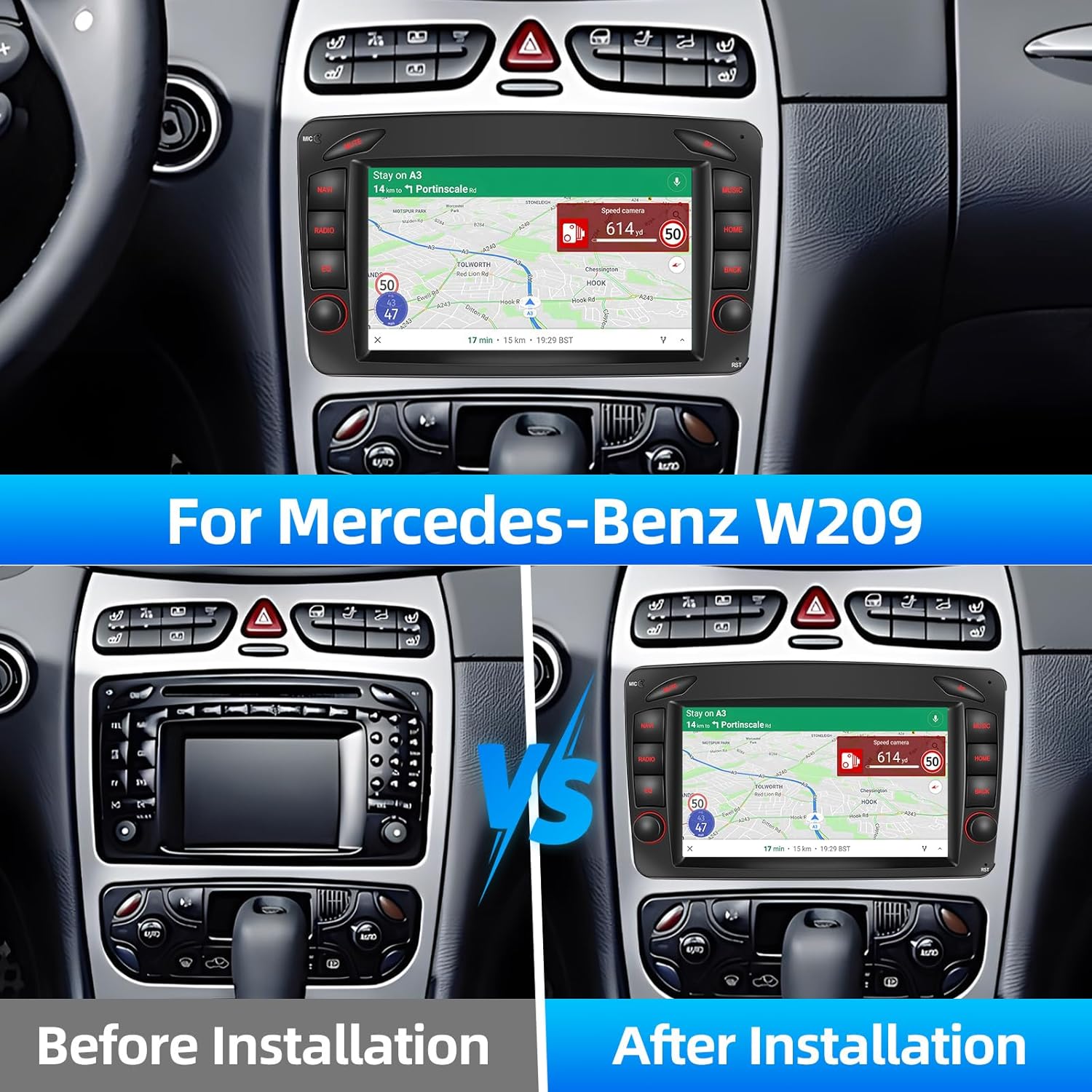
Image 3.2: Screenshots demonstrating the GPS navigation interface with route information and the Wi-Fi connection screen for connecting to mobile hotspots.
- Map Download: Use the pre-installed navigation app to download regional maps.
- Cynllunio Llwybr: Enter your destination and the system will calculate the optimal route.
- Arweiniad Llais: Follow turn-by-turn voice instructions.
Radio 3.5 FM/RDS
Enjoy your favorite radio stations with clear sound quality. The RDS (Radio Data System) feature displays station names, program content, and other information.
- tiwnio: Use the scan function to automatically find and save stations, or manually tune to frequencies.
- Rhagosodiadau: Save your preferred stations for quick access.
3.6 Bluetooth & Microphone
Connect your smartphone via Bluetooth for hands-free calling and audio streaming. The included external microphone ensures clear voice transmission during calls.
- Paru: Enable Bluetooth on your phone and search for the car stereo. Select the device and confirm the pairing code.
- Galwadau Di-dwylo: Make and receive calls directly from the car stereo interface. The phonebook can be automatically loaded.
- Ffrydio Sain: Chwaraewch gerddoriaeth o'ch ffôn drwy seinyddion y car.
3.7 Cyswllt Drych
Mirror Link allows you to project your smartphone's screen onto the car stereo display via a USB connection. This feature supports both iOS and Android systems.
- Cysylltiad: Connect your smartphone to the car stereo via a USB cable.
- Ysgogi: Follow the on-screen prompts to enable screen mirroring.
3.8 Mewnbwn Camera Cefn
The unit supports HD rearview camera input, automatically displaying the rear view image when the vehicle is in reverse gear. This includes night vision capabilities for improved visibility.
4. cynnal
To ensure the longevity and optimal performance of your Podofo car stereo, follow these maintenance guidelines:
- Glanhau sgrin: Defnyddiwch frethyn meddal, di-flwff i sychu'r sgrin yn ysgafn. Ar gyfer staeniau ystyfnig, sychwch ychydigampen the cloth with a screen cleaner solution (do not spray directly onto the screen). Avoid abrasive materials or harsh chemicals.
- Diweddariadau Meddalwedd: Periodically check for software updates provided by Podofo. Updates can improve performance, add new features, and fix bugs. Follow the instructions provided with the update package carefully.
- Amodau Amgylcheddol: Osgowch amlygu'r uned i dymheredd eithafol, golau haul uniongyrchol am gyfnodau hir, neu leithder gormodol.
- Cysylltiadau Cebl: Gwiriwch bob cysylltiad cebl o bryd i'w gilydd i sicrhau eu bod yn ddiogel ac yn rhydd o ddifrod.
5. Datrys Problemau
If you encounter issues with your car stereo, refer to the following common problems and solutions. If the problem persists, please contact customer support.
| Problem | Achos Posibl | Ateb |
|---|---|---|
| Nid yw'r uned yn pweru ymlaen. | Cysylltiad pŵer llac, ffiws wedi chwythu, problem â batri cerbyd. | Check power cable connections. Inspect vehicle's fuse box for blown fuses. Ensure vehicle battery is charged. |
| Dim sain gan siaradwyr. | Speaker wires disconnected, volume too low, incorrect audio source selected. | Verify speaker wire connections. Increase volume. Select the correct audio input (e.g., Radio, Bluetooth, USB). |
| Mae signal GPS yn wan neu'n anghywir. | GPS antenna not properly installed, obstructed view o awyr. | Ensure GPS antenna is installed in a location with a clear view yr awyr (e.e., dangosfwrdd, o dan y ffenestr flaen). |
| Problemau cysylltiad Bluetooth. | Phone's Bluetooth off, unit not in pairing mode, interference. | Ensure Bluetooth is enabled on both devices. Put the unit in pairing mode. Try unpairing and re-pairing the device. |
| Cefnview camera ddim yn arddangos. | Camera cable loose, camera faulty, incorrect input selected. | Gwiriwch y cefnview camera input cable connection. Ensure the vehicle is in reverse gear. |
6. manylebau
Detailed technical specifications for the Podofo Android 13 Car Stereo:
| Nodwedd | Manyleb |
|---|---|
| Brand | podofo |
| System Weithredu | Android 13 |
| Technoleg Cysylltedd | Wi-Fi, Bluetooth |
| Dyfeisiau Cydnaws | Ffôn clyfar |
| Nodweddion Arbennig | Wireless Carplay, Android Auto, Mirror Link, FM/RDS Radio, GPS Navigation, Rearview Cefnogaeth Camera |
| Modd Allbwn Sain | Internal and Bluetooth |
| Ffurfweddiad Sianel Sain Amgylch | 5.1 |
| Amgodio Fideo | H.264 neu H.265 |
| Math o Gysylltydd | USB Math A |
| Cyfanswm Porthladdoedd HDMI | 1 |
7. Gwarant a Chefnogaeth
Your Podofo Android 13 Car Stereo comes with a standard manufacturer's warranty. Please refer to the warranty card included in your package for specific terms and conditions.
For technical support, troubleshooting assistance, or warranty claims, please contact Podofo customer service through the retailer where you purchased the product or visit the official Podofo websafle ar gyfer gwybodaeth cyswllt.
Please have your product model number (W203/W209/W463 Series) and purchase details ready when contacting support.
Dogfennau Cysylltiedig - W203/W209/W463 Series
 |
Podofo Car Multimedia Player User Manual User instructions for the Podofo Car Multimedia Player, covering Bluetooth setup, Apple CarPlay, Android Auto, FM transmission, and troubleshooting. |
 |
CarPlay and Android Auto Car Stereo User Manual Comprehensive user manual for a car stereo system supporting Apple CarPlay, Android Auto, MirrorLink, Bluetooth, and various media playback options. Includes installation, operation, and troubleshooting guides. |
 |
Stereo Car Android gydag Apple CarPlay ac Llawlyfr Defnyddiwr Android Auto Llawlyfr defnyddiwr cynhwysfawr ar gyfer y Stereo Car Android, yn manylu ar y gosodiad, y gwifrau, nodweddion fel Apple CarPlay ac Android Auto, datrys problemau, a manylebau. Dysgwch sut i gysylltu eich ffôn clyfar, defnyddio llywio, a rheoli gosodiadau ar gyfer profiad gyrru gwell. |
 |
Canllaw Defnyddiwr Stereo Car Podofo: Nodweddion a Gweithrediad Canllaw defnyddiwr cynhwysfawr ar gyfer Stereo Car Podofo, yn manylu ar nodweddion fel Apple CarPlay, Android Auto, Bluetooth, radio FM, chwarae USB/SD, a chysylltu ffôn. Yn cynnwys cyfarwyddiadau gweithredu ac awgrymiadau datrys problemau. |
 |
Llawlyfr CarPlay Sgrin Telesgopig - Canllaw Gosod a Datrys Problemau Llawlyfr cynhwysfawr ar gyfer y Chwaraewr MP5 CarPlay Sgrin Telesgopig, yn cwmpasu'r gosodiad, nodweddion, swyddogaethau a datrys problemau ar gyfer integreiddio di-dor â'ch cerbyd a'ch ffôn clyfar. |
 |
Podofo 7010B 2 DIN Autorádio – Detailní Návod k Použití Manylion y llawlyfr ar gyfer autorádio Podofo 7010B 2 DIN, gosod pokrývající, ffyncwydd a Bluetooth, MirrorLink, handsfree, cymwysiadau meddalwedd a phroblemau eraill. |
Ask a question about this manual
Ask about setup, troubleshooting, compatibility, parts, safety, or missing instructions. Manuals+ will review the question and use this page’s manual context to help answer it.