
Rhagymadrodd
This manual provides detailed instructions for the installation, operation, and maintenance of your Eiszuso 150M USB2.0 Wireless Network Card. This device is designed to provide wireless connectivity for computers running Windows, Linux, and Android operating systems, featuring a detachable 2dBi antenna for enhanced signal reception.

Image: The Eiszuso 150M USB2.0 Wireless Network Card with its detachable 2dBi antenna.
Cynnwys Pecyn
Gwiriwch fod yr holl eitemau yn bresennol yn eich pecyn:
- Eiszuso 150M USB2.0 Wireless Network Card
- Detachable 2dBi Omnidirectional Antenna
- CD gyrrwr (os wedi'i gynnwys)
Cyfarwyddiadau Gosod
- Atodwch yr Antena: Carefully screw the detachable 2dBi omnidirectional antenna onto the USB wireless network card. Ensure it is securely fastened but do not overtighten.
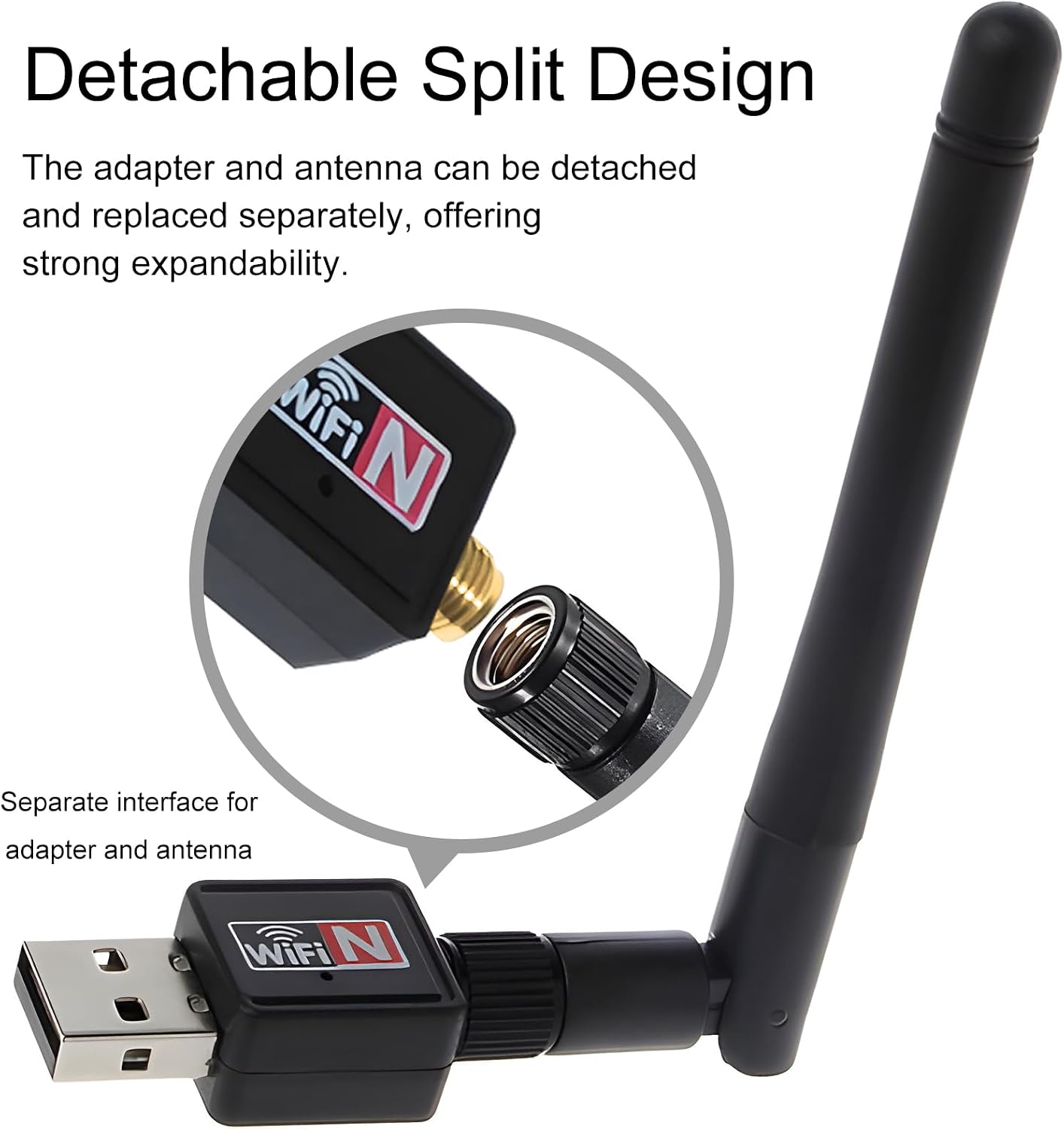
Image: Illustration of how to attach the detachable antenna to the USB adapter.
- Mewnosodwch i Borthladd USB: Plug the assembled wireless network card into an available USB 2.0 port on your computer or compatible device.
- Gosod Gyrrwr:
- Windows:
For most modern Windows operating systems (Windows 10/11), the driver may install automatically. If not, insert the provided driver CD and follow the on-screen instructions. Alternatively, download the latest driver from the Eiszuso support website (if available) by searching for "RTL8188ETV driver".
- Linux:
Linux distributions often have built-in support for the RTL8188ETV chipset. If the device is not recognized automatically, you may need to install specific kernel modules or drivers. Consult your distribution's documentation or community forums for "RTL8188ETV Linux driver installation".
- Android:
For Android devices, driver support is typically integrated into the device's firmware. Ensure your Android device supports external USB Wi-Fi adapters. No separate driver installation is usually required.

Image: The network card is compatible with Windows, Linux, and Android operating systems.
- Windows:
Cyfarwyddiadau Gweithredu
- Connect to a Wireless Network (Windows/Linux):
- Once the driver is installed, your system should detect the wireless network card.
- Open your operating system's network settings or Wi-Fi menu.
- Select your desired Wi-Fi network (SSID) from the list of available networks.
- Enter the network password (security key) if prompted.
- The device should now connect to the wireless network.
- Adjusting Antenna Position: The antenna supports multi-dimensional rotation (360° vertical, 90° horizontal) to optimize signal reception. Adjust its position for the best signal strength and stability.

Image: The antenna can be rotated 360 degrees vertically and 90 degrees horizontally for optimal signal reception.
- Using with Android Devices:
For Android devices, ensure the device supports USB OTG (On-The-Go) and external Wi-Fi adapters. Once plugged in, the Android system should automatically recognize and use the adapter for wireless connectivity.
Cynnal a chadw
- Glanhau: Defnyddiwch frethyn meddal, sych i lanhau'r ddyfais. Peidiwch â defnyddio glanhawyr hylif na thoddyddion.
- Gofal Antena: Handle the detachable antenna with care. Avoid excessive force when attaching or detaching it.
- Storio: Pan na chaiff ei ddefnyddio, storiwch y ddyfais mewn lle oer, sych i ffwrdd o olau haul uniongyrchol a thymheredd eithafol.
- Firmware/Driver Updates: Periodically check the Eiszuso support website for updated drivers or firmware to ensure optimal performance and compatibility.
Datrys problemau
- Dyfais Heb ei Chanfod:
- Ensure the device is fully plugged into a functional USB port.
- Rhowch gynnig ar borthladd USB gwahanol.
- Reinstall the drivers.
- Ailgychwyn eich cyfrifiadur.
- Methu cysylltu â Wi-Fi:
- Verify that the correct Wi-Fi password has been entered.
- Gwnewch yn siŵr bod eich llwybrydd wedi'i bweru ymlaen ac yn darlledu signal.
- Gwiriwch a all dyfeisiau eraill gysylltu â'r un rhwydwaith Wi-Fi.
- Adjust the antenna position for better signal reception.
- Restart your router and the computer.
- Cyflymder Cysylltiad Araf:
- Ensure the antenna is positioned optimally.
- Gwiriwch am ymyrraeth gan ddyfeisiau electronig eraill.
- Update the device drivers.
- Verify that your internet service provider is delivering the expected speed.
Manylebau
| Nodwedd | Manylyn |
|---|---|
| Model | RTL8188ETV |
| Rhyngwyneb | USB 2.0 |
| Safon Di-wifr | IEEE 802.11n / g / b |
| Cyfradd Trosglwyddo Data | Hyd at 150Mbps |
| Math o Antena | Detachable 2dBi Omnidirectional Antenna |
| Systemau Gweithredu | Windows, Linux, Android |
| Chipset | RTL8188ETV |
| Dimensiynau (tua) | 5.16 x 3.19 x 0.75 modfedd (Pecyn) |
| Pwysau (tua) | 0.634 owns |

Image: Approximate dimensions of the Eiszuso USB Wireless Network Card.
Gwarant a Chefnogaeth
For warranty information and technical support, please refer to the documentation provided with your purchase or visit the official Eiszuso websafle. Cadwch eich derbynneb prynu ar gyfer hawliadau gwarant.