
Rhagymadrodd
Diolch am brynuasing the Muse M-780 BTB Bluetooth Speaker. This portable speaker features 20W output, colored lights, IPX5 splash resistance, hands-free calling, and stereo pairing capabilities. It supports Bluetooth, Auxiliary input, and USB MP3 playback. Please read this manual carefully before use to ensure proper operation and to maximize your listening experience.
Gwybodaeth Diogelwch
- Peidiwch ag amlygu'r ddyfais i dymheredd eithafol, golau haul uniongyrchol, na lleithder uchel.
- Osgoi gollwng neu orfodi'r siaradwr i effeithiau cryf.
- The speaker is IPX5 splash-resistant. Do not immerse it in water or expose it to strong jets of water.
- Peidiwch â cheisio dadosod na newid y siaradwr. Bydd hyn yn gwneud y warant yn ddi-rym.
- Use only the provided or approved charging cable.
- Cadwch allan o gyrraedd plant.
Cynnwys Pecyn
Gwiriwch fod yr holl eitemau yn bresennol:
- Muse M-780 BTB Bluetooth Speaker
- Cebl Codi Tâl USB-C
- Cebl Mewnbwn Ategol
- Llawlyfr Cyfarwyddiadau (y ddogfen hon)
Cynnyrch Drosview
Ymgyfarwyddwch â rheolyddion a phorthladdoedd y siaradwr.
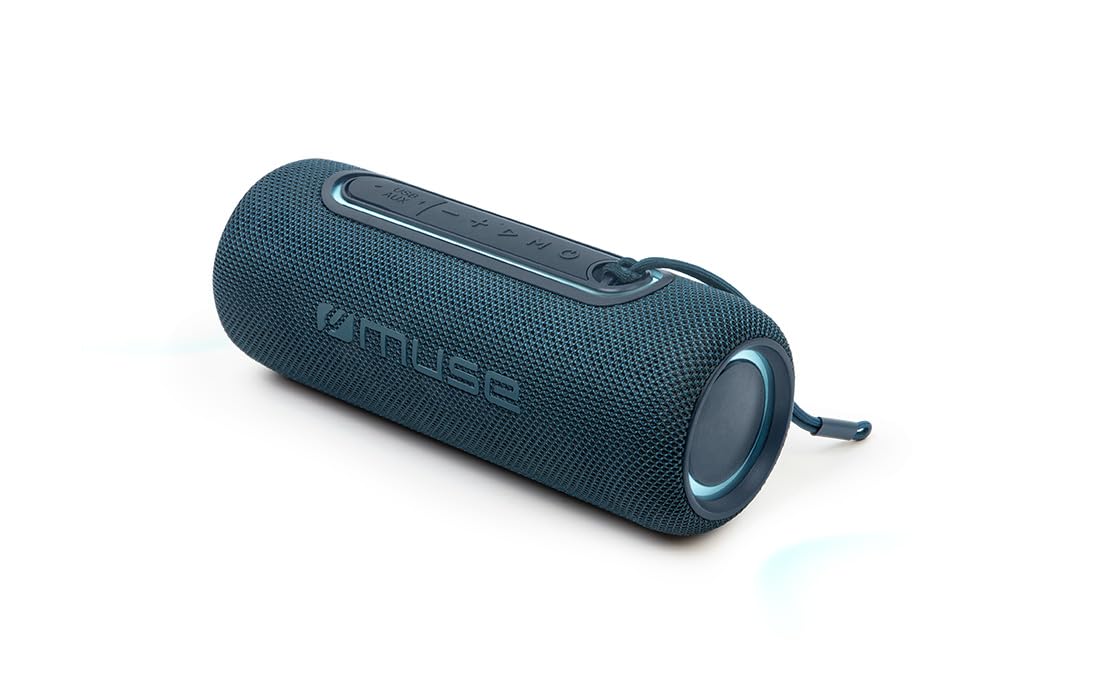
Ffigur 1: Blaen view of the Muse M-780 BTB Bluetooth Speaker, showing the speaker grille and control buttons on top.
Rheolaethau a Dangosyddion:
- Botwm Pŵer: Pwyswch a dal i droi ymlaen / i ffwrdd.
- Botwm Chwarae/Seibiant: Press to play or pause music. Answer/end calls.
- Cyfrol i Fyny (+): Pwyswch i gynyddu'r sain. Pwyswch a daliwch i weld y trac nesaf.
- Cyfrol i Lawr (-): Pwyswch i ostwng y sain. Pwyswch a daliwch i weld y trac blaenorol.
- Botwm Modd (M): Press to switch between Bluetooth, Aux-in, and USB modes.
- Botwm Modd Ysgafn: Press to cycle through different colored light effects.
- Bluetooth Pairing LED Indicator: Yn dangos statws y cysylltiad Bluetooth.
- Dangosydd LED codi tâl: Yn dangos statws gwefru'r batri.
Porthladdoedd:
- Porthladd codi tâl USB-C: Ar gyfer gwefru'r batri mewnol.
- AUX-IN Port: Ar gyfer cysylltu dyfeisiau sain allanol trwy gebl 3.5mm.
- Porth USB: For MP3 playback from a USB flash drive.
Gosod
1. Gwefru Cychwynnol
Before first use, fully charge the speaker. Connect the supplied USB-C cable to the speaker's USB-C charging port and the other end to a USB power adapter (not included) or a computer's USB port. The Charging LED indicator will illuminate during charging and turn off when fully charged. A full charge provides up to 10 hours of music playback.
2. Pweru Ymlaen / I ffwrdd
Pwyswch a dal y Botwm Pŵer for approximately 3 seconds to turn the speaker ON or OFF.
Cyfarwyddiadau Gweithredu
Pâr Bluetooth
- Turn on the speaker. It will automatically enter Bluetooth pairing mode, and the Bluetooth Pairing LED indicator will flash.
- Enable Bluetooth on your smartphone, tablet, or other Bluetooth-compatible device.
- Chwiliwch am "M-780 BTB" in the list of available devices and select it to connect.
- Once successfully paired, the Bluetooth Pairing LED indicator will stop flashing and remain solid. You can now stream music wirelessly from your device within a range of up to 10 meters.
Auxiliary Input (AUX-IN)
- Connect one end of the supplied 3.5mm auxiliary cable to the AUX-IN port on the speaker.
- Cysylltwch y pen arall â'r jac clustffonau neu allbwn sain eich dyfais sain allanol.
- Gwasgwch y Botwm Modd (M) to switch to AUX-IN mode.
- Rheoli chwarae a chyfaint o'ch dyfais allanol.
Chwarae MP3 USB
- Mewnosodwch yriant fflach USB sy'n cynnwys sain MP3 files i mewn i'r porthladd USB ar y siaradwr.
- Gwasgwch y Botwm Modd (M) i newid i modd USB.
- The speaker will automatically begin playing MP3 files o'r gyriant USB.
- Use the Play/Pause, Volume Up (+), and Volume Down (-) buttons to control playback.
Galwad Di-Ddwylo
When connected via Bluetooth to your smartphone:
- Ateb / Diwedd Galwad: Gwasgwch y Botwm Chwarae/Seibiant unwaith.
- Gwrthod Galwad: Pwyswch a dal y Botwm Chwarae/Seibiant am 2 eiliad.
Stereo Pairing (TWS - True Wireless Stereo)
You can pair two M-780 BTB speakers together for a true wireless stereo sound experience.
- Ensure both M-780 BTB speakers are turned on and not connected to any Bluetooth device.
- Ar un siaradwr (hwn fydd y prif siaradwr), pwyswch a daliwch y Botwm Modd (M) for 2-3 seconds until you hear a confirmation tone. The speakers will attempt to pair with each other.
- Once successfully paired, you will hear another confirmation tone. The Bluetooth LED on the primary speaker will flash, and the LED on the secondary speaker will be solid.
- Now, connect your Bluetooth device to the primary speaker as described in the "Bluetooth Pairing" section. Both speakers will play audio in stereo.
Goleuadau Lliw
Gwasgwch y Botwm Modd Ysgafn to cycle through various colored light effects. Press again to change the effect or turn the lights off.
Cyhuddo y Llefarydd
When the battery is low, the speaker may emit an audible alert. Connect the USB-C charging cable to the speaker and a power source. The Charging LED indicator will show the charging status. Disconnect the cable once fully charged to preserve battery life.
Cynnal a chadw
- Glanhau: Defnyddiwch frethyn meddal, sych i lanhau wyneb y siaradwr. Peidiwch â defnyddio glanhawyr sgraffiniol na thoddyddion.
- Gwrthiant Dŵr: The M-780 BTB has an IPX5 splash-resistant rating, meaning it can withstand splashes of water. Do not submerge the speaker in water or expose it to running water. Ensure the port cover is securely closed to maintain water resistance.
- Storio: Storiwch y siaradwr mewn lle oer, sych pan nad yw'n cael ei ddefnyddio am gyfnodau hir.
Datrys problemau
| Problem | Achos Posibl | Ateb |
|---|---|---|
| Nid yw'r siaradwr yn troi ymlaen. | Mae batri wedi'i ddisbyddu. | Gwefrwch y siaradwr gan ddefnyddio'r cebl USB-C. |
| Dim sain. | Volume is too low or muted. Incorrect input mode. | Increase volume on both the speaker and the connected device. Press the Mode button to select the correct input (Bluetooth, AUX, USB). |
| Methu paru drwy Bluetooth. | Nid yw'r siaradwr yn y modd paru. Mae'r ddyfais yn rhy bell. Ymyrraeth. | Ensure speaker is in pairing mode (flashing LED). Move device closer to speaker (within 10m). Turn off other Bluetooth devices. |
| Stereo pairing not working. | Speakers not correctly paired. | Ensure both speakers are disconnected from other devices. Follow the stereo pairing instructions carefully. |
Manylebau
| Enw'r Model: | M-780 BTC |
| Brand: | Muse |
| Pŵer Allbwn: | 20 Wat |
| Cysylltedd: | Bluetooth, USB, AUX-IN |
| Ystod Bluetooth: | Hyd at 10 metr (33 troedfedd) |
| Gwrthiant Dŵr: | IPX5 Splash-Resistant |
| Amser Chwarae: | Up to 10 hours (at moderate volume) |
| Porth Codi Tâl: | USB-C |
| Dimensiynau (L x W x H): | 24.2 x 9.2 x 9.2 cm (9.5 x 3.6 x 3.6 modfedd) |
| Pwysau: | 1 kg (2.2 pwys) |
| Dyfeisiau Cydnaws: | Ffonau Clyfar, Tabledi, Gliniaduron |
| Nodweddion arbennig: | Colored Lights, Hands-Free Calling, Stereo Pairing (TWS) |
Gwarant a Chefnogaeth
This product is covered by a standard manufacturer's warranty. For detailed warranty terms and conditions, please refer to the warranty card included with your purchase or contact your retailer. For technical support or service inquiries, please contact Muse customer service through their official websafle neu'r wybodaeth gyswllt a ddarparwyd gyda'ch cynnyrch.