
1. Rhagymadrodd
Thank you for choosing the LEVOIT LPF-R432-WEU Pedestal Fan. This fan is designed to provide powerful and efficient air circulation, ensuring a comfortable environment in your home or office. With its quiet operation, versatile oscillation, and smart features, it offers a superior cooling experience. Please read this manual thoroughly before use to ensure proper operation and maintenance.
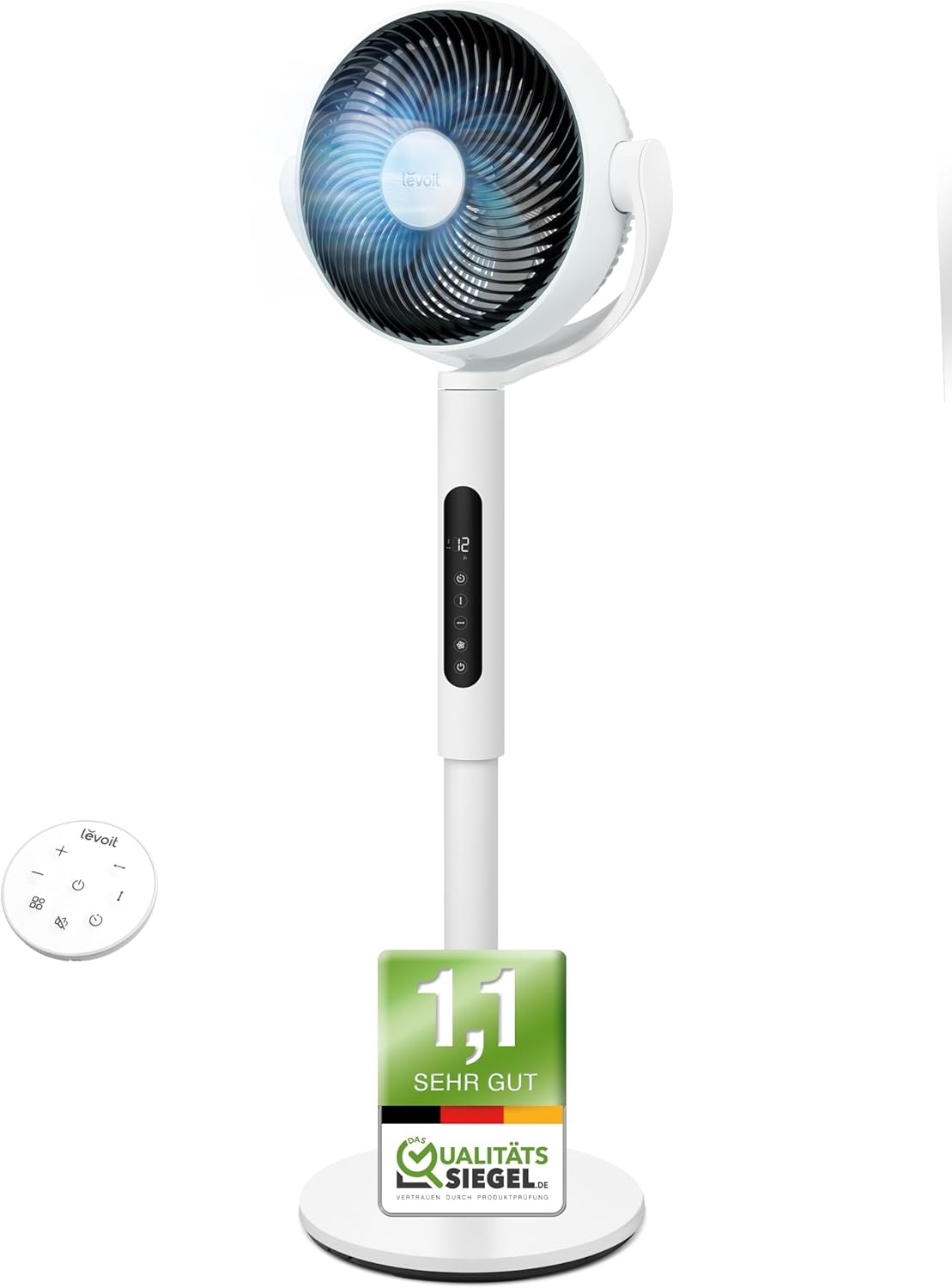
Image: The LEVOIT LPF-R432-WEU Pedestal Fan, showcasing its sleek white design and integrated remote control.
2. Cyfarwyddiadau Diogelwch Pwysig
Er mwyn lleihau'r risg o dân, sioc drydanol, neu anaf, dilynwch y rhagofalon diogelwch canlynol:
- Always unplug the fan from the power outlet before cleaning, performing maintenance, or when not in use.
- Do not operate the fan with a damaged cord or plug. If the cord or plug is damaged, contact customer support.
- Cadwch y llinyn pŵer i ffwrdd o arwynebau wedi'u gwresogi.
- Peidiwch â throchi'r gefnogwr mewn dŵr neu hylifau eraill.
- Peidiwch â rhoi bysedd na gwrthrychau tramor i mewn i unrhyw agoriadau yn y ffan.
- Gwnewch yn siŵr bod y ffan wedi'i gosod ar arwyneb sefydlog, gwastad i'w atal rhag troi drosodd.
- Nid yw'r teclyn hwn wedi'i fwriadu i'w ddefnyddio gan bersonau (gan gynnwys plant) sydd â galluoedd corfforol, synhwyraidd neu feddyliol llai, neu ddiffyg profiad a gwybodaeth, oni bai eu bod wedi cael goruchwyliaeth neu gyfarwyddyd ynghylch defnyddio'r offer gan berson sy'n gyfrifol am eu diogelwch.
- Dylid goruchwylio plant i sicrhau nad ydynt yn chwarae gyda'r teclyn.
- Peidiwch â defnyddio'r ffan yn yr awyr agored nac mewn lleoliadau gwlyb.
3. Cynnwys Pecyn
Gwiriwch y pecyn am yr eitemau canlynol:
- LEVOIT Pedestal Fan (Main Unit)
- Cynulliad Sylfaenol
- Rheolaeth Anghysbell
- Cord Pŵer
- Llawlyfr Defnyddiwr (Y ddogfen hon)
4. Gosod a Chynulliad
The LEVOIT Pedestal Fan requires minimal assembly. Follow these steps to set up your fan:
- Tynnwch yr holl gydrannau o'r pecyn yn ofalus.
- Attach the main fan unit to the base assembly. Ensure it clicks securely into place.
- Rhowch y ffan ar arwyneb cadarn, gwastad.
- Connect the power cord to the fan and then plug it into a standard electrical outlet.

Image: Diagram illustrating the simple assembly process of the LEVOIT Pedestal Fan, showing the main unit connecting to the base.
5. Cyfarwyddiadau Gweithredu
Your LEVOIT Pedestal Fan offers various settings for optimal comfort.
5.1. Pŵer Ymlaen / I ffwrdd
Press the power button on the fan's control panel or the remote control to turn the fan on or off.
5.2. Gosodiadau Cyflymder
Adjust the fan speed using the '+' and '-' buttons on the control panel or remote. The fan features 12 adjustable speed levels to suit your preference, from a gentle breeze to powerful air circulation.
5.3. Osgiliad
Activate the oscillation feature to distribute air across a wider area. The fan supports both horizontal (up to 90°) and vertical (up to 120°) oscillation for comprehensive room coverage.

Image: Visual representation of the LEVOIT Pedestal Fan's automatic oscillation capabilities, showing 90° horizontal and 120° vertical movement for wide air distribution.
5.4. Swyddogaeth Amserydd
Set the fan to automatically turn off after a specified period using the timer button. This is useful for energy saving or for use during sleep.
5.5. Modd Nos
For undisturbed sleep, activate the Night Mode. In this mode, the fan operates at a very low noise level (as low as 20 dB) and the display lights can be turned off.

Image: The LEVOIT Pedestal Fan operating in a bedroom setting, illustrating its quiet 20 dB operation and screen dimming feature for peaceful sleep.
5.6. Synhwyrydd Smart
The integrated smart sensor can automatically adjust the fan speed based on the room's temperature, optimizing comfort and energy consumption.
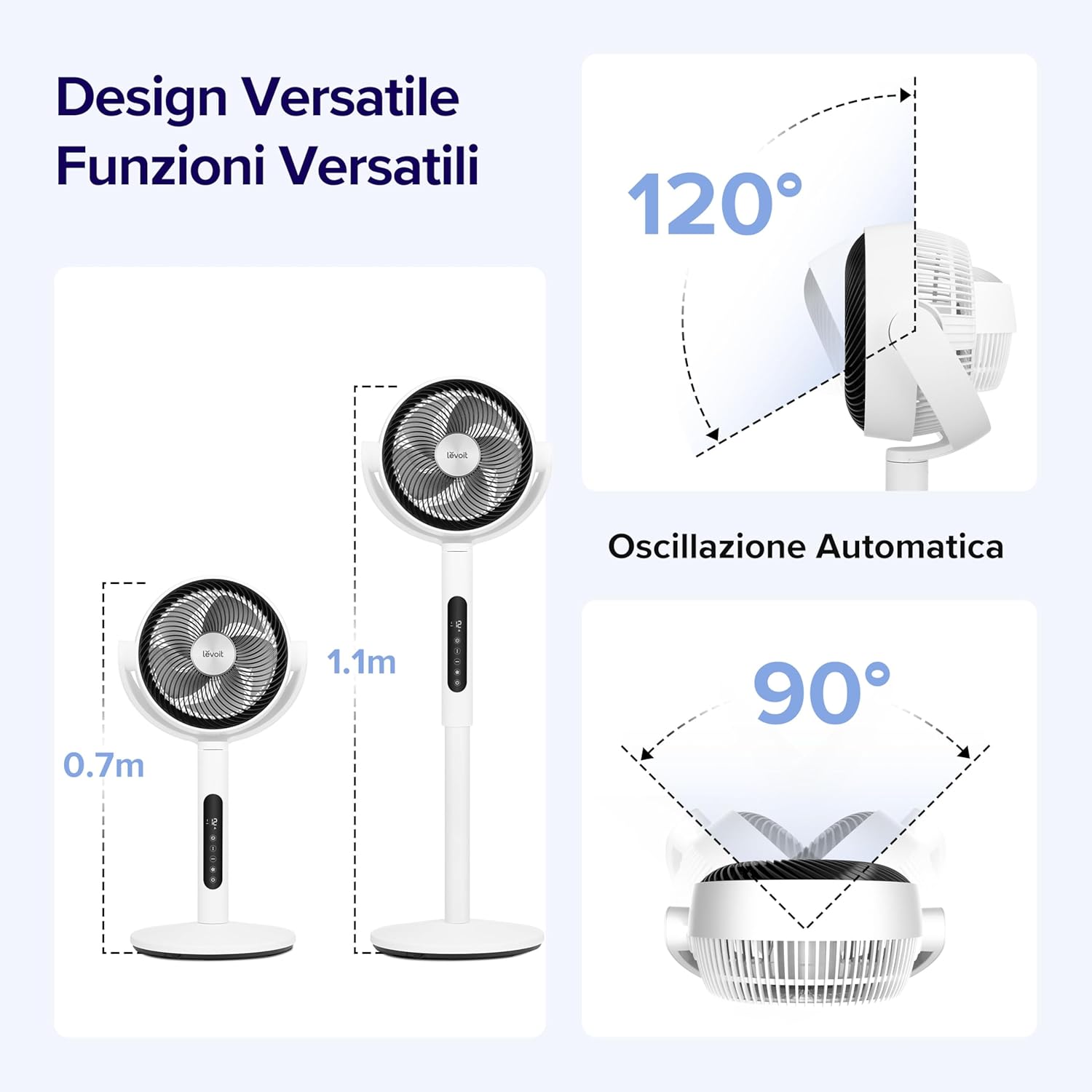
Image: A visual demonstrating the smart sensor technology of the LEVOIT Pedestal Fan, which intelligently adjusts fan speed according to ambient room temperature for energy efficiency.
5.7. Rheolaeth Anghysbell
The fan comes with a convenient remote control for easy operation from a distance. The remote control is magnetic and can be stored securely on the fan unit itself.

Delwedd: Llun agos view of the magnetic remote control for the LEVOIT Pedestal Fan, showing it being attached to the fan for convenient storage.
6. cynnal
Regular cleaning and maintenance will help prolong the life of your fan and ensure optimal performance.
6.1. Glanhau'r Ffan
- Tynnwch y plwg bob amser cyn glanhau.
- Sychwch du allan y ffan gyda lliain meddal, damp brethyn. Peidiwch â defnyddio glanhawyr neu doddyddion sgraffiniol.
- For thorough cleaning, the front grille and fan blades can be easily detached. Rotate the front grille to unlock and remove it.
- Wash the detached grille and blades with mild soap and water. Ensure they are completely dry before reattaching.
- Reassemble the fan by aligning the components and rotating the grille back into its locked position.

Image: Illustration showing the ease of disassembling the LEVOIT Pedestal Fan's front grille and blades for cleaning, emphasizing the simple rotation and washing process.
6.2. Storio
Pan nad yw'n cael ei ddefnyddio am gyfnodau hir, storiwch y ffan mewn lle oer, sych, yn ddelfrydol yn ei becynnu gwreiddiol, i'w amddiffyn rhag llwch a difrod.
7. Datrys Problemau
Os byddwch chi'n dod ar draws unrhyw broblemau gyda'ch ffan, cyfeiriwch at y problemau a'r atebion cyffredin canlynol:
| Problem | Achos Posibl | Ateb |
|---|---|---|
| Nid yw'r ffan yn troi ymlaen. | Heb ei blygio i mewn; Allfa bŵer ddim yn gweithio; Botwm pŵer heb ei wasgu. | Gwnewch yn siŵr bod y ffan wedi'i blygio'n ddiogel i mewn i soced sy'n gweithio. Pwyswch y botwm pŵer. |
| Llif aer gwan. | Fan speed too low; Air intake/outlet blocked; Fan blades dirty. | Increase fan speed. Ensure no obstructions. Clean fan blades and grilles. |
| Mae ffan yn swnllyd. | Fan not on a level surface; Loose parts; Obstruction. | Place fan on a stable, level surface. Check for any loose components or foreign objects. |
| Rheoli o bell ddim yn gweithio. | Batteries dead; Obstruction between remote and fan. | Replace remote control batteries. Ensure clear line of sight to the fan's receiver. |
8. manylebau
| Nodwedd | Manylyn |
|---|---|
| Brand | Levoit |
| Rhif Model | LPF-R432-WEU |
| Lliw | Gwyn |
| Dimensiynau (L x W x H) | 31.75 x 36.83 x 111 cm |
| Pwysau | 7.5 Cilogram |
| Grym | 21 Wat |
| Cyftage | 120.0 folt |
| Deunydd | Plastig |
| Lefel Sŵn | 20 dB (lleiafswm) |
| Nodweddion Arbennig | Portable, Lightweight, Oscillating, Timer, Remote Controlled, Smart Sensor |
| Osgiliad | Up to 90° Horizontal, Up to 120° Vertical |
| Ffynhonnell Pwer | Trydan Corded |
9. Gwarant a Chefnogaeth
For warranty information and customer support, please refer to the warranty card included with your product or visit the official LEVOIT website. Do not attempt to repair the fan yourself, as this may void the warranty.