
1. Rhagymadrodd
The HIKMICRO ECO-V Handheld Thermography Camera is a versatile thermal imaging device designed for various professional applications. It offers thermal, bi-spectrum image fusion, and visible light modes to meet diverse business needs. This manual provides essential information for the safe and effective operation of your ECO-V camera.
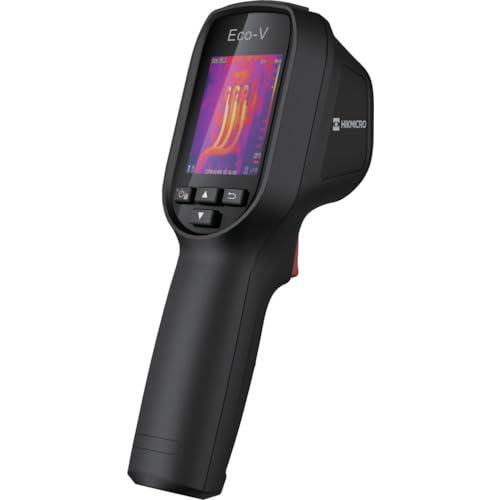
Figure 1: HIKMICRO ECO-V Handheld Thermography Camera
2. Gwybodaeth Diogelwch
Darllenwch a deallwch yr holl rybuddion a chyfarwyddiadau diogelwch cyn defnyddio'r cynnyrch hwn. Gall methu â dilyn y cyfarwyddiadau hyn arwain at sioc drydanol, tân neu anaf difrifol.
Rhagofalon Diogelwch Cyffredinol
- Peidiwch â gweithredu'r ddyfais mewn awyrgylchoedd ffrwydrol, fel ym mhresenoldeb hylifau, nwyon neu lwch fflamadwy.
- Cadwch y ddyfais i ffwrdd o ddŵr a hylifau eraill.
- Peidiwch â cheisio agor na newid y ddyfais. Cyfeiriwch yr holl waith cynnal a chadw at bersonél cymwys.
- Use only HIKMICRO-approved accessories.
- Avoid direct exposure of the thermal lens to strong light sources (e.g., sun, laser) as this may damage the detector.
Diogelwch Batri
- The device contains a built-in Lithium-ion battery. Do not expose the battery to excessive heat, direct sunlight, or fire.
- Peidiwch â thyllu, agor na dadosod y batri.
- Charge the battery only with the provided USB cable and a compatible power adapter.
- Cael gwared ar fatris yn unol â rheoliadau lleol.
3. Cynnwys Pecyn
The HIKMICRO ECO-V package includes the following items:
- HIKMICRO Handheld Thermography Camera ECO-V
- Cebl USB Math-C
- Quick Start Guide (not explicitly mentioned but standard)
- Calibration Certificate (not explicitly mentioned but standard)
Video 3.1: Unboxing the HIKMICRO M-Series (similar to ECO-V, showing typical package contents and device appearance).
4. Dyfais Drosoddview
Familiarize yourself with the physical components and interface of your HIKMICRO ECO-V camera.
Ymddangosiad a Rhyngwyneb
The ECO-V features a compact, ergonomic design for comfortable handheld use. Key components include the thermal lens, optical lens, laser indicator, white light, trigger button, navigation buttons, and a 2.4-inch display.
Video 4.1: This video demonstrates the physical appearance and interface of a HIKMICRO M-Series camera, which shares similar design elements and interface components with the ECO-V.
5. Gosod
5.1 Codi Tâl ar y Dyfais
Before initial use, fully charge the device's built-in Lithium-ion battery.
- Connect the provided USB Type-C cable to the device's USB port.
- Connect the other end of the USB cable to a compatible power adapter (5V2A recommended) and plug it into a power outlet.
- The charging indicator will show red during charging and turn green when fully charged.
Video 5.1: This HIKMICRO ECO operation video demonstrates the charging process for the device.
5.2 Pŵer Ymlaen/Diffodd
To power on the device, press and hold the power button for more than 6 seconds. To power off, press and hold the power button again until the device shuts down.
Video 5.2: This HIKMICRO ECO operation video demonstrates how to power on the device.
6. Cyfarwyddiadau Gweithredu
This section covers the basic and advanced operational features of your ECO-V camera.
6.1 Image Capture and Display
To capture a thermal image, aim the camera at the target and press the trigger button. The captured image will be saved to the internal EMMC storage. To view saved images, navigate to the 'Albums' section in the menu.
Video 6.1: This HIKMICRO ECO operation video demonstrates image capture and viewing saved snapshots.
6.2 Offer Mesur
The ECO-V provides various measurement tools to analyze thermal images:
- Hot Spot: Automatically identifies and displays the highest temperature point.
- Cold Spot: Automatically identifies and displays the lowest temperature point.
- Man canol: Displays the temperature at the center of the screen.
Video 6.2: This HIKMICRO ECO operation video demonstrates the use of measurement tools like hot, cold, and center spots.
6.3 Gwella Delwedd SuperIR
SuperIR technology enhances the thermal image resolution, providing more detail for analysis. You can enable or disable this feature in the settings menu.
Video 6.3: This HIKMICRO ECO operation video demonstrates how to enable and use the SuperIR image enhancement feature.
6.4 Modd Delwedd
The ECO-V supports multiple image modes for different inspection needs:
- Thermol: Displays only the thermal image.
- Cyfuniad: Blends the thermal and visible light images for enhanced detail.
- PIP (Llun-mewn-Llun): Overlays a smaller thermal image on a visible light image.
- Optegol: Displays only the visible light image.
Video 6.4: This HIKMICRO B10S product video demonstrates switching between different image modes, including Thermal, Fusion, PIP, and Optical.
6.5 Parallax Correction
When using fusion modes, adjust the parallax correction based on the distance to the target to ensure accurate alignment between thermal and visible images.
Video 6.5: This HIKMICRO B10S product video demonstrates how to adjust parallax correction for accurate image fusion.
6.6 Palette Adjustment
Select from various color palettes (e.g., White Hot, Black Hot, Rainbow, Ironbow) to visualize temperature differences more effectively. This can be adjusted in the settings menu.
Video 6.6: This HIKMICRO B10S product video demonstrates how to adjust color palettes.
6.7 Emissivity and Distance Settings
For accurate temperature measurements, it is crucial to set the correct emissivity value for the target material and the distance to the target. Refer to the general emissivity reference table in the specifications section.
Video 6.7: This HIKMICRO ECO operation video demonstrates setting emissivity and distance for accurate temperature readings.
6.8 Pwyntydd Laser
The built-in laser pointer helps to precisely identify the measurement target. It can be enabled or disabled in the settings menu.
Video 6.8: This HIKMICRO ECO operation video demonstrates how to enable and use the laser pointer.
6.9 Larwm Tymheredd Uchel
Set a high temperature alarm threshold to be notified when temperatures exceed a predefined limit. This feature is useful for identifying potential overheating issues.
Video 6.9: This HIKMICRO B10S product video demonstrates how to set a high temperature alarm.
6.10 Hotspot Connection
The ECO-V can connect to a mobile device via Wi-Fi hotspot for live viewing and data transfer. Enable the Wi-Fi hotspot function in the device settings and connect your mobile device.
Video 6.10: This HIKMICRO M-Series video demonstrates how to establish a hotspot connection with a mobile device.
6.11 HIKMICRO Viewer App Connection
Lawrlwythwch y HIKMICRO Viewer app on your mobile device to access live view, manage images and videos, and generate reports. Connect the device to your phone via Wi-Fi.
Video 6.11: This HIKMICRO Pocket series video demonstrates connecting the device to the HIKMICRO Viewer app for various functions.
7. cynnal
7.1 Glanhau
- Wipe the device body with a soft, damp brethyn. Peidiwch â defnyddio glanhawyr neu doddyddion sgraffiniol.
- Gently clean the lenses with a lens cleaning cloth. Avoid touching the lens surface with bare hands.
7.2 Storio
- Storiwch y ddyfais mewn lle oer, sych, i ffwrdd o olau haul uniongyrchol a thymheredd eithafol.
- If storing for an extended period, ensure the battery is partially charged (around 50%) and recharge it every few months to maintain battery health.
8. Datrys Problemau
If you encounter issues with your HIKMICRO ECO-V, refer to the following common problems and solutions:
| Problem | Achos Posibl | Ateb |
|---|---|---|
| Nid yw'r ddyfais yn pweru ymlaen | Batri isel; Camweithrediad dyfais | Charge the battery; Contact support |
| Darlleniadau tymheredd anghywir | Incorrect emissivity/distance settings; Dirty lens | Adjust emissivity/distance; Clean the lens |
| Cannot connect to Wi-Fi hotspot | Incorrect password; Hotspot not enabled | Verify password; Enable hotspot in settings |
9. manylebau
Detailed technical specifications for the HIKMICRO ECO-V camera:
| Nodwedd | Manyleb |
|---|---|
| Model | ECO-V |
| Measurement Temperature Range | -20 ° C i 550 ° C |
| Minimum Temperature Display | 0.1°C |
| Maes o View (FOV) | 50° × 50° |
| Datrysiad Gofodol (IFOV) | 8.89 mrad |
| Amrediad Tymheredd Gweithredu | -10 ° C i 50 ° C |
| Amrediad Tymheredd Storio | -40 ° C i 70 ° C |
| Maint Arddangos | 2.4 modfedd |
| Ffynhonnell Pwer | Batri Lithiwm-ion wedi'i ymgorffori |
| Amser Gweithredu Batri | 8 awr |
| Wi-Fi | Ddim ar gael |
| Lefel Amddiffyn | IP54 |
| Rhyngwyneb | USB Math-C |
| Cae Picsel | 12μm |
| Measuring Wavelength | 7.5-14μm |
| NETD | < 40 mK (@25°C, F#=1.0) |
| Hyd Ffocal | 1.35 mm |
| Agorfa | F1.0 |
| Pellter Ffocws Lleiaf | 0.1m (0.33 troedfedd) |
| Cyfradd Ffrâm | 25Hz |
| System Ffocws | Di-ffocws |
| Cyfryngau Recordio | EMMC (4GB) |
| Capasiti Storio Delwedd | 30,000 o ddelweddau |
| Delwedd File Fformat | BMP (includes measurement data) |
| Cydraniad Delwedd Thermol | 96×96 (9,216 pixels) |
| Visible Image Resolution | 640×480 |
| Cywirdeb | ±2°C or ±2% (whichever is greater), when ambient temperature is 15°C to 35°C and target temperature is 0°C or above. |
| Defnyddiau | Pholycarbonad, resin ABS |
| Pwysau | 360g |
General Emissivity Reference
| Deunydd | Allyredd |
|---|---|
| Croen Dynol | 0.98 |
| PCB | 0.91 |
| Concrit Sment | 0.95 |
| Serameg | 0.92 |
| Rwber | 0.95 |
| Paent | 0.93 |
| Pren | 0.85 |
| Brics | 0.96 |
| Tywod | 0.90 |
| Pridd | 0.92 |
| Cotwm | 0.98 |
| Cardbord | 0.90 |
| Papur Gwyn | 0.96 |
| Dwfr | 0.96 |
10. Gwarant a Chefnogaeth
HIKMICRO products are covered by a limited warranty. For detailed warranty terms and conditions, please refer to the official HIKMICRO websafle neu cysylltwch â'ch dosbarthwr lleol.
Cefnogaeth i Gwsmeriaid
If you require technical assistance, troubleshooting, or have questions about your ECO-V camera, please contact HIKMICRO customer support through their official websafle neu'r wybodaeth gyswllt a ddarperir yn eich pecynnu cynnyrch.