
1. Gwybodaeth Bwysig am Ddiogelwch
Please read these safety instructions carefully before operating your TV and retain them for future reference. This manual provides important information regarding the safe installation, use, and maintenance of your Sharp 40FH2EA television.
- Ffynhonnell Pwer: Connect the TV only to an AC 220-240V, 50Hz power supply.
- Awyru: Sicrhewch fod digon o awyru o amgylch y teledu. Peidiwch â rhwystro agoriadau awyru.
- Dŵr a lleithder: Peidiwch â gadael y teledu yn agored i law na lleithder. Peidiwch â gosod gwrthrychau sy'n llawn hylifau, fel fasys, ar y teledu.
- Ffynonellau Gwres: Cadwch y teledu i ffwrdd o ffynonellau gwres fel rheiddiaduron, cofrestri gwres, stofiau, neu offer arall sy'n cynhyrchu gwres.
- Glanhau: Datgysylltwch y teledu o'r soced wal cyn glanhau. Defnyddiwch frethyn meddal, sych. Peidiwch â defnyddio glanhawyr hylif na glanhawyr aerosol.
- Mowntio: When wall-mounting, ensure the wall mount is suitable for the TV's weight and installed by qualified personnel.
- Plant: Supervise children to ensure they do not play with the TV.
2. Cynnwys Pecyn
Gwiriwch fod yr holl eitemau yn bresennol yn y pecynnu:
- Sharp 40FH2EA 40-inch Full HD LED Android TV
- Rheolaeth Anghysbell
- TV Stands (2x)
- Sgriwiau ar gyfer Stondinau Teledu
- Cebl Pŵer
- Canllaw Cychwyn Cyflym
- Safety Information Leaflet

Delwedd: Blaen view of the Sharp 40FH2EA television, showcasing ei ddyluniad bezel main.
3. Gosod
3.1 Cysylltu'r Standiau Teledu
- Rhowch y teledu wyneb i lawr yn ofalus ar arwyneb meddal, glân i atal difrod i'r sgrin.
- Aliniwch bob stondin â'r slotiau cyfatebol ar waelod y teledu.
- Sicrhewch y stondinau gan ddefnyddio'r sgriwiau a ddarperir. Gwnewch yn siŵr eu bod wedi'u tynhau'n gadarn.

Image: The Sharp 40FH2EA television viewed from an angle, showing the two attached stand feet supporting the unit.
3.2 Cysylltu Dyfeisiau Allanol
The Sharp 40FH2EA offers various connection options for your external devices.
- HDMI: Connect Blu-ray players, game consoles, or set-top boxes to the HDMI ports. This model features 3 HDMI inputs.
- USB: Insert USB drives for media playback or software updates into the 2 USB ports.
- Antena/Cable: Cysylltwch eich antena neu signal teledu cebl â'r mewnbwn RF.
- Ethernet (LAN): I gael cysylltiad rhyngrwyd sefydlog, cysylltwch gebl Ethernet â'r porthladd LAN.
- Sain Allan: Use the optical digital audio output for connecting to a soundbar or home theater system.

Delwedd: Pro ochrfile of the Sharp 40FH2EA TV, highlighting the accessible USB and HDMI ports on the left side.
Delwedd: Cefn view of the Sharp 40FH2EA TV, displaying the various input and output ports including HDMI, USB, and antenna connections.
3.3 Troi Ymlaen Cychwynnol a Gosod Tro Cyntaf
- Cysylltwch y cebl pŵer â'r teledu ac yna â soced wal.
- Pwyswch y botwm pŵer ar y teclyn rheoli o bell neu ar y teledu.
- Dilynwch y cyfarwyddiadau ar y sgrin i ddewis eich iaith, gwlad, a gosodiadau rhwydwaith (Wi-Fi neu Ethernet).
- Perform a channel scan for DVB-T/T2/C/S/S2 signals to find available TV channels.
- Log in with your Google account to access Android TV features and download apps.
4. Gweithredu'r teledu
4.1 Swyddogaethau Rheoli o Bell
Mae'r teclyn rheoli o bell yn caniatáu ichi lywio nodweddion y teledu. Ymgyfarwyddwch â'r prif fotymau:
- Power (Red button): Yn troi'r teledu ymlaen neu i ffwrdd.
- Ffynhonnell: Yn dewis ffynonellau mewnbwn (HDMI 1, HDMI 2, teledu, ac ati).
- Botymau Rhif (0-9): Dewis sianel uniongyrchol.
- Cyfrol (+/-): Yn addasu lefel y sain.
- Sianel (CH +/-): Yn newid sianeli teledu.
- Pad Llywio (I Fyny/I Lawr/Chwith/Dde/Iawn): Yn llywio bwydlenni ac yn cadarnhau dewisiadau.
- Yn ôl: Yn dychwelyd i'r sgrin neu'r ddewislen flaenorol.
- Cartref: Yn cyrchu sgrin gartref Android TV.
- Netflix, Prime Video, YouTube, Google Play: Dedicated buttons for quick access to streaming services.

Image: The remote control for the Sharp 40FH2EA TV, showing its layout with navigation buttons and dedicated streaming service buttons.
4.2 Nodweddion Teledu Clyfar (Android TV)
Your Sharp 40FH2EA TV runs on Android TV, providing access to a wide range of apps and services.
- Sgrin Cartref: The central hub for your apps, recommended content, and settings.
- Google Play Store: Lawrlwythwch apiau, gemau a chynnwys ychwanegol.
- Rheoli llais: Use the built-in Google Assistant (if available on your remote) to search for content, control smart home devices, and more.
- Chromecast wedi'i ymgorffori: Darlledwch gynnwys o'ch ffôn clyfar neu dabled yn uniongyrchol i'r teledu.
- Gwasanaethau Ffrydio: Access popular services like Netflix, YouTube, Amazon Prime Video, Hulu, Disney+, and more.

Image: The Android TV home screen displayed on the Sharp 40FH2EA, featuring various streaming app icons and content recommendations.
5. cynnal
5.1 Glanhau'r teledu
- Datgysylltwch y teledu bob amser cyn glanhau.
- Defnyddiwch frethyn meddal, sych, heb lint i sychu'r sgrin a'r cabinet.
- Ar gyfer marciau ystyfnig ar y sgrin, rhwbiwch yn ysgafnampen the cloth with water or a specialized screen cleaner (ensure it's safe for LED screens) and wipe gently.
- Never spray cleaners directly onto the screen or cabinet.
5.2 Diweddariadau Meddalwedd
Your Android TV may receive software updates periodically. It is recommended to keep your TV's software updated for optimal performance and security. Updates can usually be found in the TV's settings menu under 'About' or 'System Update'.
6. Datrys Problemau
Os byddwch chi'n dod ar draws problemau gyda'ch teledu, cyfeiriwch at y problemau a'r atebion cyffredin canlynol:
| Problem | Achos / Ateb Posibl |
|---|---|
| Dim pŵer | Ensure the power cable is securely connected to the TV and the wall outlet. Check if the outlet is working. Try a different outlet. |
| Dim llun, ond mae sain yn bresennol | Gwiriwch y ffynhonnell fewnbwn. Gwnewch yn siŵr bod dyfeisiau allanol wedi'u troi ymlaen ac wedi'u cysylltu'n gywir. Rhowch gynnig ar gebl HDMI gwahanol. |
| Dim sain, ond mae llun yn bresennol | Check the volume level. Ensure the TV is not muted. Check audio settings and external audio device connections. |
| Rheolaeth bell ddim yn gweithio | Amnewidiwch y batris. Gwnewch yn siŵr nad oes unrhyw rwystrau rhwng y teclyn rheoli o bell a synhwyrydd IR y teledu. |
| Methu cysylltu â Wi-Fi | Gwnewch yn siŵr bod eich llwybrydd Wi-Fi ymlaen ac yn gweithio. Ail-nodwch y cyfrinair Wi-Fi. Rhowch gynnig ar ailgychwyn y teledu a'r llwybrydd. |
| Mae apiau'n araf neu'n chwalu | Close unused apps. Clear app cache (in TV settings). Restart the TV. Ensure sufficient internet speed. |
If the problem persists, consult the full user manual available on the Sharp support websafle neu cysylltwch â chymorth cwsmeriaid.
7. manylebau
Detailed technical specifications for the Sharp 40FH2EA 40-inch Full HD LED Android TV:
| Nodwedd | Manyleb |
|---|---|
| Enw Model | 40FH2EA |
| Internal Model Number | 2T-C40FHx |
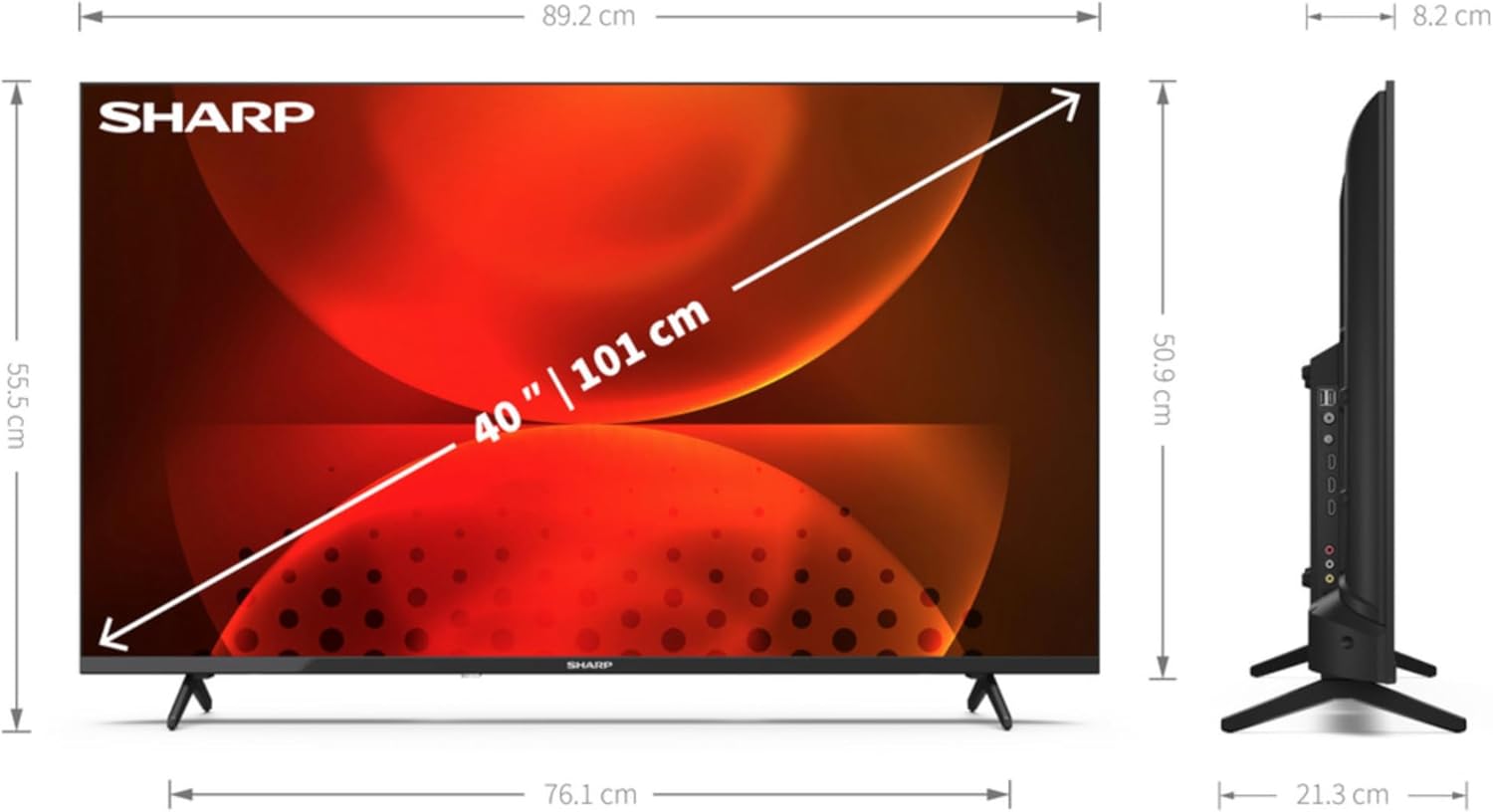
| Maint Sgrin | 40 modfedd (101.6 cm) |
| Cydraniad Arddangos | 1920 x 1080 picsel (HD Llawn) |
| Technoleg Arddangos | LED |
| Siâp Sgrin | Fflat |
| Llwyfan Teledu Clyfar | Teledu Android |
| Motion Interpolation Technology | AMR (Active Motion Rate) 400 |
| Cymhareb Agwedd Brodorol | 16:9 |
| Digital Signal Format | DVB, DVB-C, DVB-S, DVB-S2, DVB-T, DVB-T2 |
| Cysylltedd Di-wifr | Wi-Fi, Bluetooth |
| Cysylltedd Wired | LAN Ethernet |
| Porthladdoedd HDMI | 3 |
| Porthladdoedd USB | 2 |
| Lliw | Du |
| Gwasanaethau Rhyngrwyd â Chymorth | Netflix, YouTube, Amazon Prime Video, Hulu, Disney+, etc. |
8. Gwarant a Chefnogaeth
Am wybodaeth am y warant, cyfeiriwch at y cerdyn gwarant sydd wedi'i gynnwys gyda'ch cynnyrch neu ewch i wefan swyddogol Sharp website for your region. For technical support, product registration, or to download the full user manual, please visit the Sharp support portal or contact their customer service department.
Cymorth Ar-lein: www.sharpconsumer.com