
FORTINET FortiGate-120G
FortiGate-120G Firewall User Manual
Model: FG-120G | Brand: FORTINET
1. Rhagymadrodd
This manual provides detailed instructions for the installation, operation, maintenance, and troubleshooting of the FortiGate-120G Firewall appliance. The FortiGate-120G is a high-performance network security appliance designed to provide robust protection and efficient network management for enterprise environments.
It features advanced capabilities such as SP5 hardware acceleration, multiple Gigabit Ethernet and SFP+ ports, and dual AC power supplies for reliable operation.
2. Cynnyrch Drosview
The FortiGate-120G is a powerful security appliance offering comprehensive threat protection and network management. Key features include:
- Robust Port Configuration: 18 GE RJ45 ports (1 management, 1 HA, 16 switch), 8 GE SFP slots, and 4 10GE SFP+ slots.
- Cutting-edge Performance: SP5 hardware acceleration for rapid application identification and efficient operations.
- Dual AC Power Supplies: Non-hot swappable for uninterrupted service and operational reliability.
- Superior Security Features: Integrated with Fortinet’s Security Fabric, offering advanced threat protection, SSL inspection, and AI-powered FortiGuard services.
- Streamlined Network Management: FortiLink protocol for seamless integration and centralized control.
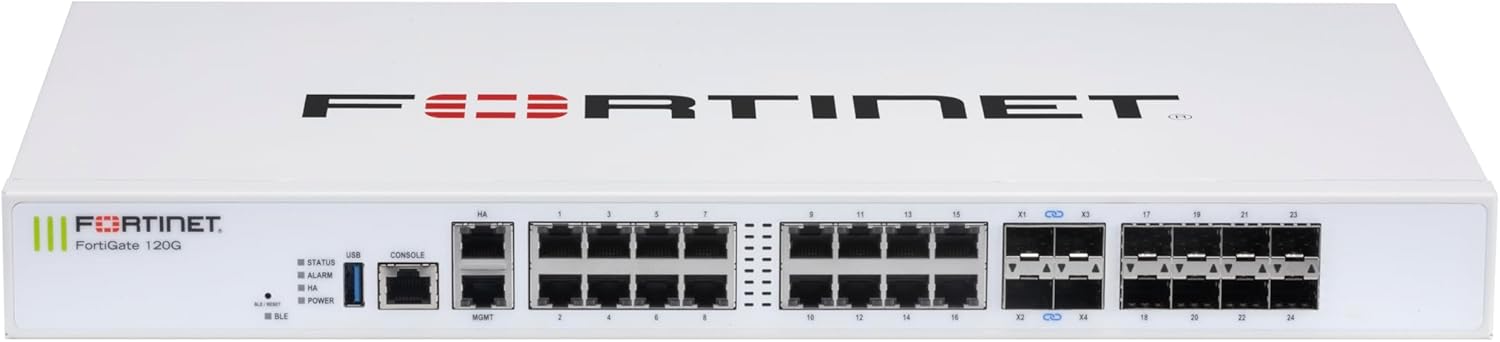
Ffigur 2.1: Blaen view of the FortiGate-120G appliance, showing the various RJ45 and SFP/SFP+ ports, status indicators, and console/USB ports.

Ffigur 2.2: Blaen a chefn view of the FortiGate-120G, highlighting the multiple GE RJ45, GE SFP, and 10 GE SFP+ slots, along with the dual AC power inputs at the rear.
3. Gosod a Gosod
3.1. Cynnwys Pecyn
Gwiriwch fod yr holl gydrannau yn bresennol yn y pecyn:
- FortiGate-120G Appliance
- Power Cords (x2)
- Pecyn gosod rac (os yn berthnasol)
- Canllaw Cychwyn Cyflym
3.2. Gosod Corfforol
The FortiGate-120G can be installed in a standard 19-inch rack or placed on a desktop.
Gosod rac:
- Attach the provided rack-mount ears to the sides of the appliance using the screws.
- Secure the appliance into the rack using appropriate rack screws. Ensure adequate ventilation around the unit.
Gosod bwrdd gwaith:
- Gosodwch y teclyn ar arwyneb gwastad, sefydlog.
- Ensure there is sufficient space for airflow around the unit, especially at the front and rear vents.

Figure 3.1: Physical dimensions of the FortiGate-120G, indicating a height of 1.73 inches, width of 17 inches, and length of 10 inches, with a weight of 12.17 pounds. This information is crucial for proper rack or desktop placement.
3.3. Cysylltiad Pwer
Connect the two provided AC power cords to the power inlets at the rear of the FortiGate-120G and then to separate, grounded power outlets. The dual power supplies ensure redundancy.

Ffigur 3.2: Cefn view of the FortiGate-120G, showing the dual AC power inlets (100-240V AC, 50-60Hz, 1.5A Max) and ventilation.
3.4. Cysylltiad Rhwydwaith Cychwynnol
For initial configuration, connect a management workstation to the FortiGate-120G using one of the following methods:
- Porth Consol: Connect a serial cable from your workstation to the RJ45 console port on the FortiGate-120G. Use a terminal emulator (e.g., PuTTY) with settings: 9600 baud, 8 data bits, no parity, 1 stop bit, no flow control.
- Porth Rheoli: Connect an Ethernet cable from your workstation to the dedicated management port (MGMT) on the FortiGate-120G. The default IP address for the management interface is typically 192.168.1.99.
4. Cyfarwyddiadau Gweithredu
4.1. Pweru Ymlaen ac i ffwrdd
To power on the FortiGate-120G, ensure both power cords are securely connected to active power outlets. The device will automatically power on. To power off, disconnect both power cords from the power outlets.
4.2. Dangosyddion Statws
Monitor the front panel LEDs for operational status:
- STATWS: Indicates system status (e.g., green for normal operation, blinking for activity).
- ALARM: Indicates a system alarm or error.
- HA: Yn dynodi statws Argaeledd Uchel.
- PŴER: Indicates power supply status.
- USB: Yn dynodi gweithgaredd porthladd USB.
- BLE: Indicates Bluetooth Low Energy status.
4.3. Cyfluniad Cychwynnol
After connecting to the device via console or management port, access the FortiGate CLI or web-based manager for initial configuration. Refer to the FortiGate Administration Guide for detailed configuration steps, including setting up interfaces, security policies, and user authentication.
Canys web-based management, open a web browser and navigate to the IP address of the management interface (e.g., https://192.168.1.99). Use the default username "admin" and no password for the first login.
5. cynnal
5.1. Diweddariadau Firmware
Regularly check for and apply firmware updates to ensure optimal performance, security, and access to new features. Firmware can be downloaded from the Fortinet Support websafle.
5.2. System Backups
Periodically back up your FortiGate configuration to prevent data loss. This can be done via the web-based manager or CLI.
5.3. Ystyriaethau Amgylcheddol
Sicrhau bod yr amgylchedd gweithredu yn bodloni'r amodau canlynol:
- Tymheredd: 0°C i 40°C (32°F i 104°F)
- Lleithder: 10% i 90% heb fod yn gyddwyso
- Maintain clear airflow around the appliance to prevent overheating.
6. Datrys Problemau
6.1. Problemau Cyffredin ac Atebion
| Mater | Achos Posibl | Ateb |
|---|---|---|
| Dyfais ddim yn pweru ymlaen | Power cords not connected, faulty power outlet, power supply failure. | Verify power cord connections. Test power outlets. Check POWER LED status. |
| Methu cyrchu web- rheolwr seiliedig | Incorrect IP address, network connectivity issue, firewall policy blocking access. | Verify IP address and network settings. Check cable connections. Try accessing via console. |
| Perfformiad rhwydwaith araf | High network traffic, misconfigured security policies, hardware limitations. | Monitor network usage. Review firewall policies. Consult performance specifications. |
6.2. Ailosod i Ddiofynion y Ffatri
If severe configuration issues arise, you may need to reset the FortiGate-120G to its factory default settings. This can typically be done via the console port using specific CLI commands. Rhybudd: This will erase all configurations and data on the device.
7. manylebau
The following table outlines the key technical specifications for the FortiGate-120G:
| Nodwedd | Manylyn |
|---|---|
| Rhif Model | FortiGate-120G (FG-120G) |
| Porthladdoedd | 18 x GE RJ45 (1 MGMT, 1 HA, 16 Switch), 8 x GE SFP, 4 x 10GE SFP+ |
| Cyflymiad | SP5 Hardware Acceleration |
| Cyflenwad Pŵer | Dual AC (Non-hot swappable) |
| Dimensiynau (H x W x L) | 1.73 x 17 x 10 modfedd |
| Pwysau | 13 pwys |
| Gwneuthurwr | Fortinet |
| UPC | 195875219500 |
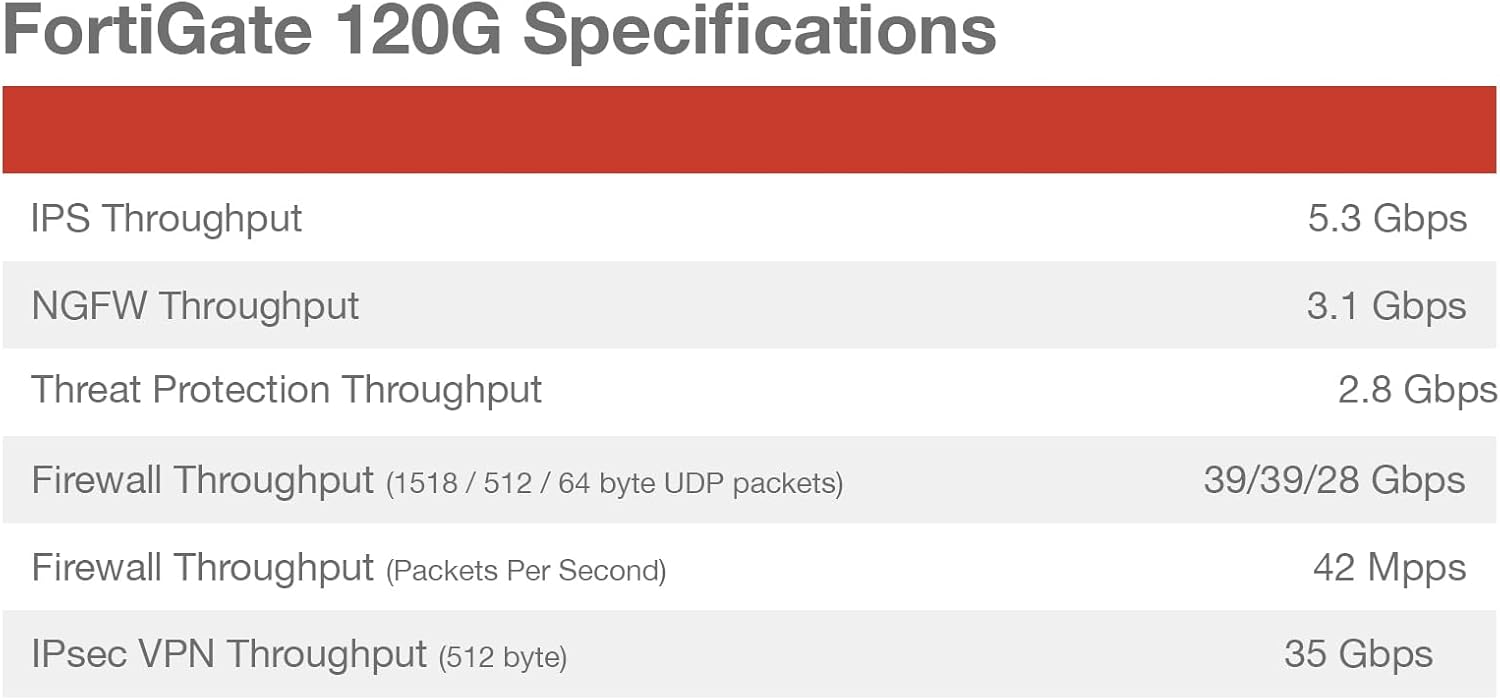
Figure 7.1: Detailed performance specifications for the FortiGate-120G, including IPS Throughput (5.3 Gbps), NGFW Throughput (3.1 Gbps), Threat Protection Throughput (2.8 Gbps), Firewall Throughput (39/39/28 Gbps for 1518/512/64 byte UDP packets), Firewall Throughput (42 Mpps), and IPsec VPN Throughput (35 Gbps).

Figure 7.2: Diagram illustrating the interfaces of the FortiGate-120G, including 1x RJ45 Console Port, 2x RJ45 HA and Management Ports, 16x GE RJ45 Ports, 4x 10GE SFP+ FortiLink Slots, and 8x SFP Ports. Also shown are hardware features like SP5 acceleration, 1U rack size, dual AC power, and 480GB storage.
8. Gwarant a Chefnogaeth
8.1. Gwarant Cynnyrch
The FortiGate-120G appliance comes with a standard hardware warranty provided by Fortinet. For specific warranty terms and conditions, please refer to the warranty documentation included with your product or visit the official Fortinet websafle.
8.2. Cymorth Technegol
Am gymorth technegol, dogfennaeth cynnyrch, a lawrlwythiadau meddalwedd, ewch i wefan Cymorth Fortinet. websafle:
Fortinet offers various support plans and services, including FortiCare subscriptions, which provide access to technical support, firmware updates, and advanced services. Information on available subscriptions can be found on the Fortinet websafle.

Ffigur 8.1: Drosoddview of Fortinet subscription services, including FortiGuard Security Services (IPS, Anti-Malware, URL Filtering, Anti-Spam, Data Loss Prevention, OT Security), SD-WAN and SASE Services, NOC and SOC Services, Hardware and Software Support (FortiCare Essentials, Premium, Elite), and Base Services (Internet Service DB Updates, GeoIP DB Updates, Device/OS Signatures, Trusted Certificate DB Updates, DDNS). These services enhance the functionality and security of the FortiGate-120G.
Ask a question about this manual
Ask about setup, troubleshooting, compatibility, parts, safety, or missing instructions. Manuals+ will review the question and use this page’s manual context to help answer it.