
Core Innovations CTP500BL
Core Innovations Wireless Mini Portable Thermal Printer Label Maker
Model: CTP500BL
Rhagymadrodd
The Core Innovations Wireless Mini Portable Thermal Printer is a compact and versatile device designed for on-the-go printing. Utilizing thermal printing technology, it produces high-quality, monochrome prints without the need for ink or toner. This manual provides comprehensive instructions for setting up, operating, and maintaining your thermal printer.
Beth Sydd yn y Bocs
- Core Innovations Wireless Mini Portable Thermal Printer
- Cebl Codi Tâl USB-C
- Thermal Paper Rolls (Labels)
- Llawlyfr Defnyddiwr

Image: The printer bundle, including the printer, a smartphone displaying the companion app, and several rolls of thermal paper.
Cynnyrch Drosview
Familiarize yourself with the key components of your thermal printer.

Image: A detailed diagram highlighting the printer's power button, indicator light, release tabs, output tray, status light, and USB-C charging port. It also explains the meaning of the indicator and status light colors (blinking green for pairing, solid green for connected, solid red for out of paper/overheated/output tray open, and off for fully charged).
Statws Golau Dangosydd:
- Golau Gwyrdd Amrantu: Mae'r ddyfais yn y modd paru.
- Golau Gwyrdd solet: Mae'r ddyfais yn gysylltiedig.
- Golau coch solet: Out of paper, overheated, or output tray is open.
- Statws golau i ffwrdd: Wedi'i gyhuddo'n llawn.
Gosod
1. Codi Tâl ar yr Argraffydd
Before first use, fully charge the printer. Connect the provided USB-C charging cable to the printer's USB-C port and the other end to a compatible USB power adapter (not included). The status light will be solid red while charging and turn off when fully charged. A full charge provides approximately 1.5 hours of continuous use.
2. Llwytho Papur Thermol
- Press the release tabs on both sides of the printer and open the lid.
- Insert a roll of thermal paper into the compartment, ensuring the paper feeds from the top and is aligned correctly.
- Pull a small amount of paper out past the cutting edge.
- Caewch y caead yn gadarn nes ei fod yn clicio i'w le.
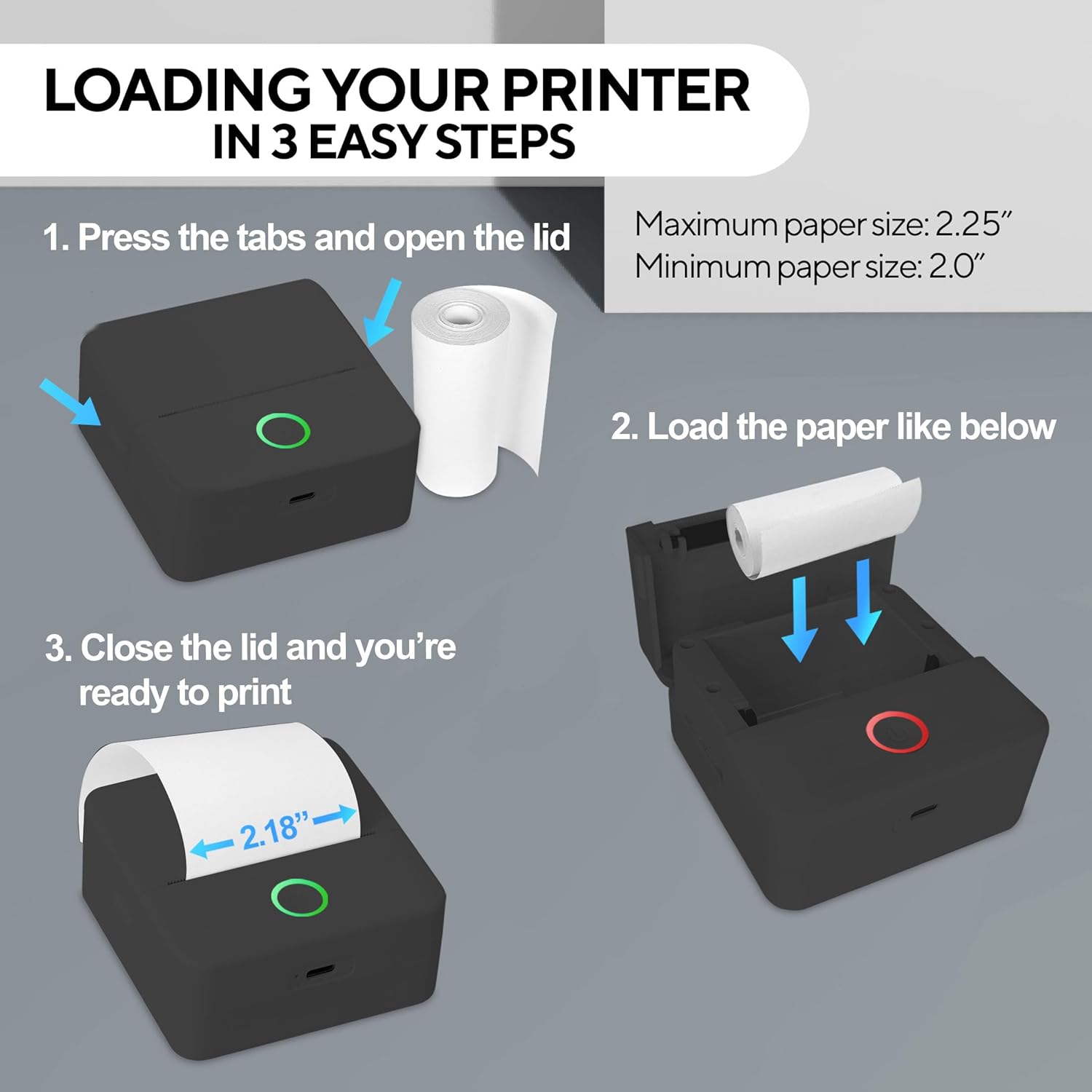
Image: A visual guide demonstrating the three steps to load thermal paper: pressing the tabs to open the lid, placing the paper roll inside, and closing the lid.
Maximum paper size: 2.25 inches. Minimum paper size: 2.0 inches.
3. Gosod App
Download the free "InstaPrint" app from the Apple App Store (for iOS devices) or Google Play Store (for Android devices). The app is required to operate the printer.

Image: A smartphone displaying the InstaPrint app interface next to the thermal printer, illustrating the wireless connection for printing.
4. Pâr Bluetooth
- Ensure the printer is charged and powered on. The indicator light will blink green, indicating it's in pairing mode.
- Galluogi Bluetooth ar eich ffôn clyfar neu dabled.
- Open the "InstaPrint" app. The app will guide you through the pairing process. Select your printer from the list of available devices.
- Once successfully paired, the indicator light on the printer will turn solid green.
Cyfarwyddiadau Gweithredu
Printing from the App
- Open the InstaPrint app on your connected device.
- Select the type of content you wish to print (e.g., photo, text, label, custom design).
- Import or create your content within the app.
- Adjust print settings such as darkness, size, and orientation as needed.
- Cynview your print to ensure it appears as desired.
- Tap the "Print" button to send the job to your thermal printer.

Image: The thermal printer actively printing a creative design onto a roll of paper, demonstrating its output capability.
Customizing Prints
The InstaPrint app offers various customization options:
- Testun: Add text, choose fonts, sizes, and styles.
- Delweddau: Import photos from your gallery, crop, rotate, and adjust contrast/brightness.
- Templedi: Utilize pre-designed templates for labels, notes, and more.
- Arlunio: Create freehand drawings directly in the app.
Video: This video demonstrates the Core Innovations Mini Thermal Printer in action, showcasing its ease of use and the quality of its prints for various applications.
Cynnal a chadw
Glanhau'r Pen Print
To ensure optimal print quality, regularly clean the print head. Use a cotton swab lightly dampened with isopropyl alcohol. Gently wipe the print head surface. Allow it to dry completely before closing the lid and using the printer.
Storio Papur
Store thermal paper in a cool, dry place away from direct sunlight and heat to prevent discoloration and degradation of print quality.
Datrys problemau
| Problem | Achos Posibl | Ateb |
|---|---|---|
| Nid yw'r argraffydd yn troi ymlaen. | Batri isel. | Charge the printer using the provided USB-C cable. |
| Methu paru drwy Bluetooth. | Bluetooth is off on device; printer not in pairing mode; interference. | Ensure Bluetooth is enabled. Power cycle the printer to enter pairing mode (blinking green light). Move closer to the printer and away from other wireless devices. |
| Poor print quality (faint/blurry). | Print head dirty; incorrect paper loading; low battery. | Clean the print head. Re-load paper correctly. Charge the printer. Adjust print darkness settings in the app. |
| Nid yw'r argraffydd yn argraffu. | Out of paper; lid not closed; app not connected; print head overheated. | Check and replace paper roll. Ensure lid is securely closed. Verify app connection. Allow printer to cool down if the indicator light is solid red. |
Manylebau
| Nodwedd | Manylyn |
|---|---|
| Rhif Model | CTP500BL |
| Technoleg Argraffu | Thermol |
| Cysylltedd | Bluetooth, USB |
| Cydraniad Argraffu | 200 x 200 DPI |
| Allbwn Argraffydd | Unlliw |
| Cyflymder Argraffu Uchaf (Monochrom) | 12 ppm |
| Dyfeisiau Cydnaws | Android 4.4 neu'n uwch, iOS 8.0 neu'n uwch |
| Bywyd Batri | Hyd at 1.5 awr o ddefnydd parhaus |
| Dimensiynau (L x W x H) | 3.31" x 3.31" x 1.46" |
| Pwysau Eitem | 11.6 owns |
| UPC | 810111502597 |

Image: The thermal printer shown with its compact dimensions: 3.3 inches (depth), 3.4 inches (width), and 1.6 inches (height).
Gwarant a Chefnogaeth
This Core Innovations product comes with a limited warranty. For detailed warranty information, technical support, or service inquiries, please refer to the contact information provided on the product packaging or visit the official Core Innovations websafle.
Always ensure you are using official Core Innovations accessories and thermal paper for optimal performance and to maintain warranty validity.