
1. Rhagymadrodd
This manual provides detailed instructions for the safe and effective operation, setup, and maintenance of your GOYOJO CYF-E+ Head-Mounted Night Vision Monocular Goggles. Please read this manual thoroughly before using the device to ensure optimal performance and longevity.
The GOYOJO CYF-E+ is designed for enhanced visibility in low-light and complete darkness, featuring 7x optical magnification, a 1.54-inch HD screen, and a rechargeable power source. It can be used handheld or head-mounted, and is compatible with certain rifle setups.
2. Gwybodaeth Diogelwch
- Do not look directly at strong light sources (e.g., sun, lasers) through the device, as this can cause permanent eye damage and damage to the device's sensor.
- Cadwch y ddyfais i ffwrdd o dymheredd eithafol, lleithder a golau haul uniongyrchol.
- Osgowch ollwng y ddyfais neu roi’r ddyfais dan effaith ddifrifol.
- Peidiwch â cheisio dadosod na thrwsio'r ddyfais eich hun. Cysylltwch â phersonél gwasanaeth cymwys i gael cymorth.
- Ensure the device is securely mounted when used with a head strap or rifle to prevent accidental drops.
- Cael gwared ar fatris yn unol â rheoliadau lleol.
3. Cynnwys Pecyn
Gwiriwch fod yr holl eitemau yn bresennol yn y pecyn:
- GOYOJO CYF-E+ Night Vision Monocular
- Strap pen addasadwy
- Cebl Codi Tâl USB
- Rifle/Air Gun Mount (if applicable)
- Llawlyfr Defnyddiwr (y ddogfen hon)

Figure 3.1: Included components of the GOYOJO CYF-E+ Night Vision Monocular package.
4. Cynnyrch Drosview
The GOYOJO CYF-E+ features a compact design with intuitive controls for night vision operation.

Figure 4.1: GOYOJO CYF-E+ Night Vision Monocular with Head Strap.
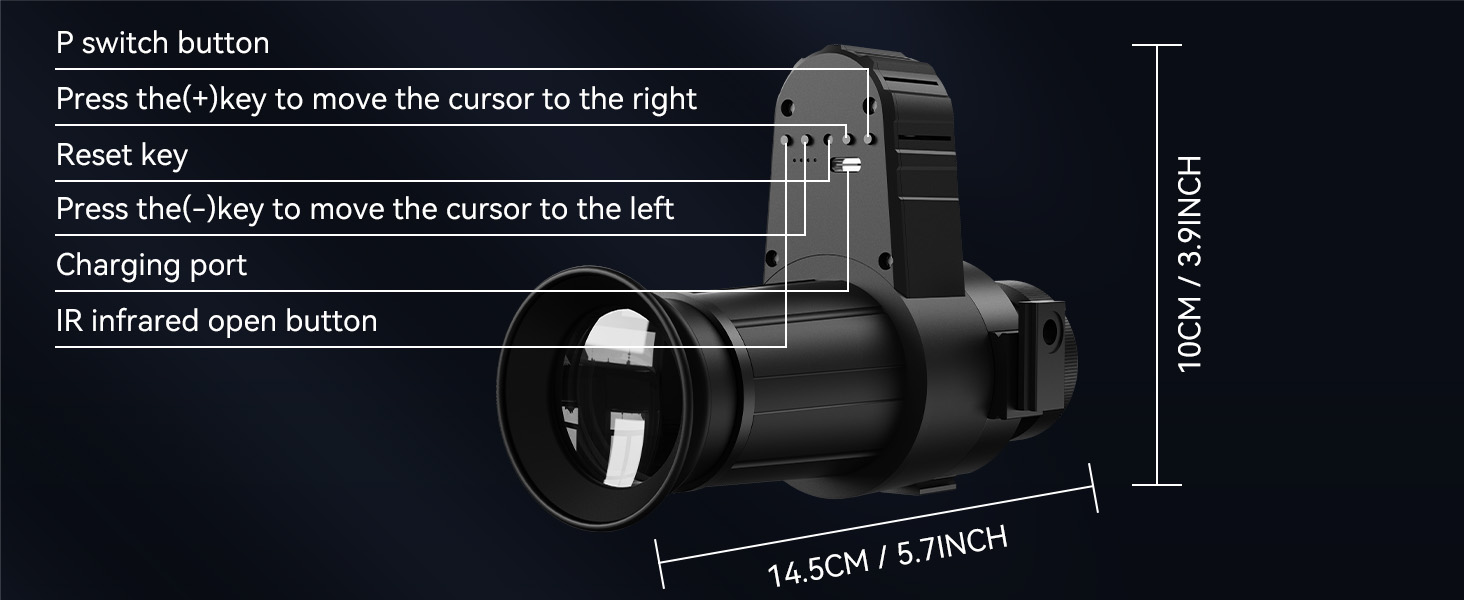
Figure 4.2: Product dimensions and control layout.
4.1 Cydrannau
- Lens Amcan: Captures light from the environment.
- Eyepiece/Screen: 1.54-inch HD display for viewing.
- Goleuydd Isgoch (IR): Provides invisible light for enhanced vision in total darkness.
- Botymau Rheoli: For power, mode selection, and crosshair adjustments.
- Porth Codi Tâl: USB Type-C for recharging the internal battery.
- Head Strap Mount: Attachment point for the adjustable head strap.
- Rifle Mount: Attachment point for compatible rifle or air gun setups.
5. Gosod
5.1 Codi Tâl ar y Dyfais
- Locate the USB Type-C charging port on the device.
- Connect the provided USB charging cable to the device and a compatible USB power source (e.g., computer, wall adapter).
- The charging indicator will illuminate. Allow sufficient time for a full charge before first use.
5.2 Attaching the Head Strap
- Attach the monocular to the head strap mount using the provided hardware.
- Place the head strap on your head and adjust the elastic straps for a secure and comfortable fit. Ensure the monocular is positioned correctly in front of your eye.

Figure 5.1: Head-mounted configuration for hands-free use.
5.3 Mounting to a Rifle/Air Gun (Optional)
The device is compatible with 20mm/21mm Picatinny/UTStandard guide rails.
- Securely attach the rifle mount to the monocular.
- Mount the assembly onto the compatible rail of your rifle or air gun.
- Ensure the mount is tightened to prevent movement during use.
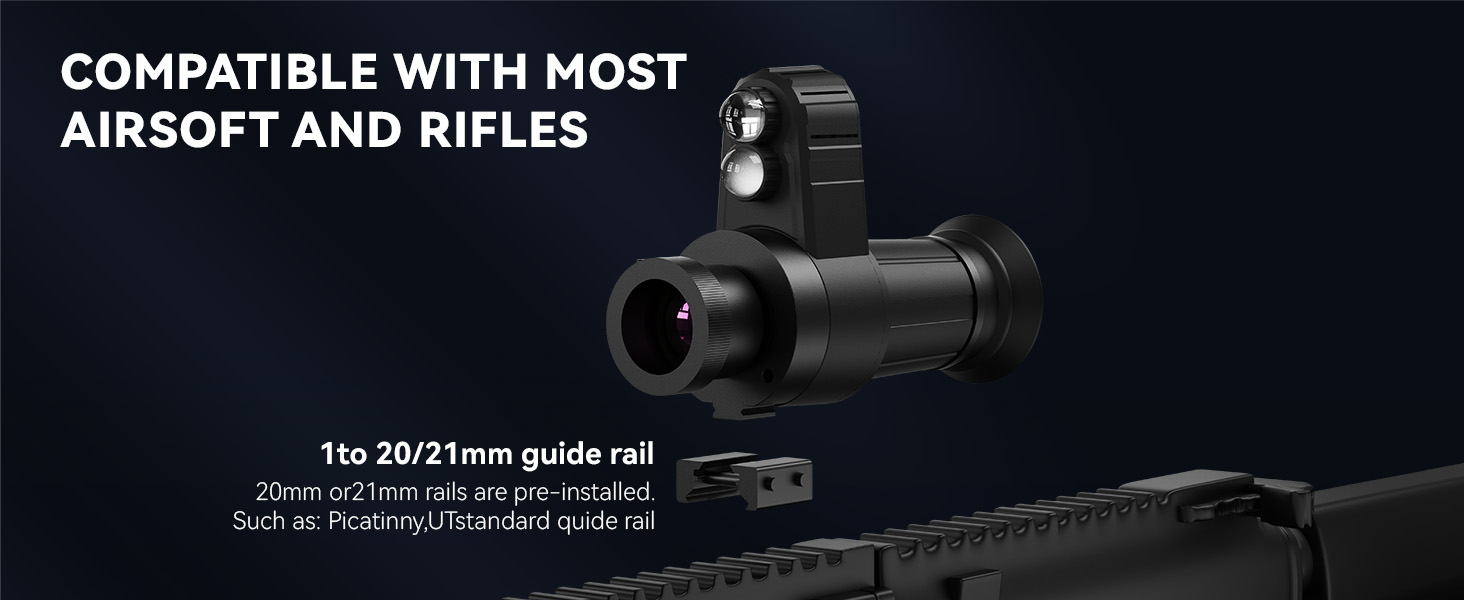
Figure 5.2: Rifle mounting compatibility.
6. Cyfarwyddiadau Gweithredu
6.1 Pŵer Ymlaen/Diffodd
- To power on, press and hold the power button (Night Vision Switch) for a few seconds until the screen illuminates.
- I ddiffodd y pŵer, pwyswch a daliwch y botwm pŵer eto nes bod y sgrin yn diffodd.
6.2 Addasu Ffocws
The device features manual focus adjustment for clear viewing.
- While looking through the eyepiece, rotate the objective lens ring.
- Adjust until the image on the screen appears sharp and clear.
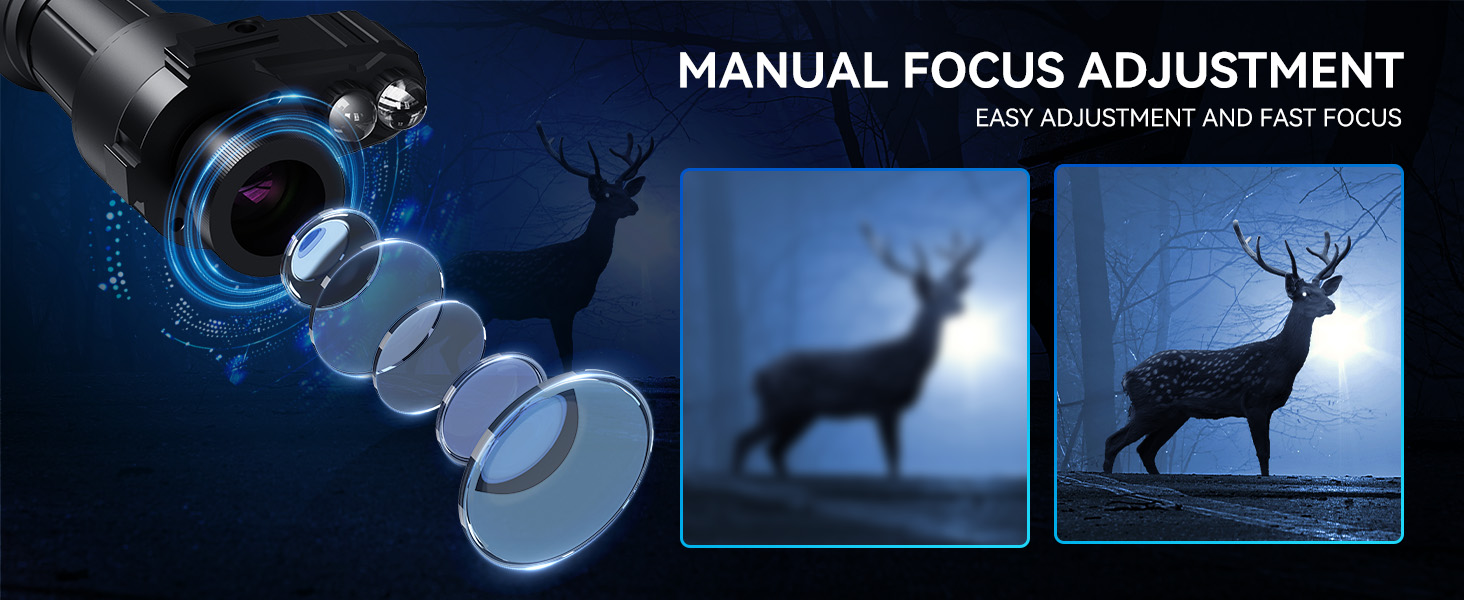
Figure 6.1: Manual focus adjustment for image clarity.
6.3 Using the IR Illuminator
The integrated IR illuminator enhances visibility in complete darkness.
- Press the IR infrared open button to activate the illuminator.
- Press again to cycle through IR intensity levels or turn off.
6.4 Adjusting Crosshairs
The digital crosshair can be adjusted for precise aiming, especially when rifle-mounted. Refer to Figure 6.2 for button locations.

Figure 6.2: Crosshair adjustment controls.
- I symud y cyrchwr yn llorweddol:
- Press the "-" key to move the cursor to the chwith.
- Press the "+" key to move the cursor to the iawn.
- I symud y cyrchwr yn fertigol:
- Press and hold the "-" key for 5 seconds until the "UD" indicator appears on the screen. Then, press the "-" key to move the cursor lawr.
- Press and hold the "+" key for 5 seconds until the "UD" indicator appears on the screen. Then, press the "+" key to move the cursor up.
- The device has a memory function for crosshair calibration, so repeated calibration is not required after initial setup.
7. cynnal
7.1 Glanhau
- Defnyddiwch frethyn meddal, di-lint i lanhau tu allan y ddyfais.
- Ar gyfer lensys, defnyddiwch frethyn a thoddiant glanhau lensys arbenigol. Osgowch ddeunyddiau sgraffiniol.
- Peidiwch â defnyddio cemegolion na thoddyddion llym.
7.2 Storio
- Storiwch y ddyfais mewn lle oer, sych, i ffwrdd o olau haul uniongyrchol a lleithder.
- If storing for extended periods, ensure the battery is partially charged (around 50%) to prolong battery life.
- Keep the lens caps on when not in use to protect the optics.
8. Datrys Problemau
| Problem | Achos Posibl | Ateb |
|---|---|---|
| Nid yw'r ddyfais yn pweru ymlaen. | Mae batri wedi'i ddisbyddu. | Gwefrwch y ddyfais gan ddefnyddio'r cebl USB. |
| Mae'r ddelwedd yn aneglur. | Focus is not adjusted correctly. | Rotate the objective lens ring to adjust focus. |
| Poor visibility in total darkness. | IR illuminator is off or at low intensity. | Activate or increase the intensity of the IR illuminator. |
| Head strap feels unstable. | Straps are not adjusted properly. | Adjust the elastic head strap for a tighter, more secure fit. |
9. manylebau
- Model: CYF-E+
- Chwyddiad: 7x (Fixed optical magnification)
- Sgrin: Arddangosfa HD 1.54-modfedd
- Diamedr Lens Amcan: 10 mm
- Gorchudd Lens: Wedi'i orchuddio'n llawn
- Math o ffocws: Ffocws â Llaw
- Goleuydd IR: Integredig
- Ffynhonnell Pwer: Ailwefradwy (USB Math-C)
- Dimensiynau: Tua 5.91 x 1.97 x 3.94 modfedd (15 x 5 x 10 cm)
- Pwysau: Tua 1.28 pwys (0.58 kg)
- Opsiynau Gosod: Head-mounted, Rifle/Air Gun (20mm/21mm Picatinny/UTStandard compatible)

Figure 9.1: Optical magnification detail.
10. Gwarant a Chefnogaeth
For warranty information and technical support, please refer to the product packaging or contact GOYOJO customer service through their official websafle neu'r manwerthwr lle prynwyd y cynnyrch.
Cadwch eich prawf prynu ar gyfer unrhyw hawliadau gwarant.