
RAINPOINT ITV105
RAINPOINT Digital Sprinkler Timer
Model: ITV105 - User Manual
Rhagymadrodd
Thank you for choosing the RAINPOINT Digital Sprinkler Timer, Model ITV105. This programmable 1-outlet automatic hose water timer is designed to provide convenient and precise control over your watering schedule, ensuring optimal moisture levels for your lawn and garden. This manual provides detailed instructions for setup, operation, maintenance, and troubleshooting to help you get the most out of your new device.
Cynnyrch Drosview a Nodweddion Allweddol
The RAINPOINT ITV105 Sprinkler Timer is engineered for durability and ease of use, offering a reliable solution for automated garden irrigation.
- Cydnawsedd Safonol: Features a 3/4" inlet and outlet thread, compatible with most standard garden hoses.
- Gwrthsefyll Tywydd: IP54 waterproof rating and heavy-duty weather-resistant ABS housing ensure durability for outdoor use.
- Rhaglennu Addasadwy: Easy-to-use interface allows customization of start time, watering frequency, and duration for automated irrigation.
- Hidlydd Mewnol: Includes a built-in metal filter to improve water quality and protect plants from debris.
- Leakage Prevention: Upgraded strong and durable ABS material and water inlet thread, paired with Teflon tape and rubber washer to prevent water leakage.
- Sgrin LCD fawr: Displays detailed information such as watering time, frequency, power, and battery life for easy readability.
- Hysbysiad Batri Isel: Powered by 2 AAA batteries (not included), with a low battery notification and automatic valve shut-off to prevent water waste.
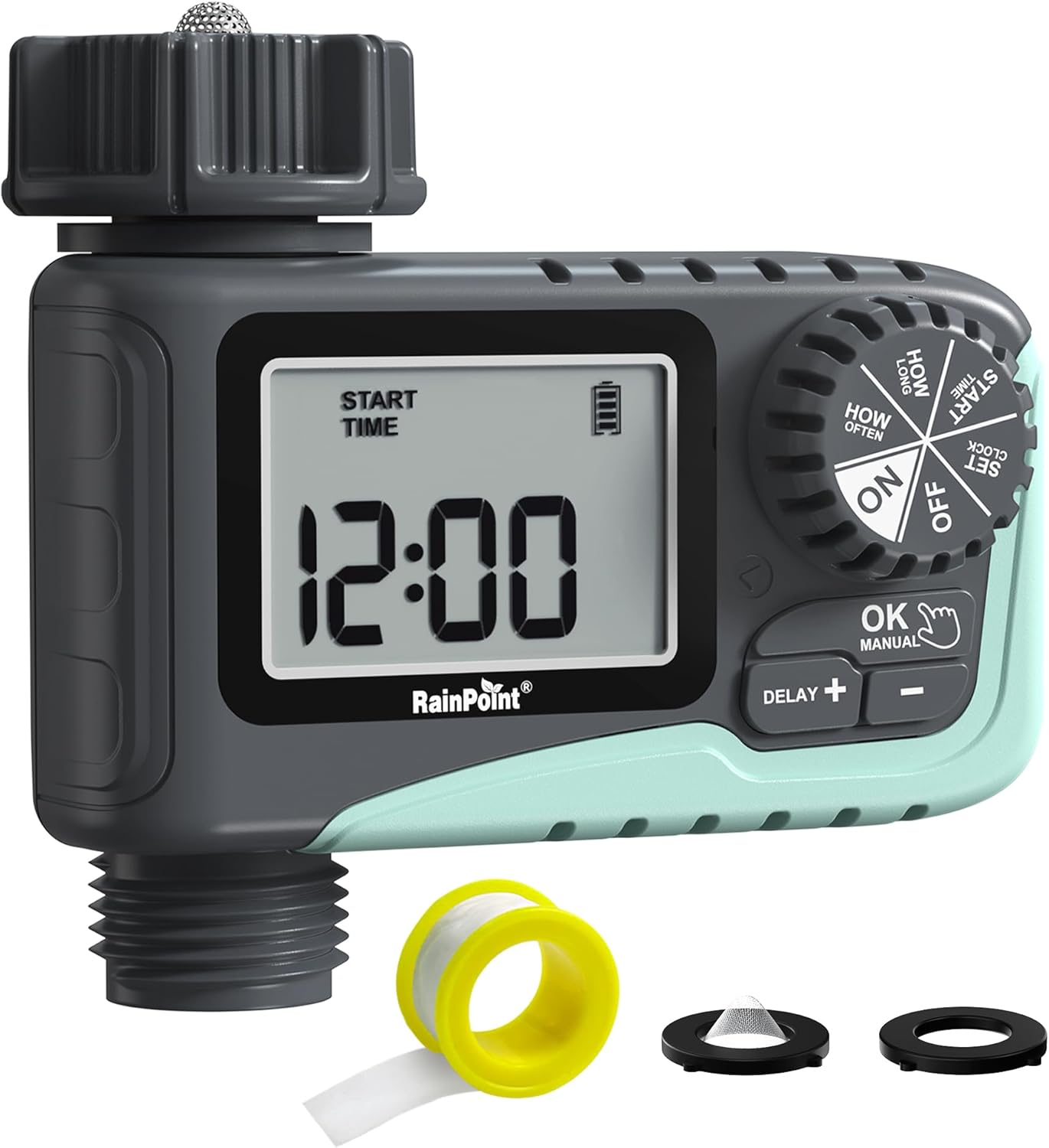
Ffigur 1: Blaen view of the RAINPOINT Digital Sprinkler Timer (ITV105) showing the large LCD screen, control dial, and buttons.
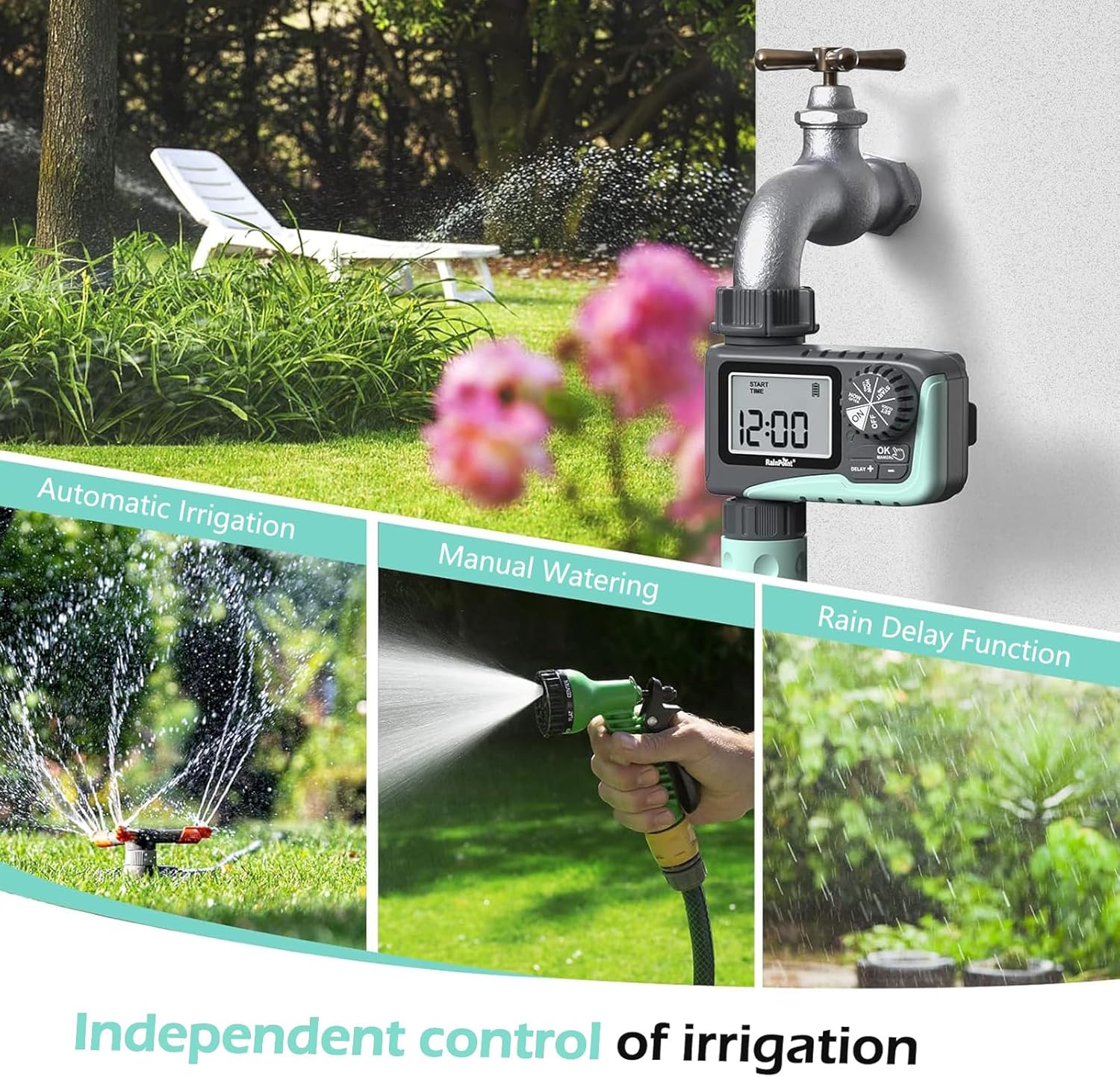
Figure 2: Illustration of the timer's three main functions: automatic irrigation, manual watering, and rain delay.
Cynnwys Pecyn
Gwiriwch gynnwys y pecyn wrth ei agor i sicrhau bod yr holl eitemau yn bresennol:
- 1 x RAINPOINT Digital Sprinkler Timer (ITV105)
- 1 x Llawlyfr Defnyddiwr (y ddogfen hon)
- 1 x tâp Teflon
- 1 x Rubber washer
- 1 x Spare filter
Gosod a Gosod
Follow these steps to properly set up your sprinkler timer:
- Gosod Batris:
Locate the battery compartment on the back of the timer. Insert 2 new AAA (1.5V) alkaline batteries, ensuring correct polarity. Close the battery compartment securely. The LCD screen will power on.
- Prepare Faucet:
Ensure your outdoor hose faucet is clean and free of debris. If necessary, apply the included Teflon tape to the faucet threads for a watertight seal.
- Attach Timer to Faucet:
Screw the timer's inlet (top connector) onto your 3/4" outdoor hose faucet. Hand-tighten firmly. Ensure the rubber washer is properly seated inside the timer's inlet to prevent leaks. The timer features a 360° rotating connector for easy positioning.
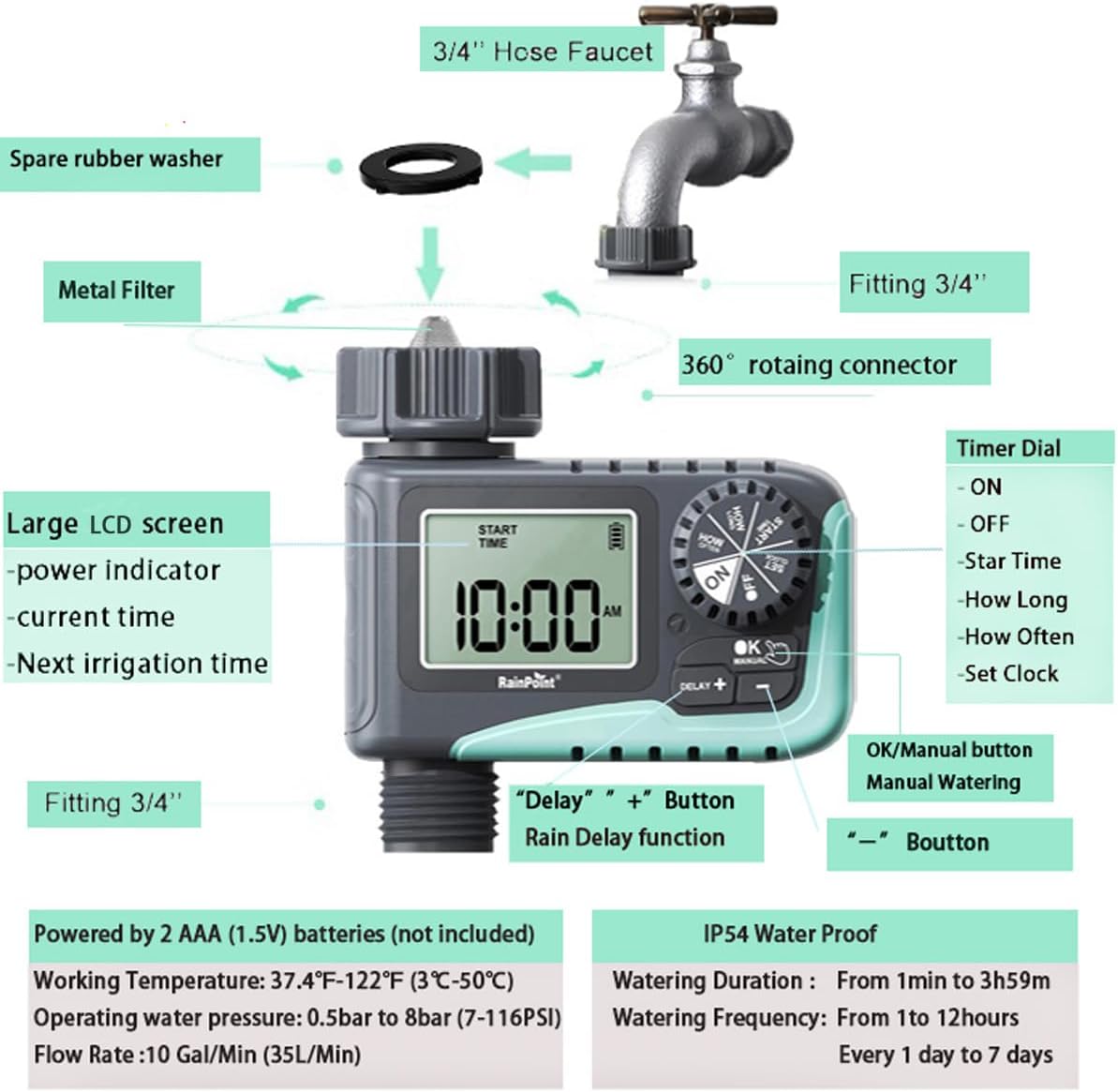
Figure 3: Diagram illustrating the components of the sprinkler timer, including the 3/4" hose faucet connection, metal filter, and LCD screen.
- Pibell Cyswllt:
Attach your garden hose to the timer's outlet (bottom connector). Hand-tighten securely. Ensure a proper washer is in place at the hose connection point.
- Open Faucet:
Fully open your outdoor hose faucet. The timer is designed to withstand water pressure from 0.5 bar to 8 bar (7-116 PSI). The timer will control the water flow, not the faucet.
Cyfarwyddiadau Gweithredu
The RAINPOINT ITV105 timer features a large dial and intuitive buttons for easy programming.
Swyddi Deialu Rheoli:
- AR: Activates the timer for automatic watering.
- I FFWRDD: Deactivates the timer, stopping all watering.
- GOSOD CLOC: Gosodwch yr amser presennol.
- AMSER CYCHWYN: Set the desired start time for watering cycles.
- PA MOR HYD: Set the duration of each watering cycle.
- PA MOR AML: Set the frequency of watering cycles.
Botymau:
- OK/MANUAL: Confirms settings or initiates manual watering.
- DELAY +: Increases values during setting or activates/adjusts rain delay.
- -: Decreases values during setting.
Setting the Current Time (SET CLOCK):
- Cylchdroi'r deial i GOSOD CLOC.
- Defnyddiwch y + a - botymau i addasu'r awr. Pwyswch OK i gadarnhau.
- Defnyddiwch y + a - botymau i addasu'r munud. Pwyswch OK i gadarnhau.
- Cylchdroi'r deial i ON to save the time and return to normal operation.
Setting Automatic Watering Program:
This timer allows you to set a start time, duration, and frequency for automated watering.
- Set Start Time (START TIME):
Cylchdroi'r deial i AMSER DECHRAU. Defnydd + a - to set the desired watering start hour and minute. Press OK i gadarnhau pob lleoliad.
- Gosod Hyd y Dyfrio (PA MOR HYD):
Cylchdroi'r deial i PA MOR HYD. Defnydd + a - to set the watering duration from 1 minute to 3 hours and 59 minutes. Press OK i gadarnhau.

Figure 4: Screen showing settings for "HOW OFTEN" (frequency) and "HOW LONG" (duration) for automatic watering.
- Gosod Amlder Dyfrio (PA MOR AML):
Cylchdroi'r deial i PA MOR AML. Defnydd + a - to set the frequency:
- Every 1 hour to 12 hours.
- Every 1 day to 7 days.
Gwasgwch OK i gadarnhau.
- Actifadu'r Rhaglen:
Cylchdroi'r deial i ONBydd yr amserydd nawr yn gweithredu yn ôl eich amserlen wedi'i rhaglennu.
Dyfrio â Llaw:
To water immediately without affecting your programmed schedule:
- Ensure the dial is in the ON sefyllfa.
- Gwasgwch y Iawn/LLAW button. The display will show the default manual watering duration (e.g., 10 minutes).
- Defnyddiwch y + a - buttons to adjust the manual watering duration from 1 minute to 8 hours.
- Gwasgwch OK again to start manual watering. The timer will count down the set duration.
- To stop manual watering early, press Iawn/LLAW eto.

Figure 5: Display showing the manual watering duration setting, adjustable from 1 minute to 8 hours.
Swyddogaeth Oedi Glaw:
The rain delay function allows you to pause your watering schedule for a set period due to rain or other reasons, preventing overwatering.
- Ensure the dial is in the ON sefyllfa.
- Gwasgwch y DELAY + button. The display will show a default delay time (e.g., 24H).
- Gwasgwch DELAY + repeatedly to cycle through delay options (e.g., 24H, 48H, 72H).
- Once you select the desired delay, the timer will enter rain delay mode. The display will show the remaining delay time.
- After the delay period ends, the timer will automatically resume its programmed watering schedule.
- To cancel the rain delay, press the DELAY + button until the delay time disappears, or rotate the dial to OFF and then back to ON.

Figure 6: The timer displaying the rain delay countdown, highlighting its IP54 waterproof rating.
Cynnal a chadw
Proper maintenance ensures the longevity and optimal performance of your RAINPOINT Sprinkler Timer.
- Hidlydd glân: Periodically check and clean the metal filter located at the timer's inlet. Remove the timer from the faucet, unscrew the filter, rinse it under running water to remove any debris, and reinsert it.
- Amnewid Batri: When the low battery indicator appears on the LCD screen, replace the 2 AAA batteries promptly. Always use new alkaline batteries.
- Gaeafu: Before the first frost, remove the timer from the faucet and store it indoors in a dry, frost-free location. Remove the batteries before storage.
- Gwiriwch am ollyngiadau: Regularly inspect all connections (faucet to timer, timer to hose) for any signs of leakage. Ensure all connections are hand-tightened and that rubber washers are properly seated.

Figure 7: Visual representation of the built-in metal filter and durable plastic material designed for anti-leakage and longer service life.
Datrys problemau
If you encounter issues with your RAINPOINT Sprinkler Timer, refer to the following common problems and solutions:
| Problem | Achos Posibl | Ateb |
|---|---|---|
| Timer not turning on / LCD blank. | Batris marw neu wedi'u gosod yn anghywir. | Replace with 2 new AAA alkaline batteries, ensuring correct polarity. |
| Dim llif dŵr. |
|
|
| Gollyngiad dŵr o gysylltiadau. |
|
|
| Timer not following schedule. |
|
|
Manylebau
| Nodwedd | Manyleb |
|---|---|
| Model | ITV105 |
| Dimensiynau Cynnyrch | 10.5 x 10.3 x 5 cm (4 x 4 x 2 modfedd) |
| Deunydd | Styren Biwtadïen Acrylonitrile (ABS) |
| Watering Duration (Automatic) | 1 munud i 3 awr 59 munud |
| Watering Frequency (Automatic) | Every 1 hour to 12 hours, or every 1 day to 7 days |
| Watering Duration (Manual) | 1 minute to 8 hours (Default: 10 minutes) |
| Cyfradd Llif Uchaf | 10 Gal/Min (35 L/Min) |
| Ystod Pwysedd Dŵr | 0.5 bar i 8 bar (7-116 PSI) |
| Tymheredd Gweithio | 3 ℃-50 ℃ (37.4 ℉-122 ℉) |
| Ffynhonnell Pwer | 2 x AAA (1.5V) batteries (not included) |
| Graddfa dal dwr | IP54 |
Gwarant a Chefnogaeth
RAINPOINT products are manufactured to high-quality standards. For specific warranty details, please refer to the warranty card included with your product or visit the official RAINPOINT website. If you encounter any issues or have questions not covered in this manual, please contact RAINPOINT customer support through their official websafle neu'r manwerthwr lle prynoch chi'r cynnyrch.
Am ragor o wybodaeth a chefnogaeth, gallwch ymweld â’r RAINPOINT Store on Amazon.
Ask a question about this manual
Ask about setup, troubleshooting, compatibility, parts, safety, or missing instructions. Manuals+ will review the question and use this page’s manual context to help answer it.