
1. Rhagymadrodd
The Solid State Logic PureDrive Octo is an 8-channel microphone preamplifier designed for professional audio recording and production environments. It integrates SSL's renowned PURE and DRIVE modes, offering versatile tonal characteristics, along with advanced digital connectivity and an onboard USB interface. This manual provides comprehensive instructions for the setup, operation, and maintenance of your PureDrive Octo unit.
The PureDrive Octo features four mic preamp input impedance options, allowing for exploration of various tonal possibilities and optimal matching with different microphone types. Each channel includes independent +48V phantom power, polarity inversion, and a High Pass Filter, making it a highly capable and feature-rich outboard microphone preampllewywr.
2. Nodweddion Allweddol
- 8 channel high-performance PureDrive mic preamps.
- +48V phantom power, polarity invert, and 3rd order hi-pass filter per channel.
- 31-step Trim control with precise 1 dB increments for signal level adjustment and gain staging.
- Line inputs via TRS Jack or dedicated D-Sub connectivity.
- Four mic preamp input impedance options to explore new tonal possibilities from dynamic and ribbon microphones.
- PURE and DRIVE modes, including a new 'Asymmetric' DRIVE option.
- Advanced digital connectivity (ADAT, AES/EBU).
- Onboard USB audio interface.
3. Cynnyrch Drosview
Panel blaen

This image displays the front panel of the PureDrive Octo. It features eight identical input channels, each with dedicated controls for Gain, Trim, and various processing options. On the right, digital metering and A/D conversion controls are visible.
Panel Cefn
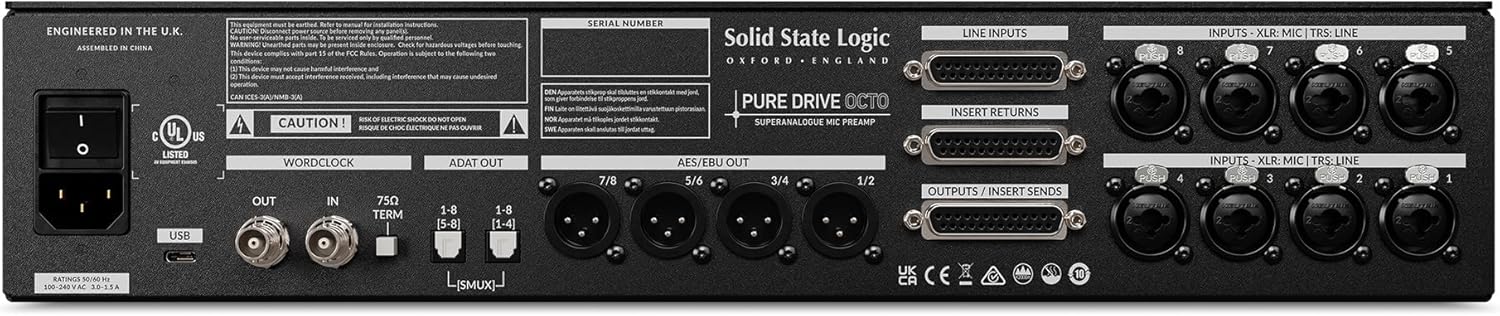
The rear panel provides all input and output connections. This includes XLR/TRS combo jacks for microphone/line inputs, D-Sub connectors for line inputs and outputs/sends, ADAT and AES/EBU digital outputs, Wordclock I/O, and a USB port for computer connectivity. The power inlet is located on the far left.
4. Canllaw Gosod
4.1 Dadbacio a Lleoli
- Carefully remove the PureDrive Octo from its packaging.
- Place the unit in a well-ventilated area, preferably in a standard 19-inch equipment rack. Ensure adequate airflow around the unit to prevent overheating.
- Osgowch osod yr uned ger ffynonellau gwres neu mewn golau haul uniongyrchol.
4.2 Cysylltiad Pwer
- Gwnewch yn siŵr bod switsh pŵer yr uned yn y safle OFF.
- Connect the supplied AC power cable to the IEC inlet on the rear panel of the PureDrive Octo.
- Plug the other end of the power cable into a grounded AC outlet.
4.3 Cysylltiadau Sain
- Mewnbynnau Meicroffon: Connect microphones to the XLR inputs on the rear panel (Channels 1-8).
- Mewnbynnau llinell: Connect line-level sources using TRS jacks or the dedicated D-Sub connectors on the rear panel.
- Allbynnau Digidol: Connect the ADAT OUT ports to your audio interface or digital mixer for multi-channel digital audio. Use AES/EBU outputs for stereo digital audio.
- Cysylltiad USB: Connect the USB port on the rear panel to your computer for use as an audio interface. Install necessary drivers if prompted by your operating system.
- Cloc geiriau: For synchronization with other digital audio devices, connect a Wordclock cable to the WORDCLOCK IN/OUT ports.
5. Cyfarwyddiadau Gweithredu
5.1 Pweru Ymlaen/Diffodd
- To power on, flip the power switch on the rear panel to the ON position.
- To power off, flip the power switch to the OFF position.
5.2 Channel Controls (Per Channel)
- ENNILL Knob: Adjusts the input gain for the microphone preamplifier. Use this to set the primary signal level.
- TRIM Knob: Provides fine-tuning of the output level in 1 dB increments. This allows for precise level matching and can be used to drive the signal into the DRIVE circuit.
- +48V Button: Engages phantom power for condenser microphones. Ensure the microphone is connected before activating.
- POLARITY Button: Inverts the phase of the input signal. Useful for correcting phase issues when using multiple microphones.
- HPF Button: Activates a High Pass Filter to reduce unwanted low-frequency rumble or proximity effect.
- Z.D. (Impedance) Button: Cycles through four input impedance options. Experiment with different settings to find the optimal tonal response for your microphone.
- PURE/DRIVE Button: Toggles between the PURE and DRIVE preamp moddau.
- PURE Mode: Provides a clean, transparent, and linear amplification.
- Modd GYRRU: Introduces harmonic saturation and warmth. The PureDrive Octo also features an 'Asymmetric' DRIVE option for unique tonal shaping.
5.3 A/D Conversion and Digital Output Controls
- Bwlb CYFRAITH: Yn dewis yr sample rate for the A/D converters (e.g., 44.1kHz, 48kHz, 88.2kHz, 96kHz).
- Botwm CLOC: Selects the clock source (Internal, Wordclock, USB).
- Mesuryddion: The front panel features LED meters for each channel, providing visual feedback on input levels.
6. cynnal
- Glanhau: Defnyddiwch frethyn meddal, sych i lanhau tu allan yr uned. Osgowch lanhawyr neu doddyddion sgraffiniol.
- Awyru: Gwnewch yn siŵr nad yw'r slotiau awyru wedi'u rhwystro i atal gorboethi.
- Storio: When not in use for extended periods, store the unit in a cool, dry environment, away from dust and extreme temperatures.
7. Datrys Problemau
- Dim pŵer:
- Check if the power cable is securely connected to both the unit and the AC outlet.
- Sicrhewch fod yr allfa bŵer yn weithredol.
- Dim Allbwn Sain:
- Ensure all audio cables are correctly connected to the inputs and outputs.
- Check the GAIN and TRIM settings on the relevant channels.
- Verify that the correct input source is selected on your receiving device (audio interface, mixer).
- If using digital outputs (ADAT, AES/EBU, USB), ensure sample rates and clocking are correctly synchronized between devices.
- Sain wedi'i ystumio:
- Reduce the GAIN or TRIM level to prevent clipping.
- Check the input level of your microphone or line source.
- Ensure the PURE/DRIVE mode is set as desired; DRIVE mode intentionally adds harmonic distortion.
8. manylebau
| Priodoledd | Gwerth |
|---|---|
| Pwysau Eitem | 19.51 pwys |
| Dimensiynau Cynnyrch | 22 x 18 x 9 modfedd |
| Rhif Model | 729745X2 |
| Enw Lliw | Du |
| Dyfeisiau Cydnaws | Meicroffon |
| Math o Gysylltydd | XLR |
| Ffynhonnell Pwer | Trydan Corded |
9. Gwarant a Chefnogaeth
For information regarding warranty coverage, technical support, or service, please contact Solid State Logic directly through their official websafle neu ddosbarthwyr awdurdodedig. Cadwch eich prawf prynu ar gyfer hawliadau gwarant.
Official Solid State Logic Websafle: www.solidstatelogic.com