
symcode 2D QR Orange (B0CS6M178X)
Symcode Bluetooth 2D Barcode Scanner Instruction Manual
Model: 2D QR Orange (B0CS6M178X)
Rhagymadrodd
This manual provides comprehensive instructions for the setup, operation, and maintenance of your Symcode Bluetooth 2D Barcode Scanner. This portable scanner offers versatile 3-in-1 connectivity (Bluetooth, 2.4G Wireless, USB Wired) and is designed for efficient scanning of both 1D and 2D barcodes across various platforms.
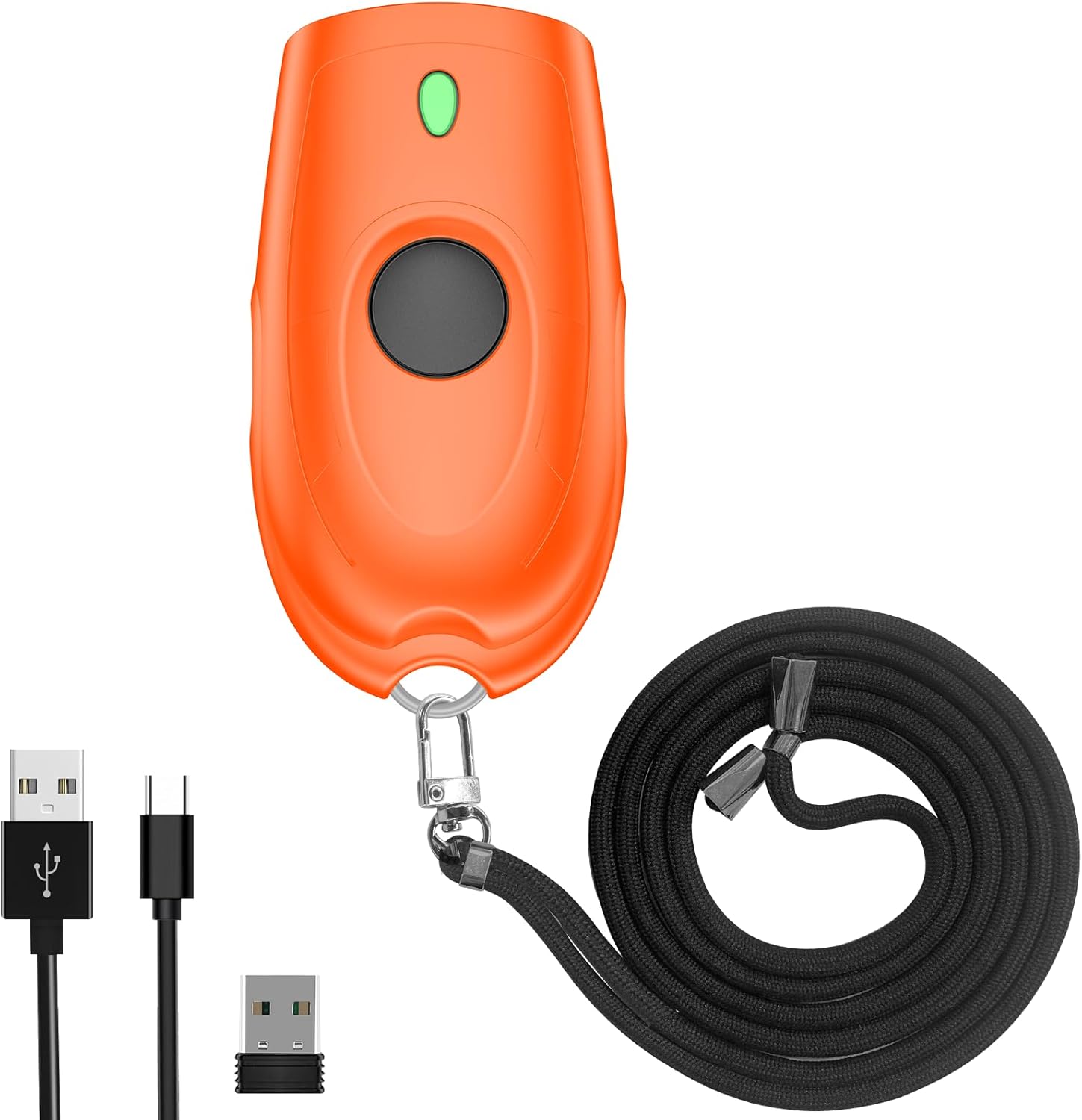
Image: The Symcode Bluetooth 2D Barcode Scanner in orange, shown with its accessories: USB charging cable, 2.4G USB dongle, and a black lanyard.
Cynnyrch Drosview a Chynnwys Pecyn
Before using your scanner, please ensure all components are present in the package.

Image: A visual representation of the package contents, including the scanner, 2.4GHz wireless dongle, user manual, USB cable, and sling.
Pecyn yn cynnwys:
- 1x Symcode 2D Barcode Scanner
- Cebl Codi Tâl USB 1x
- 1x Dongl USB 2.4G
- Llawlyfr Defnyddiwr 1x
- 1x Sling
Manylebau
| Nodwedd | Disgrifiad |
|---|---|
| Dimensiynau | 5.43 x 4.21 x 2.13 modfedd (Pecyn) |
| Pwysau | 4.2 ounces (Item) |
| Batri | 650mAh Lithium Polymer (rechargeable, included) |
| Amser Codi Tâl | Tua. 2 awr |
| Amser Sganio Parhaus | Hyd at 5 awr |
| Amser Wrth Gefn | Hyd at 30 diwrnod (720 awr) |
| Cysylltedd | Bluetooth, 2.4G Diwifr, USB Wired |
| Transmission Distance (2.4G Wireless) | 150m/492ft (barrier-free), 15m/49ft (with obstacles) |
| Transmission Distance (Bluetooth) | 50m/164ft (barrier-free), 20m/66ft (with obstacles) |
| Cynhwysedd Storio | 16MB (stores over 100,000 barcodes in offline mode) |
| Decoding Ability (2D) | Cod QR, Matrics Data, PDF417, cod Aztec, Maxicode |
| Decoding Ability (1D) | JAN/EAN-13, JAN/EAN-8, UPC-A, UPC-E, Code11, Code32, Code39, Code 39 Full ASCII, Code93, Code128, Codabar (NW-7), Interleaved 2 of 5, Matrix 2 of 5, Industrial 2 of 5, Standard 2 of 5, PLESSEY, MSI, ITF14, ISBN, ISSN, GS1 Databar, GS1-128 (UCC/EAN128), ISBT-128 |
| AO cydnaws | Windows XP/7/8/10, Mac OS, Linux, Android, iOS |

Image: Detailed battery specifications and internal components of the scanner, highlighting its 650mAh battery and long standby time.

Image: Transmission range capabilities of the scanner in different environments for both 2.4G wireless and Bluetooth connections.

Image: Visual representation of the scanner's mini portable design and dimensions, demonstrating its ease of carrying.
Gosod
1. Gwefru'r Sganiwr
Before first use, fully charge the scanner. Connect the provided USB charging cable to the scanner's charging port and to a USB power source (e.g., computer USB port, USB wall adapter). The charging indicator light will show the charging status. A full charge takes approximately 2 hours.
2. Dulliau Cysylltiad
The Symcode scanner supports three connection modes: USB Wired, 2.4G Wireless, and Bluetooth Wireless.

Image: Illustration of the three versatile connection options: USB wired, 2.4G wireless via dongle, and Bluetooth wireless.
Modd USB Wired:
- Cysylltwch y sganiwr yn uniongyrchol â'ch cyfrifiadur gan ddefnyddio'r cebl USB a ddarperir.
- The scanner will be recognized as a keyboard device, and scanned data will appear wherever your cursor is placed.
- No drivers are required for this mode.
Modd Diwifr 2.4G:
- Plygiwch y dongl USB 2.4G i mewn i borthladd USB sydd ar gael ar eich cyfrifiadur.
- Turn on the scanner. It should automatically pair with the dongle.
- This mode offers a transmission distance of up to 150m (492ft) in barrier-free environments.
Modd Di-wifr Bluetooth:
- Ensure your device (smartphone, tablet, laptop) has Bluetooth enabled.
- Turn on the scanner and put it into Bluetooth pairing mode (refer to the specific steps in the included user manual for pairing instructions, as this typically involves scanning a specific configuration barcode).
- On your device, search for Bluetooth devices and select "Symcode Scanner" or similar from the list.
- This mode supports Bluetooth HID, SPP, and BLE protocols and offers a transmission distance of up to 50m (164ft) in barrier-free environments.
3. Cydnawsedd System
The scanner is highly compatible with a wide range of operating systems and devices.

Image: The scanner's broad compatibility with various operating systems including iOS, Android, Windows, Mac OS, and Linux, connecting to devices like PCs, POS systems, laptops, tablets, and smartphones.
- Systemau Gweithredu: Windows XP, Win7, Win8, Win10, Mac OS, Linux
- Dyfeisiau: PC, Laptop, POS systems, Smartphones (Android, iOS), Tablets
Cyfarwyddiadau Gweithredu
1. Sganio Sylfaenol
To scan a barcode, point the scanner's window at the barcode and press the trigger button. A successful scan will typically be indicated by a beep and/or vibration.

Image: The scanner in action, demonstrating its ability to decode various 1D and 2D barcodes, even if they are blurred or incomplete. Examples of scannable codes are shown, including QR Code, Data Matrix, and PDF417.
The scanner can decode a wide range of 1D and 2D symbologies, including:
- 2D: Cod QR, Matrics Data, PDF417, cod Aztec, Maxicode
- 1D: JAN/EAN-13, JAN/EAN-8, UPC-A, UPC-E, Code11, Code32, Code39, Code 39 Full ASCII, Code93, Code128, Codabar (NW-7), Interleaved 2 of 5, Matrix 2 of 5, Industrial 2 of 5, Standard 2 of 5, PLESSEY, MSI, ITF14, ISBN, ISSN, GS1 Databar, GS1-128 (UCC/EAN128), ISBT-128
Example Barcodes from image:
- Data Matrix: 2125551212
- Cod QR: 20123456789
- PDF417: 00614141999996
- ITF: 1234567890135
- Profiled Barcode: 4603146002134
2. Sound and Vibration Control
The scanner allows you to turn off the sound and vibration feedback according to your preference or work environment. Refer to the detailed instructions in the included user manual for the specific configuration barcodes to enable or disable these features.

Image: Options for controlling the scanner's sound and vibration feedback, allowing for quiet operation when needed.
3. Data Upload Modes
The scanner supports two primary data upload modes:
- Modd Uwchlwytho ar Unwaith: Caiff codau bar wedi'u sganio eu trosglwyddo ar unwaith i'r ddyfais gysylltiedig. Dyma'r modd diofyn.
- Storage Mode (Offline Scanning): Barcodes are stored in the scanner's internal memory (16MB, capable of storing over 100,000 barcodes) and can be uploaded later when connected. This is useful for inventory tasks where real-time connection is not always available. To switch to storage mode and upload data, refer to the specific configuration barcodes in the included user manual.
4. Opsiynau Customization
The scanner offers various customization options to tailor its output to your needs:
- Hide/Add custom prefix/suffix digits.
- Delete characters from scanned data.
- Add keyboard keys (e.g., TAB, CR&LF) to the scanning operation for automated data entry.
Detailed instructions and configuration barcodes for these options are provided in the comprehensive user manual included with your product.
Cynnal a chadw
Gofal Batri:
- Er mwyn ymestyn oes y batri, osgoi rhyddhau'r batri'n llwyr yn aml.
- Charge the scanner regularly, even if not in constant use.
- Storiwch y sganiwr mewn lle oer, sych pan nad yw'n cael ei ddefnyddio am gyfnodau hir.
Glanhau:
- Use a soft, dry, lint-free cloth to clean the scanner's exterior.
- For the scanning window, use a soft cloth slightly dampwedi'i lanhau â glanhawr ysgafn, nad yw'n sgraffiniol. Osgowch gemegau llym neu ddeunyddiau sgraffiniol.
- Do not immerse the scanner in water or any other liquid.
Datrys problemau
If you encounter issues with your Symcode barcode scanner, please refer to the following common problems and solutions:
| Problem | Ateb Posibl |
|---|---|
| Nid yw'r sganiwr yn troi ymlaen. | Ensure the battery is charged. Connect the scanner to a power source using the USB cable and allow it to charge for at least 30 minutes before attempting to turn it on again. |
| Nid yw'r sganiwr yn sganio codau bar. |
|
| Nid yw data wedi'i sganio yn ymddangos ar y sgrin. |
|
| Problemau cysylltiad Bluetooth. |
|
| Botwm yn sownd neu ddim yn ymateb. | Gently check for any physical obstruction around the button. If the issue persists, contact customer support. Avoid forcing the button. |
Gwarant a Chefnogaeth
Your Symcode barcode scanner comes with a standard manufacturer's warranty. For specific warranty terms and conditions, please refer to the documentation included in your product packaging or contact Symcode customer support.
For any technical assistance, troubleshooting not covered in this manual, or warranty inquiries, please contact Symcode customer service.
Symcode Customer Service: Please refer to the contact information provided in your product's original packaging or visit the official Symcode websafle am fanylion cymorth.
The seller, Symcode, offers 24/7 pre-sale and after-sales service. If you experience a problem with your Symcode scanner, please contact the seller directly for assistance.