
1. Rhagymadrodd
Thank you for choosing the ieGeek 5MP Outdoor Wi-Fi Security Camera. This manual provides essential information for the proper installation, operation, and maintenance of your camera. Please read these instructions carefully before use and retain them for future reference. This camera is designed to provide reliable outdoor surveillance with advanced features for enhanced security.
2. Cynnyrch Drosview
The ieGeek 5MP Outdoor Wi-Fi Security Camera offers high-definition monitoring with flexible connectivity and smart detection capabilities.
Nodweddion Allweddol:
- Datrysiad HD 5MP: Provides clear and vivid images and videos with 2880x1600 resolution and 4x digital zoom.
- Dual-Band Wi-Fi (2.4/5 GHz): Supports both 2.4 GHz and 5 GHz Wi-Fi for stable and faster network connection.
- 360° PTZ Monitoring: Pan (355° horizontal) and Tilt (120° vertical) functionality allows for comprehensive area coverage.
- Gweledigaeth Nos Lliw: Three night vision modes (color, infrared, smart) with a range of up to 15 meters (50 feet).
- PIR Humanoid Detection: Advanced human detection reduces false alarms caused by non-human movements.
- Larwm Sain a Golau: Deters intruders with customizable sound and light alerts.
- Recordio Parhaus 24/7: Supports continuous recording and event-based recording.
- Storio Lleol a Chwmwl: Compatible with Micro SD cards (up to 128GB, not included) and cloud storage options.
- Rhannu Aml-ddefnyddiwr: Share camera access with family members via the dedicated app.
- Gwrthiant Tywydd IP65: Wedi'i gynllunio ar gyfer defnydd awyr agored, yn gallu gwrthsefyll llwch a dŵr.
Cydrannau Camera:
The camera unit typically includes the main camera body, dual Wi-Fi antennas, a power input port, and a Micro SD card slot.
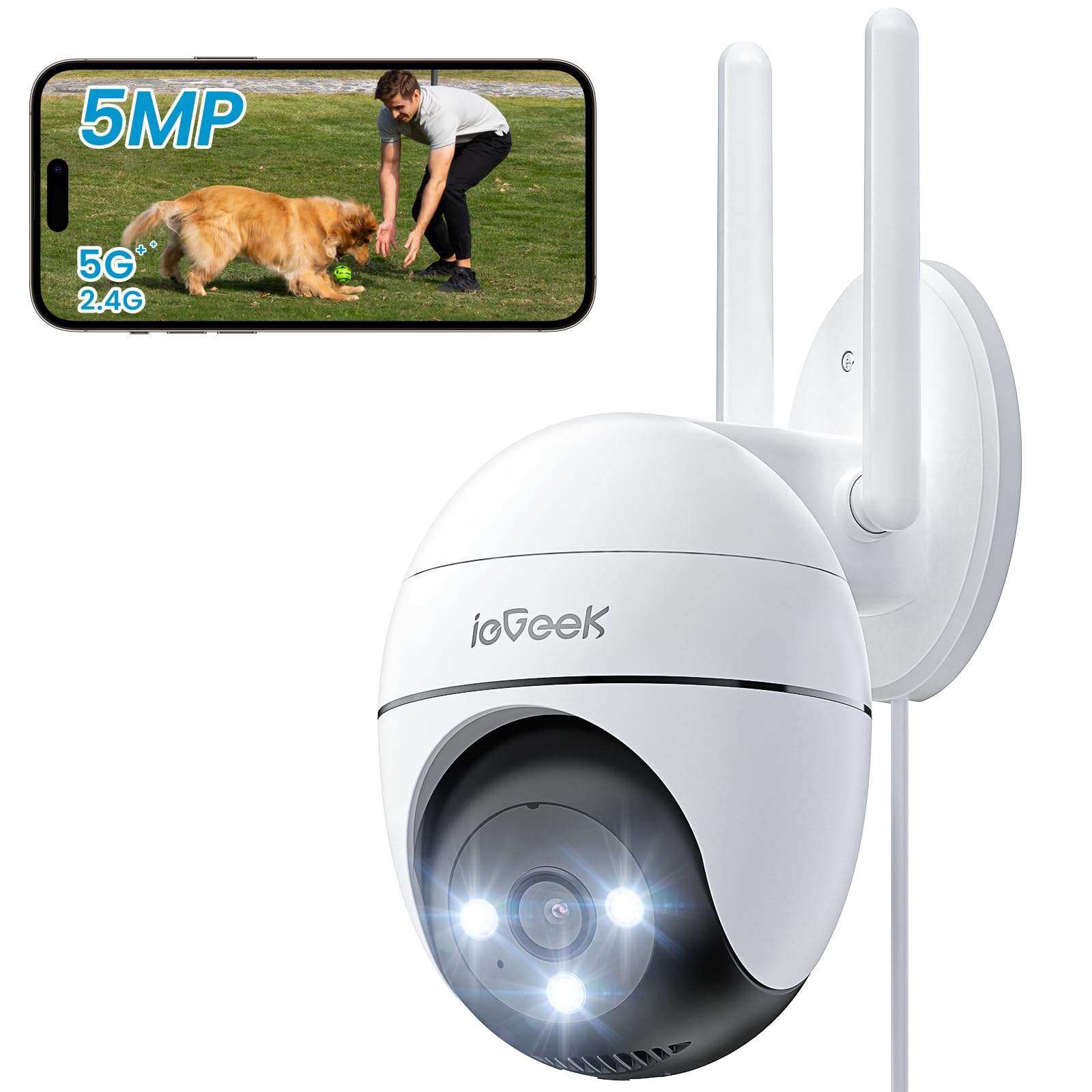
Figure 2.1: ieGeek 5MP Outdoor Wi-Fi Security Camera (Model ZS-GQ4)

Ffigur 2.2: Drosoddview of ieGeek 5MP Camera Features including PTZ, 24/7 recording, 2-way audio, humanoid tracking, Alexa compatibility, local and cloud storage, multi-user sharing, customizable alert areas, AI detection, and acoustic/light alarms.

Figure 2.3: The camera features a 5dBi antenna for improved Wi-Fi signal strength and stability.
3. Cyfarwyddiadau Gosod
3.1 Cynnwys Pecyn
- ieGeek 5MP Outdoor Wi-Fi Security Camera
- Addasydd Pŵer
- Sgriwiau Mowntio ac Angorau
- Llawlyfr Defnyddiwr
3.2 Lawrlwytho Ap a Chofrestru Cyfrif
- Lawrlwythwch y ieGeek Cam or CloudEdge app from your smartphone's app store (iOS/Android).
- Register for an account using your email address and create a secure password.
3.3 Cysylltiad Camera
- Power on the camera by connecting it to a power outlet using the provided adapter.
- Open the ieGeek Cam/CloudEdge app and tap the "+" icon to add a new device.
- Follow the on-screen instructions to connect the camera to your 2.4 GHz or 5 GHz Wi-Fi network. Ensure your phone is connected to the same Wi-Fi network during setup.
- Scan the QR code displayed on your phone with the camera lens when prompted.
- Ar ôl cysylltu, gallwch enwi'ch camera a dechrau byw viewing.

Figure 3.1: Connecting the power adapter to the camera.
3.4 Gosod Corfforol
- Dewiswch leoliad awyr agored addas gyda lle clir view and strong Wi-Fi signal.
- Use the provided mounting template to mark drill holes.
- Drill holes, insert anchors, and secure the camera base with screws.
- Addaswch ongl y camera yn ôl yr angen.

Figure 3.2: Ensure optimal Wi-Fi signal strength at the chosen installation location for stable performance.
4. Cyfarwyddiadau Gweithredu
4.1 Byw View a Rheoli PTZ
- Open the ieGeek Cam/CloudEdge app and select your camera to view y porthiant byw.
- Use the on-screen joystick or swipe gestures to control the camera's pan (horizontal 355°) and tilt (vertical 120°) movements.

Figure 4.1: Control the camera's 355° horizontal and 120° vertical rotation directly from your smartphone app.
4.2 Moddau Gweledigaeth Nos
Mae'r camera yn cynnig tri modd gweledigaeth nos:
- Gweledigaeth Nos Lliw: Utilizes built-in spotlights to provide full-color images in low-light conditions.
- Gweledigaeth Nos Isgoch: Uses infrared LEDs for black and white images in complete darkness.
- Gweledigaeth Nos Glyfar: Automatically switches between infrared and color night vision upon detection of motion.
4.3 Motion Detection and Alarms
- PIR Humanoid Detection: Configure sensitivity levels in the app to minimize false alarms.
- Parthau Canfod y gellir eu Addasu: Set specific areas for motion detection to focus on critical zones.
- Larwm Sain a Golau: When motion is detected, the camera can activate a siren and/or spotlights to deter intruders. You can choose between silent, spotlight only, siren only, or both siren and spotlight modes.

Figure 4.2: Select from silent, spotlight only, siren only, or both siren and spotlight alarm modes to suit your security needs.

Figure 4.3: The camera's humanoid motion tracking follows detected human figures, reducing false alarms from other movements.

Figure 4.4: AI smart monitoring can differentiate between various detection types such as people, animals, packages, and vehicles (some features may require a subscription).
4.4 Cofnodi a Storio
- Cofnodi Parhaus: The camera supports 24/7 continuous recording to a Micro SD card (not included).
- Recordio Digwyddiad: Yn recordio clipiau fideo pan ganfyddir symudiad.
- Cerdyn Micro SD: Insert a Micro SD card (up to 128GB) into the designated slot for local storage.
- Storio Cwmwl: Optional cloud storage plans are available through the app for secure off-site backup.

Figure 4.5: The camera supports 24/7 continuous recording, ensuring constant surveillance.
5. cynnal
5.1 Glanhau'r Camera
- Gwnewch yn siŵr bod y camera wedi'i ddiffodd cyn ei lanhau.
- Defnyddiwch feddal, damp lliain i sychu corff y camera.
- For the lens, use a specialized lens cleaning cloth to avoid scratches. Do not use harsh chemicals or abrasive cleaners.
5.2 Ystyriaethau Amgylcheddol
- The camera has an IP65 weather resistance rating, making it suitable for outdoor use in various weather conditions.
- Ystod tymheredd gweithredu: -20°C i 50°C (-4°F i 122°F).

Figure 5.1: The camera is designed with IP65 weather resistance to withstand outdoor elements like rain.

Figure 5.2: The camera operates effectively within a wide temperature range of -20°C to 50°C.
6. Datrys Problemau
If you encounter issues with your ieGeek camera, please refer to the following common troubleshooting steps:
6.1 Problemau Cysylltiad
- Camera All-lein: Ensure the camera is powered on and within range of your Wi-Fi router. Check your Wi-Fi signal strength in the app. Try restarting the camera and your router.
- Failed to Connect to Wi-Fi: Verify your Wi-Fi password is correct. Ensure you are connecting to a 2.4 GHz or 5 GHz network as supported. If using a dual-band router, ensure the camera is connecting to the correct band.
6.2 Problemau Canfod Symudiadau
- Too Many False Alarms: Adjust the PIR detection sensitivity in the app. Define specific detection zones to exclude areas with frequent irrelevant movements (e.g., trees swaying).
- Dim Canfod Symudiad: Ensure motion detection is enabled in the app settings. Check the camera's field of view for obstructions. Increase detection sensitivity if necessary.
6.3 Problemau Ansawdd Delwedd
- Delwedd aneglur: Clean the camera lens carefully. Ensure there is no condensation on the lens.
- Golwg Gwael yn y Nos: Ensure the night vision mode is set correctly (color, infrared, or smart). Check for any obstructions blocking the infrared LEDs or spotlights.
6.4 Materion Eraill
- Cerdyn SD Ddim yn Recordio: Ensure the Micro SD card is inserted correctly and is not full. Format the SD card via the app if it's a new card or if issues persist.
- Ap ddim yn ymateb: Close and restart the app. Ensure your smartphone's operating system is up to date.
If these steps do not resolve your issue, please contact ieGeek customer support for further assistance.
7. manylebau
| Model | ZS-GQ4 |
| Datrysiad | 5MP (2880 x 1600) |
| Lens | 3.6 mm |
| Chwyddo Digidol | 4x |
| Pellter Gweledigaeth Nos | Hyd at 15 metr (50 troedfedd) |
| Cysylltedd Wi-Fi | 2.4 GHz / 5 GHz Dual-Band |
| Ystod Tremio/Tilt | Tremio 355°, Tilt 120° |
| Opsiynau Storio | Cerdyn Micro SD (hyd at 128GB, heb ei gynnwys), Storio Cwmwl |
| Gwrthsefyll Tywydd | IP65 |
| Tymheredd Gweithredu | -20°C i 50°C (-4°F i 122°F) |
| Dimensiynau | 17 x 9 x 10 cm |
| Dull Rheoli | Mobile App (ieGeek Cam / CloudEdge) |
| Math o Larwm | PIR Humanoid Motion Detection, Sound & Light Alarm |
8. Gwarant a Chefnogaeth
ieGeek is committed to providing high-quality products and excellent customer service.
8.1 Gwybodaeth Gwarant
- Gwarant 2 Flwyddyn: Your ieGeek camera is covered by a 2-year warranty from the date of purchase, protecting against manufacturing defects.
- Gwarant Arian yn Ôl 30 Diwrnod: If you are not satisfied with your purchase, you may return the product for a full refund within 30 days.

Figure 8.1: ieGeek offers a 2-year warranty and a 30-day money-back guarantee, along with lifetime support.
8.2 Cefnogaeth i Gwsmeriaid
For any questions, technical assistance, or warranty claims, please contact ieGeek customer support. Refer to the contact information provided with your product packaging or visit the official ieGeek websafle am fanylion cymorth.
- Cymorth Ar-lein: Ymwelwch www.iegeek.com/support (example link, please refer to actual websafle)
- Cefnogaeth E-bost: support@iegeek.com (example email, please refer to actual contact)
- Cymorth Technegol Oes: ieGeek provides lifetime technical support for its products.