
1. Cynnyrch Drosview
The NOHON MS15 Mag-Safe Wireless Power Bank is a compact and efficient portable charging solution designed for iPhone 12, 13, 14, and 15 series, and other compatible devices. Featuring a 5000mAh capacity, ultra-slim design, and 20W Power Delivery (PD) fast charging, it offers convenient wireless and wired charging capabilities.

Figure 1: NOHON MS15 Mag-Safe Wireless Power Bank with iPhone.
2. Cynnwys Pecyn
- NOHON MS15 Mag-Safe Wireless Power Bank
- Cebl Codi Tâl USB-C
- Llawlyfr Defnyddiwr
3. Gosod a Gwefru'r Banc Pŵer
3.1 Tâl Cychwynnol
Before first use, fully charge the NOHON MS15 Power Bank. Use the included USB-C cable and connect it to a compatible power adapter (not included).
3.2 Charging Indicators
The integrated LED indicators on the side of the power bank display the remaining battery capacity and charging status. Each light typically represents approximately 25% of the battery charge.

Figure 2: LED Power Indicator explanation.
4. Cyfarwyddiadau Gweithredu
4.1 Wireless Charging (Mag-Safe Compatible)
- Ensure your device is Mag-Safe compatible (iPhone 12 series or newer) or has a magnetic phone case.
- Align the NOHON power bank with the back of your iPhone. The magnets will automatically snap it into place, initiating wireless charging.
- I roi'r gorau i wefru, dim ond datgysylltwch y banc pŵer o'ch dyfais.

Figure 3: Magnetic attachment for wireless charging.
4.2 Gwefru â Gwifrau (USB-C)
- Cysylltwch un pen y cebl USB-C â phorthladd USB-C y banc pŵer.
- Connect the other end of the USB-C cable to your device's charging port.
- Bydd codi tâl yn cychwyn yn awtomatig.
4.3 Gwefru Ar yr Un Pryd
The NOHON MS15 supports charging two devices simultaneously: one wirelessly via Mag-Safe and another via the USB-C port.
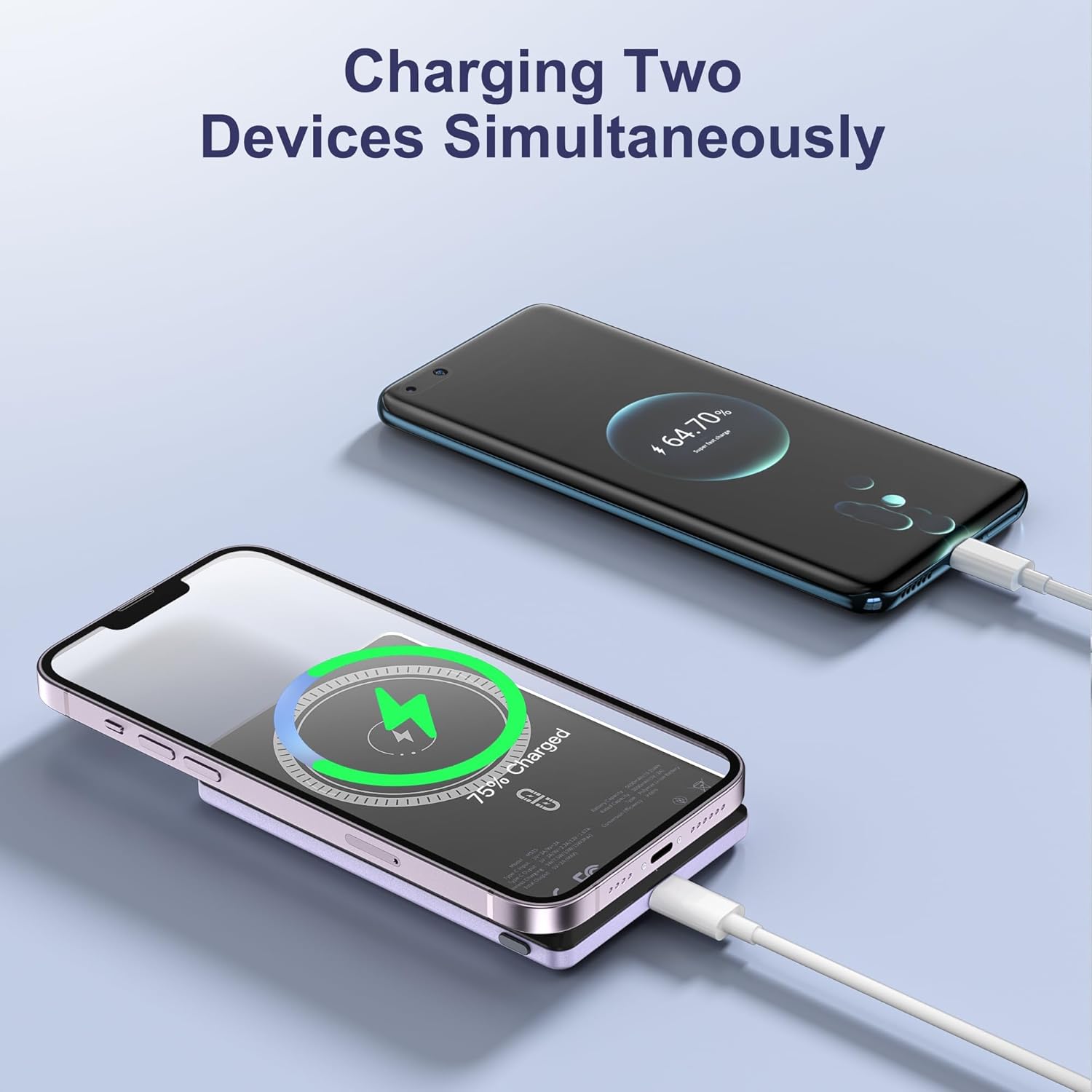
Figure 4: Charging two devices simultaneously.
4.4 Pŵer Ymlaen/Diffodd
The power bank automatically activates charging when a device is connected wirelessly or via cable. To turn off the power bank, press the power button twice in quick succession.
5. Nodweddion Allweddol
- Dyluniad Ultra-Slim: Measuring just 0.32 inches (8mm) in thickness, it's designed for easy portability.
- Cynhwysedd 5000mAh: Yn darparu ample power i'w ddefnyddio bob dydd.
- Cysylltiad magnetig: Ensures a secure and stable wireless charging link.
- Codi Tâl Cyflym 20W PD: Delivers efficient wired charging speeds.
- Codi Tâl ar y Pryd: Charge two devices at once (wireless + wired).
- Diogelu deallus: Built-in safeguards against over-current, over-voltage, a byr-gylched.

Ffigur 5: Drosoddview of NOHON MS15 features.
6. Cydweddoldeb
The NOHON MS15 Mag-Safe Wireless Power Bank is designed for universal compatibility with:
- Mag-Safe Charging: iPhone 12, 13, 14, and 15 series (including Pro Max models).
- Codi Tâl Di-wifr: Other Qi-enabled smartphones (requires a magnetic phone case for secure attachment).
- Codi Tâl Gwifrau: Any device compatible with USB-C charging.
Nodyn: For non-magnetic charging phones, a magnetic phone case is required to ensure a secure connection for wireless charging.
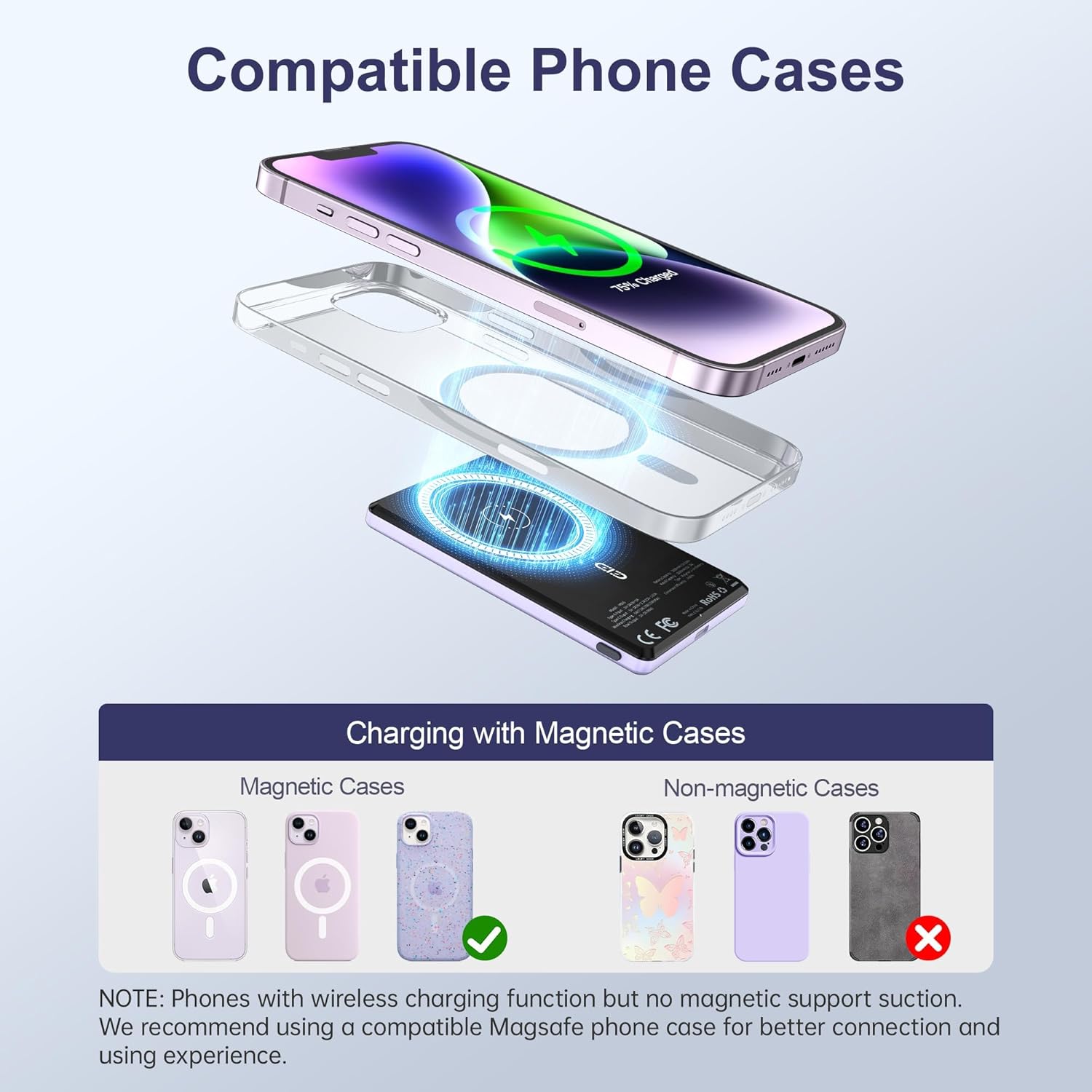
Figure 6: Compatible phone cases for magnetic charging.
7. Cynnal a Chadw a Gofal
- Cadwch y banc pŵer i ffwrdd o ddŵr, lleithder a thymheredd eithafol.
- Osgoi gollwng neu orfodi'r ddyfais i effeithiau cryf.
- Glanhewch yr wyneb gyda lliain meddal, sych. Peidiwch â defnyddio cemegau llym na deunyddiau sgraffiniol.
- Storio mewn lle oer, sych pan nad yw'n cael ei ddefnyddio.
8. Datrys Problemau
8.1 Dyfais Ddim yn Gwefru
- Ensure the power bank is sufficiently charged. Check the LED indicators.
- For wireless charging, verify proper alignment between the power bank and your device/magnetic case.
- For wired charging, check that the USB-C cable is securely connected to both the power bank and your device. Try a different cable if necessary.
- Remove any non-magnetic cases that may interfere with wireless charging.
8.2 Power Bank Overheating
- It is normal for the power bank to become slightly warm during charging.
- If it becomes excessively hot, discontinue use immediately and contact customer support.
- Ensure proper ventilation and avoid charging in direct sunlight or enclosed spaces.
9. manylebau
| Nodwedd | Manylyn |
|---|---|
| Rhif Model | MS15 |
| Gallu Batri | 5000mAh |
| Dimensiynau Cynnyrch | 4 x 2.5 x 0.32 modfedd |
| Pwysau Eitem | 4.1 owns |
| Allbwn Codi Tâl Wired | PD 20W (USB Type C) |
| Allbwn Codi Tâl Di-wifr | Up to 15W (for Android), 7.5W (for iOS) |
| Nodweddion Arbennig | Fast Charging, Slim Design, Wireless Charging, Magnetic Attachment |
| Lliw | Violet Ash |
10. Fideo Cynnyrch Swyddogol
Fideo 1: Cynnyrch Drosoddview of the NOHON Mag-Safe Power Bank. This video demonstrates the features and usage of the power bank, including its slim design and magnetic attachment.
11. Gwarant a Chefnogaeth
NOHON products typically come with a 12-month warranty. For any product inquiries, technical support, or warranty claims, please contact NOHON customer service through the retailer's platform or the official NOHON website. Please have your purchase details and model number (MS15) ready.