
Rhagymadrodd
Diolch am brynuasing the GoolRC 4K Dual Camera Foldable Drone. This manual provides essential information for the safe operation, setup, and maintenance of your drone. Please read it thoroughly before first use to ensure proper functionality and to prevent damage or injury. Keep this manual for future reference.

Image: The GoolRC DRONEmax drone, featuring dual cameras and obstacle avoidance capabilities, shown in flight over a mountainous landscape.
Canllawiau Diogelwch Pwysig
Operating a drone requires responsibility. Adhere to the following safety precautions:
- Gwiriad Cyn Hedfan: Always inspect the drone, remote control, and batteries for any damage before each flight. Ensure propellers are securely attached and free from obstructions.
- Amodau Amgylcheddol: Fly in open areas, away from people, animals, buildings, and trees. Avoid flying in strong winds, rain, snow, or fog.
- Llinell Golwg: Cadwch linell olwg gyda'r drôn bob amser.
- Diogelwch Batri: Use only the provided or approved batteries and charging cables. Do not overcharge or puncture batteries. Discontinue use if batteries show signs of swelling or damage.
- Argymhelliad Oedran: This product is recommended for adults (16 years and older).
- Rheoliadau Lleol: Be aware of and comply with all local laws and regulations regarding drone operation.
Cynnwys Pecyn
Gwiriwch fod yr holl eitemau yn bresennol yn eich pecyn:
- 1 x GoolRC Drone
- 1 x Rheolaeth Anghysbell
- 3 x 3.7V 1800mAh Drone Battery
- 4 x Wind Blades (Spare Propellers)
- 4 x Ffrâm Amddiffynnol
- 1 x Cebl Codi Tâl USB
- 1 x Sgriwdreifer
- 1 x Blwch Storio
Canllaw Gosod
1. Charge Drone Batteries
Connect the 3.7V 1800mAh drone battery to the USB charging cable, then plug the cable into a USB power adapter (not included). The charging time is approximately 100 minutes. The indicator light will show charging status.
2. Gosodwch Fatris Rheolaeth o Bell
Open the battery compartment on the back of the remote control and insert 3 x AA batteries (not included), ensuring correct polarity.
3. Attach Propellers and Protective Frames
Carefully attach the propellers to the motor shafts. Ensure each propeller is correctly oriented (A and B types). Then, snap the protective frames onto the drone's arms to shield the propellers from impact.
4. Unfold the Drone
Gently unfold the drone's arms until they lock into position. The drone is now ready for flight.

Image: The GoolRC drone in its unfolded state, highlighting its design for stable and easy flight, suitable for beginners.
5. Lawrlwytho a Chysylltu'r Ap
Download the dedicated drone control app from your device's app store. The app is compatible with Android 5.0 or above and iOS 9.0 or above. Power on the drone, then connect your smartphone to the drone's Wi-Fi network (2.4G WiFi signal) as displayed in your phone's Wi-Fi settings. Open the app to establish a connection for real-time image transmission and advanced controls.
Cyfarwyddiadau Gweithredu
1. Pŵer Ymlaen / Diffodd a Pharu
- Pŵer Ymlaen: Place the drone on a flat surface. Press and hold the power button on the drone until the indicator lights turn on. Turn on the remote control.
- Paru: Push the left joystick on the remote control up then down. The drone's lights will stop flashing and become solid, indicating successful pairing.
- Pwer i ffwrdd: Press and hold the power button on the drone and remote control until they turn off.
2. graddnodi
After pairing, perform a gyroscope calibration. Push both joysticks on the remote control to the bottom-right corner simultaneously. The drone's lights will flash rapidly and then become solid, indicating successful calibration. This ensures stable flight.
3. Esgyn a Glanio
- Tynnu â llaw: Push both joysticks to the bottom-left corner simultaneously to unlock the motors. Then, slowly push the left joystick (throttle) upwards to take off.
- Esgyn/Glanio Un Allwedd: Press the dedicated one-key take-off/landing button on the remote control for automatic take-off or landing.
4. Rheolyddion Hedfan Sylfaenol
- Joystick Chwith (Throttle/Yaw): Up/Down for altitude, Left/Right for rotation.
- Joystick Dde (Pitch/Rhol): Up/Down for forward/backward flight, Left/Right for left/right sideward flight.
- Modd Di-ben: Press the headless mode button. In this mode, the drone's orientation is relative to the pilot, regardless of its actual front.
- Lleoli Llif Optegol: The drone utilizes optical flow sensors for stable hovering and precise positioning, especially indoors or at low altitudes.

Image: A visual representation of the drone's optical flow hovering for stability, four-way obstacle avoidance, and upgraded high-brightness LED color lights.
5. Nodweddion Uwch
- Four-directional Obstacle Avoidance: The drone is equipped with sensors to detect and avoid obstacles from four directions, enhancing flight safety.
- Saethu Ystum: While in the air, perform specific hand gestures (refer to app instructions for details) to trigger photo or video recording.
- Dilyn Deallus: Activate this feature via the app, and the drone will automatically follow a designated subject, capturing dynamic footage.
- Taith Hedfan: Draw a flight path on your smartphone screen within the app, and the drone will automatically follow the specified route.

Image: The GoolRC drone following a pre-drawn trajectory path over a river landscape, demonstrating its autonomous flight capability.
- Rhôl 360°: Press the dedicated button on the remote control to perform an aerial 360-degree flip. Ensure sufficient altitude before attempting this maneuver.
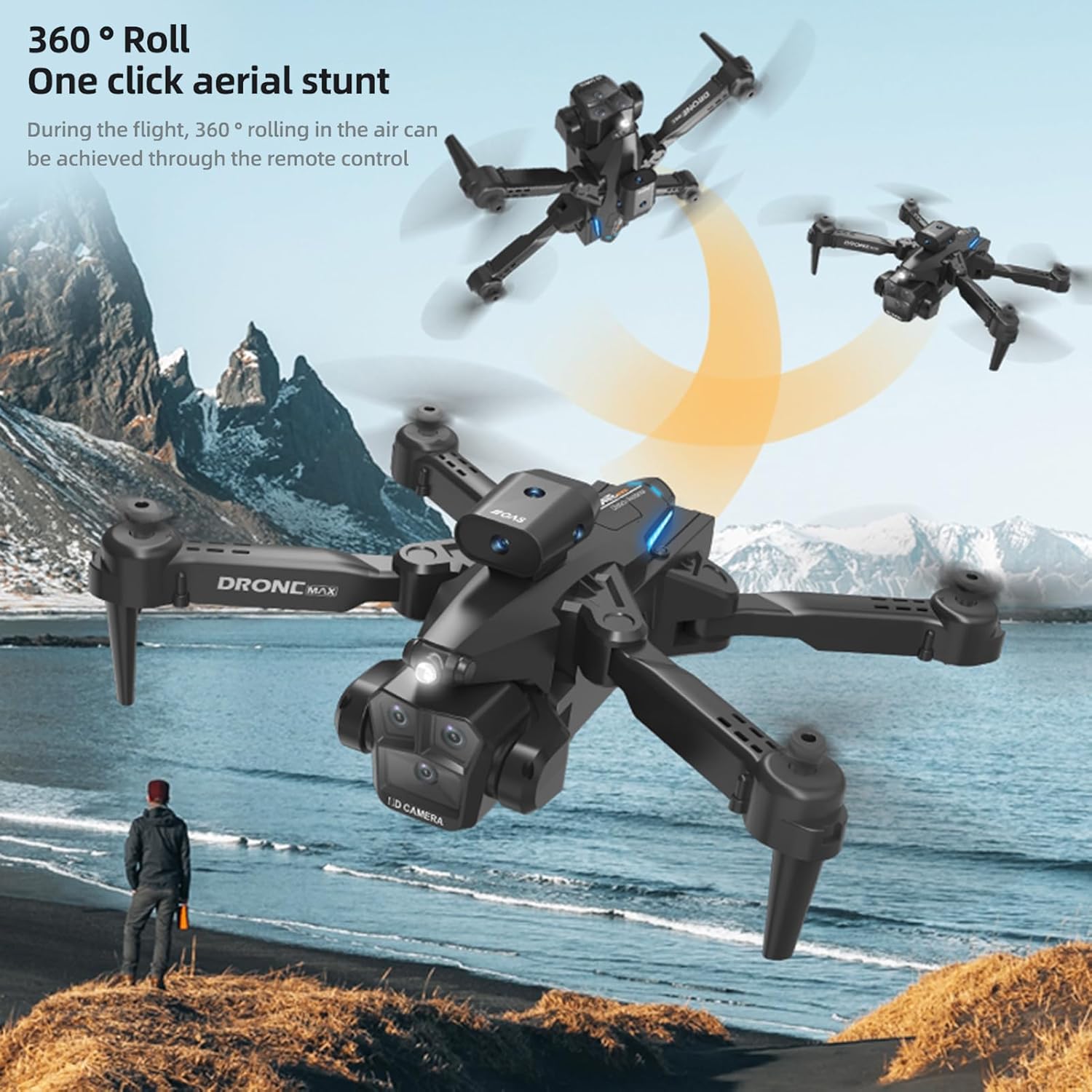
Image: The GoolRC drone executing a 360-degree roll in the air, illustrating its one-click aerial stunt capability.
6. 4K Dual Camera Operation and Real-Time Transmission
- Llun/Fideo: Use the dedicated buttons on the remote control or the app interface to capture 4K photos and videos. The drone features both a front and bottom camera.
- Electric Tuning Lens: Adjust the camera angle dynamically via the remote control or app for optimal shots.
- Real-Time Image Transmission: View byw footage from the drone's camera directly on your connected smartphone via the app, with high-definition transmission.

Image: A GoolRC drone flying over mountains, with a remote control and smartphone in the foreground displaying the drone's real-time camera view.

Delwedd: Manwl view of the GoolRC drone's 4K dual camera system, emphasizing its capability for high-quality aerial photography and videography.
- Beauty Filter Shooting: The app may offer beauty filters and post-production options for enhancing captured images.

Image: A comparison showing the effect of a beauty filter on a photograph, illustrating the drone's potential for enhanced image capture and post-processing.
Cynnal a chadw
- Glanhau: Defnyddiwch frethyn meddal, sych i lanhau'r drôn a'r teclyn rheoli o bell. Osgowch ddefnyddio dŵr na thoddyddion.
- Amnewid Propelor: If propellers are damaged, use the provided screwdriver to replace them with spare parts. Ensure correct A/B propeller types are installed in their respective positions.
- Gofal Batri: Store batteries in a cool, dry place. Do not store fully charged or completely depleted batteries for extended periods. Charge them to about 50% for long-term storage.
- Storio: When not in use, fold the drone and store it in the provided storage box to protect it from dust and damage.
Datrys problemau
| Problem | Achos Posibl | Ateb |
|---|---|---|
| Nid yw'r drôn yn ymateb i reolaeth o bell. | Not paired, low battery, interference. | Ensure drone and remote are powered on and paired correctly. Charge batteries. Fly in an open area away from other wireless devices. |
| Drone flies unstably or drifts. | Not calibrated, damaged propellers, strong wind. | Perform gyroscope calibration. Check and replace damaged propellers. Avoid flying in windy conditions. |
| No real-time image on smartphone. | Not connected to drone's Wi-Fi, app not open, weak signal. | Ensure phone is connected to the drone's Wi-Fi. Open the control app. Move closer to the drone for a stronger signal. |
| Amser hedfan byr. | Batri heb ei wefru'n llawn, batri hen, hedfan ymosodol. | Ensure battery is fully charged. Consider replacing old batteries. Fly more conservatively. |
| Obstacle avoidance not working. | Sensors obstructed, flying too fast, specific lighting conditions. | Ensure sensors are clean and unobstructed. Fly at moderate speeds. Obstacle avoidance may be less effective in certain lighting or with very thin objects. |
Manylebau
| Nodwedd | Manylyn |
|---|---|
| Enw'r Eitem | Drone Rheolaeth Anghysbell |
| Prif Ddeunydd | Plastig |
| Modur | 816 brush motor |
| Batri Drôn | 3.7V 1800mAh |
| Batri Rheolaeth Anghysbell | Batri 3 * AA (heb ei gynnwys) |
| Amser Codi Tâl | Tua 100 munud |
| Flight Time (Single Battery) | 15-18 munud |
| Image Transmission Signal | WiFi 2.4G |
| Pellter Rheolaeth Anghysbell | 100 metr |
| Pellter Trosglwyddo Delwedd | 100 metr |
| Camera | 4K Dual Camera (Front & Bottom) |
| Datrysiad Ffotograffau | 4096*2160P |
| Datrysiad Fideo | 4096*2160P |
| System Gydnaws | Android 5.0 neu'n uwch, iOS 9.0 neu'n uwch |
| Lliw | Du |
| Maint Plygedig | 13.5*8.5*7cm |
| Maint heb ei blygu | 26*26*7cm |
| Rhif Rhan Gwneuthurwr | ZDC6494289347415LT |
Gwarant a Chefnogaeth
For warranty information and customer support, please refer to the documentation provided with your purchase or visit the official GoolRC websafle. Gallwch hefyd gysylltu â'r manwerthwr y prynoch y cynnyrch ganddo i gael cymorth.
Gwneuthurwr: GoolRC
