
1. Rhagymadrodd
Diolch am brynuasing the HXW EMP16 Bluetooth MIDI Beat Pad and EMK-25 USB MIDI Keyboard Controller Bundle. This comprehensive manual provides detailed instructions for setting up, operating, maintaining, and troubleshooting your new MIDI controllers. This bundle is designed to enhance your music production and performance, offering versatile control for finger drumming, studio recording, and live performances.
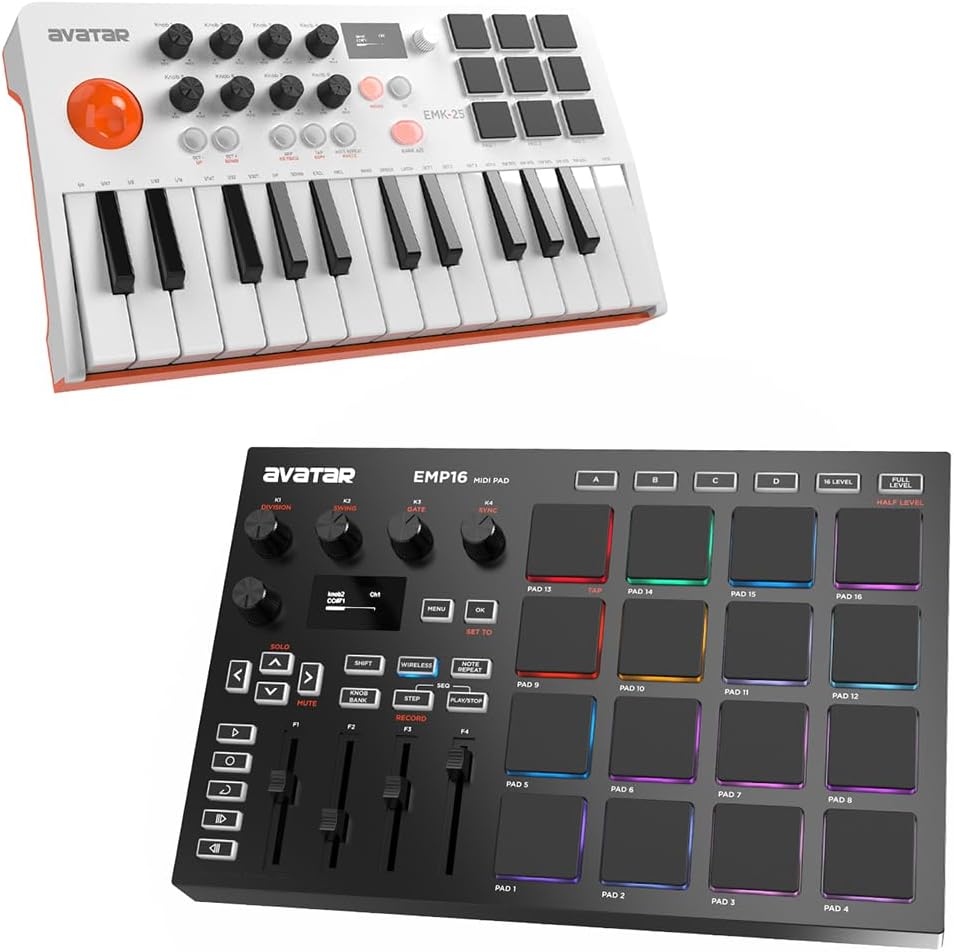
The HXW EMP16 Bluetooth MIDI Beat Pad and EMK-25 USB MIDI Keyboard Controller, shown together as a bundle.
2. Nodweddion
EMP16 Bluetooth MIDI Beat Pad
- 16 RGB beat pads with 4 banks for versatile performance.
- 4 assignable faders for dynamic control.
- 5 assignable buttons for custom functions.
- 4 assignable endless rotary knobs for precise parameter adjustments.
- OLED display for clear visual feedback of settings.
- Connectivity options: Bluetooth, USB-MIDI, MIDI In, and MIDI Out.
- Optionally battery powered for portability.

Yn agos view of the EMP16 MIDI Beat Pad, highlighting its 16 RGB velocity and pressure-sensitive beat pads. The image also shows icons for 16 colors, 16 levels, full/half level, and 4 pad banks.

A hand adjusting one of the endless rotary knobs on the EMP16 MIDI Beat Pad. This image emphasizes the control features including 4 endless rotary knobs, 4 assignable faders, and 5 transport buttons.

A manwl view of the OLED display on the EMP16 MIDI Beat Pad, showing settings such as button type, CC number, and channel. The display provides instant visual feedback for configurations.
EMK-25 USB MIDI Keyboard Controller
- 25 waterfall keys for expressive playability.
- 9 backlit beat pads with 2 banks for drumming and triggering samples.
- 8 Q-Link knobs for assigning to various parameters.
- OLED display for clear visual feedback.
- Connectivity options: Bluetooth and USB-MIDI.
- 1/4" sustain jack for connecting a sustain pedal.
- Innovative joystick for dynamic pitch and modulation control.
- 20 editable presets.
- Onboard arpeggiator, Note Repeat, and Aftertouch functionality.

A user operating the EMK-25 USB MIDI Keyboard Controller, with a tablet displaying music software in the background. This image highlights the ease of use and mentions features like 20 editable presets, onboard arpeggiator, note repeat, and aftertouch. A '1 Year Warranty' badge is also visible.

Close-up of the OLED display on the EMK-25 USB MIDI Keyboard Controller, showing parameters like pad mode, MIDI channel, and aftertouch settings. The display provides instant visual feedback for program selection and parameter changes.

A hand interacting with the innovative joystick on the EMK-25 USB MIDI Keyboard Controller, designed for dynamic pitch and modulation control. The image also shows octave up/down buttons and an arpeggiator keybed.
3. Beth sydd yn y Bocs
Upon unboxing your HXW EMP16 and EMK-25 bundle, please ensure all the following items are present:
- HXW EMP16 Bluetooth MIDI Beat Pad
- HXW EMK-25 USB MIDI Keyboard Controller
- USB Cable (for connectivity and power)
- Llawlyfr Defnyddiwr (y ddogfen hon)
4. Gosod
4.1 Pweru'r Dyfeisiau
Both the EMP16 and EMK-25 can be powered via the included USB cable. Connect the USB cable from the device to a powered USB port on your computer or a USB power adapter (not included). The EMP16 also supports optional battery power for standalone use.
4.2 Connecting to a Computer/Tablet (USB)
- Connect one end of the USB cable to the USB port on the EMP16 or EMK-25.
- Connect the other end of the USB cable to an available USB port on your computer or tablet.
- The devices are class-compliant and should be automatically recognized by your operating system (Windows, macOS, iOS, Android) without requiring additional drivers.
- Open your preferred Digital Audio Workstation (DAW) software (e.g., Ableton Live, Cubase LE12, Cubasis LE3) and select the EMP16 and EMK-25 as MIDI input devices in the software's preferences or settings.
4.3 Cysylltu trwy Bluetooth
Both the EMP16 and EMK-25 support Bluetooth MIDI connectivity for wireless operation with compatible devices (e.g., tablets, smartphones, computers with Bluetooth MIDI support).
- Gwnewch yn siŵr bod Bluetooth eich dyfais gwesteiwr wedi'i alluogi.
- On the EMP16/EMK-25, activate Bluetooth pairing mode (refer to the device's OLED display or specific button combinations if available).
- On your host device, search for available Bluetooth MIDI devices and select 'EMP16' or 'EMK-25' to pair.
- Once paired, you can select the device as a MIDI input in your music applications.
4.4 MIDI In/Out (EMP16 Only)
The EMP16 features traditional 5-pin MIDI In and Out ports for connecting to external MIDI hardware. Use standard MIDI cables to connect the EMP16 to other MIDI devices in your setup.

The EMP16 and EMK-25 devices set up with a computer monitor displaying Cubase LE12 for PC and a tablet displaying Cubasis LE3 for smart devices. This image illustrates the compatibility with free DAW software.
5. Cyfarwyddiadau Gweithredu
5.1 EMP16 Beat Pad Operation
- Beat Pads: The 16 RGB pads are velocity and pressure-sensitive. Strike them to trigger sounds or samples in your software. Use the bank buttons to switch between the 4 available pad banks, expanding your playable sounds to 64.
- Faders: The 4 assignable faders can be mapped to control volume, effects sends, or other parameters in your DAW.
- Rotary Knobs: The 4 endless rotary knobs provide continuous control over assigned parameters, ideal for fine-tuning.
- Botymau Aseinadwy: The 5 assignable buttons can be configured for various functions, such as mute, solo, or specific software commands.
- Arddangosfa OLED: Use the display and navigation buttons to access menus, change settings, assign controls, and monitor MIDI data.
5.2 EMK-25 Keyboard Operation
- Allweddi: The 25 waterfall keys are velocity-sensitive, allowing for expressive melodic and harmonic input. Use the Octave Up/Down buttons to access the full range of notes.
- Beat Pads: The 9 backlit pads can be used for drumming, triggering samples, or launching clips. Switch between the 2 banks for additional pad assignments.
- Knobs Q-Dolen: The 8 Q-Link knobs can be assigned to control parameters in your software, such as filter cutoff, resonance, or effect dry/wet levels.
- ffon reoli: The innovative joystick provides combined pitch bend and modulation control. Move it horizontally for pitch bend and vertically for modulation.
- Arpeggiator: Activate the onboard arpeggiator to create rhythmic patterns from held notes. Adjust arpeggiator settings via the OLED display.
- Note Repeat & Aftertouch: Utilize Note Repeat for rhythmic effects and Aftertouch for adding expression after a key is pressed.
- Arddangosfa OLED: The display provides visual feedback for program selection, parameter changes, CC values, and more.
6. cynnal
Proper care and maintenance will ensure the longevity and optimal performance of your HXW MIDI controllers.
- Glanhau: Use a soft, dry, lint-free cloth to clean the surfaces of the devices. For stubborn dirt, slightly dampen the cloth with water. Avoid using abrasive cleaners, solvents, or waxes, as they may damage the finish.
- Storio: When not in use, store the devices in a cool, dry place away from direct sunlight, extreme temperatures, and high humidity.
- Trin: Avoid dropping or subjecting the devices to strong impacts. Do not place heavy objects on top of them.
- Cysylltedd: Always handle USB and MIDI cables by the connector, not the cable itself, to prevent damage to the ports and cables.
7. Datrys Problemau
If you encounter any issues with your HXW MIDI controllers, please refer to the following common troubleshooting steps:
- Dim Pŵer/Dyfais Ddim yn Troi Ymlaen:
- Ensure the USB cable is securely connected to both the device and a powered USB port or adapter.
- If using battery power for EMP16, check battery levels or replace batteries.
- Rhowch gynnig ar gebl USB neu borthladd USB gwahanol.
- Device Not Recognized by Computer/DAW:
- Datgysylltwch ac ailgysylltwch y cebl USB.
- Ailgychwynwch eich cyfrifiadur a'ch meddalwedd DAW.
- Check your DAW's MIDI settings to ensure the device is enabled as an input.
- Ensure your operating system's drivers are up to date.
- No Sound/MIDI Output:
- Verify that the MIDI track in your DAW is armed for recording and monitoring.
- Check that the correct virtual instrument or sound source is loaded and active.
- Ensure the MIDI channel settings on the controller match the MIDI channel of your instrument in the DAW.
- Check the volume levels in your DAW and on your audio interface/speakers.
- Materion Cysylltedd Bluetooth:
- Ensure Bluetooth is enabled on both the controller and the host device.
- Unpair and re-pair the device from your host device's Bluetooth settings.
- Gwnewch yn siŵr nad oes unrhyw ddyfeisiau eraill yn ymyrryd â'r signal Bluetooth.
- Symudwch y dyfeisiau'n agosach at ei gilydd.
8. manylebau
| Nodwedd | Manyleb |
|---|---|
| Brand | HXW |
| Rhifau Model | EMP16, EMK-25 |
| Technoleg Cysylltedd | Bluetooth, USB |
| Rhyngwyneb Caledwedd | USB |
| Dyfeisiau Cydnaws | Tablet, PC (x86_64) |
| Meddalwedd â Chymorth | Ableton Live, Cubase LE12, Cubasis LE3 |
| Number of Keyboard Keys (EMK-25) | 25 (Waterfall Keys) |
| Beat Pads (EMP16) | 16 RGB, Velocity and Pressure Sensitive, 4 Banks |
| Beat Pads (EMK-25) | 9 Backlit, 2 Banks |
| Assignable Faders (EMP16) | 4 |
| Assignable Rotary Knobs (EMP16) | 4 (Endless) |
| Q-Link Knobs (EMK-25) | 8 |
| Arddangos | OLED |
| Nodweddion Arbennig | Backlit Pads, Onboard Arpeggiator, Note Repeat, Aftertouch, Innovative Joystick |
| Arddull Gerddorol | Electronig |
| Dyddiad Cyntaf Ar Gael | Tachwedd 2, 2023 |
9. Gwarant a Chefnogaeth
The HXW EMP16 Bluetooth MIDI Beat Pad + EMK-25 USB MIDI Keyboard Controller Bundle comes with a Gwarant Cyfyngedig 1 Mlynedd o'r dyddiad prynu. Mae'r warant hon yn cwmpasu diffygion mewn deunyddiau a chrefftwaith o dan ddefnydd arferol.
For warranty claims, technical support, or any questions not covered in this manual, please contact HXW customer support through the retailer's platform or the official HXW website. Please have your purchase receipt and product model numbers ready when contacting support.
Nodwch os gwelwch yn dda: The warranty does not cover damage caused by misuse, accident, unauthorized modification, or external causes such as power surges or liquid damage.