
Victron Energy SHU050130050
Victron Energy SmartShunt Battery Monitor (Bluetooth) - User Manual
Brand: Ynni Dioddefwyr
Model: SHU050130050
Rhagymadrodd
The Victron SmartShunt is an all-in-one smart battery monitor designed to provide detailed battery insights directly to your smartphone. It enables advanced functionalities and optimized charging by wirelessly sharing live battery data with other devices within your system. Its design prioritizes ease of installation and adaptability for both new and existing setups.
This manual provides comprehensive instructions for the installation, operation, and maintenance of your SmartShunt battery monitor, ensuring you get the most out of its capabilities.
Nodweddion Allweddol
- All-in-One Smart Battery Monitor: Provides comprehensive battery insights on your phone, enabling smart functionalities and optimized charging.
- Detailed In-App Insights: Battery monitor data is conveniently presented in the VictronConnect app, offering instant readouts of all important data without Bluetooth pairing delays. Alarm notifications keep you informed of urgent matters.
- Precision Shunt Technology: Utilizes highly accurate shunt technology to calculate critical data including Current State of Charge, Time Remaining, Voltage, Cyfredol, Amp Hours, Number of Charge Cycles, Deepest Discharge, Highest Voltage, and Lowest Voltage.
- Integreiddiadau Clyfar: Wirelessly shares battery sensor data with other Victron devices for optimized charging efficiency via VE.Smart Networking. Can also connect to a communication center for VRM - Remote Management and DVCC (Distributed Voltage and Current Control).
- Cysylltiadau Ategol: The Aux cable connection supports various applications, such as monitoring a second battery, monitoring the mid-point of a battery bank, or connecting to an optional temperature sensor. The SmartShunt can also function as a versatile DC energy meter.
Beth Sydd yn y Bocs
- 1x SmartShunt 300A Battery Monitor
Note: Additional cables (e.g., VE.Direct cable, temperature sensor) and a wrench for M8 bolts are not included and may be required for specific installations.
Gosod a Gosod
Gosod Corfforol
The SmartShunt is designed for easy mounting in a small space near your battery. Ensure the installation location is dry and protected from environmental elements. The shunt requires M8 wire lugs for connections to the negative battery terminal and the load/bus block.

Figure 1: SmartShunt components and basic connections. Note that the wrench and some cables are not included.
Diagramau Gwifro
Proper wiring is crucial for accurate battery monitoring. The SmartShunt should be installed on the negative side of your battery bank. All loads and chargers must be connected to the system side of the shunt, ensuring that only the battery negative terminal is connected to the battery side of the shunt.

Figure 2: Basic wiring diagram for SmartShunt installation. All loads and chargers connect to the system side of the shunt.
For remote monitoring and advanced system integration, the SmartShunt can be connected to a communication center, such as a Cerbo GX, via its VE.Direct port.

Figure 3: Wiring diagram for remote management using a Cerbo GX communication center.
Initial Setup via VictronConnect App
The SmartShunt is configured and monitored using the VictronConnect app, available for smartphones and tablets. Download the app from your device's app store or scan the QR code below for direct access.

Figure 4: VictronConnect app interface showing battery state of charge.
To connect, ensure Bluetooth is enabled on your device and open the VictronConnect app. The SmartShunt should appear in the device list. Select it to connect and begin the initial setup, which includes inputting battery information and other parameters.
For app download and further information, scan this QR code: http://ve3.nl/65
Cyfarwyddiadau Gweithredu
Monitoring Battery Data
Once connected via the VictronConnect app, you can view real-time battery data. The app provides an instant readout of critical information such as State of Charge (SOC), voltage, current, consumed amp-hours, and time remaining until discharge. This data is essential for understanding your battery's health and performance.

Figure 5: SmartShunt's precision technology ensures accurate readings and allows for configurable alarms.
Cysylltiadau Ategol
The SmartShunt's auxiliary connection offers versatile monitoring options:
- Battery Temperature Monitor: Connect an optional temperature sensor (sold separately) to monitor the battery's temperature, which is crucial for battery health and charging optimization.
- Starter Battery Monitoring: Monitro'r cyftage of a second battery, such as a starter battery, or other auxiliary batteries.
- Midpoint Deviation Monitoring: For battery banks with multiple series-connected batteries, monitor the midpoint voltage to detect imbalances.

Figure 6: Auxiliary cable connection options for the SmartShunt.
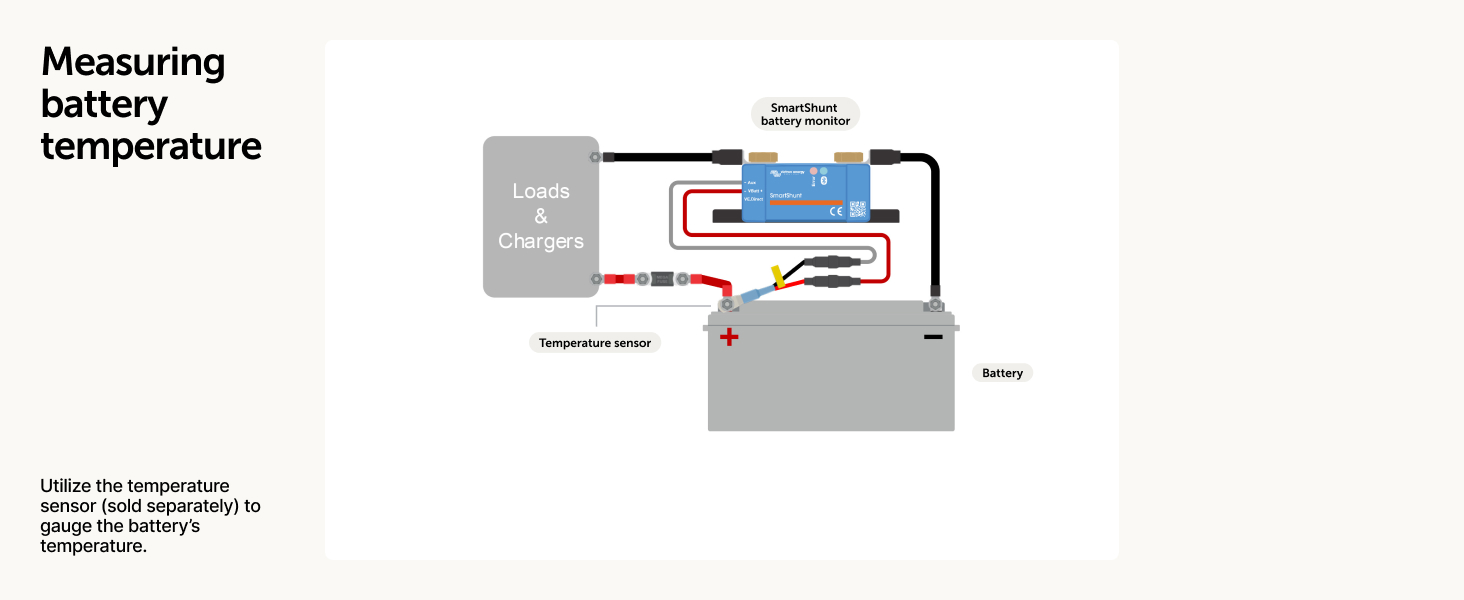
Figure 7: SmartShunt configured to monitor a starter battery.

Figure 8: SmartShunt connected to an optional temperature sensor.
Remote Management (Optional)
For advanced users, the SmartShunt can integrate into a larger Victron Energy system, enabling remote monitoring and control through the Victron Remote Management (VRM) portal. This requires a Victron GX device (e.g., Cerbo GX) connected to the internet.

Figure 9: Victron Remote Management (VRM) portal interface.
The VRM portal allows you to monitor your system from anywhere, analyze historical data, receive alerts, and even perform remote firmware updates.
Cynnal a chadw
The Victron SmartShunt is designed for minimal maintenance. Periodically inspect all cable connections to ensure they are secure and free from corrosion. Keep the device clean and free of dust and debris. Avoid exposing the unit to excessive moisture or extreme temperatures outside its specified operating range.
Datrys problemau
Materion Cyffredin ac Atebion
- Dim Cysylltiad Bluetooth:
- Sicrhewch fod Bluetooth wedi'i alluogi ar eich ffôn clyfar/llechen.
- Verify the SmartShunt is powered on.
- Move closer to the SmartShunt; Bluetooth range can be limited, especially through obstructions.
- Restart the VictronConnect app.
- If the issue persists, try restarting your smartphone/tablet.
- Darlleniadau Anghywir:
- Confirm all loads and chargers are connected to the "System Minus" side of the shunt, and only the battery negative is connected to the "Battery Minus" side. Any direct connection to the battery negative that bypasses the shunt will result in inaccurate readings.
- Check that the battery capacity settings in the VictronConnect app match your actual battery capacity.
- Sicrhewch fod pob cysylltiad yn dynn ac yn rhydd o gyrydiad.
- SmartShunt Not Appearing in App:
- Check power supply to the SmartShunt. The LED indicators should be active.
- Ensure no other device is currently connected to the SmartShunt via Bluetooth.
- Try resetting the SmartShunt by temporarily disconnecting its power.
For more detailed troubleshooting or persistent issues, refer to the official Victron Energy documentation or contact customer support.
Manylebau
| Priodoledd | Gwerth |
|---|---|
| Dimensiynau Cynnyrch | 2.24 x 4.69 x 6.5 modfedd |
| Pwysau Eitem | 0.24 cilogram (8.47 owns) |
| Rhif Model yr Eitem | SHU050130050 |
| Brand | Ynni Dioddefwyr |
| Lliw | Du |
| Cydrannau wedi'u Cynnwys | 1 Smartshunt 300A |
| Max. Cyfredol Parhaus | 300A |
| Cyftage Ystod | 6.5 - 70VDC |
| Ystod Cynhwysedd Batri | 1 - 9999Ah |
| Shunt Connection | Bolltau M8 |
Fideo Cynnyrch Swyddogol
Fideo: Dros benview of the Victron SmartShunt battery monitor, highlighting its features and integration within the Victron Energy ecosystem.
Gwybodaeth Gwarant
Victron Energy products typically come with a standard manufacturer's warranty. For specific details regarding the warranty period and terms for your SmartShunt, please refer to the warranty card included with your product or visit the official Victron Energy websafle. Cadwch eich prawf prynu ar gyfer hawliadau gwarant.
Cefnogaeth
For technical assistance, product inquiries, or support, please visit the official Victron Energy website. They offer extensive documentation, FAQs, and a global network of dealers and trained experts to assist you.
Swyddogol Websafle: www.victronenergy.com
You can also find community forums and detailed wiring schematics on their platform.
Dogfennau Cysylltiedig - SHU050130050
 |
Victron SmartShunt Battery Monitor User Manual This comprehensive user manual provides detailed instructions for the Victron SmartShunt battery monitor, covering installation, configuration, operation, interfacing, and troubleshooting for optimal battery performance and monitoring. |
 |
Victron SmartShunt IP65 Manual: Battery Monitor Guide Comprehensive user manual for the Victron Energy SmartShunt IP65 battery monitor. Covers installation, configuration, operation, troubleshooting, and technical specifications for models 300A, 500A, 1000A, and 2000A. |
 |
Victron SmartShunt IP65 Battery Monitor Manual: Installation, Configuration, and Operation Comprehensive user manual for the Victron Energy SmartShunt IP65 battery monitor. Learn about installation, configuration, operation, troubleshooting, and technical specifications for your battery monitoring system. |
 |
Canllaw Gosod Cyflym Victron Energy SmartShunt IP65 Canllaw cryno ar gyfer gosod y Victron Energy SmartShunt IP65, sy'n ymdrin â diogelwch batri, camau cysylltu, a ffurfweddu apiau ar gyfer perfformiad gorau posibl. |
 |
Canllaw Gosod Cyflym Victron Energy SmartShunt IP65 Canllaw gosod cyflym ar gyfer y Victron Energy SmartShunt IP65, sy'n cwmpasu rhybuddion diogelwch batri, camau cysylltu ar gyfer gwahanol gyfluniadau (batri sengl, ail fatri, canolbwynt, synhwyrydd tymheredd, dyfais GX), a gosodiadau ap VictronConnect ar gyfer cyfaint y systemtagbatris e a lithiwm. |
 |
Taflen Ddata Monitro Batri Bluetooth Victron SmartShunt 300A/500A/1000A/2000A Gwybodaeth fanwl am y Victron SmartShunt, monitor batri popeth-mewn-un heb arddangosfa. Mae'n cysylltu trwy Bluetooth â'r ap VictronConnect neu drwy VE.Direct â dyfais GX, gan gynnig monitro paramedrau batri cynhwysfawr. |
Ask a question about this manual
Ask about setup, troubleshooting, compatibility, parts, safety, or missing instructions. Manuals+ will review the question and use this page’s manual context to help answer it.