
1. Rhagymadrodd
This manual provides detailed instructions for the setup, operation, and maintenance of your edaiser Swivel Keyboard Case. Please read this manual thoroughly before using the product to ensure proper function and longevity. This keyboard case is designed to enhance your iPad mini experience by providing a physical keyboard and trackpad, along with robust protection and versatile viewing onglau.
2. Cynnwys Pecyn
- edaiser Swivel Keyboard Case
- Cebl Codi Tâl USB-C
- Llawlyfr Defnyddiwr
3. Cydweddoldeb
Mae'r cas bysellfwrdd hwn wedi'i gynllunio'n benodol ar gyfer y modelau iPad canlynol:
- 2021 iPad mini 6th Generation (8.3-inch): Model Numbers A2567, A2568, A2569
- 2024 iPad mini 7th Generation (8.3-inch): Model Numbers A2993, A2995, A2996
To verify your iPad model number, check the back of your iPad or go to Settings > General > About > Model Number.

Image: Compatible iPad models and their model numbers.
4. Nodweddion Cynnyrch
4.1 Swivel and Rotation
The keyboard case features a 360-degree rotatable hinge and 180-degree fold, allowing for multiple viewing and typing modes:
- Modd Gliniadur: Standard laptop-like setup for typing.
- Modd Sefwch: Ideal for watching videos or presentations.
- Tent Mode: Suitable for touch-based interactions or drawing.
- Modd Tabled: Fold the keyboard back for a traditional tablet experience.

Image: iPad mini in laptop mode, demonstrating swivel and rotation.

Image: Different usage modes of the keyboard case.
4.2 RGB Backlit Keyboard and Trackpad
The integrated keyboard features RGB backlighting for comfortable typing in low-light conditions. The precision trackpad supports multi-touch gestures for enhanced navigation within iPadOS.
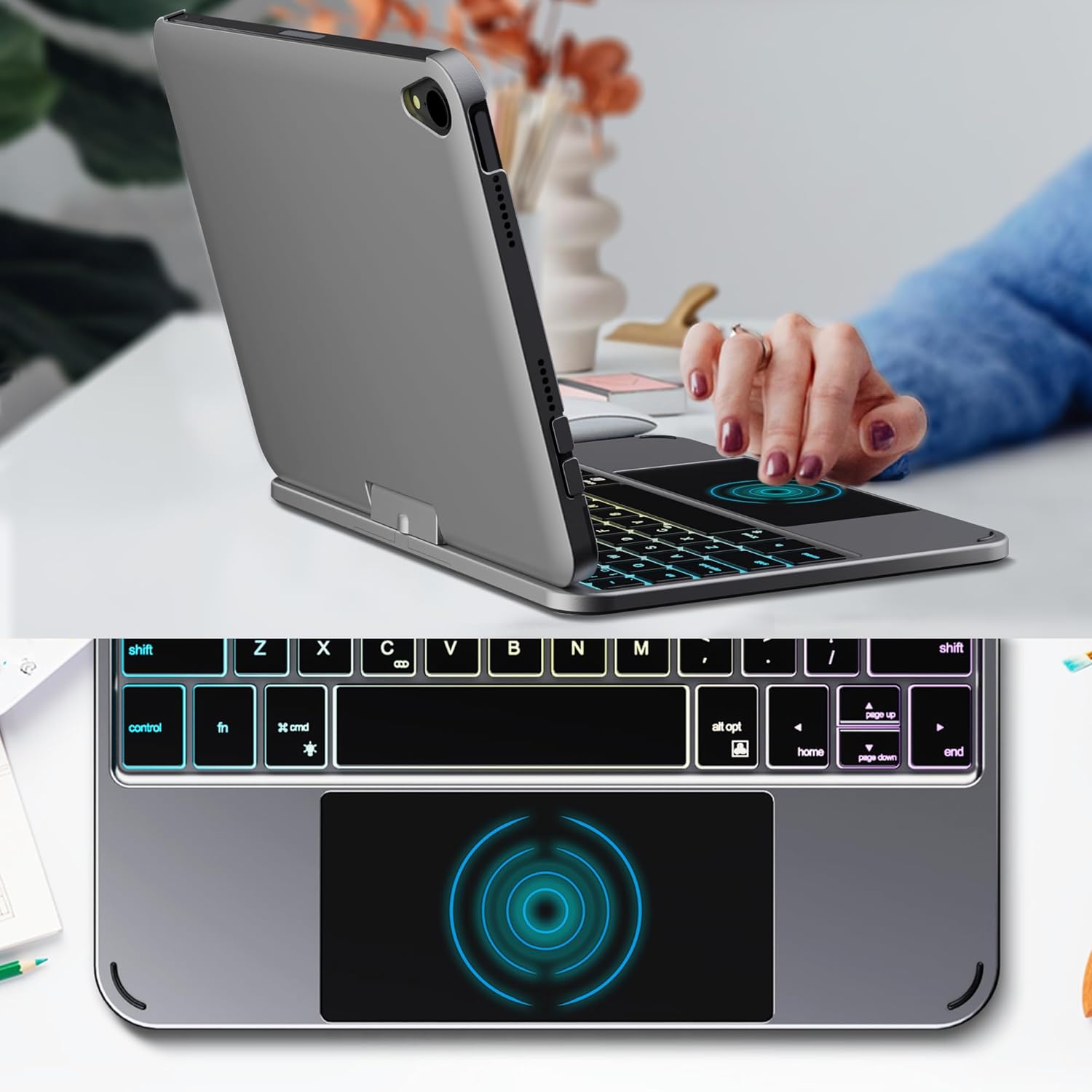
Image: Backlit keyboard and trackpad in use.

Image: Keycap and touchpad dimensions, and available colors.
4.3 Protection and Design
The case provides comprehensive protection for your iPad mini, safeguarding it from scratches and minor impacts. It features precise cutouts for the camera, charging port, and speakers.

Image: Case features and drop protection illustration.
5. Cyfarwyddiadau Gosod
5.1 Installing Your iPad mini
- Gently align your iPad mini with the case.
- Press the iPad firmly into the case until it is securely seated. Ensure all edges are properly covered and ports/buttons are accessible.
Video: Demonstrates the installation of the iPad mini into the keyboard case, followed by usage in laptop mode, trackpad interaction, and backlight activation.
5.2 Pâr Bluetooth
- Trowch y bysellfwrdd ymlaen: Locate the power button on the keyboard and press it to turn on the device.
- Activate Bluetooth on the keyboard: Press the "Fn" key and the "C" key simultaneously to activate Bluetooth pairing mode. The Bluetooth indicator light will flash.
- Open iPad Settings: Ar eich iPad, ewch i Gosodiadau > Bluetooth.
- Cysylltu: In the Bluetooth device list, find "iPad keyboard" and tap to connect. A pairing request may appear; confirm it.
- The Bluetooth indicator light on the keyboard will stop flashing once successfully paired.
Video: Demonstrates the rotation of the iPad within the case, various usage modes, and the Bluetooth pairing process for the keyboard.
6. Cyfarwyddiadau Gweithredu
6.1 Swyddogaethau Bysellfwrdd
The keyboard includes standard keys and function keys specific to iPadOS:
- Fn+C: Activates Bluetooth pairing mode.
- Fn + Light Bulb icon: Toggles keyboard backlight on/off and cycles through brightness levels.
- Fn + RGB icon: Changes backlight color (if multiple colors are supported).
- Allwedd cartref: Returns to the iPad home screen.
- Allwedd chwilio: Activates iPad search.
- Allweddi cyfaint: Adjusts iPad volume.
- Allweddi rheoli cyfryngau: Play/Pause, Previous Track, Next Track.
6.2 Trackpad Gestures
The trackpad supports various multi-touch gestures for efficient navigation:
- Tap bys sengl: Left-click.
- Tap dau fys: Right-click (context menu).
- Sgrolio dau fys: Scroll up/down or left/right.
- Sweipiwch dri bys i fyny: Go to the home screen.
- Three-finger swipe up and hold: Open the App Switcher.
- Swipe tair bys i'r chwith/dde: Switch between open apps.
- Pinsiad i chwyddo: Zoom in/out on content.
7. Gwefru a Batri
The keyboard case is powered by a built-in rechargeable battery. Use the provided USB-C cable to charge the keyboard.
- Gallu Batri: 500mAh
- Amser Wrth Gefn: Hyd at 90 diwrnod
- Amser Gweithio: Up to 180 hours (without backlight)
- Dangosydd Codi Tâl: The LED indicator will show charging status.
Connect the USB-C cable to the charging port on the keyboard and the other end to a USB power adapter (not included).

Image: Battery specifications and charging port location.
8. cynnal
- Keep the keyboard case away from liquids and extreme temperatures.
- Clean the case and keyboard with a soft, damp brethyn. Osgoi cemegau llym.
- Peidiwch â cheisio dadosod y cynnyrch.
9. Datrys Problemau
9.1 Bysellfwrdd Ddim yn Cysylltu drwy Bluetooth
- Gwnewch yn siŵr bod y bysellfwrdd wedi'i droi ymlaen ac wedi'i wefru'n llawn.
- Gwnewch yn siŵr bod Bluetooth wedi'i alluogi ar eich iPad.
- Press "Fn" + "C" on the keyboard to enter pairing mode.
- Anghofiwch y ddyfais yng ngosodiadau Bluetooth eich iPad a cheisiwch ail-baru.
- Ailgychwynwch eich iPad a'r bysellfwrdd.
9.2 Allweddi Ddim yn Ymateb
- Check the battery level of the keyboard.
- Gwnewch yn siŵr bod y bysellfwrdd wedi'i gysylltu'n iawn trwy Bluetooth.
- Glanhewch yr allweddi i gael gwared ar unrhyw falurion.
9.3 Trackpad Not Working
- Gwnewch yn siŵr bod y bysellfwrdd wedi'i gysylltu trwy Bluetooth.
- Check iPad settings: Gosodiadau > Cyffredinol > Trackpad & Mouse to ensure it's enabled and sensitivity is adjusted.
- Ailgychwynwch eich iPad a'r bysellfwrdd.
10. manylebau
| Nodwedd | Manyleb |
|---|---|
| Brand | elaiser |
| Rhif Model | edaiser Swivel 83ATS |
| Modelau Cydnaws | Apple iPad mini 6th Gen (8.3-inch), iPad mini 7th Gen (A17 Pro) |
| Cysylltedd | Bluetooth |
| Math Bysellfwrdd | Compact with RGB Backlight |
| Trackpad | Integrated, Multi-touch |
| Ffynhonnell Pwer | Wedi'i Bweru â Batri |
| Gallu Batri | 500mAh |
| Amser Wrth Gefn | Hyd at 90 diwrnod |
| Amser Gweithio | Up to 180 hours (without backlight) |
| Porthladd Codi Tâl | USB-C |
| Nifer yr Allweddi | 64 |
| Keycap Size | 11.5mm x 12.9mm |
| Touchpad Size | 98.4mm x 49.7mm |
11. Gwarant a Chefnogaeth
For warranty information and customer support, please refer to the official edaiser websafle neu cysylltwch â'u gwasanaeth cwsmeriaid yn uniongyrchol. Cadwch eich derbynneb prynu ar gyfer hawliadau gwarant.