
WONDOM ADAU1701
WONDOM ADAU1701 DSP CynampLlawlyfr Cyfarwyddiadau Prosesydd Signal Digidol 2-Mewn 4-Allan
Model: ADAU1701
Rhagymadrodd
This manual provides detailed instructions for the installation, operation, and maintenance of your WONDOM ADAU1701 DSP Preamp. This unit is designed for advanced audio signal processing, offering a 2-input, 4-output configuration with digital crossover capabilities and support for SigmaStudio programming.
Mae nodweddion allweddol yn cynnwys:
- Powered by ADAU1701 DSP, a 28/56bit Digital Signal Processor Engine.
- 24bit ADC/DAC Resolution Ratio with a 48kHz SampCyfradd ling.
- Unbalanced 2-Input, 4-Output Preamp Uned.
- USB Type-C Port for DC 5V Power.
- Four Potentiometers for High-Pass Filter (HPF), Low-Pass Filter (LPF), and Volume Control.
- Integrated Mute & Phase Switches.
- Supports SigmaStudio Programming when connected with an ICP5 programmer.
- Open-sourced Demo Program & HEX Files are provided for restoring factory settings.
Cynnwys Pecyn
Gwiriwch fod yr holl eitemau yn bresennol yn y pecyn:
- WONDOM ADAU1701 DSP Cynamp Uned
- USB Type-C Cable (for power)
- Llawlyfr Defnyddiwr (y ddogfen hon)
- (Optional: ICP5 Programmer, sold separately for advanced programming)
Gwybodaeth Diogelwch
- Ensure the power supply matches the device's requirements (DC 5V, 1A via USB Type-C).
- Peidiwch ag amlygu'r uned i leithder na thymheredd eithafol.
- Avoid opening the enclosure unless you are a qualified technician.
- Cadwch allan o gyrraedd plant.
Gosod
1. Cysylltiadau Corfforol
Refer to the diagrams below for proper connection of audio inputs, outputs, and power.

Ffigur 1: Cysylltiadau Panel Cefn. This image shows the rear panel of the ADAU1701 DSP Preamp, highlighting the DC Input (5V, 1A), ICP Port, Line In (ADC0 Left, ADC1 Right), and Line Out (DAC0 Right, DAC1 Left, DAC2 Right, DAC3 Left) RCA jacks.
- Cysylltiad Pwer: Connect a DC 5V, 1A power supply to the USB Type-C port labeled "DC INPUT 5V, 1A" on the rear panel.
- Mewnbwn sain: Connect your audio source (e.g., media player, pre-amplifier) to the "LINE IN" RCA jacks (ADC0 Left, ADC1 Right).
- Allbwn sain: Cysylltwch eich amplifiers or powered speakers to the "LINE OUT" RCA jacks. The default configuration provides 2-channel mid-range output (DAC2 Right, DAC3 Left) and 2-channel bass output (DAC0 Right, DAC1 Left) for a 2-way digital crossover setup.
- ICP Port: This port is used for connecting an ICP5 programmer (sold separately) for advanced SigmaStudio programming.
2. Troi ymlaen yn gychwynnol
Once all connections are secure, apply power to the unit. The "POWER" LED on the front panel should illuminate, indicating the device is operational.
Cyfarwyddiadau Gweithredu
The WONDOM ADAU1701 DSP Preamp features several controls on its front panel for direct adjustment, as well as advanced programming capabilities via SigmaStudio.

Ffigur 2: Rheolyddion y Panel Blaen. This image displays the front panel, showing the Power LED, Busy LED, SW1 (Mute) and SW2 (Phase) switches, and four potentiometers (POT1, POT2, POT3, POT4) for various audio adjustments.
Rheolaethau Panel Blaen:
- POWER LED: Yn dangos bod yr uned wedi'i phweru ymlaen.
- BUSY LED: Indicates DSP activity.
- SW1 (Mute Switch): Toggles audio output mute on/off.
- SW2 (Phase Switch): Adjusts the phase of the audio output.
- POT1 (MP3 / ADC2): Controls the High-Pass Filter (HPF) for Bank B (3kHz-20kHz).
- POT2 (MP8 / ADC3): Controls the Low-Pass Filter (LPF) for Bank A (210Hz-3kHz).
- POT3 (MP9 / ADC0): Controls the High-Pass Filter (HPF) for Bank A (10Hz-310Hz).
- POT4 (VOL): Yn rheoli'r cyfaint gyffredinol.
Digital Crossover Configuration:
The unit's default output is configured as a 2-way digital crossover, providing dedicated outputs for bass and mid-range frequencies.
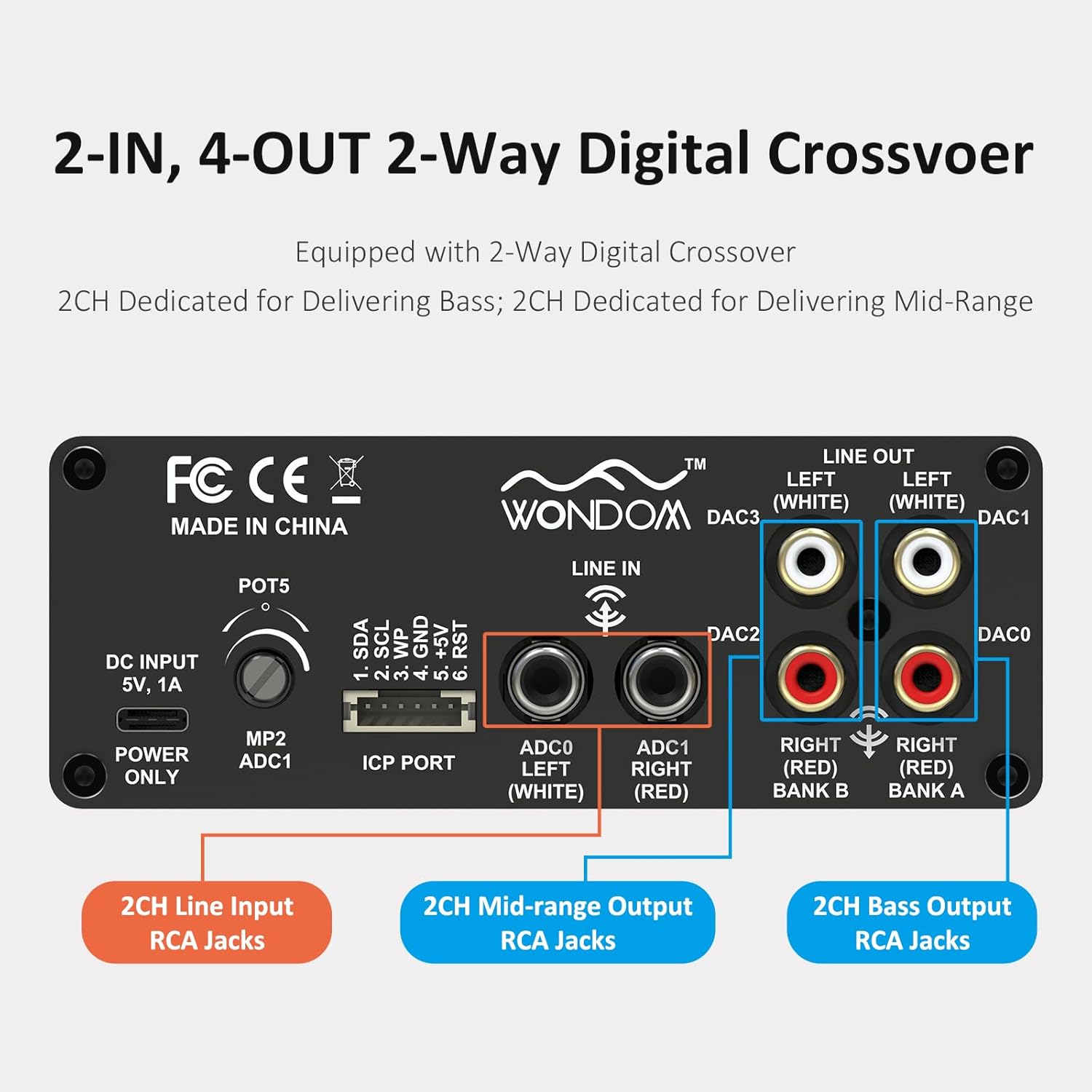
Figure 3: 2-In, 4-Out Digital Crossover. This diagram shows the RCA jack assignments for 2-channel Line Input, 2-channel Mid-range Output, and 2-channel Bass Output, facilitating a 2-way digital crossover setup.
- 2CH Line Input: ADC0 Left (White), ADC1 Right (Red).
- 2CH Mid-range Output: DAC2 Right (Red), DAC3 Left (White).
- 2CH Bass Output: DAC0 Right (Red), DAC1 Left (White).
Rhaglennu SigmaStudio:
For advanced customization and fine-tuning of the DSP functions, the unit supports programming via Analog Devices' SigmaStudio software. An ICP5 programmer (sold separately) is required to connect the DSP unit to your computer.

Figure 4: SigmaStudio Programming Setup. This image illustrates the connection between the DSP unit and an ICP5 programmer, along with a visual representation of the SigmaStudio graphical programming interface.
- Meddalwedd: Download and install SigmaStudio from the Analog Devices websafle.
- Caledwedd: Connect the ICP5 programmer to the ICP Port on the DSP unit and to your computer via USB.
- Rhaglennu: Utilize the open-sourced demo program and HEX files provided by WONDOM to get started or to restore factory settings. All terminal functions can be tailored to specific needs using SigmaStudio.
Cynnal a chadw
- Cadwch yr uned yn lân trwy ei sychu â lliain meddal, sych.
- Ceisiwch osgoi defnyddio cemegau llym neu lanhawyr sgraffiniol.
- Sicrhewch awyru digonol o amgylch yr uned i atal gorboethi.
- Regularly check all cable connections for secure fit.
Datrys problemau
| Problem | Achos Posibl | Ateb |
|---|---|---|
| Dim pŵer / LED pŵer i ffwrdd | Incorrect power supply, loose connection, faulty cable. | Verify DC 5V, 1A power supply. Check USB Type-C cable connection. Try a different power source or cable. |
| Dim allbwn sain | Incorrect input/output connections, Mute switch engaged, volume too low, faulty audio cables. | Check all RCA connections. Ensure SW1 (Mute) is disengaged. Increase POT4 (Volume). Test with different audio cables. |
| Audible hiss or noise | Ground loop, interference, power supply noise, high gain settings. | Ensure all components are properly grounded. Use a high-quality, stable 5V power supply (a separate USB power bank/battery can help reduce noise from PC USB). Reduce gain settings if applicable. |
| Cannot connect to SigmaStudio | ICP5 programmer not connected or faulty, DSP not powered, incorrect software drivers. | Ensure ICP5 programmer is correctly connected to the DSP and computer. Verify DSP unit is powered on. Install SigmaStudio drivers in administrator mode (as suggested by user reviews). |
Manylebau
| Nodwedd | Manylyn |
|---|---|
| Sglodion DSP | ADAU1701 (28/56bit Digital Signal Processor) |
| ADC/DAC Resolution | 24-did |
| SampCyfradd ling | 48 kHz |
| Ffurfweddiad Mewnbwn | 2-Input (Unbalanced RCA) |
| Ffurfweddiad Allbwn | 4-Output (Unbalanced RCA, default 2-way digital crossover) |
| Cyflenwad Pŵer | DC 5V, 1A (via USB Type-C) |
| Rheolaethau | 4 Potentiometers (HPF/LPF/Volume), Mute Switch, Phase Switch |
| Cymorth Rhaglennu | SigmaStudio (requires ICP5 programmer, sold separately) |
| Dimensiynau (L x W x H) | 4.72 x 4.72 x 1.77 modfedd |
| Pwysau | 1.23 pwys |
| Tai | Sleek Aluminum Enclosure |
Gwarant a Chefnogaeth
WONDOM products are manufactured by Sure Electronics. For warranty information, technical support, and further assistance, please refer to the official Sure Electronics websafle neu cysylltwch â'u gwasanaeth cwsmeriaid yn uniongyrchol. Cadwch eich derbynneb prynu fel prawf o brynu ar gyfer hawliadau gwarant.
Manufacturer: Sure Electronics
For additional resources and community support regarding SigmaStudio programming, online forums and tutorials can be a valuable resource.
Ask a question about this manual
Ask about setup, troubleshooting, compatibility, parts, safety, or missing instructions. Manuals+ will review the question and use this page’s manual context to help answer it.