
1. Rhagymadrodd
Thank you for choosing the ARROWMAX SES PRO Electric Precision Screwdriver. This cordless tool is designed for precision tasks, featuring smart motion control and a comprehensive set of 34 magnetic bits. It is ideal for electronics, laptops, glasses, and other delicate applications. This manual provides essential information for safe operation, setup, maintenance, and troubleshooting to ensure optimal performance and longevity of your device.
2. Gwybodaeth Diogelwch
Darllenwch yr holl rybuddion a chyfarwyddiadau diogelwch yn ofalus cyn defnyddio'r cynnyrch hwn. Gall methu â dilyn y cyfarwyddiadau hyn arwain at sioc drydanol, tân, a/neu anaf difrifol.
- Cadwch yr ardal waith yn lân ac wedi'i goleuo'n dda. Mae mannau anniben neu dywyll yn gwahodd damweiniau.
- Peidiwch â gweithredu offer pŵer mewn atmosfferau ffrwydrol, megis ym mhresenoldeb hylifau, nwyon neu lwch fflamadwy. Mae offer pŵer yn creu gwreichion a all danio'r llwch neu'r mwg.
- Cadwch blant a gwylwyr draw wrth weithredu teclyn pŵer. Gall gwrthdyniadau achosi i chi golli rheolaeth.
- Osgowch gychwyn ar ddamwain. Gwnewch yn siŵr bod y switsh yn y safle diffodd cyn cysylltu â phecyn batri, codi neu gario'r offeryn.
- Peidiwch â gorgyrraedd. Cadwch y sylfaen a'r cydbwysedd cywir bob amser. Mae hyn yn galluogi gwell rheolaeth ar yr offeryn pŵer mewn sefyllfaoedd annisgwyl.
- Gwisgwch yn iawn. Peidiwch â gwisgo dillad llac na gemwaith. Cadwch eich gwallt a'ch dillad i ffwrdd o rannau symudol. Gellir dal dillad rhydd, gemwaith, neu wallt hir mewn rhannau symudol.
- Defnyddiwch offer amddiffynnol personol. Gwisgwch amddiffyniad llygaid bob amser. Bydd offer amddiffynnol fel mwgwd llwch, esgidiau diogelwch di-sgid, het galed, neu offer amddiffyn y clyw a ddefnyddir ar gyfer amodau priodol yn lleihau anafiadau personol.
- Storiwch offer pŵer segur allan o gyrraedd plant a pheidiwch â chaniatáu i bobl sy'n anghyfarwydd â'r offeryn pŵer neu'r cyfarwyddiadau hyn weithredu'r offeryn pŵer.
- Cynnal offer pŵer. Gwiriwch am gamaliniad neu rwymo rhannau symudol, torri rhannau ac unrhyw gyflwr arall a allai effeithio ar weithrediad yr offeryn pŵer. Os caiff ei ddifrodi, gwnewch yn siŵr bod yr offeryn pŵer wedi'i atgyweirio cyn ei ddefnyddio.
- Defnyddiwch yr offeryn pŵer, yr ategolion a'r darnau offer ac ati yn unol â'r cyfarwyddiadau hyn, gan ystyried yr amodau gwaith a'r gwaith sydd i'w wneud. Gallai defnyddio'r offeryn pŵer ar gyfer gweithrediadau gwahanol i'r rhai a fwriadwyd arwain at sefyllfa beryglus.
- Dim ond gyda'r gwefrydd a bennir gan y gwneuthurwr y gellir ailwefru. Gall gwefrydd sy'n addas ar gyfer un math o becyn batri greu risg o dân pan gaiff ei ddefnyddio gyda phecyn batri arall.
- Peidiwch â defnyddio'r offeryn os nad yw'r switsh yn ei droi ymlaen ac i ffwrdd. Mae unrhyw offeryn pŵer na ellir ei reoli gyda'r switsh yn beryglus a rhaid ei atgyweirio.
- Datgysylltwch y pecyn batri o'r offeryn pŵer cyn gwneud unrhyw addasiadau, newid ategolion, neu storio offer pŵer. Mae mesurau diogelwch ataliol o'r fath yn lleihau'r risg o ddechrau'r offeryn pŵer yn ddamweiniol.
3. Cynnwys Pecyn
The ARROWMAX SES PRO Electric Precision Screwdriver package typically includes the following items:
- 1 x ARROWMAX SES PRO Electric Precision Screwdriver
- 1 x Magnetic Storage Case
- 34 x Magnetic Precision Bits (S2 Steel, 4mm)
- 1 x Cebl Codi Tâl USB-A i USB-C

Image: The ARROWMAX SES PRO Electric Precision Screwdriver, its magnetic bit case, and the included 34 precision bits.
4. Cynnyrch Drosview a Chydrannau
Familiarize yourself with the main components of your ARROWMAX SES PRO screwdriver:

Image: Labeled diagram of the ARROWMAX SES PRO screwdriver's key components.
- Porthladd codi tâl Math-C: Located at the top for recharging the internal battery.
- Arddangosfa Statws LED: An OLED screen showing battery level, torque setting, and operational status.
- Botwm Pŵer: Used to turn the device on/off and adjust torque settings.
- Corff Aloi Alwminiwm: Adeiladu gwydn a ysgafn.
- Goleuadau LED: Yn goleuo'r ardal waith er mwyn gweld yn well.
- Bit Installation Port: Where precision bits are inserted.
5. Gosod
5.1 Gwefru'r Sgriwdreifer
- Locate the USB-C charging port at the top of the screwdriver.
- Connect the provided USB-A to USB-C charging cable to the screwdriver and a compatible USB-A power adapter (not included).
- The LED Status Display will indicate the charging progress. A full charge allows for tightening approximately 900 screws.
- Nodyn Pwysig: This electric screwdriver only supports USB-A to USB-C charging and is not compatible with USB-C PD (Power Delivery) chargers.

Delwedd: Drosoddview of charging port, battery, torque adjustment, and OLED display.
5.2 Installing Precision Bits
- Select the appropriate precision bit from the magnetic storage case. The case features a pop-up design for easy access.
- Insert the bit firmly into the Bit Installation Port at the tip of the screwdriver. The magnetic holder will secure the bit in place.
- To remove a bit, simply pull it out.
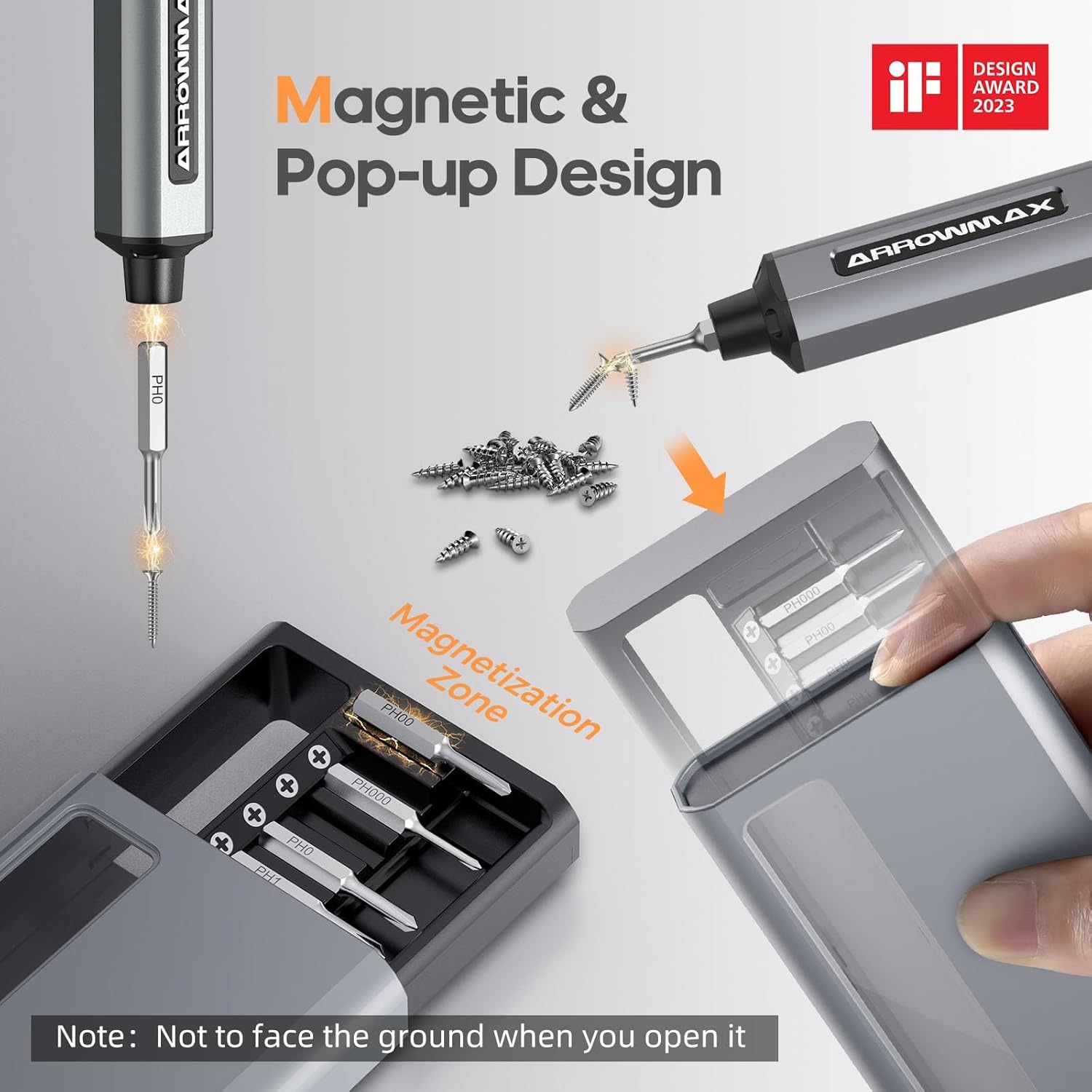
Image: Magnetic pop-up bit case design and bit magnetization zone.
6. Cyfarwyddiadau Gweithredu
6.1 Pweru Ymlaen/Diffodd
Press and hold the Power Button for a few seconds to turn the screwdriver on or off. The OLED screen will illuminate upon activation.
6.2 Addasu Gosodiadau Torque
The SES PRO offers 5 adjustable torque levels, including an auto-sensing mode, to suit various tasks. The electric torque ranges from 0.049 N.m to 0.30-0.35 N.m, with a manual torque of 3 N.m.
- With the screwdriver powered on, press the Power Button three times continuously to cycle through the torque settings.
- The OLED screen will display the current torque level (e.g., 1, 2, 3, 4, A for Auto-Sensing).
- Select a lower torque for delicate items like glasses or small electronics, and higher torque for more robust applications.
- For screws that are too tight for the electric motor, the screwdriver can be used in manual mode by applying direct force.
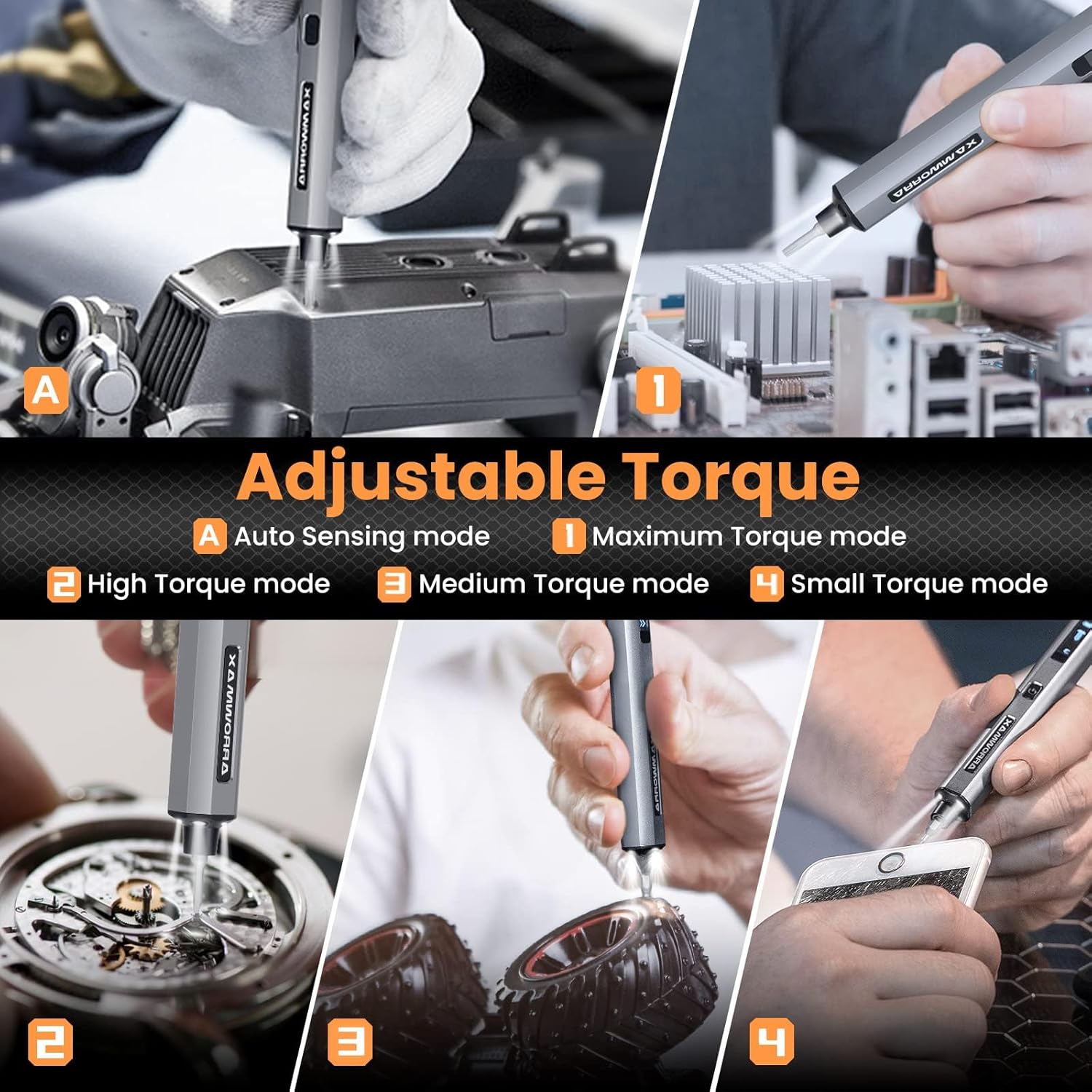
Image: Adjustable torque settings for various applications.
6.3 Body Sensory Dual-Mode (Forward/Reverse)
The SES PRO features a body sensory dual-mode for intuitive control of rotation direction.
- To drive a screw in (tighten), gently rotate your wrist in a clockwise direction while holding the screwdriver.
- To remove a screw (loosen), gently rotate your wrist in a counter-clockwise direction.
- The screwdriver's internal gyroscope detects your wrist movement and activates the motor accordingly.
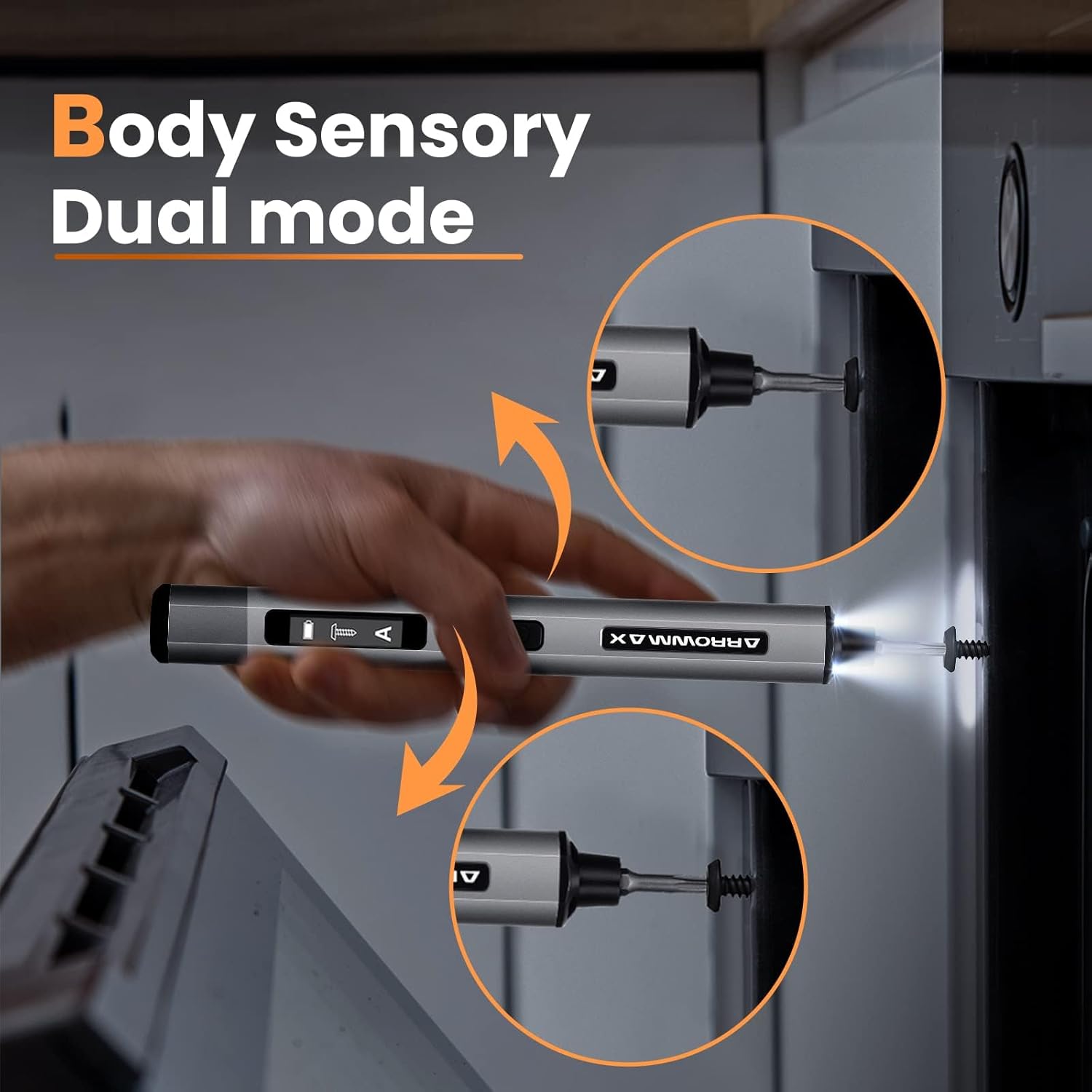
Image: Body sensory dual-mode in action for forward and reverse operation.
6.4 LED Work Lights
The integrated LED lights at the tip of the screwdriver automatically illuminate when the motor is active, providing clear visibility of your work area.
7. cynnal
7.1 Glanhau
- Wipe the screwdriver body with a soft, dry cloth. Do not use abrasive cleaners or solvents.
- Ensure the bit installation port is free of debris.
7.2 Gofal Batri
- Er mwyn ymestyn oes y batri, osgoi rhyddhau'r batri'n llwyr yn aml.
- Store the screwdriver in a cool, dry place when not in use.
- Recharge the battery periodically if stored for extended periods to prevent deep discharge.

Image: The SES PRO's long-lasting battery capacity.
7.3 Bit Care
- Keep the precision bits clean and free of rust.
- Store bits securely in the magnetic case to prevent loss and damage.
8. Datrys Problemau
If you encounter issues with your ARROWMAX SES PRO screwdriver, refer to the following common problems and solutions:
| Problem | Achos Posibl | Ateb |
|---|---|---|
| Screwdriver does not turn on or respond. | Low battery; device is off. | Charge the screwdriver using the provided USB-A to USB-C cable. Ensure the power button is pressed to turn it on. |
| Nid yw sgriwdreifer yn gwefru. | Incorrect charger type; faulty cable/adapter. | Ensure you are using a USB-A to USB-C cable and a standard USB-A power adapter. USB-C PD chargers are not supported. Try a different cable or adapter. |
| Motor lacks power or cannot loosen/tighten screws. | Low battery; incorrect torque setting; screw is too tight for electric mode. | Charge the screwdriver. Increase the torque setting. For very tight screws, manually loosen or tighten them first, then use the electric mode. |
| Directional control (forward/reverse) is inconsistent. | Improper wrist movement; gyroscope calibration issue. | Ensure clear and deliberate wrist movements. If issues persist, try restarting the device. |
| Bits fall out or are not held securely. | Bit installation port is dirty; bit is not fully inserted. | Clean the bit installation port. Ensure the bit is pushed in firmly until it clicks or feels secure. |
9. manylebau
Key technical specifications for the ARROWMAX SES PRO Electric Precision Screwdriver:
| Nodwedd | Manyleb |
|---|---|
| Brand | ARROWMAX |
| Model | SES PRO (AM-199913-G) |
| Cyflymder | 200 RPM |
| Ffynhonnell Pwer | Wedi'i Bweru â Batri |
| Cyftage | 3.7 folt (DC) |
| Torque Trydan | 0.049 N.m - 0.30-0.35 N.m (Adjustable) |
| Torque â Llaw | 3 Nm |
| Math Batri | Ion Lithiwm (500mAh) |
| Porthladd Codi Tâl | USB-C (USB-A to USB-C charging only) |
| Pwysau Eitem | 13.7 owns |
| Dimensiynau Pecyn | 7.48 x 3.43 x 1.73 modfedd |
| Nodweddion Arbennig | OLED Screen, Smart Motion Control, Ergonomic Design, LED Lights |
10. Gwarant a Chefnogaeth
The manufacturer's warranty information for this product is not explicitly provided in the available data. For details regarding warranty coverage, duration, and terms, please refer to the documentation included with your purchase or contact the retailer where the product was acquired.
For technical support, product inquiries, or assistance with troubleshooting that is not covered in this manual, please visit the official ARROWMAX website or contact their customer service department. Contact information can typically be found on the product packaging or the manufacturer's official online channels.