Gwybodaeth Ddiogelwch Bwysig
Read all instructions carefully before using the appliance. Failure to follow these instructions may result in electric shock, fire, or serious injury.
- This appliance is waterproof and suitable for use in the bath or shower. For safety reasons, the appliance can only be used cordless.
- Do not use the appliance if it is damaged. Always check the appliance before use for any damage to the blades or housing.
- Keep the appliance and its accessories out of reach of children.
- Defnyddiwch yr offeryn at ei ddiben bwriadedig yn unig fel y disgrifir yn y llawlyfr hwn.
- Peidiwch â throchi'r cebl gwefru na'r addasydd mewn dŵr.
- Ensure the appliance is fully dry before connecting it to a power source for charging.
Cynnyrch Drosview
The Philips All-in-One Series 5000 Trimmer MG5950/15 is a versatile grooming tool designed for face, hair, and body. It includes 12 tools to cater to various trimming and styling needs.

The Philips All-in-One Series 5000 Trimmer, model MG5950/15, shown alongside its retail packaging, highlighting its 12-in-1 versatility for face, hair, and body styling.
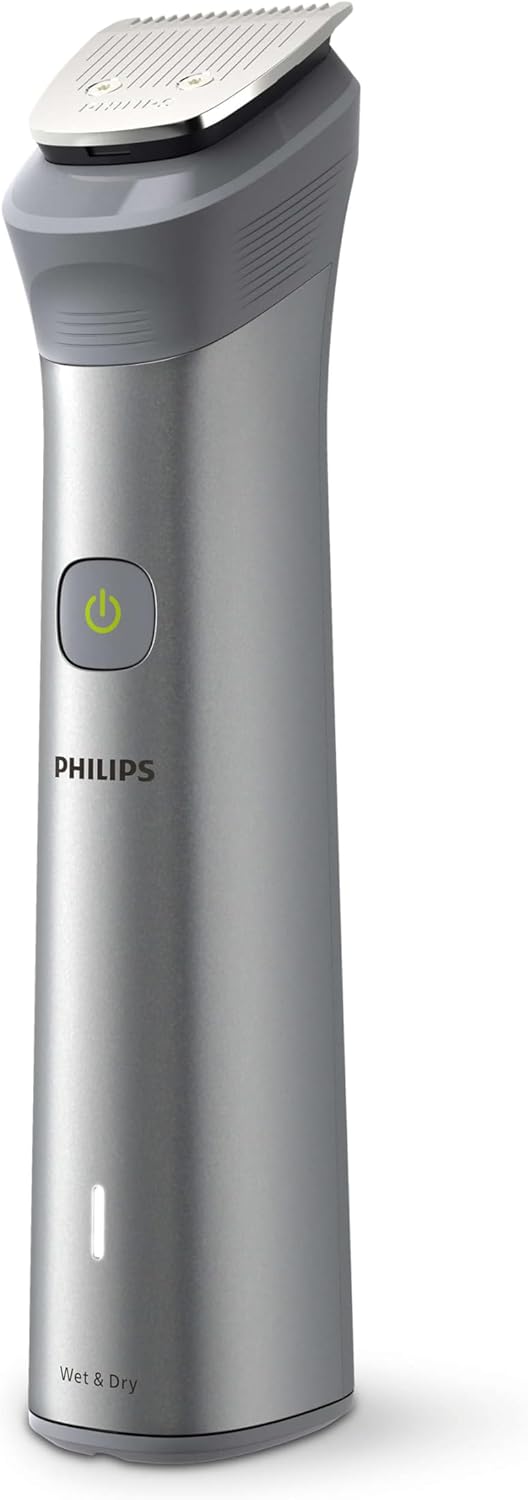
A detailed image of the Philips MG5950/15 trimmer's main body, showcasing its ergonomic design, power button, and "Wet & Dry" indicator.
Mae'r pecyn yn cynnwys:
- Main trimmer handle
- Pen trimiwr trachywiredd
- Pen trimmer trwyn a chlust
- Various guide combs for beard, hair, and body (0.5mm to 16mm)

Cynhwysfawr view of the Philips MG5950/15 trimmer body and its full set of 12 interchangeable attachments, including various combs for different lengths, a precision trimmer, and a nose/ear trimmer.
Gosod
Codi Tâl ar y Offer
Before first use, fully charge the trimmer. A full charge provides up to 120 minutes of cordless use, which can last up to 4 weeks depending on usage frequency.
- Ensure the trimmer is dry.
- Connect the USB charging cable to the trimmer and a compatible USB power adapter (not included). The appliance requires a 5V, 1A USB power adapter.
- The battery indicator light will show charging status. When fully charged, the indicator will signal completion.

Hands connecting the Philips MG5950/15 trimmer to a USB charging cable, illustrating the charging process and the battery indicator light. The trimmer comes with a USB cable, but the power adapter is sold separately.
Attaching and Removing Trimming Heads
- To attach a head: Align the head with the trimmer body and push it down until it clicks into place.
- To remove a head: Pull the head upwards away from the trimmer body.
- To attach a comb: Slide the desired comb onto the trimming head until it locks.
- To remove a comb: Gently pull the comb off the trimming head.
Cyfarwyddiadau Gweithredu
General Trimming Tips
- Ensure your skin and hair are clean.
- For best results, move the trimmer against the direction of hair growth.
- The trimmer can be used wet or dry.
Face Trimming (Beard, Stubble)
Use the main trimmer head with the appropriate beard comb for desired length. The trimmer features BeardSense Technology, which scans beard density 125 times per second and adjusts cutting power for consistent performance, even on dense or long beards.

An illustrative image depicting the Philips BeardSense Technology in action, showing how the trimmer's sensor detects beard density and adjusts cutting power for an even trim.
Choose from 14 lock-in length settings, ranging from 0.5mm to 16mm, to achieve your preferred beard style.
Trimio Gwallt
Attach the hair trimming comb to the main trimmer head. Select the desired length setting. Move the trimmer slowly and steadily against the direction of hair growth for an even cut.

A man using the Philips MG5950/15 trimmer to style his hair in front of a mirror, demonstrating its application for home haircuts.
Body Grooming
Use the body grooming combs for trimming body hair to a uniform length. The waterproof design allows for comfortable use in the shower.
Nose and Ear Trimming
Attach the dedicated nose and ear trimmer head. Gently insert the trimmer into your nostril or ear canal to remove unwanted hair. Do not insert too deeply.
Cynnal a chadw
Glanhau'r Trimmer
The Philips MG5950/15 is fully washable. After each use:
- Turn off the appliance and detach the trimming head and comb.
- Rinse the trimming head and comb under running water.
- Rinse the trimmer body under running water, ensuring no water enters the charging port.
- Ysgwydwch y dŵr gormodol i ffwrdd a gadewch i bob rhan sychu'n llwyr yn yr awyr cyn ail-ymgynnull neu storio.
Gofal Blade
The trimmer features self-sharpening blades, which do not require oiling or special maintenance. Ensure blades are clean after each use to maintain optimal performance.
Storio
Store the trimmer and its accessories in a dry, safe place, away from direct sunlight and extreme temperatures. Use the provided pouch for organized storage.
Datrys problemau
- Trimmer ddim yn troi ymlaen: Ensure the battery is charged. If the battery is completely depleted, it may take a few minutes of charging before the trimmer responds.
- Perfformiad tocio gwael: Clean the trimming head and blades thoroughly. Ensure no hair is caught. If using combs, ensure they are correctly attached.
- Batri ddim yn codi tâl: Check the USB cable and power adapter for damage. Ensure the charging port on the trimmer is clean and dry. Try a different USB power adapter (5V, 1A recommended).
- Gormod o sŵn neu ddirgryniad: Ensure the trimming head is correctly attached and free from debris.
Manylebau Technegol
| Brand | PHILIPS |
| Rhif Model | MG5950/15 |
| Ffynhonnell Pwer | Wedi'i Bweru â Batri |
| Math Batri | 1 Ion Lithiwm (wedi'i gynnwys) |
| Bywyd Batri | 120 munud |
| Nodweddion Arbennig | Diwifr, gwrth-ddŵr |
| Deunydd Blade | Dur Di-staen |
| Math Pen | Ffoil |
| Number of Tools/Attachments | 12 (as in 12-in-1 grooming kit) |
| Dimensiynau Cynnyrch | 7 x 16 x 0.44 cm |
| Pwysau Eitem | 0.27 Cilogram |
| Lliw | Du |
Gwarant a Chefnogaeth
Gwybodaeth Gwarant
This Philips appliance is covered by a manufacturer's warranty. Please refer to the warranty card included in your product packaging for specific terms and conditions, including warranty period and coverage details.
Cefnogaeth i Gwsmeriaid
For further assistance, product registration, or to find replacement parts and accessories, please visit the official Philips website or contact Philips customer support in your region. Contact details can typically be found in the product packaging or on the Philips websafle.