
Urbanista 1037551
Urbanista Malibu Small Solar Bluetooth Speaker User Manual
Model: 1037551 | Brand: Urbanista
Rhagymadrodd
The Urbanista Malibu is a portable Bluetooth speaker designed for outdoor and indoor use, featuring integrated Powerfoyle solar cell technology for continuous charging. It offers robust sound, IP67 dust and waterproof rating, and dual pairing capabilities for an enhanced audio experience. This manual provides essential information for setting up, operating, maintaining, and troubleshooting your Malibu speaker.

Figure 1: Urbanista Malibu Speaker Overview
The image displays the Urbanista Malibu speaker in black, showcasing its compact, rounded design with a textured speaker grille and a smooth top surface that integrates the Powerfoyle solar panel. Control buttons are visible on the top edge.
Nodweddion Allweddol
- Codi Tâl Solar: Equipped with Powerfoyle solar cell technology for continuous charging from indoor and outdoor light.
- Gradd IP67: Fully dust and waterproof, making it suitable for various environments including beaches, pools, and outdoor adventures.
- Bluetooth 5.2: Ensures stable and efficient wireless connectivity with compatible devices.
- Stereo Link Function: Allows pairing two Malibu speakers for a true stereo sound experience.
- Urbanista App Control: Provides access to EQ settings, battery status, and charging performance data.
- Dyluniad Gwydn: Constructed with recycled plastic and materials, featuring a rugged build and integrated wrist strap for portability.
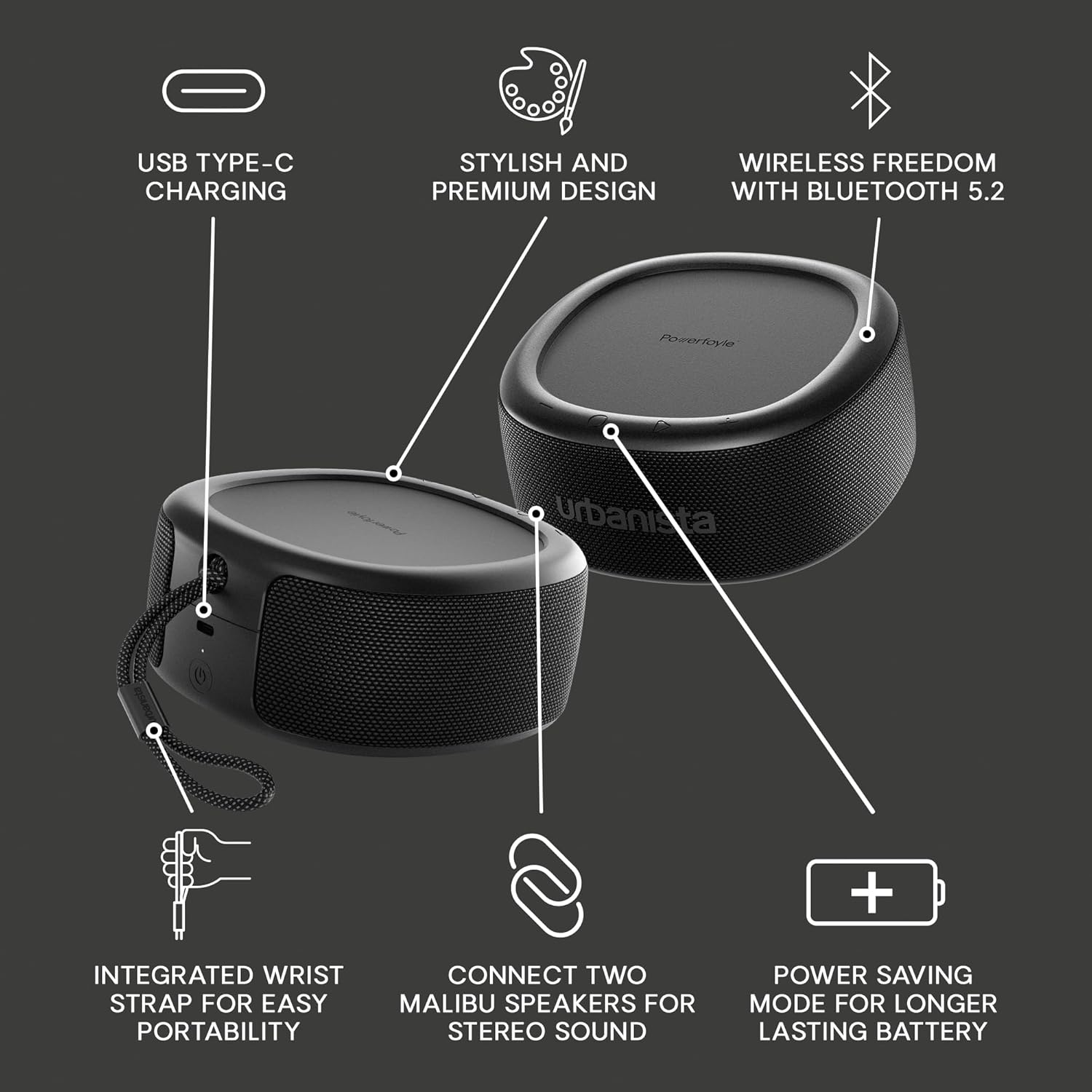
Figure 2: Malibu Speaker Feature Overview
This diagram illustrates the various features of the Malibu speaker, including USB Type-C charging, stylish design, Bluetooth 5.2 wireless freedom, integrated wrist strap, the ability to connect two speakers for stereo sound, and a power-saving mode.
Gosod
1. Gwefru Cychwynnol
Before first use, it is recommended to fully charge your Urbanista Malibu speaker using the included USB-C cable. Connect the USB-C end to the speaker's charging port and the other end to a compatible USB power adapter (not included). The charging indicator light will provide feedback on the charging status.
2. Pweru Ymlaen / I ffwrdd
To power on the speaker, press and hold the power button located on the side until you hear an audible prompt or see the indicator light illuminate. To power off, press and hold the power button again until the speaker shuts down.
3. Pâr Bluetooth
- Ensure the speaker is powered on and in pairing mode (indicated by a flashing LED). If not, press and hold the Bluetooth button.
- Ar eich dyfais (ffôn clyfar, tabled, ac ati), ewch i osodiadau Bluetooth.
- Select "Urbanista Malibu" from the list of available devices.
- Once connected, the speaker will provide an audible confirmation, and the LED indicator will turn solid.
4. Urbanista Audio App
For enhanced control and features, download the Urbanista Audio App from your device's app store. The app allows you to monitor solar charging performance, check battery levels, and customize sound settings via an equalizer.

Figure 3: Urbanista App Integration
This image shows the Urbanista Malibu speaker alongside a smartphone running the Urbanista app, demonstrating how users can monitor charging performance and battery levels, as well as change EQ settings to personalize their sound.
Cyfarwyddiadau Gweithredu
Rheolaethau Sylfaenol
| Botwm / Swyddogaeth | Gweithred |
|---|---|
| Botwm Pŵer | Pwyswch a daliwch i Bweru Ymlaen/Diffodd. |
| Cyfrol i Fyny (+) | Pwyswch i gynyddu cyfaint. |
| Cyfrol Down (-) | Pwyswch i leihau cyfaint. |
| Botwm Chwarae/Seibiant | Press to Play/Pause audio. Double-press for next track. Triple-press for previous track. |
| Botwm Bluetooth | Pwyswch a dal i fynd i mewn i fodd paru Bluetooth. |
Codi Tâl Solar
The Malibu speaker features an integrated Powerfoyle solar panel on its top surface. For optimal charging, expose the speaker to direct sunlight or strong indoor light. The speaker will continuously charge as long as it is exposed to light, extending its playtime. Monitor charging efficiency via the Urbanista Audio App.

Figure 4: Solar Charging Capability
This image illustrates the speaker's solar charging feature, showing it being held outdoors with sunlight illuminating its top panel, emphasizing its "Light Powered" functionality.
Stereo Link Function (Dual Pairing)
To achieve a wider soundstage and true stereo audio, you can pair two Urbanista Malibu speakers together:
- Ensure both Malibu speakers are powered on and not connected to any other Bluetooth device.
- Ar un siaradwr (hwn fydd eich prif siaradwr), pwyswch a daliwch y botwm Bluetooth nes iddo fynd i mewn i'r modd paru.
- Quickly double-press the Bluetooth button on the primary speaker. It will then search for another Malibu speaker.
- Once connected, both speakers will provide an audible confirmation, and their LEDs will indicate a successful stereo link.
- Now, connect your audio source device to the primary Malibu speaker via Bluetooth as usual.

Figure 5: Dual Speaker Pairing
This image shows two Urbanista Malibu speakers positioned near a pool, illustrating the dual speaker support feature for achieving stereo sound.
Cynnal a chadw
Glanhau
Due to its IP67 rating, the Malibu speaker can be rinsed with water to clean off dirt, sand, or dust. Use a soft, damp cloth for general cleaning. Do not use harsh chemicals or abrasive cleaners, as these may damage the speaker's finish or solar panel.
Storio
Store the speaker in a cool, dry place away from extreme temperatures. While the solar panel charges in various light conditions, prolonged storage in complete darkness may lead to battery depletion over time. For long-term storage, ensure the battery is at least 50% charged.

Figure 6: IP67 Water and Dust Protection
This image shows the Urbanista Malibu speaker near a pool, highlighting its IP67 dust and waterproof rating, signifying its durability and suitability for outdoor use.
Datrys problemau
| Problem | Achos Posibl | Ateb |
|---|---|---|
| Nid yw'r siaradwr yn troi ymlaen. | Gwefr batri isel neu ddim gwefr batri o gwbl. | Charge the speaker using the USB-C cable. Ensure the power adapter is working. |
| Methu paru drwy Bluetooth. | Nid yw'r siaradwr yn y modd paru; dyfais yn rhy bell; ymyrraeth. | Ensure speaker is in pairing mode (flashing LED). Move device closer. Turn off other Bluetooth devices. Try restarting both speaker and device. |
| Dim sain na chyfaint isel. | Volume too low; device not connected; audio source issue. | Increase volume on both speaker and connected device. Verify Bluetooth connection. Check audio source playback. |
| Solar charging not effective. | Insufficient light exposure; dirty solar panel. | Place speaker in direct sunlight or strong artificial light. Clean the solar panel surface. Use the Urbanista app to monitor charging performance. |
| Stereo Link not working. | Incorrect pairing procedure; speakers too far apart. | Ensure both speakers are disconnected from other devices. Follow the Stereo Link instructions precisely. Keep speakers within close proximity during pairing. |
Manylebau
| Nodwedd | Manylyn |
|---|---|
| Enw Model | Malibu |
| Rhif Model | 1037551 |
| Technoleg Cysylltedd | Bluetooth 5.2 |
| Ffynhonnell Pwer | Solar Powered (Powerfoyle), USB-C |
| Llefarydd Uchafswm Pŵer Allbwn | 20 Watts (2x10W) |
| Lefel Gwrthsefyll Dŵr | IP67 (Gwrth-lwch a gwrth-ddŵr) |
| Bywyd Batri | Up to 20 hours (plus solar extension) |
| Dimensiynau Cynnyrch | 6.69"D x 2.76"W x 2.76"H |
| Pwysau Eitem | 2.4 pwys |
| Deunydd | Plastig wedi'i ailgylchu |
Fideo Cynnyrch Swyddogol
Video 1: Urbanista Malibu - Solar Powered Waterproof Speaker
This official product video from Urbanista showcases the key features of the Malibu speaker, including its solar charging capabilities, IP67 waterproof design, and portability, demonstrating its use in various outdoor settings.
Gwarant a Chefnogaeth
Urbanista products are covered by a limited warranty. For detailed warranty information, product registration, and technical support, please visit the official Urbanista websafle neu cysylltwch â'u gwasanaeth cwsmeriaid. Cadwch eich prawf prynu ar gyfer hawliadau gwarant.
Am gymorth pellach, gallwch hefyd gyfeirio at y Urbanista Brand Store on Amazon.
Ask a question about this manual
Ask about setup, troubleshooting, compatibility, parts, safety, or missing instructions. Manuals+ will review the question and use this page’s manual context to help answer it.