
Rhagymadrodd
The zelotes T30 Wired Vertical Mouse is designed to enhance comfort and reduce wrist strain during prolonged computer use. Its ergonomic vertical design promotes a natural hand and wrist posture. This manual provides essential information for setting up, operating, maintaining, and troubleshooting your new mouse.

Ffigur 1: Blaen-chwith view of the zelotes T30 Wired Vertical Mouse.

Figure 2: Various side views illustrating the vertical design of the mouse.
Gosod
The zelotes T30 Vertical Mouse is designed for simple plug-and-play operation, requiring no driver installation.
Cysylltu'r Llygoden
- Locate an available USB port on your computer (Laptop, PC, Mac).
- Insert the USB connector of the zelotes T30 mouse into the USB port.
- The mouse will be automatically recognized by your operating system (Win11, Win10, Win8, Win7, Mac OS, Linux) and ready for use.
Attaching the Detachable Palm Rest
The mouse comes with a detachable palm rest for enhanced comfort. To attach it:
- Align the palm rest with the designated slots on the bottom of the mouse.
- Gently slide the palm rest into place until it clicks securely.
- Ensure the palm rest is firmly attached before use.

Figure 3: Illustration of the detachable palm rest and its attachment points.
Cyfarwyddiadau Gweithredu
Ergonomic Design and Grip
The vertical design of the T30 mouse positions your hand in a natural handshake posture, reducing pronation of the forearm and wrist. This design aims to alleviate discomfort associated with traditional mouse use.

Figure 4: Proper hand placement on the ergonomic vertical mouse.

Ffigur 5: Manwl view of the humanized grip design, ensuring comfortable finger placement.
Addasu Sensitifrwydd DPI
The mouse features 4 adjustable DPI settings: 1200, 1600, 2400, and 3200 DPI. To change the sensitivity:
- Locate the DPI button on the mouse. This button is typically positioned near the scroll wheel or thumb area.
- Press the DPI button to cycle through the available sensitivity settings. Each press will switch to the next DPI level.
- The LED illumination on the mouse may change color or pattern to indicate the current DPI setting.
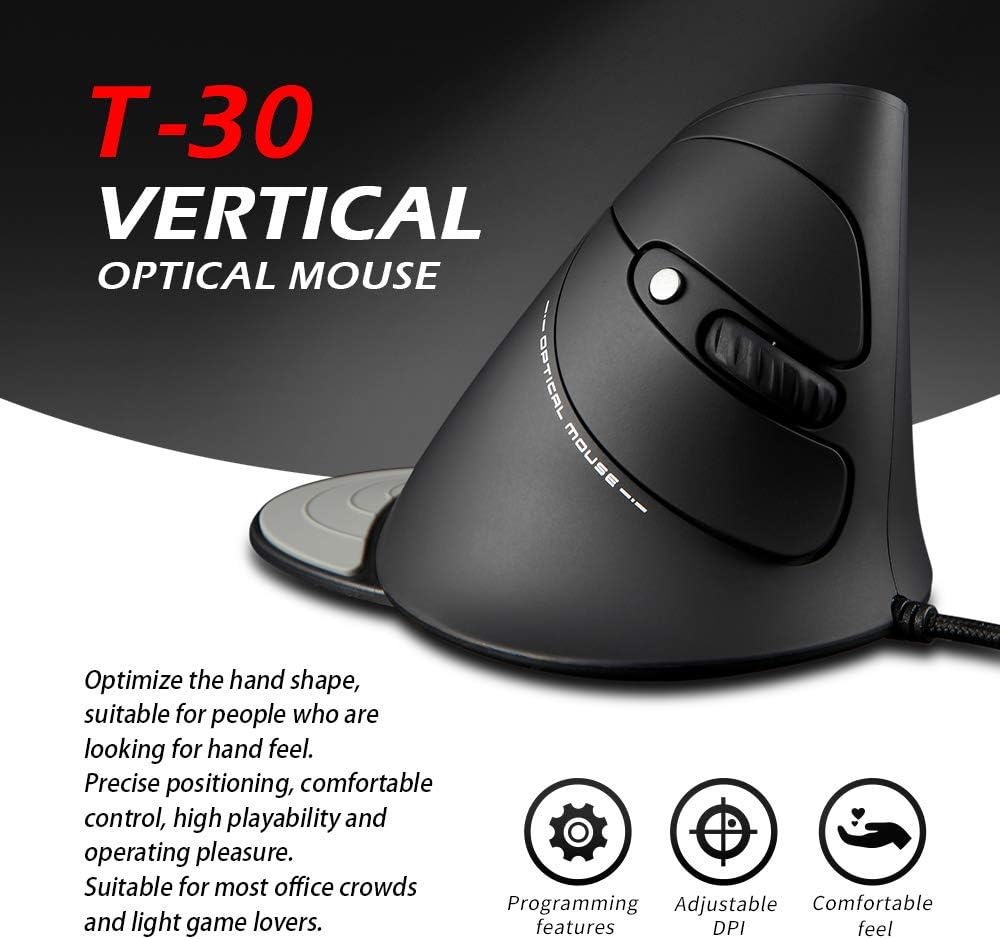
Figure 6: The T30 mouse with an emphasis on its adjustable DPI feature.
Swyddogaethau Botwm
The zelotes T30 mouse is equipped with 6 buttons for various functions:
- Botwm Clic Chwith: Swyddogaeth clicio sylfaenol safonol.
- Botwm Clic Dde: Swyddogaeth clicio eilaidd safonol.
- Olwyn Sgroliwch: For vertical scrolling. Can also be pressed for middle-click functionality.
- Botwm DPI: Adjusts mouse sensitivity (DPI).
- Botwm Ymlaen: Yn llywio ymlaen yn web porwyr neu file fforwyr.
- Botwm Cefn: Yn llywio yn ôl i mewn web porwyr neu file fforwyr.
Video 1: Demonstration of the zelotes T30 Ergonomic Vertical Mouse features and usage.
Cynnal a chadw
To ensure the longevity and optimal performance of your zelotes T30 mouse, follow these maintenance guidelines:
- Glanhau: Defnyddiwch frethyn meddal, sych i sychu wyneb y llygoden. Ar gyfer baw ystyfnig, defnyddiwch frethyn ychydig yn sych.amp gellir defnyddio lliain, ond gwnewch yn siŵr nad oes hylif yn mynd i mewn i'r llygoden. Osgowch gemegau llym neu lanhawyr sgraffiniol.
- Storio: Pan nad yw'n cael ei ddefnyddio, storiwch y llygoden mewn amgylchedd glân, sych i ffwrdd o dymheredd eithafol a golau haul uniongyrchol.
- Gofal Cebl: Osgowch blygu neu droelli'r cebl USB yn ormodol, gan y gall hyn niweidio'r gwifrau mewnol.
Datrys problemau
If you encounter issues with your zelotes T30 mouse, refer to the following common problems and solutions:
| Problem | Achos Posibl | Ateb |
|---|---|---|
| Llygoden ddim yn ymateb | Loose USB connection, faulty USB port, operating system issue. |
|
| Mae symudiad y cyrchwr yn afreolaidd neu'n neidio | Synhwyrydd optegol budr, arwyneb pad llygoden anaddas. |
|
| Nid yw'r addasiad DPI yn gweithio | Button malfunction, temporary software glitch. |
|
Manylebau
| Nodwedd | Manylyn |
|---|---|
| Brand | zelotes |
| Rhif Model | T-30 |
| Dimensiynau Cynnyrch | 4.33 x 3.15 x 3.27 modfedd |
| Pwysau Eitem | 4.2 owns |
| Technoleg Cysylltedd | USB Wired |
| Technoleg Canfod Symudiad | Optegol |
| Gosodiadau DPI | 1200/1600/2400/3200 DPI |
| Nifer y Botymau | 6 |
| Nodwedd Arbennig | Ergonomic Design, Detachable Wrist Rest, LED Illumination |
| Cydweddoldeb | Win11, Win10, Win8, Win7, Mac OS, Linux |

Figure 7: Detailed dimensions of the zelotes T30 Vertical Mouse.
Gwarant a Chefnogaeth
For warranty information and technical support, please refer to the official zelotes websafle neu cysylltwch â'u gwasanaeth cwsmeriaid yn uniongyrchol. Cadwch eich derbynneb prynu ar gyfer hawliadau gwarant.
Gwneuthurwr: zelotes