
1. Rhagymadrodd
The IHSENO Mini WiFi Smart Switch Relay is a compact and intelligent device designed to integrate your traditional lighting and appliances into a smart home system. It operates on 2.4GHz WiFi and is compatible with the Tuya Smart Life App, allowing for remote control, voice commands via Alexa and Google Home, and intelligent scheduling.

Delwedd 1.1: Drosoddview of the IHSENO Mini WiFi Smart Switch Relay and its packaging.
Nodweddion Allweddol:
- Mini WiFi Smart Switch: Designed for 2.4GHz WiFi, enabling whole-house intelligence through the Tuya APP.
- Tuya Smart Life App Control: Connects with other smart devices for intelligent scene linkage.
- Customize Different Scene Modes: Allows setting scenes like 'Reading' or 'Movie' and controlling various smart devices.
- Alexa & Google Home Enabled: Supports voice control for hands-free operation.
- Dyluniad Compact: Fits into most standard electrical boxes, even with existing wiring.
2. Gwybodaeth Diogelwch
Darllenwch yr holl gyfarwyddiadau diogelwch yn ofalus cyn eu gosod a'u gweithredu. Gall methu â dilyn y cyfarwyddiadau hyn arwain at sioc drydanol, tân neu beryglon eraill.
- Gosodiad Proffesiynol a Argymhellir: Electrical work should be performed by a qualified electrician.
- Diffoddwch y Pŵer Cyn Gosod: Datgysylltwch y pŵer wrth y torrwr cylched bob amser cyn gosod neu wasanaethu'r ddyfais.
- Defnydd Dan Do yn Unig: Bwriedir y ddyfais hon ar gyfer defnydd dan do mewn lleoliadau sych.
- Cyftage a Graddfeydd Cyfredol: Peidiwch â bod yn fwy na'r cyfrol benodoltage (AC 100-240V) and current (3 Amps) ratings.
- Gwifrau: Ensure all wiring connections are secure and comply with local electrical codes. Input and output connections cannot be reversed.

Image 2.1: Safety and Certification details for the Mini Smart Switch.
3. Gosod a Gosod
The IHSENO Mini WiFi Smart Switch Relay is designed for easy integration into your existing electrical system. It supports both 1-way and 2-way control setups.
Diagramau gwifrau:
Pwysig: Always ensure the power is OFF at the circuit breaker before performing any wiring. Input and output connections cannot be reversed.

Image 3.1: Wiring Method 1 - Direct connection to a lamp and mains power.

Image 3.2: Wiring Method 2 - Connection with a 1-way wall switch.

Image 3.3: Wiring Method 3 - Connection with a 2-way wall switch.
Paru Ap:
- Lawrlwythwch y Tuya Smart or Bywyd Clyfar ap o siop apiau eich ffôn clyfar.
- Cofrestrwch neu fewngofnodwch i'ch cyfrif.
- Sicrhewch fod eich ffôn clyfar wedi'i gysylltu â rhwydwaith WiFi 2.4GHz.
- Power on the smart switch. The indicator light should blink rapidly, indicating it's in pairing mode. If not, refer to the troubleshooting section for resetting the device.
- In the app, tap '+' to add a device. Select 'Electrical' > 'Switch (Wi-Fi)' or allow the app to auto-discover the device.
- Dilynwch y cyfarwyddiadau ar y sgrin i gwblhau'r broses baru.
4. Cyfarwyddiadau Gweithredu
Once installed and paired, you can control your IHSENO Mini WiFi Smart Switch Relay through various methods.
4.1. Rheolaeth Anghysbell Ap
Control your connected devices from anywhere using the Tuya Smart Life App, as long as your smartphone and the switch are connected to the internet.

Image 4.1: WiFi Remote Control functionality.

Image 4.2: App Remote Control in action, showing control of a lamp.
4.2. Rheoli Llais
Integrate your smart switch with Amazon Alexa or Google Assistant for convenient voice commands.
- Agorwch yr ap Alexa neu Google Home.
- Link your Tuya Smart Life account to the voice assistant.
- Darganfod dyfeisiau.
- Defnyddiwch orchmynion fel "Alexa, trowch yr l ymlaenamp" or "Hey Google, turn off the kitchen light."
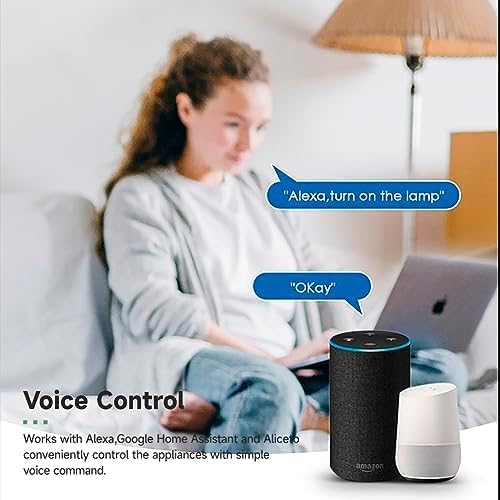
Image 4.3: Voice control with Alexa and Google Home.
4.3. Intelligent Timing and Scene Modes
Set schedules, countdowns, and create custom scene modes within the Tuya Smart Life App.
- Amseru: Schedule devices to turn on/off at specific times (e.g., 23:30 Off).
- Beicio: Set recurring schedules (e.g., 08:00 ON Everyday).
- Cyfri lawr: Gosodwch amserydd i'r ddyfais ddiffodd ar ôl cyfnod penodol.
- Dulliau golygfa: Combine multiple smart devices to activate with a single command or schedule (e.g., 'Movie Night' scene dims lights and turns on entertainment).
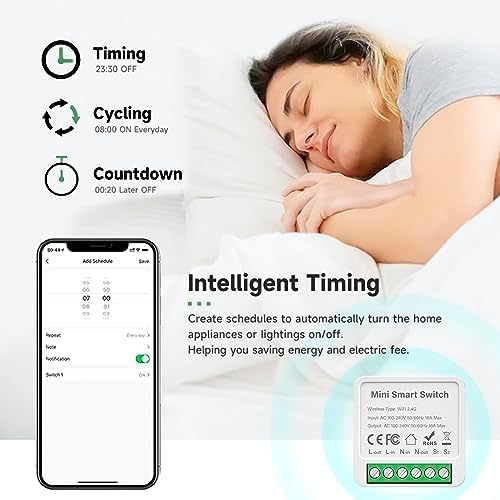
Image 4.4: Intelligent Timing features in the app.
4.4. Sharing Function
Share control of your smart devices with family members through the Tuya Smart Life App.

Image 4.5: Sharing function for family members.
5. cynnal
To ensure the longevity and optimal performance of your IHSENO Mini WiFi Smart Switch Relay, follow these simple maintenance guidelines:
- Glanhau: Defnyddiwch frethyn meddal, sych i lanhau'r ddyfais. Peidiwch â defnyddio glanhawyr hylif na aerosolau.
- Amgylchedd: Avoid exposing the device to excessive moisture, extreme temperatures, or direct sunlight.
- Arolygiad: Periodically check wiring connections for any signs of wear or looseness.
6. Datrys Problemau
If you encounter issues with your IHSENO Mini WiFi Smart Switch Relay, refer to the following common problems and solutions:
- Dyfais heb ei pharu:
- Gwnewch yn siŵr bod eich rhwydwaith WiFi yn 2.4GHz. Nid yw'r ddyfais yn cefnogi WiFi 5GHz.
- Check that the device is powered on and the indicator light is blinking rapidly. If not, power cycle the device or perform a factory reset (refer to app instructions for reset procedure).
- Move the device closer to your WiFi router during pairing.
- Device offline in app:
- Verify your home WiFi network is active and has internet access.
- Check the power supply to the smart switch.
- Ailgychwynwch eich llwybrydd WiFi.
- Nid yw rheolaeth llais yn gweithio:
- Ensure your Tuya Smart Life account is correctly linked to Alexa or Google Home.
- Check the device name in the voice assistant app; ensure it's easy to pronounce and recognize.
- Verify your voice assistant device is connected to the internet.
- Physical switch not responding:
- Ensure all wiring connections are secure and correct according to the diagrams.
- Check if the physical switch itself is functional.
7. manylebau
Technical specifications for the IHSENO Mini WiFi Smart Switch Relay:

Delwedd 7.1: Manylebau cynnyrch manwl.
| Manyleb | Manylyn |
|---|---|
| Brand | IHSENO |
| Model | B0CF1FYYBN |
| Math Di-wifr | WiFi 2.4G |
| Mewnbwn Voltage | AC 100-240V 50/60Hz |
| Allbwn Voltage | AC 100-240V 50/60Hz |
| Max Current Rating | 3 Amps (Note: Product image shows 16A Max, but product specifications list 3 Amps. Please verify with product packaging.) |
| Math Mowntio | Mount Wyneb |
| Deunydd Cyswllt | Copr |
| Deunydd | PC V0 (Fireproof) |
| Maint | 41x20x41mm (approx. 1.6*0.8*1.6 inches) |
| Modd Gweithredu | (ON)-ON-OFF |
| Newid Math | 1-ffordd |
| Arddull Newid | Botwm Gwthio |
| Cydnawsedd App | Smart Life (Support iOS & Android) |
8. Gwarant a Chefnogaeth
IHSENO is committed to providing high-quality products and customer satisfaction.
If you have any questions about this product, please feel free to contact our customer service team. We aim to reply within 24 hours to assist you with any inquiries or issues.
Cyfeiriwch at eich dogfennaeth prynu am delerau ac amodau gwarant penodol.