
Rhagymadrodd
This manual provides detailed instructions for the safe and efficient use of your Blow Portable Bluetooth Speaker, Model 30-391. Please read this manual thoroughly before operating the device and retain it for future reference.
The Blow 30-391 is a versatile portable Bluetooth speaker designed for universal use with smartphones, tablets, computers, and other audio devices. It features Bluetooth 5.0 connectivity, AUX input, Micro USB port, and an integrated microphone for various audio applications.
Cynnwys Pecyn
Gwiriwch fod yr holl eitemau a restrir isod yn bresennol yn eich pecyn:
- Blow Portable Bluetooth Speaker (Model 30-391)
- Cebl Codi Tâl USB
- Cebl meicroffon
- Llawlyfr Defnyddiwr (y ddogfen hon)
- Rheolaeth Anghysbell

Delwedd: Blaen view of the Blow Portable Bluetooth Speaker 30-391, showcasing its RGB lighting, included remote control, and wired microphone.

Image: The USB charging cable and the microphone cable that come with the speaker.
Nodweddion Cynnyrch
- Cysylltedd: Bluetooth 5.0, AUX-in (3.5mm), Micro USB, USB port, MicroSD card slot.
- Allbwn sain: 10 Watts maximum speaker output.
- Batri: Integrated 4500 mAh rechargeable battery.
- Nodweddion arbennig: Integrated microphone, RGB lighting effects, voice control capability.
- Cludadwyedd: Compact design with a handle for easy transport.
- Cydnawsedd: Universal compatibility with desktop computers, laptops, smartphones, and tablets.
Gosod
1. Codi Tâl ar y Llefarydd
Before first use, fully charge the speaker. Connect the supplied USB charging cable to the Micro USB port on the speaker and the other end to a standard USB power adapter (not included) or a computer's USB port. The charging indicator light will illuminate during charging and turn off when fully charged.
2. Pweru Ymlaen / I ffwrdd
Locate the power switch on the top panel of the speaker. Slide the switch to the "ON" position to power on the speaker. Slide it to the "OFF" position to power off the speaker.

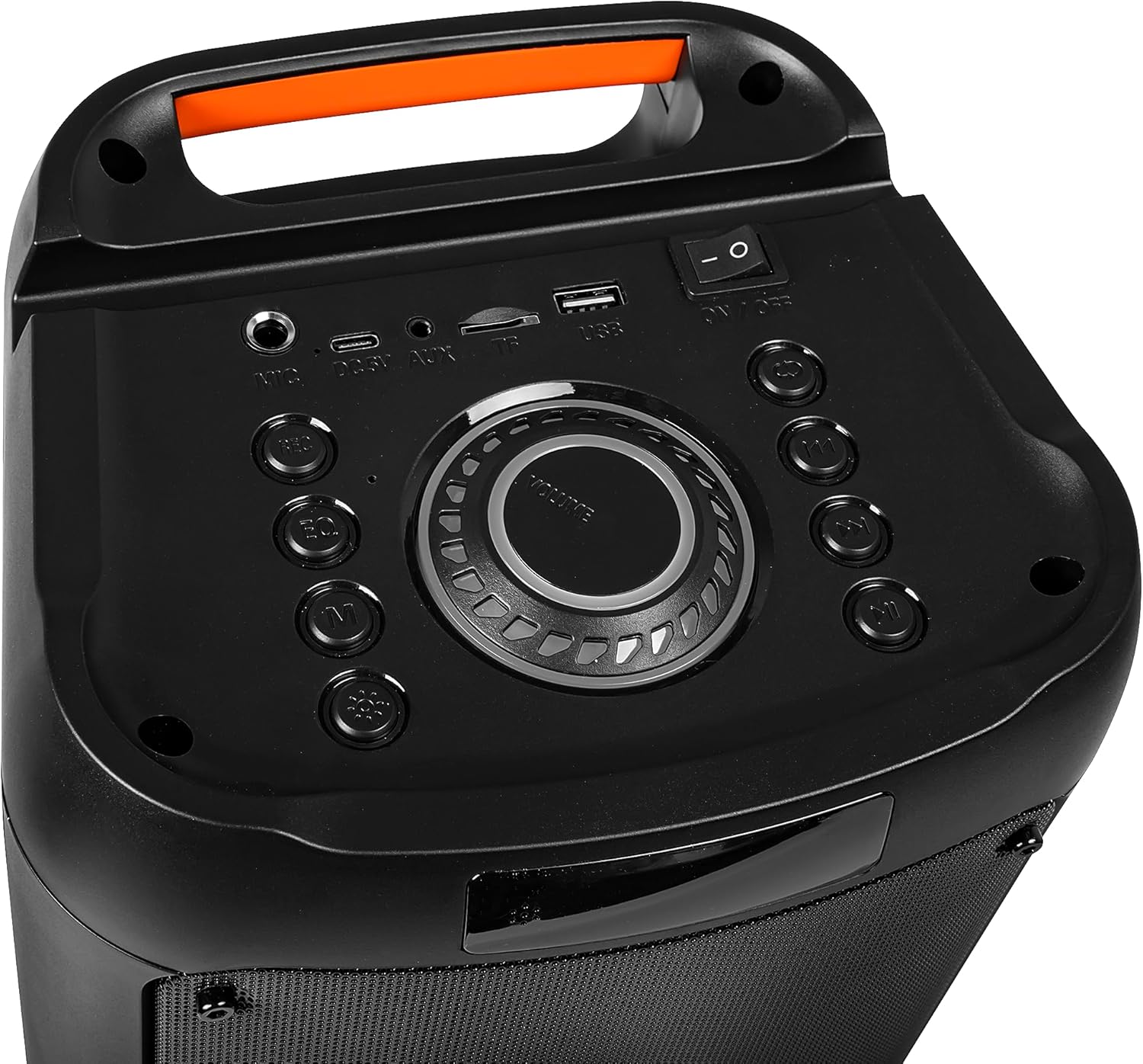
Image: Close-up of the speaker's top control panel, showing the power switch, volume knob, and various input ports.
3. Pâr Bluetooth
- Trowch y siaradwr ymlaen. Bydd yn mynd i mewn i'r modd paru Bluetooth yn awtomatig, a nodir gan olau LED sy'n fflachio.
- Ar eich dyfais symudol (ffôn clyfar, tabled, ac ati), galluogwch Bluetooth a chwiliwch am ddyfeisiau sydd ar gael.
- Select "Blow 30-391" from the list of devices.
- Ar ôl paru, bydd y siaradwr yn allyrru cadarnhad clywadwy, a bydd y golau LED yn rhoi'r gorau i fflachio.
- Bydd y siaradwr yn ailgysylltu'n awtomatig â'r ddyfais a barwyd ddiwethaf pan gaiff ei throi ymlaen, os yw'r ddyfais o fewn cyrraedd a bod Bluetooth wedi'i alluogi.
4. Cysylltiad AUX
To connect an external audio device via AUX, use a 3.5mm audio cable (not included). Plug one end into the AUX-in port on the speaker and the other end into the headphone jack or audio output of your device. The speaker will automatically switch to AUX mode.
5. Chwarae USB/MicroSD
Insert a USB flash drive or a MicroSD card (up to 32GB) containing MP3 audio files into the respective port on the speaker. The speaker will automatically detect the storage device and begin playing music. Use the control buttons to navigate tracks.
Cyfarwyddiadau Gweithredu
1. Rheolaethau Drosview
The speaker features a control panel on the top for easy operation. Refer to the image in the "Setup" section for button layout.
- Newid Pwer: YMLAEN / I FFWRDD.
- Knob Cyfrol: Rotate to adjust master volume.
- Botwm Modd: Press to switch between Bluetooth, AUX, USB, and MicroSD modes.
- Botwm Chwarae/Seibiant: Pwyswch i chwarae neu oedi sain.
- Botymau Trac Blaenorol/Nesaf: Pwyswch i neidio i'r trac blaenorol neu nesaf.
- Botwm EQ: Press to cycle through equalizer presets.
- Botwm Modd Ysgafn: Press to change RGB lighting effects.
- Mewnbwn meicroffon: Cysylltwch y meicroffon â gwifrau yma.
2. Defnyddio'r Meicroffon
Connect the supplied wired microphone to the microphone input port on the speaker. Adjust the microphone volume using the dedicated control (if available) or the main volume knob. The integrated microphone allows for voice control and hands-free calling when connected via Bluetooth.
3. Effeithiau Goleuo RGB
The speaker features dynamic RGB lighting. Press the "Light Mode" button on the control panel or remote control to cycle through different lighting patterns or to turn the lights off.
Cynnal a chadw
- Glanhau: Defnyddiwch frethyn meddal, sych i lanhau tu allan y siaradwr. Peidiwch â defnyddio glanhawyr sgraffiniol na thoddyddion.
- Gofal Batri: Er mwyn ymestyn oes y batri, osgoi rhyddhau'r batri'n llwyr yn aml. Gwefrwch y siaradwr yn rheolaidd, hyd yn oed os nad yw'n cael ei ddefnyddio am gyfnodau hir.
- Storio: Storiwch y siaradwr mewn lle oer, sych i ffwrdd o olau haul uniongyrchol a thymheredd eithafol.
- Gwrthiant Dŵr: NID yw'r siaradwr hwn yn dal dŵr. Osgowch ddod i gysylltiad â dŵr neu leithder gormodol.
Datrys problemau
| Problem | Ateb Posibl |
|---|---|
| Nid yw'r siaradwr yn troi ymlaen. | Ensure the battery is charged. Connect the speaker to a power source using the USB cable. Check the power switch position. |
| Methu paru drwy Bluetooth. | Ensure the speaker is in pairing mode (flashing LED). Make sure your device's Bluetooth is enabled and within range (up to 10 meters). Forget previous pairings on your device and try again. |
| Dim sain. | Check the volume level on both the speaker and your connected device. Ensure the correct input mode (Bluetooth, AUX, USB, MicroSD) is selected. Check cable connections for AUX mode. |
| Ansawdd sain gwael. | Ensure the speaker is not too far from the Bluetooth device. Avoid obstacles between the speaker and the device. Try a different audio source or file. |
| Meicroffon ddim yn gweithio. | Ensure the microphone is securely connected to the input port. Check microphone volume settings. |
Manylebau
| Rhif Model | 30-391 |
| Brand | Chwythu |
| Technoleg Cysylltedd | Bluetooth 5.0, Auxiliary (3.5mm), Micro USB, USB |
| Modd Allbwn Sain | AUX, Bluetooth |
| Pŵer Allbwn Siaradwr Uchaf | 10 Wat |
| Gallu Batri | 4500 mAh |
| Max Memory Card Size | 32 GB (MicroSD) |
| Nodweddion Arbennig | Integrated Microphone, RGB Lighting, Voice Control |
| Ffynhonnell Pwer | Wedi'i Bweru â Batri |
| Dimensiynau Cynnyrch (L x W x H) | 26 x 46 x 24 cm (tua) |
| Pwysau Cynnyrch | 3.67 kg (tua) |
| Lliw | Black (with multicolor RGB lighting) |

Delwedd: Ochr view of the Blow Portable Bluetooth Speaker 30-391, showing its vertical orientation.
Delwedd: Cefn view of the Blow Portable Bluetooth Speaker 30-391, highlighting the integrated carrying handle.
Delwedd: Manwl view of the top control panel, including the power switch, volume knob, and various input ports.

Image: The retail packaging for the Blow Portable Bluetooth Speaker 30-391, showing product features and accessories.
Gwarant a Chefnogaeth
The Blow Portable Bluetooth Speaker 30-391 comes with a limited warranty. Please refer to the warranty card included in your package for specific terms and conditions. For technical support, troubleshooting assistance, or warranty claims, please contact your retailer or the manufacturer directly. Contact information can typically be found on the product packaging or the manufacturer's official websafle.
Gwneuthurwr: Chwythu
ASIN: B0CDXQRT9Q