
Sioe Echo Amazon 21
Llawlyfr Defnyddiwr Amazon Echo Show 21
Model: Echo Show 21
1. Rhagymadrodd
Welcome to your new Amazon Echo Show 21. This smart display is designed to be the central hub for your home, offering a large Full HD screen for entertainment, organization, and communication. With built-in Fire TV and Alexa, you can stream content, manage your smart home, make video calls, and keep your family organized with customizable widgets.

Figure 1.1: Amazon Echo Show 21 Overview
The Echo Show 21 integrates seamlessly into your daily life, providing a visual and interactive experience for all your Alexa commands.
2. Dechrau Arni: Gosod
2.1 Beth sydd yn y Bocs
- Dyfais Echo Show 21
- Alexa Voice Remote with batteries (2 AAA included)
- Power adapter (30W) and 5 ft. cord (white)
- Wall mount, anchors, screws, mounting template
- Canllaw cychwyn cyflym
2.2 Gosodiad Cychwynnol
The Echo Show 21 is designed for simple setup. You will need a Wi-Fi connection.
- Pŵer Ymlaen: Cysylltwch yr addasydd pŵer â'ch Echo Show 21 a'i blygio i mewn i soced wal. Bydd y ddyfais yn troi ymlaen yn awtomatig.
- Cysylltiad Wi-Fi: Follow the on-screen instructions to connect your device to your Wi-Fi network. Amazon Wi-Fi simple setup can automatically connect your device if you are a Prime member and have previously saved your Wi-Fi credentials.
- Mewngofnodi i Gyfrif Amazon: Mewngofnodwch gyda manylion eich cyfrif Amazon.
- Personoli: Customize your home screen, set up profiles, and configure your preferred settings.
- Paru o Bell: The included Alexa Voice Remote should pair automatically. If not, follow the on-screen instructions or refer to the quick start guide for manual pairing.
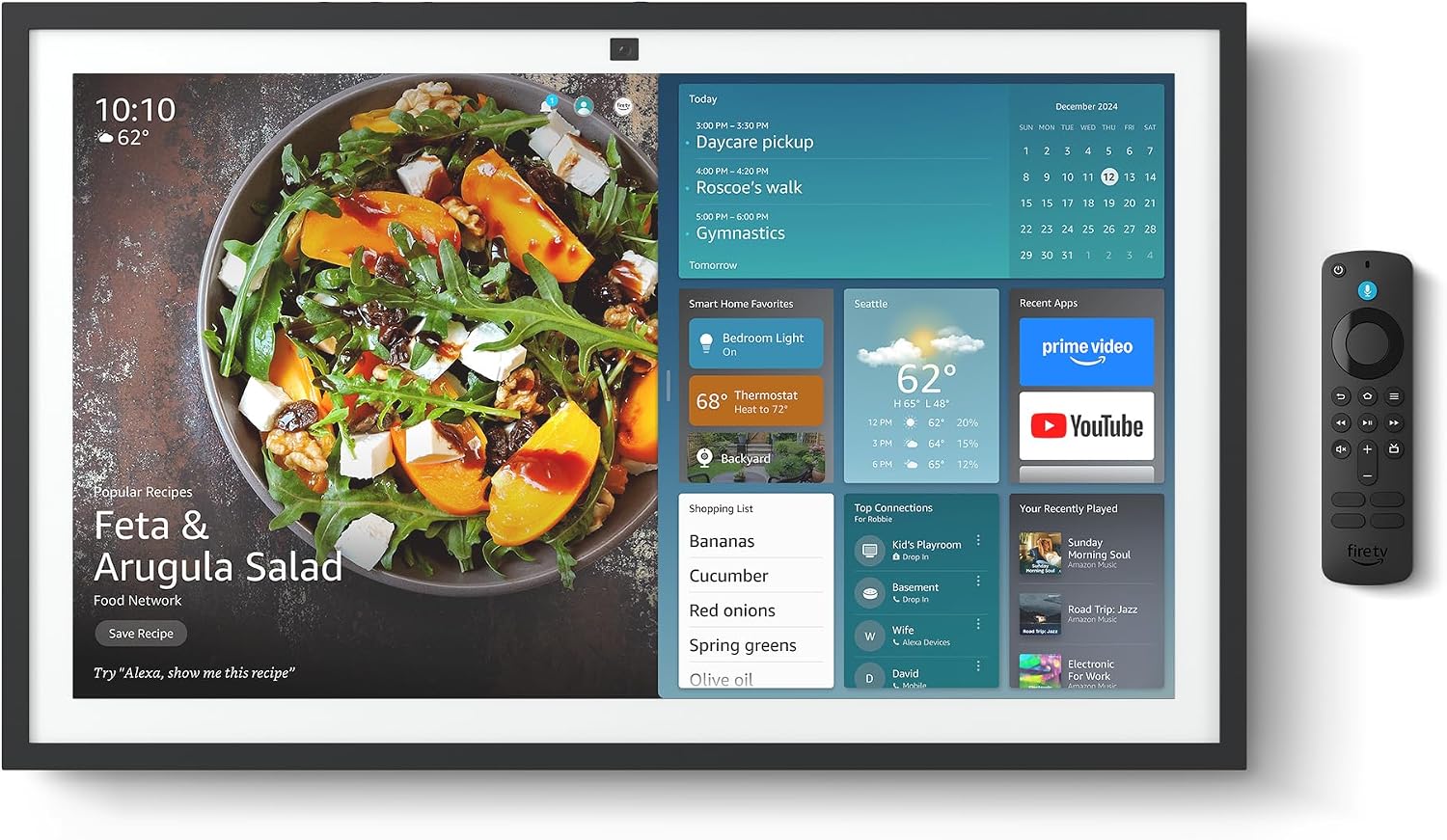
Figure 2.1: Echo Show 21 with Alexa Voice Remote
2.3 Opsiynau Mowntio
The Echo Show 21 can be wall-mounted using the included hardware or placed on a stand (sold separately). Wall mounting requires an electric drill.
3. Gweithredu Eich Echo Show 21
3.1 Rheoli Llais gydag Alexa
Your Echo Show 21 is primarily controlled by voice using Alexa. Simply say the wake word "Alexa" followed by your command or question.
- Gorchmynion Cyffredinol: "Alexa, what's the weather?", "Alexa, set a timer for 10 minutes."
- Cerddoriaeth a Sain: "Alexa, play pop music," "Alexa, play my morning playlist."
- Video & Entertainment: "Alexa, open Prime Video," "Alexa, play The Boys on Netflix."
3.2 Fire TV Integration
Enjoy endless entertainment with built-in Fire TV. Use the included Alexa Voice Remote or voice commands to navigate.

Figure 3.1: Fire TV Interface
- Access thousands of apps like Prime Video, Netflix, YouTube, Apple TV.
- Stream movies, TV shows, and live content.
- The Fire TV remote allows for traditional navigation and playback control.
3.3 Home Screen & Widgets
The 21-inch display is ideal for organizing your day with customizable widgets.

Figure 3.2: Customizable Home Screen Widgets
- Keep important information like calendars, shopping lists, and weather in view.
- Personalize your home screen with family photos.
3.4 Rheoli Cartref Clyfar
Control compatible smart devices using your voice or the smart home dashboard.

Figure 3.3: Smart Home Dashboard
- Turn lights on/off, adjust thermostats, or view porthiant camera byw.
- Supports Zigbee, Matter, and Thread Border Router for broad compatibility.
3.5 Galwadau Fideo
Connect with family and friends using the 13 MP camera with auto-framing, wide field of vision, 3.3x zoom, and noise reduction.

Figure 3.4: Echo Show 21 as a Digital Photo Frame
The camera can also be used to display your favorite memories as a digital photo frame.
4. cynnal
Er mwyn sicrhau hirhoedledd a pherfformiad gorau posibl eich Echo Show 21, dilynwch y canllawiau cynnal a chadw hyn:
- Glanhau'r sgrin: Defnyddiwch frethyn meddal, di-flwff i sychu'r sgrin yn ysgafn. Ar gyfer staeniau ystyfnig, sychwch ychydigampgolchwch y lliain gyda dŵr. Osgowch lanhawyr sgraffiniol neu chwistrellau'n uniongyrchol ar y sgrin.
- Glanhau Corff y Dyfais: Wipe the exterior surfaces with a dry, soft cloth. Do not use harsh chemicals or solvents.
- Awyru: Ensure the device's ventilation openings are not blocked to prevent overheating.
- Diweddariadau Meddalwedd: Your Echo Show 21 receives automatic software security updates. Ensure your device is connected to Wi-Fi to receive these updates.
5. Datrys Problemau
If you encounter issues with your Echo Show 21, try the following common solutions:
- Dyfais Ddim yn Ymateb: Try saying "Alexa" again clearly. If unresponsive, unplug the power adapter for a few seconds and then plug it back in to restart the device.
- Dim Cysylltiad Wi-Fi: Check your router and modem to ensure they are working correctly. Restart your router. On the Echo Show 21, go to Settings > Network to re-select your Wi-Fi network and re-enter the password.
- Problemau Sain: Ensure the volume is not muted or too low. Say "Alexa, turn up the volume." Check audio settings in the device menu.
- Camera Ddim yn Gweithio: Ensure the physical camera shutter is open and the mic/camera-off button is not activated (red light indicates off).
- Ddim yn Ymateb o Bell: Check the batteries in the Alexa Voice Remote. If necessary, replace them. Re-pair the remote if it becomes disconnected.
6. Manylebau Technegol
| Nodwedd | Manyleb |
|---|---|
| Maint | 21.4"L x 13.2"U x 1.5"D |
| Pwysau | 10.7 pwys |
| Arddangos | 21” with 1920 x 1080 resolution (landscape or portrait) |
| Camera | 13 MP + Shutter |
| Sain | Two 2” woofers + two 0.6” tweeters |
| Cysylltedd Wi-Fi | Wi-Fi 6E (802.1ax), Tri-band, dual-antenna (MIMO). Supports 802.11a/b/g/n/ac. |
| Hwb Cartref Smart | Llwybrydd Ffin Zigbee + Matter + Edau |
| Prosesydd | Octa-core SoC with Amazon AZ2 neural network engine |
| Synwyryddion | ALS RGB + Accelerometer |
| Iaith | Saesneg a Sbaeneg |

Figure 6.1: Echo Show 15 vs. Echo Show 21 Dimensions
7. Nodweddion Preifatrwydd
Mae'r Echo Show 21 wedi'i gynllunio gyda sawl haen o reolaethau preifatrwydd:
- Mic/Camera-Off Button: Botwm ffisegol i ddatgysylltu'r meicroffonau a'r camera yn electronig.
- Caead Camera: A built-in physical shutter to cover the camera lens.
- Technoleg Geiriau Deffro: Alexa devices only begin recording and sending audio to the cloud after detecting the wake word.
- Dangosyddion Ffrydio: Mae dangosyddion gweledol yn dangos pryd mae sain neu fideo yn cael ei ffrydio i'r cwmwl.
- Voice Recording Control: Gallu i view a dileu eich recordiadau llais.

Figure 7.1: Mic/Camera-Off Button and Camera Shutter
For more details, visit the Alexa Privacy Hub.
8. Nodweddion Hygyrchedd
The Echo Show 21 includes various accessibility features to personalize Alexa to your abilities:
- Tapiwch i Alexa: Mynediad i Alexa trwy gyffwrdd trwy deils ar y sgrin neu fysellfwrdd.
- Gwrando Addasol: Yn rhoi mwy o amser i orffen siarad cyn i Alexa ymateb.
- Cyfradd Siarad a Ffefrir: Rheoli pa mor gyflym neu araf mae Alexa yn siarad.
- Capsiynau: Mae Alexa Captioning, Call Captioning, a Chapsion Caeedig yn darparu testun ar gyfer cynnwys a gefnogir.
- Dangos a Dweud: Helps users who are blind or visually impaired identify products.
- LlaisView Darllenydd Sgrin: Enables access for customers who are blind or visually impaired.
- Chwyddwr Sgrin: Chwyddo i mewn/allan a symud o gwmpas y sgrin.
- Darllen yn Uchel Kindle: Gofynnwch i Alexa ddarllen eich llyfrau Kindle yn uchel.
- Testun Amser Real: Type live text in a video call.
These features can be enabled via Settings > Accessibility on your device.
9. Gwarant a Chefnogaeth
9.1 Gwarant Cynnyrch
Your Echo Show 21 comes with a Gwarant a gwasanaeth cyfyngedig 1 blynedd. Optional 1-year, 2-year, and 3-year extended warranties are available for U.S. customers, sold separately.
Use of Echo Show 21 and Fire TV on Echo Show 21 is subject to their respective terms of service.
9.2 Cefnogaeth i Gwsmeriaid
For further assistance, troubleshooting, or to learn more about your device, please visit the Amazon support websafle neu cysylltwch â gwasanaeth cwsmeriaid Amazon.
Ask a question about this manual
Ask about setup, troubleshooting, compatibility, parts, safety, or missing instructions. Manuals+ will review the question and use this page’s manual context to help answer it.