1. Rhagymadrodd
The Stealth Cam Browtine 16MP Game Camera (Model STC-BT16) is designed for reliable outdoor surveillance and wildlife monitoring. This durable trail camera captures high-resolution still images and video, providing detailed insights into your target area. Its robust features, including a 60ft infra-red detection range and various capture modes, make it an effective tool for observing wildlife activity.

Ffigur 1: Blaen view of the Stealth Cam Browtine 16MP Game Camera. This image shows the camera's compact, camouflaged design, with the lens and infrared emitters visible on the front panel.
2. Cynnwys Pecyn
Gwiriwch fod yr holl eitemau yn bresennol ac mewn cyflwr da wrth agor y pecyn:
- Stealth Cam Browtine 16MP Game Camera (STC-BT16)
- Strap Mowntio
- Llawlyfr Defnyddiwr (y ddogfen hon)
Nodyn: 8 AA batteries and an SD card are required for operation and are not included in the package.
3. Gosod
3.1. Gosod Batri
- Locate the latch on the side of the camera and open the camera housing.
- Insert 8 new AA batteries into the battery compartment, ensuring correct polarity (+/-).
- Close the camera housing securely until the latch clicks into place.
3.2. Gosod Cerdyn SD
- Gyda thai'r camera ar agor, lleolwch y slot cerdyn SD.
- Insert a formatted SD card (up to 32GB, not included) into the slot until it clicks.
- I'w dynnu allan, gwthiwch y cerdyn i mewn ychydig nes iddo neidio allan.
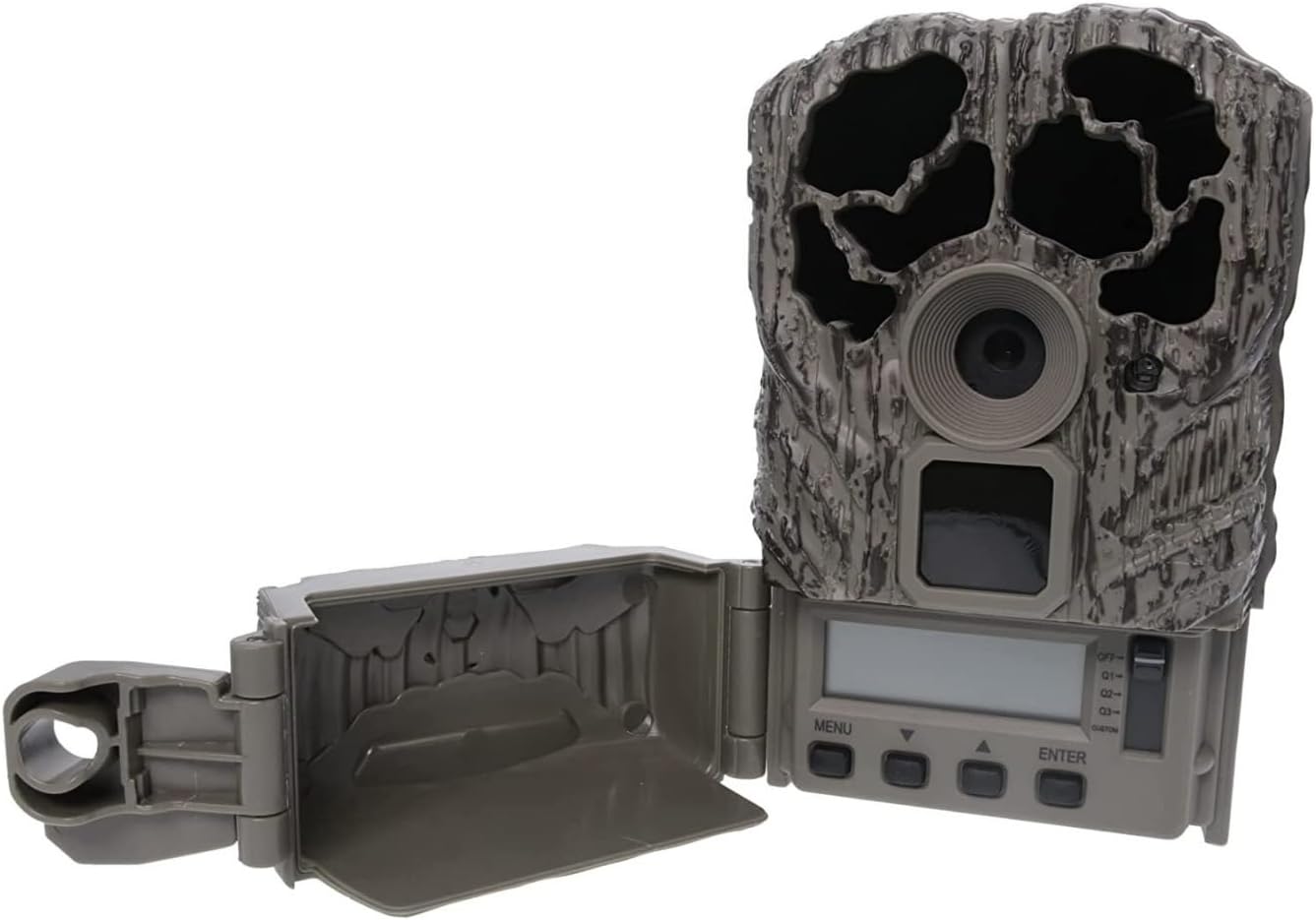
Figure 2: The camera with its housing open, revealing the control panel and battery compartment. This view is essential for battery and SD card installation, as well as initial configuration.
3.3. Mowntio'r Camera
The camera features an integrated Python lock latch for secure mounting. Use the provided mounting strap to attach the camera to a tree or post. Ensure the camera is stable and pointed towards the desired monitoring area, free from obstructions.
4. Cyfarwyddiadau Gweithredu
4.1. Troi Ymlaen a Gosodiadau Sylfaenol
- Ar ôl gosod batris a cherdyn SD, trowch y camera i'r safle "ON".
- Use the control buttons (MENU, UP, DOWN, ENTER) to navigate the on-screen menu.
- Set the current Time, Date, and Moon Phase for accurate data stamping on captured media.
4.2. Capture Modes
The Browtine camera supports various capture settings:
- Delweddau Llonydd: Captures 16 Megapixel photos.
- Fideo: Records 480p video at 30 frames per second (FPS).
- Modd Byrstio: Captures 1-3 images per triggering event.
4.3. Motion Detection and Recovery
The camera features a 60ft infra-red detection range. Once motion is detected, the camera activates with a trigger speed of 0.8 seconds. After a capture event, the camera enters a recovery time before it can trigger again. Recovery time options include 120, 60, 30, 15, or 5 seconds, allowing customization based on monitoring needs.
4.4. ViewCyfryngau a Ddaliwyd
I view photos and videos, remove the SD card from the camera and insert it into a compatible device (e.g., computer, card reader, or dedicated viewer). The media files are stored in standard formats (e.g., JPEG for images, AVI for video) for easy access.
5. cynnal
- Amnewid Batri: Replace all 8 AA batteries when the battery indicator shows low power to ensure continuous operation.
- Rheoli Cerdyn SD: Regularly check the SD card capacity. Transfer important files to a computer and format the SD card periodically to maintain optimal performance.
- Glanhau: Gently clean the camera lens and infrared sensors with a soft, lint-free cloth. Avoid abrasive materials or harsh chemicals.
- Diogelu'r Amgylchedd: The camera has an IP65 rating, indicating protection against dust and low-pressure water jets. While durable, avoid submerging the camera in water.
6. Datrys Problemau
If you encounter issues with your Browtine camera, refer to the following common troubleshooting steps:
- Camera Ddim yn Pweru Ymlaen:
- Gwnewch yn siŵr bod batris wedi'u mewnosod yn gywir gyda'r polaredd cywir.
- Amnewid pob batris gyda rhai newydd.
- Check that the power switch is in the "ON" position.
- Dim Delweddau/Fideos wedi'u Cipio:
- Verify the SD card is properly inserted and formatted.
- Check the SD card for sufficient free space.
- Ensure the camera is placed within the detection range of the target area.
- Adjust camera settings (e.g., sensitivity, recovery time) if necessary.
- Ansawdd Delwedd/Fideo Gwael:
- Clean the camera lens and infrared sensors.
- Ensure there are no obstructions directly in front of the camera.
- Check for adequate lighting conditions for daytime captures; ensure night vision is enabled for low-light.
7. manylebau
| Nodwedd | Manylyn |
|---|---|
| Enw Model | STC-BT16 |
| Datrysiad llonydd effeithiol | 16 AS |
| Datrysiad Dal Fideo | 480p at 30 FPS |
| Infra-red Detection Range | 60 tr |
| Cyflymder Sbarduno | 0.8 Eiliad |
| Modd Byrstio | 1-3 images per triggering |
| Recovery Time Options | 120/60/30/15/5 seconds |
| Ffynhonnell Pwer | 8 Batris AA (heb eu cynnwys) |
| Dimensiynau (L x W x H) | 3.5 x 2.51 x 5.5 modfedd |
| Pwysau | 13 owns |
| Graddfa IP | IP65 |
| Nodwedd Integredig | Python Lock Latch |
8. Gwarant a Chefnogaeth
8.1. Gwybodaeth Gwarant
The Stealth Cam Browtine 16MP Game Camera (STC-BT16) comes with a Gwarant Cyfyngedig 1 Flwyddyn. This warranty covers manufacturing defects and ensures the product performs as described under normal use. Please retain your proof of purchase for warranty claims.
8.2. Cefnogaeth i Gwsmeriaid
For technical assistance, troubleshooting, or warranty inquiries, please contact Stealth Cam customer support. Refer to the official Stealth Cam websafle neu becynnu cynnyrch am y wybodaeth gyswllt ddiweddaraf.
Adnoddau Ar-lein: Ymwelwch â'r Llechwraidd Cam websafle for FAQs, updated manuals, and software downloads.