
UNI-T UT890C
UNI-T UT890C Digital Multimeter User Manual
Professional Digital Multimeter for AC/DC Ammeter, Voltmeter, Resistance, Capacitance, and Frequency Measurement
Rhagymadrodd
The UNI-T UT890C Digital Multimeter is a versatile and reliable instrument designed for precise electrical measurements. This manual provides essential information for the safe and effective operation, maintenance, and troubleshooting of your UT890C multimeter. It features a 6000-count manual range, True RMS measurement, and advanced safety features like automatic fuse blowing alarm and overload prompts.

Ffigur 1: Blaen view of the UNI-T UT890C Digital Multimeter.
Cynnyrch Drosview a Chydrannau
Familiarize yourself with the main components and functions of the UT890C multimeter.

Figure 2: Detailed diagram showing the LCD screen, function button, MAX/MIN switch, insulating protective cover, small current jack, 20A current jack, transistor jack, short press/long press functions, function switch, voltage/resistor/diode/circuit switching, frequency/temperature measuring jack, and public jack.
- Sgrin LCD: Displays measurement readings, unit symbols, and other indicators.
- Botymau Swyddogaeth: Includes SELECT, MAX/MIN, HOLD/LIGHT for various operations.
- Switsh Swyddogaeth: Rotary dial to select measurement modes (e.g., DC Voltage, AC Cyftage, Resistance, Capacitance, Frequency, Temperature).
- Jaciau Mewnbwn: Dedicated jacks for current (mA, A), voltage/resistance/diode/temperature, and common (COM) connections.
- Transistor Jack: For hFE measurements.
- Insulating Protective Cover: Provides protection for the device.
Gosod
1. Gosod Batri
The UT890C requires AAA batteries. Ensure proper polarity when installing.
- Lleolwch y compartment batri ar gefn y multimedr.
- Defnyddiwch sgriwdreifer i agor y clawr batri.
- Insert the batteries, observing the polarity markings (+/-).
- Caewch y clawr batri yn ddiogel.

Ffigur 3: View of the battery compartment, showing battery type (AAA 1.5V x 4) and fuse specifications (FF600mA 1000V, FF11A 1000V).
2. Cysylltu Gwifrau Prawf
Always connect the black test lead to the "COM" (common) jack. Connect the red test lead to the appropriate input jack based on the measurement type (e.g., VΩHz for voltage, resistance, frequency; mA/A for current).

Figure 4: The UT890C multimeter, test leads, and K-type temperature probe (for UT890C) included in the standard packaging.
Cyfarwyddiadau Gweithredu
General Measurement Procedures
- Trowch y switsh cylchdro i'r swyddogaeth fesur a ddymunir.
- Cysylltwch y gwifrau prawf â'r gylched neu'r gydran sy'n cael ei fesur.
- Read the measurement value on the LCD screen.
- Gwasgwch y DETHOL button to cycle through sub-functions if available (e.g., AC/DC, Diode/Continuity).
- Gwasgwch DAL/GOLAU to freeze the display reading or activate the backlight.
- Gwasgwch MAX/MIN to record maximum and minimum values during a measurement session.
Specific Measurement Functions
CyftagMesuriad e (AC/DC)
- Set the rotary switch to V~ (AC Voltage) neu V- (Cyf. DCtaga).
- Connect the red lead to VΩHz and the black lead to COM.
- Connect the test leads in parallel to the circuit or component.

Ffigur 5: Mesur cyfainttage from a power outlet using the UT890C multimeter.
Current Measurement (AC/DC)
- Set the rotary switch to A~ (AC Current) or A- (DC Current).
- Connect the red lead to the appropriate current jack (mA or 20A) and the black lead to COM.
- Cysylltwch y multimedr mewn cyfres â'r gylched.

Ffigur 6: Examples of accurate measurements: Analog mains output 220V, Standard capacitance 220 microfarad, and Standard AC low current 200 mA.
Mesur Gwrthiant
- Gosodwch y switsh cylchdro i Ω.
- Connect the red lead to VΩHz and the black lead to COM.
- Connect the test leads across the resistor or component.
Mesur Cynhwysedd
- Set the rotary switch to the capacitance symbol (e.g., -||-).
- Connect the red lead to VΩHz and the black lead to COM.
- Cysylltwch y gwifrau prawf ar draws y cynhwysydd.
Mesur Amledd
- The UT890C supports both low-voltage (below 30V, 10Hz~10MHz) and high-voltage (5V~750V, 10Hz~10kHz) frequency measurements.
- Set the rotary switch to Hz.
- Connect the red lead to VΩHz and the black lead to COM.
- Connect the test leads to the circuit where frequency is to be measured.
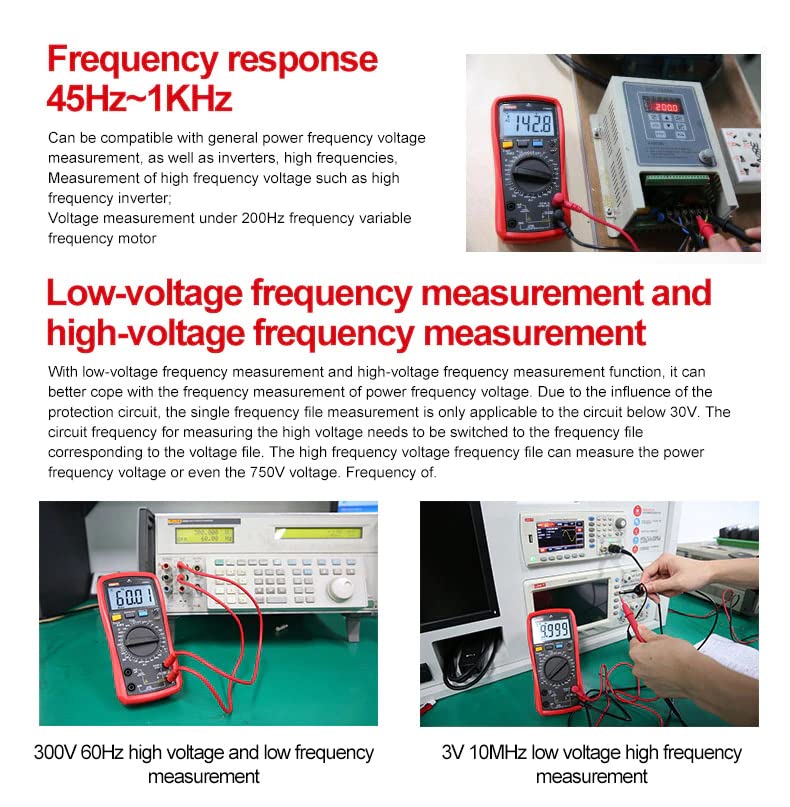
Figure 7: Demonstrates frequency response (45Hz~1KHz) and both low-voltage (3V 10MHz) and high-voltage (300V 60Hz) frequency measurements.
NCV (Cyfrol Di-gyswllttage) Function
- Gosodwch y switsh cylchdro i NCV.
- Move the top of the multimeter near a live wire. The meter will beep and the display will show the sensed electric field strength.
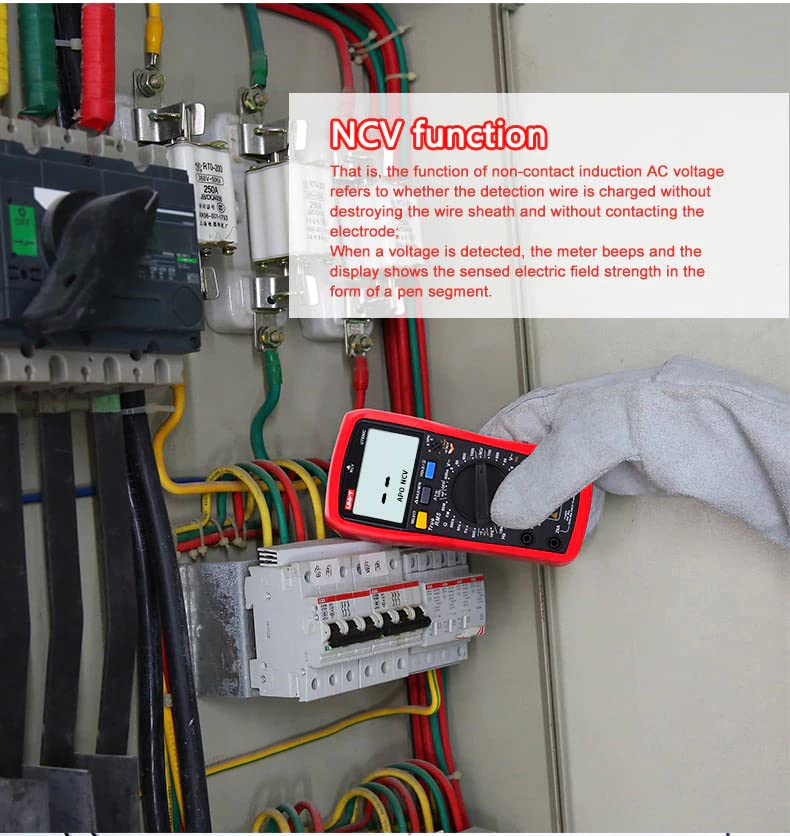
Figure 8: Using the NCV function to detect live wires without direct contact, enhancing safety.
Zero Fire Line Measurement (UT890C)
- For UT890C, use the NCV function to distinguish between live and neutral wires.
- When the NCV function is active, the display will indicate "EF" for electric field detection, helping identify the live wire.

Figure 9: Illustrates how the UT890C (bottom) and UT890D+ (top) measure fire and zero line responses, with the UT890C showing "EF" for electric field detection.
Cynnal a chadw
Glanhau
Sychwch y multimedr casing gyda hysbysebamp lliain a glanedydd ysgafn. Peidiwch â defnyddio glanhawyr sgraffiniol na thoddyddion. Gwnewch yn siŵr bod y ddyfais wedi'i diffodd ac wedi'i datgysylltu o unrhyw gylchedau cyn glanhau.
Amnewid Batri
When the low battery indicator appears on the LCD, replace the batteries promptly to ensure accurate measurements and proper operation. Refer to the "Battery Installation" section for instructions.
Amnewid Ffiws
The UT890C features an automatic fuse blowing alarm. If a fuse blows, the device will alert you. Replace blown fuses with specified types only (FF600mA 1000V and FF11A 1000V) to maintain safety and functionality. Refer to the battery compartment image for fuse specifications.

Figure 10: Displays the fuse blowing alarm (mA only) and detailed specifications for UT890C and UT890D+ models.
Storio
Store the multimeter in a cool, dry place away from direct sunlight and extreme temperatures. If storing for extended periods, remove the batteries to prevent leakage.
Datrys problemau
| Problem | Achos Posibl | Ateb |
|---|---|---|
| Dim arddangosfa neu arddangosfa dywyll | Low battery; Batteries incorrectly installed; Device off. | Replace batteries; Check battery polarity; Turn on the device. |
| Darlleniadau anghywir | Wrong function selected; Test leads not properly connected; Blown fuse; Overload. | Select correct function; Ensure secure connections; Check and replace fuses; Ensure measurement is within range. |
| Fuse blowing alarm | Overcurrent; Incorrect measurement range. | Disconnect from circuit immediately; Replace fuse with correct rating; Select higher current range if necessary. |
| Multimeter does not turn on after auto shutdown | Automatic shutdown activated. | Pwyswch a dal SEL/REL i'w droi ymlaen eto. |
Manylebau
The following table details the technical specifications for the UNI-T UT890C Digital Multimeter.
| Manyleb | Range (UT890C) | Accuracy (UT890C) |
|---|---|---|
| DC Cyftage | 600mV/6V/60V/600V/1000V | ±(0.7%+3) |
| AC Cyftage | 6V/60V/600V/750V | ±(0.8%+3) |
| AC Amlder | 10Hz ~ 10kHz | ±(0.1%+5) |
| DC Cyfredol | 60μA/600μA/6mA/60mA/600mA/20A | ±(0.8%+8) |
| AC Cyfredol | 60μA/600μA/6mA/60mA/600mA/20A | ±(1%+12) |
| Gwrthsafiad | 600Ω/6kΩ/60kΩ/600kΩ/6MΩ/60MΩ | ±(0.8%+2) |
| Cynhwysedd | 100mF | ±(3%+10) |
| Amlder | 9.999Hz ~ 9.999MHz | ±(0.1%+5) |
| Tymheredd | -40°C~1000°C/-40°F~1832°F | ±(1%+3) |
| Cyfrif Arddangos | 6000 | - |
| Graddfeydd Categori | CAT II 1000V, CAT III 600V | - |
Nodweddion Cyffredinol
- Pwer: 1.5V Battery (AAA) x 4
- Arddangos: 60 x 35mm
- Maint y Cynnyrch: 183 x 88 x 56mm
- Pwysau Net Cynnyrch: 346g
- Ategolion Safonol: Batteries, test lead, K-type temperature probe (UT890C), English manual.
- Nodweddion: Manual range/True RMS, NCV/hFE/Max/Min, Data hold/REL, Diode test/Continuity test, Audible/visual alarm (NCV/continuity), High voltage false detection: 1000Vrms, Current (AC/DC) mode memory, Over-current alarm: ≥20A, Low battery indication: ≤2.5V, Auto power off/LCD backlight, Fuse blowing alarm (mA only): Input overload or misoperation.
Gwarant a Chefnogaeth
UNI-T products are manufactured to high-quality standards. For warranty information and technical support, please refer to the official UNI-T websafle neu cysylltwch â'u gwasanaeth cwsmeriaid. Cadwch eich derbynneb prynu fel prawf o brynu ar gyfer hawliadau gwarant.
Am gymorth pellach, gallwch ymweld â'r UNI-T Store on Amazon neu eu swyddog websafle www.uni-trend.com.
Ask a question about this manual
Ask about setup, troubleshooting, compatibility, parts, safety, or missing instructions. Manuals+ will review the question and use this page’s manual context to help answer it.