
Thomson 24HA2S13C
Llawlyfr Defnyddiwr Teledu Android Clyfar THOMSON 24HA2S13C 24-modfedd 12V HD
Model: 24HA2S13C
Gwybodaeth Ddiogelwch Bwysig
Read all instructions before operating the TV. Keep this manual for future reference. Follow all warnings and instructions marked on the product.
- Peidiwch â rhwystro agoriadau awyru.
- Peidiwch â gosod ger ffynonellau gwres.
- Amddiffynnwch y llinyn pŵer rhag cael ei gerdded ymlaen neu ei binsio.
- Defnyddiwch atodiadau/ategolion a nodir gan y gwneuthurwr yn unig.
- Tynnwch y plwg yn ystod stormydd mellt neu pan na chaiff ei ddefnyddio am gyfnodau hir.
- Cyfeirio pob gwasanaeth i bersonél gwasanaeth cymwys.
Cynnyrch Drosview
The THOMSON 24HA2S13C is a 24-inch HD Smart Android TV designed for versatile use, including camping with its 12V power supply. It features Google Assistant, Wi-Fi, Bluetooth, Dolby Digital audio, and a triple-tuner for various signal reception.

Delwedd: Blaen view of the THOMSON 24HA2S13C 24-inch Smart Android TV, showing the screen displaying streaming service logos and a family enjoying the TV in a camping gosodiad.
Cynnwys Pecyn
Gwiriwch fod yr holl eitemau wedi'u cynnwys yn y pecyn:
- THOMSON 24HA2S13C Smart Android TV
- Rheolaeth Anghysbell
- Power Adapter (12V compatible)
- Stondinau Teledu (2)
- Sgriwiau ar gyfer Stondinau Teledu
- Llawlyfr Defnyddiwr (y ddogfen hon)
- Canllaw Cychwyn Cyflym
Gosod
1. Cysylltu'r Standiau Teledu
- Rhowch y teledu wyneb i lawr yn ofalus ar arwyneb meddal, gwastad i atal y sgrin rhag cael ei difrodi.
- Align the TV stands with the mounting holes on the bottom of the TV.
- Sicrhewch y stondinau gan ddefnyddio'r sgriwiau a ddarperir. Gwnewch yn siŵr eu bod wedi'u tynhau'n gadarn.

Image: The THOMSON 24HA2S13C TV showing two possible stand positions for different furniture widths. The image highlights the flexibility in stand placement.
2. Pŵer Cysylltu
Connect the 12V power adapter to the TV's power input and then to a suitable power source. For camping or mobile use, connect to a 12V DC power outlet.

Image: The THOMSON 24HA2S13C TV mounted in a caravan, with a 12V power adapter shown, illustrating its suitability for mobile use.
3. Cysylltu Dyfeisiau Allanol
Mae'r teledu yn cynnig amryw o borthladdoedd ar gyfer cysylltu dyfeisiau allanol:
- HDMI: For high-definition audio and video devices (e.g., game consoles, Blu-ray players).
- USB: Ar gyfer cysylltu dyfeisiau storio USB i chwarae cyfryngau.
- LAN: Ar gyfer cysylltiad rhyngrwyd gwifrau.
- Antena/Lloeren: Ar gyfer derbyn signalau darlledu.
- AV YN: Ar gyfer dyfeisiau analog hŷn.
- Allbwn Sain (Optegol): Ar gyfer cysylltu â systemau sain allanol.
- CI+: Ar gyfer modiwlau mynediad amodol.

Delwedd: Cefn view of the THOMSON 24HA2S13C TV, detailing the various input and output ports available for connectivity.
Gweithredu'r teledu
1. Dewin Setup Cychwynnol
Ar ôl ei droi ymlaen am y tro cyntaf, bydd y teledu yn eich tywys trwy broses sefydlu gychwynnol. Mae hyn yn cynnwys:
- Dewis iaith.
- Cysylltiad rhwydwaith (Wi-Fi neu Ethernet).
- Google account sign-in (optional, but recommended for full Smart TV features).
- Channel scanning (for DVB-T2/C/S2).
2. Swyddogaethau Rheoli o Bell
The included remote control provides access to all TV functions. It features backlit buttons for use in low light and a dedicated "Favorite" button for quick access to your preferred app.

Image: The remote control for the THOMSON 24HA2S13C TV, highlighting its ergonomic design, backlit buttons, and voice control capabilities.
3. Nodweddion Teledu Clyfar (Android TV)
This TV runs on Android TV, providing access to a wide range of applications and services:
- Gwasanaethau Ffrydio: Access Netflix, Prime Video, YouTube, Disney+, and more.
- Cynorthwyydd Google: Use voice commands to search for content, control playback, and get information. Activate by pressing the Google Assistant button on the remote.
- Chromecast wedi'i ymgorffori: Cast content from compatible smartphones, tablets, or computers directly to your TV.
- Google Play Store: Download additional apps and games.

Image: The THOMSON 24HA2S13C TV screen showing the Android TV home interface with popular streaming applications and content recommendations.
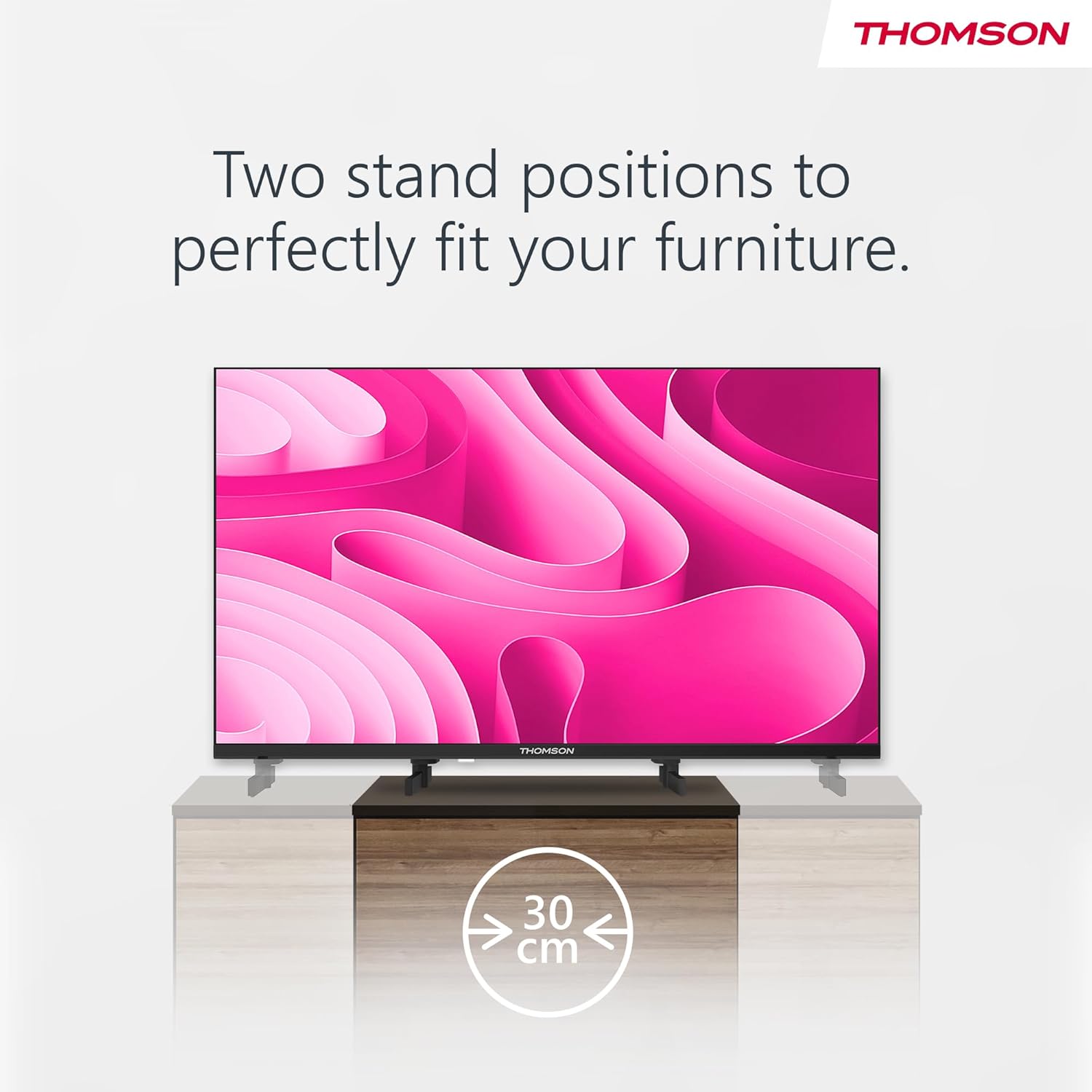
Image: A person using the voice control feature of the THOMSON TV remote, demonstrating interaction with Google Assistant.
Cynnal a chadw
Glanhau'r teledu
- Datgysylltwch y teledu bob amser cyn glanhau.
- Use a soft, dry cloth to wipe the screen and cabinet. Do not use liquid cleaners or aerosol sprays.
- Ar gyfer marciau ystyfnig, rhwbiwch yn ysgafnampen a microfiber cloth with water and gently wipe. Avoid excessive moisture.
Diweddariadau Meddalwedd
The TV may receive software updates to improve performance and add new features. Ensure your TV is connected to the internet to receive these updates. You can usually check for updates in the TV's settings menu.
Datrys problemau
| Problem | Achos Posibl | Ateb |
|---|---|---|
| Dim pŵer | Llinyn pŵer heb ei gysylltu; allfa bŵer heb ei gweithio. | Gwiriwch gysylltiad y llinyn pŵer. Profwch y soced gyda dyfais arall. |
| Dim llun, ond mae sain yn bresennol | Ffynhonnell mewnbwn anghywir wedi'i dewis; problem gyda golau cefn. | Press the "Input" button on the remote to select the correct source. Contact support if issue persists. |
| Dim sain, ond mae llun yn bresennol | Volume too low or muted; audio cables loose. | Increase volume. Check mute status. Ensure audio cables are securely connected. |
| Rheolaeth bell ddim yn gweithio | Batteries depleted; obstruction between remote and TV. | Amnewidiwch y batris. Tynnwch unrhyw rwystrau. Gwnewch yn siŵr bod y teclyn rheoli o bell wedi'i anelu at synhwyrydd IR y teledu. |
| Methu cysylltu â Wi-Fi | Cyfrinair anghywir; problemau gyda'r llwybrydd; teledu yn rhy bell o'r llwybrydd. | Gwiriwch gyfrinair Wi-Fi. Ailgychwynwch y llwybrydd. Symudwch y teledu yn agosach at y llwybrydd neu defnyddiwch gysylltiad gwifrau. |
Manylebau
| Nodwedd | Manylyn |
|---|---|
| Brand | Thomson |
| Model | 24HA2S13C |
| Maint Sgrin | 24 modfedd (60 cm) |
| Technoleg Arddangos | LED |
| Datrysiad | 1366 x 768 (HD) |
| System Weithredu | Teledu Android |
| Nodweddion Arbennig | Google Assistant, Chromecast Built-in, 12V Power Supply, Dolby Audio, Triple Tuner (DVB-T2/C/S2) |
| Cysylltedd | Wi-Fi, Bluetooth, HDMI (x3), USB (x2), LAN, Optical Audio Out, AV In, CI+ |
| Cyftage | 12 folt (DC) |
| Dimensiynau Cynnyrch (W x D x H) | 53.5 x 15.1 x 35.3 cm (gyda stondin) |
| Pwysau | 3.5 kg |
Am wybodaeth fanwl am effeithlonrwydd ynni, cyfeiriwch at gronfa ddata EPREL yr UE: https://eprel.ec.europa.eu/qr/1456673

Image: The EU Energy Label for the THOMSON 24HA2S13C TV, showing an energy efficiency rating of E and power consumption of 18 kWh/1000h.
Gwarant a Chefnogaeth
This Thomson TV comes with a 3-year guarantee. For technical support, warranty claims, or service inquiries, please contact your local Thomson service provider or refer to the manufacturer's websafle.
Manufacturer: STREAMVIEW GmbH
Websafle: www.streamview.com
E-bost: cyswllt@ffrwdview.com
Fideo Cynnyrch Swyddogol
Gwyliwch y fideo hwn am drosolwg gweledolview of the Thomson 24-inch Easy TV.
Fideo: Crynodeb byrview of the Thomson 24-inch Easy TV, showcasing its design and features. This video is provided by the vendor Streamview GmbH.
Ask a question about this manual
Ask about setup, troubleshooting, compatibility, parts, safety, or missing instructions. Manuals+ will review the question and use this page’s manual context to help answer it.